
The Dell XPS 13 2-in-1 asks buyers to make one real decision: whether a single convertible can replace both a thin ultrabook and a tablet without forcing a compromise on either side. It folds flat for pen and touch work, then flips back into a full laptop with a keyboard, trackpad, and a 13.4-inch display. That dual role is the whole point, and it only works when the hardware underneath is strong enough to carry both jobs.
This guide is for students, office workers, and frequent travelers who want one premium machine for writing, calls, documents, and media, plus a tablet mode for reading, notes, and markup. We focus on the configuration sold on Amazon, the XPS 9310 with an Intel Core i7 processor, 32GB of memory, and a 512GB SSD, and we judge it on the details that decide whether a convertible earns its place in a daily bag.
Quick Picks
As an Amazon Associate we earn from qualifying purchases
| Product | Best for | Key spec from title |
|---|---|---|
| Dell XPS 13 2-in-1 (9310) | One premium device for laptop and tablet work | 13.4-inch FHD+ touchscreen, Intel Core i7-1165G7 |
How to Choose
A convertible hides its trade-offs behind a clever hinge, so judge this machine on the four points below before you commit. Each one decides whether the XPS 13 2-in-1 fits your daily work or whether a standard laptop would serve you better.
Match the processor to your daily workload
The XPS 9310 runs on an 11th Generation Intel Core i7-1165G7, a chip that boosts up to 4.7 GHz with 12MB of cache. That is the right level of power for office documents, large spreadsheets, browser tabs by the dozen, video calls, and light photo editing. It handles those jobs without lag and without fan noise intruding on a meeting. What it does not do is replace a workstation: long video renders, large 3D scenes, and heavy compilation jobs will take their time on integrated graphics. Buyers who live in documents, email, and calls will find the chip more than enough.
Treat memory and storage as a long-term decision
This configuration ships with 32GB of 4267MHz LPDDR4x memory and a 512GB PCIe NVMe SSD, and both are onboard, which means they cannot be swapped later. That makes the buying decision a long-term one: 32GB keeps dozens of tabs, office apps, and a video call running side by side without slowdowns, and it leaves headroom for heavier apps a few years from now. The 512GB drive holds a full working library of documents, photos, and apps, though buyers with large video collections should plan on external storage. Choose this configuration when you want a machine that stays smooth for years, not one you plan to open up and upgrade.
Judge the screen by touch, size, and sharpness
The 13.4-inch FHD+ touchscreen runs at 1920 x 1200, a taller ratio than the usual widescreen panel, so documents and web pages show more lines before you scroll. Touch matters here because the 360-degree hinge lets the screen fold flat for reading, sketching, and marking up documents with a pen. Sharpness is strong for text and photos, and the slim bezels keep the whole machine small enough to carry anywhere. Buyers who read long documents, annotate PDFs, or present to a client across a table will use the touch panel daily, while buyers who never touch a screen can treat it as a bonus rather than a reason to buy.
Weigh the convertible design against a standard laptop
A convertible earns its keep only when tablet mode gets real use. The 360-degree hinge on the XPS 9310 flips the keyboard out of the way and turns the machine into a flat slate for reading and handwriting, which a standard laptop cannot do. The trade is that the hinge and touch panel add complexity, and the keyboard sits underneath in tablet mode, so the machine needs a sleeve or a flat surface when carried that way. GORE Thermal Insulation keeps the thin chassis cool during long sessions. If you fold the screen back at least a few times a week, the design pays for itself.
The N Best Options
There is one configuration at the center of this guide, the XPS 9310 sold on Amazon, and everything below judges that exact machine on its own merits.
Dell XPS 13 2-in-1 (9310)
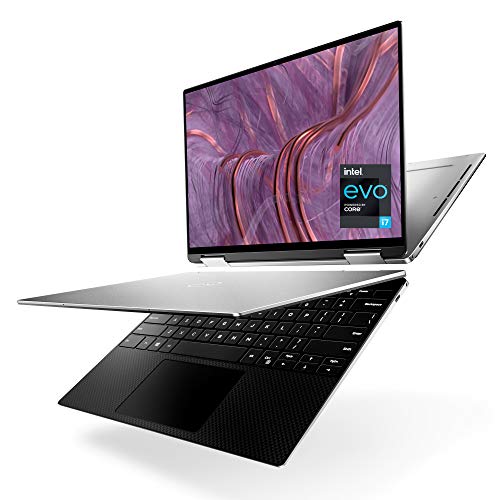
The Dell XPS 13 2-in-1 (9310) is the convertible for buyers who want a premium ultrabook first and a tablet second. The 13.4-inch FHD+ touchscreen, Intel Core i7-1165G7 processor, 32GB of memory, and 512GB SSD give it the speed and headroom for demanding office work, while the 360-degree hinge folds it flat for reading, notes, and markup. GORE Thermal Insulation keeps the slim aluminum body cool, and the small webcam with temporal noise reduction keeps video calls sharp. It suits students, professionals, and travelers who carry one machine everywhere and want it to adapt to the task instead of the other way around.
Specs
- 13.4-inch FHD+ touchscreen display, 1920 x 1200
- 11th Generation Intel Core i7-1165G7 processor, up to 4.7 GHz, 12MB cache
- 32GB 4267MHz LPDDR4x onboard memory
- 512GB PCIe NVMe SSD
- Intel Iris Xe Graphics
- Windows 10 Home, eligible for the Windows 11 upgrade
- 360-degree hinge for tablet mode
- GORE Thermal Insulation
- Webcam with temporal noise reduction
Best for: Students, professionals, and travelers who want one premium machine for laptop work plus a tablet mode for reading, notes, and markup.
Watch out for: Memory and storage are onboard and cannot be upgraded later, so confirm the 32GB and 512GB configuration fits your needs for years; also note that it ships with Windows 10 Home and needs the Windows 11 upgrade.
Which One Fits Your Situation
One machine, four common situations. Match yours below and you will know whether the XPS 13 2-in-1 is the right pick or whether a different shape of laptop fits better.
You want one device instead of a laptop plus a tablet
Choose the Dell XPS 13 2-in-1 (9310) when you are tired of carrying two devices and syncing files between them. It runs full Windows apps with a keyboard and trackpad, then folds flat into a slate for reading and handwriting. You get one set of files, one charger, and one bag, and you stop deciding which device to grab before you leave the house.
You travel light and work from anywhere
Choose the Dell XPS 13 2-in-1 (9310) when your office is a cafe table, a plane seat, or a client lounge. The 13.4-inch frame slips into a small bag, the touchscreen makes cramped spaces workable, and the full laptop mode handles email, documents, and calls without a second device. It is the pick for travelers who want a complete workstation that weighs little and sets up fast.
You take notes and mark up documents by hand
Choose the Dell XPS 13 2-in-1 (9310) when handwriting and annotation are part of your day. Fold the screen flat, pick up a pen, and the machine becomes a digital notepad for lectures, meetings, and PDF markup, with your notes saved alongside the documents they belong to. Few standard laptops offer this, and for note-takers it is the feature that justifies the convertible shape.
You want a quiet, premium machine for office work and calls
Choose the Dell XPS 13 2-in-1 (9310) when your workday is calls, documents, and spreadsheets in a shared office. The Core i7 chip and 32GB of memory keep everything smooth, GORE Thermal Insulation keeps the chassis cool without noisy fans, and the webcam with temporal noise reduction keeps your image sharp on video calls. It is a calm, capable machine for people who need reliability more than raw power.
Common Mistakes
- Buying the convertible when you never use tablet mode. If the screen stays in laptop position for months, you paid for a hinge and a touch panel you do not need, and a standard XPS 13 would have given you the same laptop experience with a simpler design.
- Assuming the memory can be upgraded later. The 32GB of LPDDR4x memory is onboard and cannot be swapped, so buyers who expect to add memory in a year or two will be disappointed. Decide now whether 32GB covers your work for the life of the machine.
- Ignoring the Windows 10 to Windows 11 step. This configuration ships with Windows 10 Home and is eligible for the Windows 11 upgrade, so plan a little time to move over and check that your essential apps run well on the newer system before you rely on it for a deadline.
- Expecting a dedicated graphics card. Intel Iris Xe Graphics handles office work, media, and light photo editing well, but it is integrated graphics, not a separate GPU. Buyers who edit long video projects or play demanding games should choose a machine with a dedicated graphics card instead.
- Judging it only by the screen size. A 13.4-inch display is compact and portable, which is ideal for travel and small desks, but buyers who work with two documents side by side all day may want a larger external monitor at their desk to pair with it.
Frequently Asked Questions
Does the Dell XPS 13 2-in-1 work as a tablet?
Yes. The 360-degree hinge folds the screen back so the machine lies flat like a slate, and the touchscreen handles taps, swipes, and pen input for reading, sketching, and handwriting. The keyboard sits underneath in this mode, so use a sleeve or a flat surface to protect it. It still runs full Windows, which makes it more capable than a typical tablet.
Is 32GB of memory enough for heavy multitasking?
For nearly every buyer, yes. With 32GB of 4267MHz LPDDR4x memory, the XPS 9310 keeps dozens of browser tabs, office apps, and a video call running side by side without slowdowns. That headroom also leaves room for heavier apps a few years from now. Only buyers running large virtual machines or very large data sets alongside everything else should consider a machine with even more memory.
Can the memory or storage be upgraded later?
No. Both the 32GB of memory and the 512GB PCIe NVMe SSD are onboard in this configuration, which means they are fixed for the life of the machine. That is why the buying decision matters: confirm that 32GB and 512GB cover your work for years before you buy, and plan on external storage if you keep a large library of video files.
Who should skip this laptop?
Buyers who never fold the screen back should look at a standard laptop instead, since the convertible design would go unused. Gamers and video editors who need a dedicated graphics card should also look elsewhere, as the integrated Intel Iris Xe Graphics is built for office work and media rather than heavy rendering.
More from Amazon
Programs that pair well with the guide above. Offers and eligibility are set by Amazon and may change.
A free business account with business pricing and bulk-buying tools for work, shop or home office.
Create a business accountFree shipping on eligible items, Prime Video and more. Eligible new members can start with a free trial.
Start a Prime free trialAudiobooks and podcasts to listen to on the go. Eligible new members can start with a free trial.
Try Audible freeAd-free music streaming. Eligible new subscribers can start with a free trial.
Try Music Unlimited freeAs an Amazon Associate we earn from qualifying purchases.
Write Your Review
No reviews yet. Be the first to share your experience!