
Our Short List of 3

- CPU: Intel Core Ultra 9 285H
- GPU: NVIDIA GeForce RTX 5070 Ti 12GB GDDR7
- RAM: 32GB LPDDR5X
- Storage: 2TB SSD

- CPU: AMD Ryzen 9 8945HS
- GPU: NVIDIA GeForce RTX 4060 8GB GDDR6
- RAM: 16GB LPDDR5X
- Storage: 1TB SSD

- CPU: AMD Ryzen 7 260
- GPU: NVIDIA GeForce RTX 5060 8GB GDDR7
- RAM: 16GB DDR5-5600 (slots, up to 32GB as listed)
- Storage: 1TB PCIe Gen4 SSD
All 5 Picks at a Glance
| Product | Specs | Action |
|---|---|---|
| ASUS ROG Zephyrus G16 (2025) |
| Check price on Amazon |
| ASUS ROG Zephyrus G14 (2024) |
| Check price on Amazon |
| Lenovo Legion 5 Gen 10 |
| Check price on Amazon |
 HP Victus 15 |
| Check price on Amazon |
 Lenovo LOQ 15 |
| Check price on Amazon |
Outer Wilds is a space exploration mystery set in a small solar system caught in a repeating loop, and it is famously best played knowing almost nothing about it. We will keep this guide free of story details, because going in unspoiled is half the fun. What you do need is a laptop that runs the game comfortably while you fly, land, and piece together clues at your own pace.
As an Amazon Associate, we earn from qualifying purchases.
The good news is that this is not a hardware-hungry blockbuster. A modest dedicated graphics card, a fast solid-state drive, and a clear screen cover most of what the game asks for. The five Windows laptops below range from slim premium machines to plainer gaming models, and each one clears the game’s needs with headroom to spare.
How to Choose a Laptop for Outer Wilds
Start with the platform: the PC version of Outer Wilds is Windows-only, so every pick in this guide runs Windows, and there are no Mac options to weigh up. Next, look at the graphics card. The game’s worlds are small but dense, with constant physics simulation running underneath, so a modest real GPU, even an entry-level GeForce RTX card, is a safer bet than integrated graphics alone. It does not need a flagship chip, and we make no promises about frame rates; the settings menu gives you room to tune on any of these machines.
Storage and screen matter more than raw power here. The install is compact, but a quick SSD keeps loading brief when the loop resets and you jump back in. A fast-refresh screen helps landings and quick flying feel responsive, while strong brightness makes dim caves and dark planet surfaces easier to read. Finally, consider weight: this is a game many people play in long, relaxed sessions away from a desk, so a lighter chassis is a genuine plus.
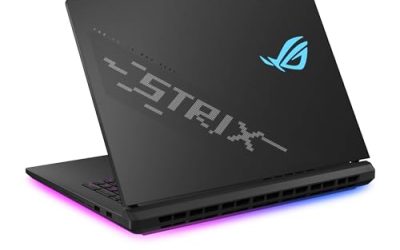
ASUS ROG Zephyrus G16 (2025)
- CPU: Intel Core Ultra 9 285H
- GPU: NVIDIA GeForce RTX 5070 Ti 12GB GDDR7
- RAM: 32GB LPDDR5X
- Storage: 2TB SSD
The Zephyrus G16 is the premium pick, and its RTX 5070 Ti graphics go far beyond what Outer Wilds asks for. That headroom is the point: the game’s hand-painted planets and moody lighting look superb on the 16-inch OLED panel, and the 240Hz refresh keeps fast flying scenes feeling fluid and calm.
It is also unusually easy to live with for a gaming laptop. The CNC aluminum chassis weighs 4.30 lb as listed and measures just 0.59 inches thin, the 2TB SSD swallows a whole game library, and Windows 11 Pro suits anyone who also works on the same machine. If you play heavier games alongside this one, nothing here will hold you back.
ASUS ROG Zephyrus G14 (2024)
- CPU: AMD Ryzen 9 8945HS
- GPU: NVIDIA GeForce RTX 4060 8GB GDDR6
- RAM: 16GB LPDDR5X
- Storage: 1TB SSD
The smaller Zephyrus G14 pairs an RTX 4060 with a sharp 14-inch OLED screen, a combination that handles Outer Wilds with ease while staying genuinely portable. The 2880×1800 panel is a lovely match for the game’s painterly art, and the compact body slips into a bag for trips in a way bigger gaming laptops never do.
Day to day, the details hold up well: 16GB of memory is plenty for this game alongside a browser and chat apps, the 1TB SSD loads the loop quickly, and the listing names a memory card slot, which is handy for camera photos between sessions. It runs Windows 11 Home and keeps the same slim aluminum build as its bigger sibling.
Lenovo Legion 5 Gen 10
- CPU: AMD Ryzen 7 260
- GPU: NVIDIA GeForce RTX 5060 8GB GDDR7
- RAM: 16GB DDR5-5600 (slots, up to 32GB as listed)
- Storage: 1TB PCIe Gen4 SSD
The Legion 5 Gen 10 is the balanced middle pick, built around an RTX 5060 and one of the nicest screens in this group: a 15.1-inch WQXGA OLED at 165Hz and 500 nits as listed. That brightness helps in the game’s darker corners, and the OLED contrast suits its deep-space backdrops down to the ground.
Practical touches round it out. The 80Wh battery as listed is generous for a gaming laptop, the 24-zone RGB backlit keyboard as listed is easy to see in a dim room, and the port mix includes USB4 and Ethernet for a wired connection at a desk. Memory sits in slots up to 32GB as listed, so a later upgrade is on the table.
HP Victus 15
- CPU: AMD Ryzen AI 7 350
- GPU: NVIDIA GeForce RTX 5060 8GB GDDR7
- RAM: 32GB DDR5
- Storage: 1TB SSD
The Victus 15 brings current-generation graphics to a plainer, more workmanlike shell. Its RTX 5060 is the same class of GPU as the Legion above, the 144Hz Full HD screen keeps motion clear while you fly, and the generous 32GB of memory means the game, a guide-free browser, and voice chat can all sit open at once without fuss.
One honest note: this listing bundles a 7-in-1 USB-C hub with the laptop, so confirm the exact configuration on the page before ordering, since bundle listings can change. You also get an RJ-45 Ethernet port as listed for a steady wired connection, and the 1TB SSD leaves plenty of room for the rest of your library.
Lenovo LOQ 15
- CPU: AMD Ryzen 7 170
- GPU: NVIDIA GeForce RTX 4050 6GB GDDR6
- RAM: 16GB DDR5
- Storage: 512GB PCIe SSD
The LOQ 15 is the modest pick of the five, and for this game modest is enough. Its RTX 4050 is a real dedicated GPU, which is the one box that truly needs ticking here, and the 15.6-inch 144Hz screen keeps the flying and landing feeling responsive at the panel’s native Full HD.
It also leaves room to grow. The listing describes dual memory slots and dual SSD slots, so adding memory or storage later is straightforward, and the backlit keyboard includes a numeric keypad as listed. The 512GB SSD is the smallest drive in this group, though the game’s compact install fits comfortably with space left over.
Comparison Table
| Product | Best for | Key spec |
|---|---|---|
| ASUS ROG Zephyrus G16 (2025) | Premium all-rounder | RTX 5070 Ti, 16″ OLED 240Hz |
| ASUS ROG Zephyrus G14 (2024) | Travel-friendly play | RTX 4060, 14″ OLED 2880×1800 |
| Lenovo Legion 5 Gen 10 | Bright OLED screen | RTX 5060, 15.1″ OLED 165Hz |
| HP Victus 15 | Memory headroom | RTX 5060, 32GB RAM |
| Lenovo LOQ 15 | Modest, upgradeable pick | RTX 4050, 144Hz FHD screen |
FAQ
Can I play Outer Wilds on a Mac?
No. The PC version is Windows-only and there is no Mac edition, so you need a Windows laptop like the five above. If your household only has a Mac, this is one game that calls for a Windows machine or a friend’s PC.
Do I need a powerful gaming laptop for Outer Wilds?
No. A modest dedicated graphics card is enough, which is why the LOQ 15 with its RTX 4050 makes this list. Integrated graphics is the risky end of the scale; any real GeForce RTX chip here gives you comfortable headroom and room to raise settings.
Will the same laptop run the Echoes of the Eye expansion?
Yes. The expansion runs on the same hardware as the base game and installs into the same copy, so any laptop in this guide covers both. Just make sure you have some free SSD space before installing it.
Conclusion
Outer Wilds asks for curiosity, not horsepower: pick any of these five Windows laptops and the game will run as its makers intended. Choose the Zephyrus G16 for the finest screen and the most headroom, the Legion 5 for bright OLED contrast, or the LOQ 15 if you simply want a sound machine for the journey. Then stop reading guides and go play it unspoiled.
More from Amazon
Programs that pair well with the guide above. Offers and eligibility are set by Amazon and may change.
A free business account with business pricing and bulk-buying tools for work, shop or home office.
Create a business accountFree shipping on eligible items, Prime Video and more. Eligible new members can start with a free trial.
Start a Prime free trialAudiobooks and podcasts to listen to on the go. Eligible new members can start with a free trial.
Try Audible freeAd-free music streaming. Eligible new subscribers can start with a free trial.
Try Music Unlimited freeAs an Amazon Associate we earn from qualifying purchases.
Write Your Review
No reviews yet. Be the first to share your experience!