
As an Amazon Associate we earn from qualifying purchases
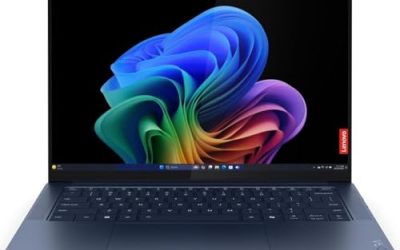
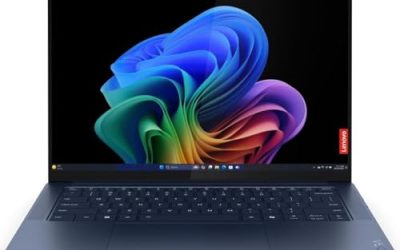
Most slim laptops force a choice: a light chassis with integrated graphics, or real processing power in a body that is awkward to carry. The Lenovo Slim 7 Pro X (model family 14ARH7) was built to close that gap. It pairs AMD Ryzen 6000 HS-series processors with a discrete NVIDIA GeForce RTX 3050 Laptop GPU inside an aluminium shell that is 15.9 mm thin and starts at 1.45 kg, then adds a 14.5-inch 3K display with a 120Hz refresh rate and factory colour calibration.
This lenovo slim 7 pro x review looks at the configuration that anchors the current Amazon US listing — Ryzen 7 6800HS, RTX 3050 graphics, 32GB of LPDDR5 memory and a 1TB PCIe 4.0 SSD — and explains how the rest of the configuration range differs, so you can judge whether this creator-focused machine fits your workload. It is aimed at photographers, video editors, developers and mobile professionals who want discrete graphics without a gaming-laptop footprint. Where a specification matters, it is taken from Lenovo’s published product specifications for the 14ARH7.
Quick Picks From This Lenovo Slim 7 Pro X Review
| Product | Best for | Key spec |
|---|---|---|
| Lenovo Slim 7 Pro X (Ryzen 7 6800HS, RTX 3050, 32GB, 1TB) | Creators who travel and want discrete graphics in a 1.45 kg laptop | 14.5-inch 3K (3072 x 1920) IPS touch display at 120Hz |
Only one configuration is covered as a purchasable pick here, because it is the one tied to a verified Amazon US listing. The Slim 7 Pro X was also sold with Ryzen 5 6600HS and Ryzen 9 6900HS processors, 16GB memory options and smaller storage on some SKUs, so the sections below explain what changes between configurations and what to check on any listing before ordering.
How to Choose Your Slim 7 Pro X Configuration
Processor: Ryzen 5, 7 or 9 HS
Every Slim 7 Pro X uses an AMD Ryzen 6000 “Creator Edition” HS processor. The Ryzen 5 6600HS offers 6 cores and 12 threads with boost speeds up to 4.5GHz. The Ryzen 7 6800HS in the listed configuration steps up to 8 cores and 16 threads, with a 3.2GHz base clock and boost up to 4.7GHz. The range-topping Ryzen 9 6900HS keeps the same 8-core, 16-thread layout and raises the boost ceiling to 4.9GHz. For photo editing, compiling code and multitasking across many applications, the 8-core chips are the sensible target; the Ryzen 9 mainly shortens long exports and renders rather than changing day-to-day responsiveness.
Graphics: RTX 3050, GTX 1650 or Integrated
The discrete option that matters is the NVIDIA GeForce RTX 3050 Laptop GPU with 4GB of GDDR6 memory, rated up to 55W in this chassis. It accelerates GPU effects in video editors, supports NVIDIA Studio drivers, and handles light gaming and 3D work that integrated graphics cannot. Some configurations shipped with the older GeForce GTX 1650, and others rely only on the integrated AMD Radeon 680M (660M on the Ryzen 5). If you edit video or work in 3D, confirm the listing names the RTX 3050 explicitly; the Radeon 680M is capable for everyday graphics but is not a substitute in GPU-accelerated timelines.
Memory: 16GB or 32GB, and It Is Soldered
Memory is dual-channel LPDDR5 running at 6400MHz, in either 16GB or 32GB capacities. The important catch is that it is soldered to the board and cannot be upgraded later. That makes the memory choice a permanent one: 16GB is workable for office work, browsing and light editing, while 32GB is the safer pick for large photo catalogues, virtual machines, containers or keeping many heavy applications open at once. The listed configuration includes 32GB, which removes the biggest long-term limitation of the design.
Storage: 512GB or 1TB PCIe 4.0 SSD
Storage comes from a single M.2 2280 PCIe 4.0 x4 NVMe SSD, in 512GB or 1TB capacities. Unlike the memory, the SSD sits in a standard slot, so it can be replaced with a larger drive later. Even so, starting with 1TB — as the listed configuration does — is worthwhile if you keep local copies of photo libraries, video projects or game installs, because there is no second drive bay.
Display: One Panel, Two Surface Options
All configurations share the same core panel: a 14.5-inch PureSight IPS display at 3072 x 1920 (3K) in a 16:10 aspect ratio, with a 120Hz adaptive refresh rate, 400 nits of brightness, 100% sRGB coverage and average Delta E below 1 from factory hardware calibration. Dolby Vision support and TÜV low blue light certification round it out. Touch input was fitted to many SKUs with a glass surface, but it was not universal across every configuration, so check the individual listing if touch matters to you. The glossy finish helps contrast and colour depth, but it reflects more light than a matte panel in bright rooms.
Ports, Camera and Battery
The AMD model provides two USB-C 3.2 Gen 2 ports with DisplayPort 1.4 output and Power Delivery charging, two USB-A 3.2 Gen 1 ports (one of them always-on for charging a phone), and a 3.5mm audio combo jack. There is no HDMI port and no SD card reader on this AMD version, and the USB-C ports are not Thunderbolt — docks and adapters need to match that. Above the display sits a 1080p FHD infrared webcam with a privacy shutter and Windows Hello sign-in. Power comes from a 70Wh battery with Rapid Charge Express, which Lenovo rates at up to three hours of runtime from a 15-minute charge, and charging runs through USB-C with a 100W adapter. Wireless connectivity is Wi-Fi 6E with Bluetooth 5.1, and audio is handled by dual 2W speakers with Dolby Atmos.
The Configuration in Detail
Lenovo Slim 7 Pro X — Ryzen 7 6800HS, RTX 3050, 32GB, 1TB

This is the configuration attached to the verified Amazon US listing for the Slim 7 Pro X, and it is the balanced one in the range. The 8-core Ryzen 7 6800HS handles editing, compiling and heavy multitasking, the RTX 3050 provides genuine GPU acceleration, and the 32GB of memory plus 1TB SSD remove the two constraints that age a laptop fastest. It runs Windows 11 Pro in this configuration.
- Strength: The full creator package — 8-core CPU, RTX 3050 graphics, 32GB of fast LPDDR5 memory and a factory-calibrated 3K 120Hz display — in an aluminium unibody that weighs 1.45 kg and measures 328.2 x 221.4 x 15.9 mm.
- Strength: The display specification is unusually complete for the class: 100% sRGB coverage, Delta E below 1 on average, Dolby Vision and a 120Hz adaptive refresh rate that keeps scrolling and pen-free navigation fluid.
- Strength: USB-C charging with a 70Wh battery and rapid top-up support makes it practical as a daily travel machine, and the 1080p IR webcam is a step above the 720p cameras still common in this size.
- Trade-off: Memory is soldered, so the 32GB fitted here is also the ceiling; there is no upgrade path if your workload grows.
- Trade-off: The RTX 3050’s 4GB of video memory and 55W power limit suit photo work, 1080p and light 4K timelines, and casual gaming — not heavy 3D scenes or high-settings modern games.
- Trade-off: No HDMI port, no SD card reader and no Thunderbolt on the AMD model, so photographers and presenters should budget for a USB-C dock or adapter.
- Trade-off: This is a 2022 model line, so stock on marketplace listings can be limited; check the seller, the exact configuration and the warranty terms on the listing before ordering.
Skip it if you need Thunderbolt docks, plan to upgrade memory later, or your main workload is demanding 3D rendering or high-end gaming — a thicker workstation or gaming laptop will serve you better.
Which One Fits Your Situation
You Edit Photos and Video on the Move
The listed 32GB configuration is the one to get. The calibrated 3K panel covers the full sRGB space, the RTX 3050 accelerates effects and exports in mainstream editors, and the 1.45 kg chassis disappears into a camera bag. Add a USB-C card reader, since there is no built-in SD slot.
You Write and Compile Code All Day
Eight cores and 32GB of memory give containers, local services and large projects room to breathe, and the high-resolution 16:10 display fits more code on screen than a standard 1080p panel. The backlit keyboard and large touchpad suit long sessions, and USB-C charging means one adapter can serve the laptop and your phone.
You Want One Laptop for Work and Light Play
The RTX 3050 and 120Hz display make esports titles and older games enjoyable at sensible settings, while the Radeon 680M integrated graphics can handle undemanding games on battery. Treat it as a work laptop that games on the side, not a dedicated gaming machine.
You Mostly Do Office Work and Browsing
The Slim 7 Pro X is more machine than you strictly need, but the display quality, build and webcam make it a pleasant long-term desk companion. If a 16GB configuration is the one available, it still covers this workload comfortably — just remember the memory cannot grow later.
You Need Maximum CPU Output in a Slim Body
Look for the Ryzen 9 6900HS configuration of the same model, which raises boost clocks for long renders and exports. The chassis, display and port selection stay the same, so every other point in this review still applies — only buy it with a listing whose full specification you can confirm.
Common Mistakes
- Confusing it with the Slim 7i Pro X. The “7i” is the Intel version (14IAH7) with Thunderbolt 4 and an HDMI port; the Slim 7 Pro X reviewed here is the AMD model with a different port layout.
- Confusing it with newer Slim models. The Slim Pro 7 (2023) and the Snapdragon-powered Yoga Slim 7x are different machines with different processors, despite the similar names.
- Assuming the memory can be upgraded. The LPDDR5 memory is soldered on every configuration; buy the capacity you will need in three years, not the one that fits today.
- Assuming every unit has a touchscreen. Touch was fitted to many SKUs but not all; verify it on the specific listing if you rely on touch input.
- Expecting Thunderbolt docking. The AMD model’s USB-C ports carry USB 3.2 Gen 2, DisplayPort and Power Delivery, but not Thunderbolt, so some docks will not work as expected.
- Overlooking the GPU variant. Listings exist with a GTX 1650 or integrated graphics only; for editing and light gaming, the RTX 3050 configuration is the one to look for.
- Forgetting a card reader. Photographers shooting to SD cards need a USB-C reader or dock, because the AMD Slim 7 Pro X has no built-in slot.
FAQ
Is the Lenovo Slim 7 Pro X the same as the Yoga Slim 7 Pro X?
Yes, it is the same laptop. Lenovo sold the 14ARH7 under the Slim 7 Pro X name in the US, while other regions know it as the Yoga Slim 7 Pro X. Specifications, dimensions and configuration options are shared across both names.
Can the memory or storage be upgraded later?
The storage can: the single M.2 2280 PCIe 4.0 SSD can be replaced with a larger drive. The memory cannot, because the LPDDR5 chips are soldered to the main board. Choose 32GB at purchase if you run heavy multitasking, virtual machines or large creative projects.
Does the Slim 7 Pro X have Thunderbolt or HDMI?
The AMD version does not. Its two USB-C ports support USB 3.2 Gen 2 data, DisplayPort 1.4 video output and Power Delivery charging, and video can also be sent to an external display through those ports with a suitable cable or dock. The Intel-based Slim 7i Pro X is the variant with Thunderbolt 4 and HDMI.
How good is the display for photo editing?
It is one of the model’s strongest points: a 14.5-inch 3072 x 1920 IPS panel with 100% sRGB coverage, factory hardware calibration to an average Delta E below 1, 400 nits of brightness and Dolby Vision support. The glossy surface favours contrast over glare control, so a shaded workspace helps.
Can the Slim 7 Pro X play games?
Within limits. The RTX 3050 Laptop GPU at up to 55W, helped by the 120Hz display, runs esports titles and older games well at moderate settings, and the integrated Radeon 680M covers very light games. Demanding modern titles at high settings exceed what a 4GB entry-level discrete GPU in a 15.9 mm chassis can deliver.
What battery life and charging should you expect?
The battery is a 70Wh unit, and Lenovo rates the model for long video playback figures under light use; heavy CPU and GPU work shortens runtime considerably, as with any performance laptop. Charging is by USB-C at up to 100W, and Rapid Charge Express is rated to restore up to three hours of runtime from a 15-minute top-up.
More from Amazon
Programs that pair well with the guide above. Offers and eligibility are set by Amazon and may change.
A free business account with business pricing and bulk-buying tools for work, shop or home office.
Create a business accountFree shipping on eligible items, Prime Video and more. Eligible new members can start with a free trial.
Start a Prime free trialAudiobooks and podcasts to listen to on the go. Eligible new members can start with a free trial.
Try Audible freeAd-free music streaming. Eligible new subscribers can start with a free trial.
Try Music Unlimited freeAs an Amazon Associate we earn from qualifying purchases.

Write Your Review
No reviews yet. Be the first to share your experience!