

Key takeaways
- Who it suits: frequent flyers who need an AC socket for a laptop charger or a camera charger.
- Pros: under 100Wh; light; wireless pad; USB-C ports alongside the AC socket.
- Cons: one AC port at 100W; recharging is slower than the larger stations; mid-range price for a small capacity.
The best power bank with an AC outlet depends on whether you plan to fly with it: the Goal Zero Sherpa 100AC is the only pick here small enough (about 94.7Wh) to sit under the 100Wh carry-on line, while the EcoFlow River 3, Anker SOLIX C300 and Bluetti Elite 30 V2 are the better choices for car trips, camping and home backup because they pack 245Wh to 288Wh and run a proper wall socket. In every case the AC outlet is a convenience, not an efficiency gain, so the first thing to check is whether your gear can charge over USB-C instead.
This guide compares six real models that put a mains-style outlet on a rechargeable battery, from a laptop-sized bank to compact power stations. It explains how to size one by watt-hours, how to estimate runtime, why airline rules rule out most of them, and what to look for in outlet count and surge rating. Figures come from manufacturer spec pages; where retailers and reviewers disagree, the differences are flagged.
Our top picks

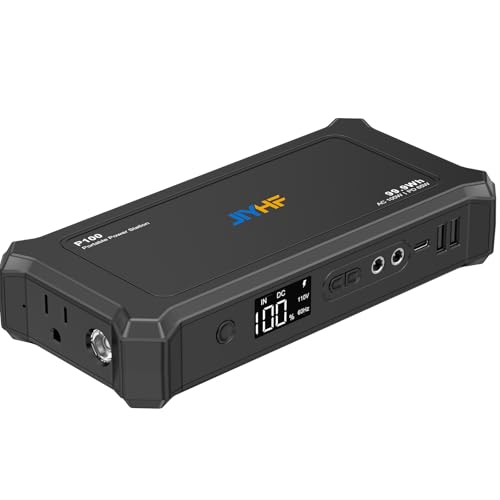
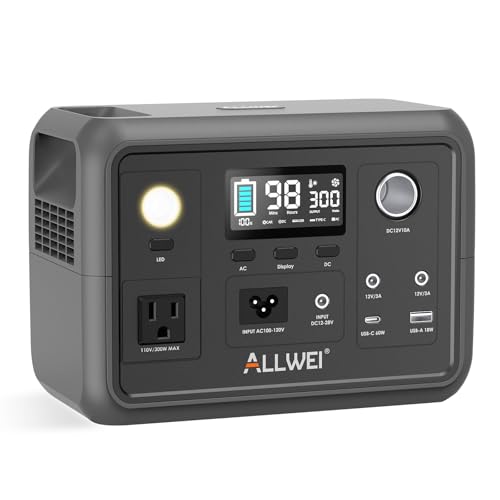
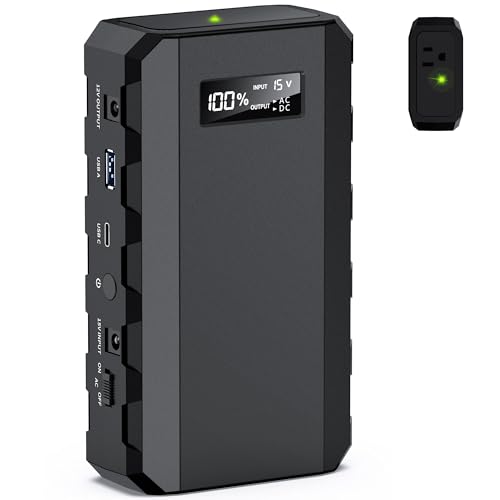
As an Amazon Associate we earn from qualifying purchases at no extra cost to you.
Quick comparison of the six picks
| Pick | Best for | Capacity | AC output | Weight | Flight-legal? | Price tier |
|---|---|---|---|---|---|---|
| Goal Zero Sherpa 100AC | Flying with laptop-class AC | about 94.7Wh (25,600mAh equivalent) | 100W | about 2.1 lb | Yes, under 100Wh | Mid-range |
| Omni Ultimate | Long-day laptop work | about 142Wh | 120W (US version) | about 3 lb | Airline approval needed | Premium |
| EcoFlow River 3 | Fast recharge, small appliances | 245Wh | 300W, 600W X-Boost | about 7.8 lb | No | Mid-range |
| Anker SOLIX C300 (AC model) | Camping and backup with many ports | 288Wh | 300W, 600W surge | about 9.1 lb | No | Mid-range to premium |
| Bluetti Elite 30 V2 | Higher AC wattage for the size | 288Wh | 600W, 1,500W surge | about 9.5 lb | No | Mid-range |
| Bluetti EB3A | Solar-friendly starter | 268.8Wh | 600W, 1,200W surge | about 10.1 lb | No | Budget to mid-range |
What an AC outlet on a power bank really means
An AC outlet is the same type of socket you have on a wall, delivering 110 to 120 volts in the US or 230 volts in much of the world. Inside the case an inverter converts the battery’s direct current into alternating current. That conversion costs energy: most small inverters lose roughly 10 to 15 percent as heat, plus a small idle draw whenever the inverter is on. A device that can charge over USB-C Power Delivery will therefore run longer on the same battery than one plugged into the AC socket through its own brick.
Use the AC outlet for the things that really need it: a laptop with a proprietary charger, a camera battery charger, a small fan, a CPAP without a DC cable, a drone charger, a monitor or a lamp. For phones, tablets and modern USB-C laptops, use USB-C directly.
Power bank versus power station
The line between the two is blurry. Marketing calls a small AC unit a “power bank” when it is laptop-sized, with a strap or a handle, and a “power station” when it has a bigger case and a more powerful inverter. The Sherpa 100AC and Omni Ultimate sit in the first group; the other four are compact power stations. The practical difference is carry weight and airline status, not electronics.
How to size an AC power bank: watt-hours and watts
Two numbers decide whether a unit fits your use. Watt-hours (Wh) tell you how much energy it stores. Watts (W) tell you how much it can deliver at once. Add up the watts of what you plan to run; that sum must stay under the unit’s AC rating, and the surge rating should cover any motor or compressor start-up.
| Device | Typical draw | Runtime from 94.7Wh (Sherpa) | Runtime from 245Wh (River 3) | Runtime from 288Wh (C300 / Elite 30 V2) |
|---|---|---|---|---|
| Laptop, 65W charger at full load | about 65W | about 1.2 hours | about 3.2 hours | about 3.8 hours |
| Camera or drone charger | about 30W | about 2.7 hours | about 7 hours | about 8 hours |
| CPAP without humidifier | about 30W | about 2.7 hours | about 7 hours | about 8 hours |
| LED lamp or small fan | about 10W | about 8 hours | about 20 hours | about 24 hours |
The runtimes assume about 85 percent inverter efficiency, which is why the figures are lower than a simple division of Wh by watts. For example, the River 3 holds 245Wh; multiply by 0.85 to get about 208Wh of usable energy, and divide by 65W to get about 3.2 hours of laptop use. Real-world reviews of the River 3 report usable capacity around 210Wh, which agrees with this estimate.
The surge question
Anything with a motor or compressor, such as a mini fridge, a small pump or a power tool, draws several times its running wattage for a fraction of a second. Anker advertises 600W surge on the SOLIX C300, EcoFlow advertises a 600W X-Boost mode on the River 3 that lets it run some devices rated above its 300W limit by reducing voltage, and Bluetti lists 1,500W of surge for the Elite 30 V2. If you want to run a device on the edge of the rating, the surge figure matters more than the continuous figure.
Best for flying: Goal Zero Sherpa 100AC
The Sherpa 100AC is the compact, travel-friendly option. Goal Zero lists a pack capacity of 94.7Wh, equivalent to about 25,600mAh at cell voltage, which puts it just under the 100Wh line that airlines apply to carry-on batteries. A 100W AC port is built in, along with USB-C output ports (60W and 100W on the current 4th-generation version), two USB-A ports and a 15W wireless charging surface. Input comes through an 8 mm barrel connector and the maker offers optional solar panels up to 60W. The unit weighs roughly 2.1 lb, and a 2-year warranty applies.
Different retailers describe the AC waveform differently, some as pure sine wave and some as modified, so if you plan to run sensitive electronics, check Goal Zero’s current spec sheet first. A single 100W outlet can run a laptop charger, a camera charger or a small fan, but not a hair dryer or a kettle.
- Who it suits: frequent flyers who need an AC socket for a laptop charger or a camera charger.
- Pros: under 100Wh; light; wireless pad; USB-C ports alongside the AC socket.
- Cons: one AC port at 100W; recharging is slower than the larger stations; mid-range price for a small capacity.
Best for long laptop days: Omni Ultimate
The Omni Ultimate is a purpose-built “universal” power bank with an AC outlet, two USB-C Power Delivery ports at up to 100W each and a DC barrel port at up to 100W. Its larger version, often listed as the Ultimate+, carries about 142Wh, around 38,400mAh. The US version delivers up to 120W of AC at 120 volts, and the pack weighs about 3 lb (1,367 g) with dimensions of roughly 6.5 by 5.7 by 2.1 inches. Recharging is by barrel connector at up to 90W or by USB-C at 60W, in under three hours.
At 142Wh it is above the 100Wh limit, so an airline must approve it, and it counts toward the two-battery allowance for 100 to 160Wh units. The manufacturer says it falls inside the FAA’s maximum, but you should still confirm with the airline before flying. Retail listings also mention a smaller 25,600mAh option, but its AC specifications are not confirmed in the sources checked, so verify before ordering that variant.
- Who it suits: remote workers who want a laptop to last all day and also need DC and USB-C flexibility.
- Pros: multiple output types; 100W USB-C twice; compact for 142Wh; recharges in under three hours.
- Cons: premium tier; airline approval needed; 120W AC ceiling.
Best for fast recharge: EcoFlow River 3
The River 3 is a small 245Wh power station with a lithium iron phosphate (LiFePO4) battery rated for 3,000 cycles to 80 percent capacity. EcoFlow lists 300W of AC output with a 600W X-Boost mode, a 100W USB-C port, two USB-A ports and a 12V car socket. It weighs about 3.55 kg (7.8 lb) and measures about 255 by 212 by 113 mm. Charging from the wall takes about an hour from empty to full, with AC input up to roughly 305W to 320W by region, and solar input reaches 110W. A UPS switchover under 20 milliseconds means a plugged-in router or desktop can ride through a short outage.
The number of AC outlets varies by region: the US model is described as having two, while some European pages list one. Reviewers also note that 245Wh and 300W are starter-station numbers, suitable for electronics, small fans and lighting rather than space heaters.
- Who it suits: car campers and home users who want a quick recharge and quiet operation.
- Pros: rapid wall charging; LiFePO4 cells; UPS mode; compact for the capacity.
- Cons: not airline-legal; 300W limit; real usable capacity around 210Wh.
Best with many ports: Anker SOLIX C300 (AC model)
Anker’s SOLIX C300 stores 288Wh in a LiFePO4 battery rated for 3,000 cycles to at least 80 percent. The AC model delivers 300W with a 600W surge rating, and Anker lists three AC sockets for the US and two for the UK. The USB side is generous: two 140W USB-C PD 3.1 ports, one 100W USB-C, one 15W USB-C and two 12W USB-A ports, plus a car socket. Wall recharging reaches 80 percent in about 50 minutes, with up to 330W AC input and 100W of solar input. The official weight is about 4.13 kg (9.1 lb), and Anker gives a five-year warranty. A cheaper C300 DC version exists without AC outlets, so be sure you buy the AC model if the socket matters.
- Who it suits: people who want one unit to power several laptops and phones at once.
- Pros: 140W USB-C ports; many outlets; long warranty; fast recharge.
- Cons: heavy; 300W AC ceiling; not airline-legal; the DC version is easy to buy by mistake.
Best AC wattage for the size: Bluetti Elite 30 V2
The Elite 30 V2 offers 288Wh of LiFePO4 storage rated for 3,000 cycles, with AC output of 600W and a 1,500W Power Lifting mode that can run some appliances above that rating. Weight is about 4.3 kg (9.48 lb) and dimensions are about 250 by 178 by 167.5 mm. AC input is up to 380W, solar input up to 200W, a full recharge takes about 70 minutes, and switchover as a UPS is within 10 milliseconds. Bluetti gives a five-year warranty. Sources disagree on the number of outlets (one or two), and a single review quotes 300W where most list 600W, so confirm the AC rating on the current product page.
- Who it suits: buyers who want more headroom for small appliances such as a mini fridge or a fan.
- Pros: 600W AC; UPS; five-year warranty; fast recharge.
- Cons: heavy; spec inconsistency across sources; not airline-legal.
Best starter for solar: Bluetti EB3A
The EB3A is an older design that remains popular. Sources list 268.8Wh of LiFePO4 capacity rated for 2,500 or more cycles, with two 110V pure sine wave AC outlets delivering 600W continuous and 1,200W of surge. It also has a 100W USB-C port, two USB-A ports, a 12V car output, two DC5521 ports and a 15W wireless pad. It weighs about 10.1 lb (4.6 kg), and measures about 10 by 7.1 by 7.2 inches. Solar input reaches 200W, and the AC charge rate is about 268W in standard mode and up to 350W in Turbo mode. Reviewers disagree about charge time and warranty length, so confirm both on the product page before ordering.
- Who it suits: people adding a small solar panel and wanting more AC headroom than the River 3.
- Pros: 600W AC; solar input of 200W; wireless pad; proven design.
- Cons: heaviest of the six; older; inconsistent warranty information.
Decision matrix
| Your situation | Choose | Why |
|---|---|---|
| Need an AC socket on a plane | Goal Zero Sherpa 100AC | Under 100Wh |
| Laptop day without wall power, willing to ask the airline | Omni Ultimate | 142Wh, 120W AC, two 100W USB-C |
| Car camping, router and lights | EcoFlow River 3 | Quiet, one-hour recharge |
| Work from a van with several laptops | Anker SOLIX C300 | Two 140W USB-C and several outlets |
| Mini fridge or small fan | Bluetti Elite 30 V2 | 600W AC and high surge |
| Adding solar on a budget | Bluetti EB3A | 200W solar input |
Flying with an AC power bank
The rule that decides is watt-hours. Units up to 100Wh may go in carry-on baggage without approval; units from 100Wh to 160Wh need airline approval and are limited to two per passenger; anything above 160Wh is not allowed on commercial aircraft. Batteries never go in checked luggage. A unit marketed as “300W” or “600W” often stores far more than 100Wh, so ignore the output number and look for the Wh figure on the label. Among the six, only the Sherpa 100AC fits under 100Wh and the Omni Ultimate fits in the approval band; the rest are too large to bring on a plane.
Airlines can add further limits, such as restricting use in flight or the number of banks, and these policies have been changing, so check the carrier’s current page shortly before departure.
Safety and ownership tips
- Use the outlet only within the rated wattage, including the start-up surge of motors.
- Keep the unit ventilated while it is running. Do not cover the vents with clothes or bags.
- LiFePO4 batteries tolerate heat and deep cycles better than standard lithium-ion packs, which is why three of the stations here quote 3,000 cycles.
- Store at moderate charge in a cool place if you will not use the unit for months.
- Do not use a damaged or swollen battery; replace it.
- For sensitive electronics, check whether the inverter produces pure sine wave output.
What wears first
The inverter fan is the first moving part to fail in many small stations. Dust accumulates on the vents, so wipe them with a dry cloth every few months. The battery itself should last years if you avoid heat; a unit rated for 3,000 cycles to 80 percent would, at one full cycle per week, still hold most of its capacity after more than a decade of use.
Frequently Asked Questions
Is there a power bank with an AC outlet that I can take on a plane?
Yes, if its capacity is 100Wh or less. The Goal Zero Sherpa 100AC, at about 94.7Wh, fits that rule. Larger units like the Omni Ultimate at about 142Wh need airline approval, and stations of 245Wh or more are not allowed on commercial aircraft.
Will an AC power bank run a hair dryer or a kettle?
No. Those devices draw 1,000W or more, far above the 100W to 600W ratings of these units. A hair dryer would also drain a 288Wh battery in under 20 minutes.
Is it better to charge a laptop through USB-C or the AC outlet?
Through USB-C when the laptop supports it. Going through the inverter wastes energy, so the same battery gives a longer runtime with USB-C Power Delivery.
How long can a 288Wh unit run a laptop?
About 3 to 4 hours of heavy use with a 65W charger once inverter losses are included, and much longer for light office use, when a laptop draws closer to 30W.
What does the surge rating mean?
It is the short burst of power the inverter can supply when a motor starts. A device rated 300W continuous may need 600W for an instant, so the surge number tells you whether a fan or pump will start at all.
Can I charge an AC power bank with solar panels?
Most can. The River 3 accepts up to 110W, the C300 up to 100W and the Elite 30 V2 and EB3A up to 200W. Make sure the panel’s voltage stays inside the unit’s allowed range.
More from Amazon
Programs that pair well with the guide above. Offers and eligibility are set by Amazon and may change.
A free business account with business pricing and bulk-buying tools for work, shop or home office.
Create a business accountFree shipping on eligible items, Prime Video and more. Eligible new members can start with a free trial.
Start a Prime free trialAudiobooks and podcasts to listen to on the go. Eligible new members can start with a free trial.
Try Audible freeAd-free music streaming. Eligible new subscribers can start with a free trial.
Try Music Unlimited freeAs an Amazon Associate we earn from qualifying purchases.


Write Your Review
No reviews yet. Be the first to share your experience!