

Key takeaways
- The best power banks for laptops: six USB-C packs compared on watt-hours, wattage, ports and airline limits to match your laptop charger.
The best power bank for laptops in this group is the Anker Prime 26,250mAh 300W: it holds just under 100Wh, so it stays within the usual airline carry-on limit, and it can send up to 140W through a single USB-C port while feeding other devices at the same time. If you carry a lighter machine, the Anker 25,000mAh 165W with built-in retractable cables is the tidier everyday choice. A laptop power bank must do three things: deliver enough wattage over USB-C Power Delivery to run or charge your laptop, hold enough watt-hours to matter, and stay legal for flights. These six cover that range from slim 65W packs to a 300W pack.
Quick List
- Power Bank with AC Outlet (98Wh) – best for running devices that need a wall-style plug
- Baseus Blade 100W 20000mAh – best for a slim bag-friendly bank with 100W output
- JUOVI 65W 20000mAh – best for ultrabooks, tablets and phones
- Anker Laptop Power Bank 25,000mAh 165W – best for built-in cables and two-laptop charging
- Anker 20,000mAh 87W with Built-In USB-C Cable – best for a simple cable-in-hand carry
- Anker Prime 26,250mAh 300W – best for power users with multiple devices and bigger laptops
Which One Is Right for You?
| If you… | Choose |
|---|---|
| Own a performance laptop or want to charge two laptops | Anker Prime 26,250mAh 300W |
| Want built-in cables so you never forget one | Anker Laptop Power Bank 25,000mAh 165W |
| Need a bank that slides into a slim laptop bag | Baseus Blade 100W |
| Use an ultrabook, MacBook Air or iPad | JUOVI 65W |
| Want one built-in cable and a simple three-port pack | Anker 20,000mAh 87W |
| Need an AC plug for a small appliance or older charger | Power Bank with AC Outlet (98Wh) |
Start with your laptop’s charger. If it is a 65W adapter, a 65W bank is enough to charge it at full speed; if it is 100W or more, you need a bank rated at or above that to avoid slow charging. Then consider capacity and carry: a heavier pack lasts longer but costs you shoulder weight on every trip.
All 6 Picks in Detail
1. Power Bank with AC Outlet (98Wh) – Best for Devices That Need a Wall-Style Plug
As an Amazon Associate we earn from qualifying purchases at no extra cost to you.

This unusual pack adds a standard AC outlet to a laptop-class bank. The listing describes a portable power bank with an AC outlet, 100W portable laptop charger, 98Wh (27000mAh) capacity and a 65W USB-C Power Delivery port. At 98Wh it sits just below the common 100Wh limit for airline carry-on batteries, which makes it the largest-capacity pack in this group that is still marketed for travel.
The AC outlet is the selling point. It lets you plug in a laptop’s original charger, a small fan or a camera battery charger without a USB-C adapter. Use it sparingly, though: converting battery power to AC and back to DC wastes energy, so your usable runtime is lower than the capacity suggests. For modern laptops that charge over USB-C, the 65W USB-C port is the more efficient choice.
Think about the situations where an AC outlet earns its weight: a remote work session where you need to run a laptop’s original adapter, a camping trip where a small fan or light needs a standard plug, or a power cut at home when you want to keep a router and a laptop running for a while. For a daily commute, a USB-C-only pack weighs less and does the job more efficiently. Check the product page for the AC output limit and which appliances it can safely run; a device that draws more than 100W will not work.
- 98Wh / 27,000mAh capacity
- AC outlet rated at 100W (per the listing)
- 65W USB-C Power Delivery output
- Additional USB ports – confirm on listing
- Weight and recharge time – confirm on listing
Pros:
- Flexible: USB-C and AC in one pack
- Large capacity just under the airline limit
Cons:
- Heavier and bulkier than USB-C-only banks
- AC conversion lowers efficiency
Compared with the Baseus Blade, it trades portability for a plug and a bigger battery.
2. Baseus Blade 100W 20000mAh – Best for a Slim Bank with 100W Output

The Baseus Blade is described as a 100W, 20,000mAh laptop portable charger with fast charging, two USB-C ports and two USB-A ports, and the listing mentions use with a Steam Deck and MacBook. The name suggests a thin, flat shape, which is easy to slip into a laptop sleeve or a bag’s slim pocket. Twenty thousand milliamp-hours at a typical cell voltage works out to roughly 74Wh, comfortably under the 100Wh airline guideline.
A 100W port is enough to charge most 14-inch laptops and many 16-inch models at a good speed, though power-hungry machines will draw down the pack quickly while under load. The Steam Deck mention is a useful hint: handheld gaming PCs use USB-C Power Delivery, and a 100W bank can run one for several hours.
At the desk, a 100W port can charge a laptop while you work, since the pack acts like a second wall socket. On the move, the second USB-C port and two USB-A ports let you top up a phone and earbuds without carrying another charger. Because the title lists a handheld console, the pack is also appealing to travelers who split their power bank between work and play. Look at the product page for whether the 100W is available at the same time as the other ports.
- 20,000mAh capacity (roughly 74Wh at a typical cell voltage – confirm on listing)
- Up to 100W via USB-C
- Two USB-C and two USB-A ports
- Output when several ports are used together – confirm on listing
- Display or indicator type – confirm on listing
Pros:
- Four ports and 100W for a slim design
- Lighter than the 25,000mAh packs
Cons:
- Output drops when multiple ports are used at once
- No built-in cable listed
It is the sleeker alternative to the Anker 25,000mAh 165W, with less capacity and no built-in cables.
3. JUOVI 65W 20000mAh – Best for Ultrabooks, Tablets and Phones

JUOVI’s listing describes a 65W, 20,000mAh laptop portable charger with fast charging, four ports, an LED display and compatibility with a MacBook Air and an iPad. Sixty-five watts is the standard wattage for many ultrabook chargers, so this pack can charge a thin laptop at its normal speed. It is not the right tool for a performance laptop that ships with a 100W or larger charger.
The LED display shows remaining capacity, which beats guessing from a row of dots. Four ports let you charge a laptop, a phone and earbuds from one pack, though the 65W figure is shared; when several ports are in use, the laptop will receive less. Use it as a travel companion for lighter gear.
This is the pack for someone who mainly carries a MacBook Air, a Chromebook or a thin Windows ultrabook, plus a tablet and a phone. Those devices draw modest power, so 65W is enough for them to charge at a normal pace while you work. The LED display helps you plan: if the display shows low charge, you know to top up before a flight. If you later upgrade to a larger laptop, you will want a higher-wattage bank, so consider how long you plan to keep your current machine.
- 20,000mAh capacity
- 65W maximum output
- Four ports; USB-C and USB-A mix – confirm on listing
- LED display for charge level
- Weight and dimensions – confirm on listing
Pros:
- Right-sized for thin laptops, tablets and phones
- Display shows battery level
Cons:
- 65W is not enough for power-hungry laptops
- Output shared across ports
Choose it over the Baseus Blade only if you do not need the extra 35W.
4. Anker Laptop Power Bank 25,000mAh 165W – Best for Built-In Cables and Two-Laptop Charging
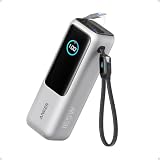
This is the most convenient everyday laptop bank in the group. The listing calls out 25,000mAh, 165W total output, three USB-C ports at up to 100W each and built-in retractable cables. According to Anker’s specification page, the capacity is about 90Wh, which is within the usual 100Wh airline limit, and the retractable cable measures about 27.6 inches with a short lanyard cable that doubles as a carrying strap.
Any two of the USB-C ports can share up to 165W, so you can charge two laptops, or a laptop and a tablet, at the same time. When three or four ports are in use, the combined output drops, so do not expect full speed everywhere. The built-in cables are a quiet benefit: the most common reason a power bank fails on a trip is a forgotten or broken cable.
A good habit with this pack is to use the built-in cable for the laptop and the other USB-C port for the phone, so the laptop receives its full share. The short lanyard cable is a useful strap but carries less, so use it for phones and accessories. For overnight recharging, plug the bank into a capable charger rated for at least 65W to 100W and expect a recharge of a couple of hours. Keep it out of hot cars, and do not leave it charging on a bed or sofa.
- 25,000mAh (about 90Wh per Anker’s specification page)
- 165W total output with two ports; up to 100W per USB-C port
- Three USB-C ports, two of which are built-in cables, plus one USB-A
- Smart display showing power and battery status
- USB-C input up to 100W for recharging
Pros:
- Built-in cables reduce what you carry
- Strong output for two devices
Cons:
- Output falls when three or four ports are used
- Heavier than 20,000mAh banks
It is a better daily carry than the Prime for lighter laptops, with the Prime offering more power for demanding loads.
5. Anker 20,000mAh 87W with Built-In USB-C Cable – Best for a Simple, Cable-In-Hand Pack

The listing describes a 20,000mAh power bank with a built-in USB-C cable, three ports and up to 87W maximum fast charging, aimed at MacBooks and iPhones. It sits between the 65W JUOVI and the 100W Baseus in output, and it is a better match for 14-inch laptops than for large performance machines. The built-in cable means one less thing to pack.
At 20,000mAh, the pack holds roughly 74Wh at a typical cell voltage, which is within airline limits. In practice, 87W covers MacBook Air and many MacBook Pro 14-inch charging scenarios at a reasonable speed, but the specifications in the listing do not say how the 87W splits across ports, so check the product page before assuming a laptop and phone will each get full speed.
If you mostly travel with one laptop and a phone, the simplicity of this pack is a plus: one cable is always attached, so you only need a second cable for the phone. It is also the lighter of the two Anker laptop banks in this group, which matters when you carry it daily. Because the maximum figure is 87W, check your laptop charger wattage. A 65W laptop will charge normally, but a 100W-class machine will charge more slowly than it does from its own adapter.
- 20,000mAh capacity
- Up to 87W maximum
- Three ports, one of them a built-in USB-C cable
- Port-by-port output split – confirm on listing
- Recharge speed and weight – confirm on listing
Pros:
- Built-in cable means fewer things to forget
- Output suits 14-inch laptops
Cons:
- Lower output than the 100W and 165W packs
- Only one built-in cable
It is the simplified, lighter cousin of the 25,000mAh Anker.
6. Anker Prime 26,250mAh 300W – Best for Power Users with Several Devices

The Anker Prime is the high-end option. The listing describes a 26,250mAh pack with 300W fast charging, three ports, two-way charging, TSA approval and app control. Anker’s specification information lists about 99.75Wh, just under the 100Wh airline guideline, with up to 140W from each USB-C port and 300W total across all ports. The battery cannot deliver 300W to one device; the high number applies when you connect several devices at once.
Two-way charging means the pack can recharge fast, with a very high input wattage when connected to a strong charger. App control lets you adjust output and see status. For a traveler with a large laptop plus a tablet and phone, it can replace a pile of wall chargers on a hotel desk.
The Prime’s display and app make it more of a power hub than a simple bank. You can see input and output wattage per port, which helps diagnose slow charging, and you can limit output to protect a device. It is also the pack that makes sense for a two-laptop household or a photographer with a laptop, camera batteries and a phone. For commuters with a light ultrabook, it is overkill; carrying 600 grams of battery to charge a 45W laptop wastes shoulder weight.
- 26,250mAh (about 99.75Wh per Anker’s specification information)
- 300W total output; up to 140W per USB-C port
- Two USB-C ports and one USB-A (per Anker’s specification information)
- Two-way fast charging; app control
- Included cable and weight – confirm on listing
Pros:
- Highest output in the group
- Smart display and app control
Cons:
- Heaviest and bulkiest pack in the group
- Single-device output is limited to the port rating
Choose it over the Anker 25,000mAh 165W if your laptop demands more than 100W.
Specs Compared
| Power bank | Capacity | Max output | Ports | Built-in cable | Extras |
|---|---|---|---|---|---|
| AC Outlet Power Bank | 98Wh / 27,000mAh | 65W USB-C PD; 100W AC | AC plus USB (confirm on listing) | Confirm on listing | AC outlet |
| Baseus Blade 100W | 20,000mAh | 100W | 2 USB-C, 2 USB-A | Confirm on listing | Slim design |
| JUOVI 65W | 20,000mAh | 65W | 4 ports (confirm on listing) | Confirm on listing | LED display |
| Anker 25,000mAh 165W | 25,000mAh (about 90Wh) | 165W total; 100W per USB-C | 3 USB-C, 1 USB-A | Yes, retractable | Smart display |
| Anker 20,000mAh 87W | 20,000mAh | 87W | 3 ports | Yes, USB-C | Confirm on listing |
| Anker Prime 300W | 26,250mAh (about 99.75Wh) | 300W total; 140W per USB-C | 2 USB-C, 1 USB-A | Confirm on listing | App control, two-way charging |
How We Chose These
We began with the six listings supplied for this page and checked them against manufacturer specification pages where Anker publishes them. Each pack was compared on watt-hour capacity, maximum USB-C output, number and type of ports, built-in cables and the extras the listing names. We used watt-hours rather than milliamp-hours as the common yardstick, because airlines and laptops both reason in watt-hours. Where a listing leaves a value open, we flag it for you to confirm on the product page. We have not run discharge tests, so runtime guidance below is a calculation, not a measurement.
What to Look For
Watts: match the charger, not the headline
Look at the label on your laptop’s original charger. A 65W adapter calls for at least a 65W USB-C output; a 100W adapter calls for 100W. A pack with a lower wattage can still charge the laptop, but slowly, and a laptop under heavy load may drain the battery even while plugged in. Remember that headline totals like 165W or 300W usually apply to several ports together, not one. The per-port number is the one that decides how fast your laptop charges.
Watt-hours and runtime
Watt-hours tell you how much energy the pack holds. To convert milliamp-hours, multiply by the cell voltage (usually 3.6 to 3.7V) and divide by 1,000: 20,000mAh at 3.7V is about 74Wh. Real-world usable energy is lower because of conversion losses, often around 60 to 70 percent. Worked example: a 74Wh pack delivers roughly 45 to 52Wh to a laptop; a laptop that draws 30W on average then runs for about an hour and a half to just under two hours, or it can recharge a typical 50Wh laptop battery about once.
Airline and safety rules
Power banks and spare lithium batteries must travel in carry-on bags, not checked bags, under US aviation guidance. Packs up to 100Wh are generally allowed; packs between 100 and 160Wh need airline approval, and packs above 160Wh are generally not permitted. Check your airline for limits on the number of banks. Protect the terminals from contact with metal objects, do not use a swollen, damaged or hot pack, and avoid charging it under a pillow or in a closed bag. If a pack becomes hot, smells odd or changes shape, stop using it and have it disposed of through a battery recycling program.
Cables, ports and charging features
USB-C Power Delivery is the standard that lets a bank charge a laptop; look for PD 3.0 or newer. A short, high-quality cable rated for the wattage you need makes a bigger difference than people expect: a cable rated for 60W will not carry 100W. Built-in cables remove that risk, and pass-through charging lets you charge the bank and the device together, though it generates more heat. Finally, check recharge speed. A big bank that takes six hours to refill is less useful on a short layover.
Questions
Can a power bank charge a laptop?
Yes, if it supports USB-C Power Delivery and provides enough wattage for your laptop. Check your laptop’s charger wattage and choose a pack with at least that output for full-speed charging.
Can I take a laptop power bank on a plane?
Generally yes, in carry-on baggage only. Packs up to 100Wh are typically allowed, and those between 100 and 160Wh need airline approval, so confirm with your carrier.
How many watt-hours do I need?
Aim for roughly the capacity of your laptop’s own battery plus a margin for losses. For a typical 50Wh laptop, a pack around 70 to 100Wh gives one full recharge and a spare partial one.
Why does my laptop charge slowly from a power bank?
The most common causes are a pack with a lower wattage than your charger, a cable that is not rated for the wattage, or several ports sharing the output. Use one port, a certified cable and a pack rated for your laptop.
Is the AC outlet on a power bank worth it?
It is useful for devices that only come with a wall plug, but it is less efficient than charging over USB-C. If your laptop and devices charge over USB-C, you may not need it.
How long does a power bank last before it wears out?
Lithium cells slowly lose capacity with use, and many packs are designed for several hundred charge cycles. Storing the pack partly charged and avoiding heat extends its life.
Update History
- October 20, 2026 – Initial publication; product set drawn from current catalog listings.
- Check the product page for current specifications and availability before buying.
Sources
- Manufacturer specification pages for Anker power banks
- Retailer listing titles and specification fields for the Baseus, JUOVI and AC-outlet packs
- USB-IF documentation on USB Power Delivery
- US aviation safety guidance on carrying lithium batteries and power banks in carry-on baggage



Write Your Review
No reviews yet. Be the first to share your experience!