

Key takeaways
- Pro: two built-in cables remove the most common point of failure and forgetfulness.
- Pro: 100W from any USB-C port, plus 165W combined, leaves headroom for a second device.
- Pro: 100W input shortens the refill time compared with 65W-input rivals.
- Con: at roughly 595 g it behaves like a bag accessory rather than a pocket item.
- Con: owner reports mention wear on built-in cables over time, so check the warranty length where you buy.
- Con: the USB-A port tops out at a far lower rate than the USB-C ports.
The best 100W power bank for most people is the Anker Laptop Power Bank 25K, because it pairs a 25,000mAh cell with two built-in USB-C cables and keeps a full 100W available on a single port. If you want the same 100W laptop speed in a lighter, simpler package, the UGREEN Nexode 20,000mAh 100W is the safer value pick, and the Baseus Blade HD wins when thickness in a laptop sleeve matters more than anything else. Every power bank below can charge a typical 14-inch or 16-inch ultrabook at full speed from one USB-C port, but they differ sharply in weight, port sharing and what happens when you plug in a second device.
A 100W label is easy to misread. Some manufacturers quote the maximum from one port, others quote the combined total across every port, and a few quote a figure that only appears when two ports are used at the same time. Before you spend anything on a laptop battery, it helps to know exactly which of those numbers you are reading, because the difference decides whether your laptop charges at full speed or crawls. The sections below explain the numbers, compare seven real models side by side, and then walk through the calculations and ownership details that a simple product listing leaves out.
Our top picks


As an Amazon Associate we earn from qualifying purchases at no extra cost to you.
What “100W” actually means on a power bank
USB Power Delivery negotiates a voltage and current between the charger and the device. A 100W profile means 20 volts at 5 amps, and every laptop that accepts USB-C charging at that level asks the power bank for exactly the amount it needs. A laptop that ships with a 65W adapter will simply draw 65W from a 100W port; the extra headroom is not wasted or forced into the machine. That is why a 100W bank is a sensible default: it covers the 45W, 65W, 90W and 100W adapters that account for nearly every USB-C laptop in circulation.
Three details matter more than the headline wattage. First, the single-port maximum, which tells you the fastest rate a lone laptop can charge. Second, the combined maximum, which tells you what happens when a phone, earbuds and a laptop all connect together. Third, the input rating, which tells you how quickly the bank itself refills. A bank with a 100W output and a 30W input can take most of a night to recover, and that matters on a trip where you only have a hotel wall socket for a few hours.
There is also a cable requirement that surprises many buyers. Any USB-C cable that carries more than 60W must contain an electronic marker chip that declares it safe for 5 amps. A thin cable that came with a phone will quietly limit a laptop to 60W or less, and some laptops will refuse to charge at all if the negotiation fails. Several of the models below ship with a suitable 100W or 240W cable, and two build the cable directly into the case, which removes the problem entirely.
Quick comparison of the seven picks
| Pick | Best for | Capacity | Single-port output | Approx. weight | Tier |
|---|---|---|---|---|---|
| Anker Laptop Power Bank 25K (165W) | Best overall, built-in cables | 25,000mAh (about 90Wh rated) | 100W per USB-C port, 165W total | about 595 g | Premium |
| UGREEN Nexode 20,000mAh 100W | Best value | 20,000mAh (72Wh) | 100W on USB-C1 | about 420 g | Mid-range |
| Baseus Blade HD 20,000mAh 100W | Slimmest for sleeves | 20,000mAh | 100W on a USB-C port | about 445 g | Mid-range |
| UGREEN Nexode 12,000mAh 100W | Lightest 100W option | 12,000mAh (44.4Wh) | 100W on USB-C | about 310 g | Budget to mid-range |
| INIU 25,000mAh 100W | Highest capacity for the size | 25,000mAh | 100W on USB-C1 | about 390 to 475 g by version | Budget to mid-range |
| UGREEN Nexode 20,000mAh 165W Retractable | Built-in retractable cable | 20,000mAh (72Wh) | 100W on cable or port | about 535 g | Mid-range to premium |
| Anker Prime 20K 220W | Two laptops at once | 20,100mAh (72.36Wh) | 140W per USB-C port, 220W total | about 510 g | Premium |
Weights come from manufacturer spec sheets and published review measurements, and sources differ by a few percent, so treat each figure as approximate. Capacity in watt-hours is calculated as milliamp-hours multiplied by the nominal cell voltage, then rounded.
Best overall: Anker Laptop Power Bank 25K (165W)
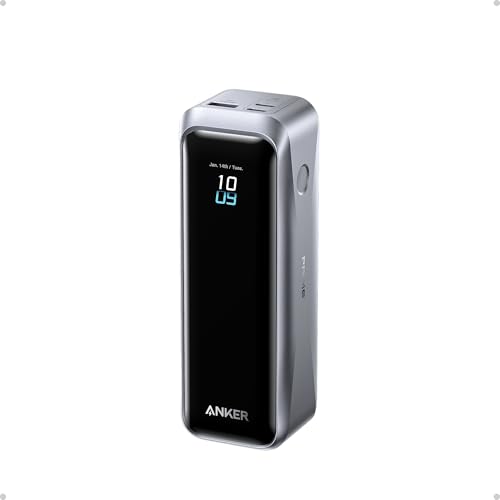
Anker’s 25,000mAh laptop bank is the most complete design in this group. It carries about 90Wh by the standard rating, which is still under the 100Wh limit most airlines apply to carry-on batteries, and it offers three USB-C ports plus one USB-A port. Each USB-C port can reach 100W, while the combined total across all ports is 165W. Two of those USB-C connections are actually built-in cables: one retracts to roughly 2.3 feet, and the other is a short strap-style cable of about a foot that doubles as a carry loop. Anker rates both for tens of thousands of bends or retractions, according to its product page.
The result is that you can plug a laptop and a phone into the bank without carrying a single loose cable. Input is up to 100W through a USB-C port, so a 100W wall charger refills the pack in a sensible overnight window or a long lunch. A real-time display shows the wattage flowing in or out, which is useful for diagnosing a slow charge, because you can immediately see whether the laptop is asking for 45W or 100W.
Who it suits
Frequent travelers, students who commute with one bag, and anyone who wants a single device to replace a charger, cable bundle and spare phone battery. It also suits people with two devices that both accept 100W, since the combined budget exceeds a single port.
Pros and cons
- Pro: two built-in cables remove the most common point of failure and forgetfulness.
- Pro: 100W from any USB-C port, plus 165W combined, leaves headroom for a second device.
- Pro: 100W input shortens the refill time compared with 65W-input rivals.
- Con: at roughly 595 g it behaves like a bag accessory rather than a pocket item.
- Con: owner reports mention wear on built-in cables over time, so check the warranty length where you buy.
- Con: the USB-A port tops out at a far lower rate than the USB-C ports.
Best value: UGREEN Nexode 20,000mAh 100W
The UGREEN Nexode 100W 20K (model PB205, SKU 25188) is the straightforward answer to “I just need my laptop to charge at full speed.” Its 20,000mAh cell works out to 72Wh, so it flies without paperwork. The main USB-C port outputs 100W, a second USB-C port gives 30W, and the USB-A port gives 22.5W, but the total is capped at 100W, and the secondary ports drop to about 20W each when both are used together, according to UGREEN’s spec sheet. A color display shows live output, and the box includes a 240W-rated USB-C cable and a travel pouch.
Recharging is the one area where it asks for patience. The input is limited to 65W on the first USB-C port, and a published review measured about 50 minutes to reach half and roughly 99 minutes to full with a suitable charger. That is acceptable for a bank this size, and it is faster than many older 20,000mAh models. Dimensions are about 139 by 80 by 26.5 mm, so the slab is wide but not especially thick.
Who it suits
Students and remote workers who need one dependable laptop charger and an occasional phone top-up. It is also the sensible pick if you already own good cables and do not want to pay for built-in ones.
Pros and cons
- Pro: full 100W on one port with a ship-in-the-box 240W cable.
- Pro: 72Wh is comfortably airline-friendly.
- Pro: clear display, good build and a well-known brand with accessible support.
- Con: the 100W cap is shared, so charging two devices lowers the speed of the second.
- Con: no built-in cable, so one more cord to carry.
- Con: 65W input means a long refill compared with 100W-input models.
Slimmest: Baseus Blade HD 20,000mAh 100W
The Blade HD is built around a flat, square shape of about 134 by 134 by 19.8 mm, which slides into the padded pocket of a laptop sleeve instead of sitting in a bag corner. Baseus lists the weight at about 445 g and says the HD version is lighter and smaller than the original Blade, which was a longer, heavier slab. It has two USB-C and two USB-A ports, delivers 100W from a USB-C port, and splits the output when several ports run together, with one example in the specification being 65W plus 30W across two ports. The manufacturer quotes about 1.5 hours to recharge, and a screen shows the live output.
Capacity figures differ between retail listings, so check the label on the version you buy; the nominal 20,000mAh class corresponds to roughly 72Wh, and 20,000mAh is the number to compare against rivals. The flat form is the selling point here. A rectangular tall brick presses awkwardly against a laptop in a slim bag, while a flat plate lies against the back panel and disappears.
Who it suits
Commuters with a tight sleeve or a slim backpack, and anyone who dislikes the lump a thick power bank makes in a bag.
Pros and cons
- Pro: very thin profile that suits sleeves and briefcases.
- Pro: two USB-C and two USB-A ports for mixed devices.
- Pro: about 1.5 hours to recharge according to the manufacturer.
- Con: the wide footprint takes more bag area than a tall brick.
- Con: multi-port use splits the 100W budget.
- Con: retail pages disagree on some capacity numbers, so confirm the label.
Lightest: UGREEN Nexode 12,000mAh 100W
If you only need one top-up per day and you hate carrying weight, this is the compact choice. The Nexode 12,000mAh 100W (model 35526) weighs about 310 g and measures roughly 45.5 by 46 by 115 mm. Its single USB-C port can supply 100W and recharges at up to 65W, and a USB-A port supplies up to 22.5W. The capacity of 44.4Wh sounds small beside a 20,000mAh bank, but it is enough to take a 14-inch ultrabook from low to roughly half or two thirds, depending on how hard you work it.
A reviewer’s main complaint is that it is chunkier than a phone-only bank of the same capacity, because the 100W electronics need extra space. Even so, it is less than half the weight of the largest models here, and it remains well below any airline limit.
Who it suits
Light travelers, people who mostly use a laptop near a desk and want emergency power, and anyone who wants a laptop-capable bank that also fits a jacket pocket.
Pros and cons
- Pro: lowest weight of any 100W model in this roundup.
- Pro: still delivers the full 100W on one port.
- Pro: smaller footprint fits a small bag or a coat pocket.
- Con: 44.4Wh means roughly half a laptop charge, not a full one.
- Con: only two ports, so no spare USB-C for a second device.
- Con: some reviewers found the shape thicker than expected for its capacity.
Most capacity for the size: INIU 25,000mAh 100W
INIU sells several generations of its 25,000mAh 100W bank, and the specifications vary by version, so verify the exact variant you buy. The common thread is a 25,000mAh cell (about 92.5Wh by the brand’s own figure), a USB-C port that outputs up to 100W, a second USB-C port with a lower rating and a USB-A port. Listed weights range from roughly 390 g for the newer, smaller version to about 475 g for the earlier classic model, and the newer version measures about 11 by 7 by 3.6 cm. Recharging happens through the main USB-C port, with listings quoting about 1.5 hours with a strong charger.
When more than one USB-C device is connected, the combined output falls well below the single-port rating; listings describe about 110W with two USB-C devices and about 80W with all three ports active. In practice that means the laptop port stays near its maximum only while the other ports are idle.
Who it suits
Budget-conscious buyers who want the highest stored energy for the money and are happy to charge one laptop at a time.
Pros and cons
- Pro: the biggest rated capacity in the 100W group at a compact size.
- Pro: lighter than most banks with comparable capacity.
- Pro: the input supports quick refilling when paired with a strong wall charger.
- Con: several versions share a name, so compare specs before buying.
- Con: output falls sharply when all ports are in use.
- Con: less display detail than premium rivals.
Built-in cable: UGREEN Nexode 20,000mAh 165W Retractable
This model (PB726) pairs a 20,000mAh cell with a retractable USB-C cable that locks at seven lengths up to about 65 cm. According to UGREEN, the cable provides up to 100W, the fixed USB-C port also supplies up to 100W, and the USB-A port supplies up to 33W. The 165W figure appears when the cable and the port run together, at 100W plus 65W. Independent review notes report that with all three ports in use, the cable keeps 100W while the other two share a much smaller allowance, so that is the realistic budget if you are charging three devices.
Input is 100W through either the cable or the fixed port, which is a major advantage over the 65W input on the value pick above. The unit weighs about 535 g, with the length around 146 mm, so it is closer to the Anker 25K in feel. Some early reviews list a lighter weight, but the manufacturer and teardown figures point to the heavier number, so plan on a pack that you notice in a bag.
Who it suits
People who want the built-in cable convenience of the Anker model with a smaller 72Wh capacity, or who often recharge from a strong wall adapter and care about quick refills.
Pros and cons
- Pro: retractable cable with seven length steps and 100W support.
- Pro: 100W input cuts the refill time sharply.
- Pro: a second USB-C port remains for another device.
- Con: heavier than most 20,000mAh banks because of the cable mechanism.
- Con: only one built-in cable, unlike the Anker 25K.
- Con: three-port use drops the secondary outputs to a low shared figure.
Two laptops at once: Anker Prime 20K 220W
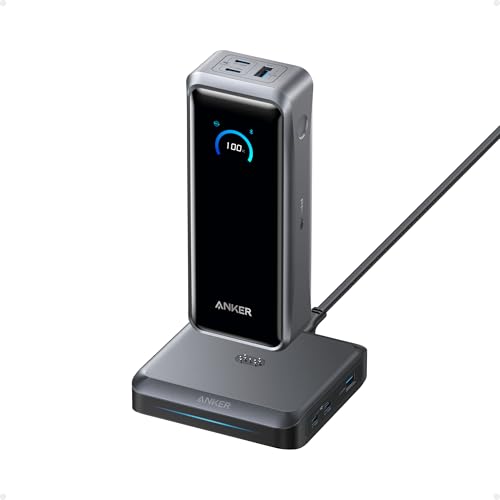
The Anker Prime 20K (listed as the A110B model, with an older 200W generation also sold) has a 20,100mAh cell, equal to about 72.36Wh, and a total output of 220W. Anker’s spec sheet lists both USB-C ports as capable of 140W, so it can feed one demanding laptop faster than the 100W class or split power between two machines. The USB-A port gives up to 22.5W, input reaches 100W, and the unit weighs about 510 g in a compact 44 by 50 by 147 mm body. An optional charging base is sold separately.
The older 200W version splits 100W per USB-C port and weighs a little more, which is why sources sometimes mix up the two. If you plan to charge two laptops, confirm which generation a listing refers to. For a single 100W laptop, you will not use the extra headroom, but you gain faster recharging of the bank itself and a build that handles a second device without throttling the first.
Who it suits
Creators and professionals who carry two laptops or a laptop and a tablet, or anyone with a 140W-capable machine who still wants a bank that is not a brick.
Pros and cons
- Pro: 140W on a single port per Anker’s spec sheet, above the 100W class.
- Pro: 100W input for quicker refills.
- Pro: compact, slim body for the output it delivers.
- Con: premium tier cost for power that a 100W laptop will not use.
- Con: generations share a name, so check the model number.
- Con: the 220W total is shared, so not every port reaches its maximum together.
Decision matrix: match the bank to your situation
| Your situation | Best choice | Why |
|---|---|---|
| Daily commuter with one laptop and one phone | UGREEN Nexode 20,000mAh 100W | Full-speed laptop charging, 72Wh, easy to carry |
| Frequent flyer who hates loose cables | Anker Laptop Power Bank 25K | Two built-in cables and a 165W total |
| Thin sleeve or slim briefcase | Baseus Blade HD | Flat 19.8 mm profile |
| Weight-sensitive traveler, occasional top-ups | UGREEN Nexode 12,000mAh 100W | About 310 g with a 100W port |
| Highest stored energy for the money | INIU 25,000mAh 100W | 25,000mAh in a compact shell |
| Fast refills from a strong wall charger | UGREEN Nexode 165W Retractable | 100W input through cable or port |
| Two laptops or a 140W machine | Anker Prime 20K 220W | 140W per USB-C port |
A worked example: how many charges and how long a trip it covers
Rated capacity overstates what you can use. Converting cell voltage, boosting to 20 volts and managing heat all waste energy, and a reasonable planning figure is about 70 to 80 percent of the rated watt-hours. Take the 72Wh class as an example. At 75 percent, you have about 54Wh available.
- A thin-and-light laptop with a 55Wh battery, charged from 10 to 100 percent, needs about 50Wh before conversion losses on the laptop side. One 72Wh bank gives you a little less than one full charge, or about 1.1 refills if you only recharge between 20 and 90 percent.
- A 25,000mAh bank at 90Wh rated gives you about 67Wh usable. That covers roughly 1.3 refills of the same laptop.
- The 12,000mAh bank at 44.4Wh rated gives about 33Wh usable, which is a bit over half a refill.
Charging time follows the laptop, not the bank. A laptop that accepts 65W will draw 65W from any of these banks, so refilling 50Wh takes a little under an hour at full draw. If the laptop is under load while charging, the draw available for the battery shrinks. A 45W workload leaves only 20W of a 65W charge for the battery, and recovery stretches to more than two hours. This is why a 100W port helps even a 65W laptop: it leaves room for the machine to work and refill at the same time.
Recharging the bank itself is the other half of the equation. A 72Wh bank accepting 65W needs about 1.1 hours at best, but real charging slows near the end to protect the cells, so one and a half to two hours is a safer estimate. A 100W input saves roughly half an hour, which can matter on a short layover.
How to choose: the numbers that matter
Match the bank to your adapter
Look at the label on your laptop’s original charger. If it says 45W or 65W, any bank in this list will charge it at full speed. If it says 90W or 100W, you need a port with the same rating. If it says more than 100W, as many gaming and workstation laptops do, a 100W bank will only slow the battery drain, not reverse it, and you should look at the 140W class instead.
Capacity versus weight
Each additional 5,000mAh adds roughly 18Wh and about 100 to 150 g. A 12,000mAh bank at 310 g suits a day trip. A 20,000mAh bank at 420 to 535 g suits a full day away from a socket. A 25,000mAh bank at 390 to 600 g suits a two-day trip, and anything larger than about 27,000mAh generally crosses the airline threshold of 100Wh and needs approval.
Port splitting
Multiple ports almost always share a fixed budget. Read the specification for the “two ports used” and “three ports used” case, not just the single-port headline, and keep in mind that the second USB-C port often falls to 20 or 30W as soon as the first is busy.
Recharge speed
Aim for at least 65W input. A bank with a 30W input will take more than three hours to refill a 72Wh pack, which is awkward on any trip where the socket is not always available.
Cables
Choose a bank that includes a 100W-rated cable or has one built in. If you buy a separate cable, make sure it is rated for 5 amps and, ideally, 240W so it also works with future laptops.
Display
A screen showing live wattage is not a gimmick. It tells you at a glance whether your laptop is receiving 20V at 5A or has fallen back to a slow phone profile because of a poor cable.
Durability and ownership realities
Lithium-ion cells in these banks are generally rated for several hundred full cycles before they fall to about 80 percent of their original capacity; one manufacturer, for example, quotes 300 cycles to 80 percent for a competing premium model. If you cycle a bank every working day, expect noticeable fade after a year or two. Using only part of the charge, rather than draining to zero, slows that wear.
Heat is the second factor. Charging a bank while it also discharges into a laptop, known as pass-through, generates extra heat and can reduce power. Manufacturers such as UGREEN note that simultaneous input and output is supported but may lower output and raise temperature. Keep the bank out of a closed bag when it is working hard, and do not leave it on a car dashboard.
Cables are the part that wears out first. Built-in retractable cables are convenient, but they have moving parts, and a damaged one cannot be swapped. Banks with removable cables let you replace a worn cord for a small cost. Whatever you choose, a warranty of at least 18 months is a useful indicator that the maker expects the product to last.
For flights, carry power banks in your hand luggage, not in checked bags. Most airlines allow banks up to 100Wh without approval and may allow up to 160Wh with approval, so any bank in this roundup that is rated below 100Wh travels without paperwork. Check the label on the bank for the Wh figure, since a bank without a printed rating can be refused at the gate.
Common mistakes to avoid
- Buying on the biggest wattage number without reading whether it is a total or a single-port figure.
- Using a thin phone cable and then wondering why the laptop charges slowly or not at all.
- Assuming 20,000mAh means 20,000mAh at 20 volts; the figure is measured at about 3.6 volts, so the energy is about 72Wh, not 400Wh.
- Charging a laptop and a phone together from a single 100W budget and expecting both to run at full speed.
- Storing a bank fully charged or fully empty for months; store it around half full in a cool place.
- Ignoring the recharge side: a great output with a weak input leaves you waiting.
Frequently Asked Questions
Will a 100W power bank charge a laptop that normally uses a 65W charger?
Yes. The laptop requests the power it needs through USB Power Delivery, and the bank supplies up to its maximum. A laptop with a 65W adapter draws about 65W from a 100W port, so you do not risk overpowering it. Use a cable rated for at least 60W, and for a full 100W use a 5A cable with an electronic marker.
Is a 100W power bank allowed on a plane?
Generally yes, as long as it is in carry-on baggage and rated below 100Wh. A 20,000mAh bank is about 72Wh and a 25,000mAh bank is about 90Wh, both under the common limit. Some airlines permit larger batteries with prior approval, but check your carrier’s rules and keep the rating label visible.
Can I charge two laptops at once from one 100W power bank?
Only some banks can. A bank with a 100W total has to split that power, so two laptops will each charge slowly. Models with a higher combined output, such as a 165W or 220W unit with two high-power ports, can serve two machines more comfortably, though each laptop may still receive less than its maximum while both are connected.
How long does a 20,000mAh power bank take to recharge?
It depends on the input rating. With a 65W input, about 1.5 to 2 hours is realistic for a 72Wh bank. With a 100W input, about one hour to 90 minutes is common. A 30W input stretches that to three hours or more, so check this number before buying if you rely on short charging windows.
Is a 12,000mAh 100W bank enough for a laptop?
It is enough for a partial charge. About 44Wh of rated energy gives you roughly 30Wh usable, which restores around half of a typical thin laptop battery. It suits emergencies and short trips, but a day of travel with heavy use is better served by a 20,000mAh or 25,000mAh model.
Do power banks wear out?
Yes. Lithium cells slowly lose capacity with every charge cycle, and heat accelerates it. Most banks keep around 80 percent of their capacity after a few hundred full cycles. Using the bank within a moderate temperature range and avoiding constant pass-through charging helps it last longer.
More from Amazon
Programs that pair well with the guide above. Offers and eligibility are set by Amazon and may change.
A free business account with business pricing and bulk-buying tools for work, shop or home office.
Create a business accountFree shipping on eligible items, Prime Video and more. Eligible new members can start with a free trial.
Start a Prime free trialAudiobooks and podcasts to listen to on the go. Eligible new members can start with a free trial.
Try Audible freeAd-free music streaming. Eligible new subscribers can start with a free trial.
Try Music Unlimited freeAs an Amazon Associate we earn from qualifying purchases.



Write Your Review
No reviews yet. Be the first to share your experience!