

Key takeaways
- Pro: 65W on the cable and port covers every common Chromebook adapter.
- Pro: no loose cable to lose.
- Pro: about 72Wh refills a typical Chromebook battery more than once.
- Con: heavier than the 10,000mAh banks, at roughly 440 g.
- Con: no pass-through charging.
- Con: the built-in cable cannot be replaced if it fails.
For most Chromebooks, the best power bank is a 45W to 65W USB-C Power Delivery model with a built-in cable, and the Anker Power Bank 20K 87W is the all-round pick because its 65W USB-C connections match what Chromebooks ship with. If your Chromebook only came with a 45W adapter and you want something that slips into a jacket, the Anker Nano 10K 45W and the INIU P50 are the compact answers. The key rule is simple: your power bank needs to speak USB-C Power Delivery at your Chromebook’s wattage or higher, because a phone-class bank that offers only 18W or 20W will either charge the laptop very slowly or not at all.
Chromebooks are a friendlier match for power banks than Windows gaming laptops or workstations. Their processors sip power, their batteries are modest, and nearly all current models charge over USB-C. That means a reasonably priced bank can give a student or a field worker a full extra day. This guide covers seven real models, explains how to read your Chromebook’s charger label, and works through the arithmetic of how much extra runtime you really gain.
Our top picks


As an Amazon Associate we earn from qualifying purchases at no extra cost to you.
First, find your Chromebook’s wattage
Turn over your Chromebook’s original wall adapter and read the small print. Two numbers matter: the output voltage and current (for example 20V and 2.25A, which is 45W) and the stated wattage. Typical Chromebooks charge with a 45W adapter, while some premium and larger-screen models ship with 65W. A smaller group of education models and tablets use 18W to 30W. If you cannot find the adapter, the manufacturer’s spec page for your exact model lists the supplied wattage.
A power bank can supply more than your Chromebook asks for without any risk. The laptop negotiates the exact power it needs through the Power Delivery protocol and takes only that amount. Supplying less is where trouble starts. ChromeOS can show a low-power charger notice when the source cannot keep up with the system, and under load the battery percentage may even drop while plugged in.
Also check the physical connection. Almost every modern Chromebook charges through a USB-C port, but a handful of older or budget models use a barrel plug or a proprietary connector, and those cannot be charged from a USB-C bank without a special adapter. If your charger has a round plug, this article’s banks will not help you.
Quick comparison of the seven picks
| Pick | Best for | Capacity | USB-C output | Approx. weight | Tier |
|---|---|---|---|---|---|
| Anker Power Bank 20K 87W (A1383) | Best overall, built-in cable | 20,000mAh (about 72Wh) | 65W cable and 65W port, 87W total | about 440 g | Mid-range |
| Anker Nano Power Bank 10K 45W (A1638) | Pocket size with retractable cable | 10,000mAh | 45W | about 230 g | Mid-range |
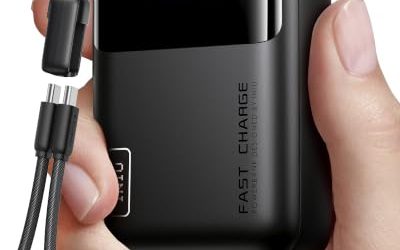
| INIU P50 10,000mAh 45W | Smallest 45W option | 10,000mAh | 45W | about 160 g | Budget |
| UGREEN Nexode Pro 10,000mAh 45W | Built-in short cable and display | 10,000mAh | 45W cable or port | about 249 g | Mid-range |
| INIU 20,000mAh 45W | Budget two-day capacity | 20,000mAh | 45W | about 326 g | Budget |
| Baseus Free2Pull 65W 20K | Lightest 65W with retractable cable | 20,000mAh | 60W per connection, 65W total | about 429 g | Mid-range |
| Baseus Elf 65W 20,000mAh | Many ports for a class set | 20,000mAh | 65W | about 480 g | Budget to mid-range |
Weights and ratings come from manufacturer spec sheets and published review measurements. Where sources disagree by a few percent, the table uses a rounded value.
Best overall: Anker Power Bank 20K 87W (A1383)
Anker’s 20,000mAh model with a built-in USB-C cable is the safest recommendation for a Chromebook owner because its numbers line up with what Chromebooks actually draw. The recessed cable and the separate USB-C port each reach 65W, the USB-A port reaches 22.5W, and the combined total is 87W. At 20,000mAh the stored energy is about 72Wh, which is under the 100Wh airline guideline and larger than the battery in most Chromebooks, so a single bank can refill a Chromebook more than once.
The cable is recessed into the body, rated by Anker for about 10,000 bends and 5,000 twists, and it means you cannot forget the one cord you need. Input is 65W through USB-C, and a recharge takes about 1.5 hours. The body measures around 157 by 74 by 25 mm and weighs about 440 g. One drawback that reviewers mention is the lack of pass-through charging, so you cannot reliably power the bank and the laptop at the same time from a wall outlet.
Who it suits
Students and office staff with a 45W or 65W Chromebook who want a single dependable bank for a school day, a long flight or an all-day workshop.
Pros and cons
- Pro: 65W on the cable and port covers every common Chromebook adapter.
- Pro: no loose cable to lose.
- Pro: about 72Wh refills a typical Chromebook battery more than once.
- Con: heavier than the 10,000mAh banks, at roughly 440 g.
- Con: no pass-through charging.
- Con: the built-in cable cannot be replaced if it fails.
Best pocket pick: Anker Nano Power Bank 10K 45W (A1638)
The Nano Power Bank is built for people who prefer to carry as little as possible. It stores 10,000mAh, measures about 81 by 50 by 36 mm and weighs roughly 230 g. A retractable USB-C cable, about 70 cm long and locking at six different lengths, is part of the body. Both that cable and the USB-C port can deliver up to 45W when used alone, which is the exact figure that a standard 45W Chromebook adapter provides. The USB-A port delivers up to 22.5W.
Pay attention to the multi-port rules. When the cable and USB-C port are used together, the total falls to 22.5W, and when all three connections are active it is 7.5W each. Recharging is limited to 30W, so a full refill takes a couple of hours. Anker advertises pass-through charging and a small display that shows the remaining capacity.
Who it suits
Chromebook users who mostly need a top-up between classes or meetings and who want a bank that fits a jacket pocket.
Pros and cons
- Pro: 45W on a single connection matches a standard Chromebook adapter.
- Pro: built-in retractable cable with six length stops.
- Pro: small enough for a pocket, with a display for remaining charge.
- Con: 10,000mAh gives only about one partial refill.
- Con: using more than one port at once drops the output sharply.
- Con: recharge is capped at 30W.
Smallest and lightest: INIU P50 10,000mAh 45W
The INIU P50 (sold as the Pocket Rocket in some markets) is among the smallest power banks that can still hold a Chromebook at 45W. It measures about 83 by 52 by 26 mm and weighs about 160 g, according to the brand’s listing, with variations in some reseller listings. It stores 10,000mAh, offers 45W from either USB-C port and includes a USB-A port, but output falls to roughly 15W in total when several ports run together.
Recharging is slow by design. Input is listed at about 20W, with some documents quoting a slightly higher figure, so plan to refill it overnight rather than during a short break. It is the lightest option here, which makes it attractive for students who carry a heavy load of books and hate adding weight.
Who it suits
Students and commuters who want emergency Chromebook power in the lightest possible form and are happy to charge it overnight.
Pros and cons
- Pro: lightest and smallest bank on this list that still delivers 45W.
- Pro: fits a pencil case or a small pocket.
- Pro: two USB-C outputs, handy for sharing between a Chromebook and a phone.
- Con: low input rate means a slow refill.
- Con: no built-in cable, so you carry a separate cord.
- Con: spec figures vary between listings and manuals, so check the label.
Built-in cable plus a display: UGREEN Nexode Pro 10,000mAh 45W
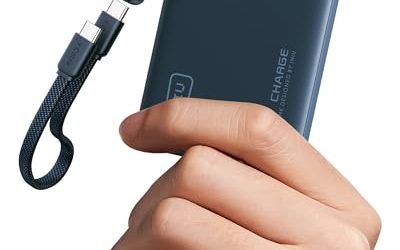
UGREEN’s 10,000mAh Nexode Pro with a built-in cable attaches a short braided USB-C cable, about 22 cm long, to the body, and the same cable doubles as a wrist strap. The cable and a separate USB-C port can both deliver up to 45W, and a USB-A port is also provided. The unit measures about 90 by 50.5 by 33.5 mm and weighs roughly 249 g. A small TFT display reports real-time power, remaining charge and battery health, which is rare at this size.
Listings disagree on recharge speed, with figures between 35W and 36W appearing in different places, so assume a refill in roughly two to two and a half hours. The short cable is a trade-off: it is perfect when the bank sits on the desk beside the Chromebook, and awkward if you want the bank in a bag while the laptop sits on your knees.
Who it suits
Desk workers and students who keep the bank next to the laptop and like seeing wattage and battery health on a screen.
Pros and cons
- Pro: built-in cable and a second USB-C port give two ways to connect.
- Pro: display with battery health information.
- Pro: moderate weight for 10,000mAh with a cable included.
- Con: the cable is short at around 22 cm.
- Con: the nominal 10,000mAh limits a full-day extension.
- Con: recharge listings are inconsistent, so confirm on the product page.
Best budget capacity: INIU 20,000mAh 45W
INIU’s 20,000mAh 45W bank targets people who want two days of Chromebook runtime without paying premium-brand prices. Retail listings give its size as about 11.5 by 7.3 by 3 cm, with a weight near 326 g and a built-in USB-C cable. At 20,000mAh the rated energy is about 74Wh by the retailer’s own calculation, enough to restore a Chromebook battery fully more than once. Because the cable is built in, it is easy to use, though a failure of that cable would be hard to repair.
The listing details for input wattage are thin, so check the product page for the exact recharge rating before you buy. Plan on a refill time of a few hours if you pair it with a modest charger. For most students this is not a problem because the bank is refilled overnight anyway.
Who it suits
Budget-minded students and teachers who want multiple charges from a single bank and do not mind a heavier object in the bag.
Pros and cons
- Pro: large capacity with a 45W output that matches common Chromebooks.
- Pro: built-in cable included.
- Pro: lighter than many 20,000mAh banks at about 326 g.
- Con: less detail in the manufacturer’s published specifications.
- Con: the built-in cable cannot be replaced.
- Con: output may drop if several devices are connected.
Lightest 65W: Baseus Free2Pull 65W 20K
The Free2Pull is a 20,000mAh bank with a retractable USB-C cable and an extra USB-C port. A published review measured it at about 429 g and 6.1 by 2.8 by 1.3 inches, and described it as the lightest laptop bank in that comparison. Output is modest by laptop standards: each USB connection delivers up to 60W while the shared total is 65W. It recharges at 65W through the spare USB-C port, or at 60W through the retractable cable.
That 60W per connection is more than enough for a 45W Chromebook and almost enough for a 65W adapter, since a Chromebook drawing the full 65W while also running a heavy tab load could see slightly slower filling than from the wall. For classroom and office use the difference is trivial. The retractable cable means no loose cord, and the slim form feels pleasant in a bag.
Who it suits
Chromebook owners with a 65W adapter who want a lighter bank than the premium 20,000mAh models.
Pros and cons
- Pro: lightest 20,000mAh bank in the comparison that reviewers measured.
- Pro: retractable cable and an additional USB-C port.
- Pro: 65W recharge through the spare port.
- Con: 60W per connection falls just short of a full 65W draw.
- Con: shared 65W total limits multi-device use.
- Con: older reviews may not reflect the latest revisions, so check the listing.
Most ports for shared use: Baseus Elf 65W 20,000mAh
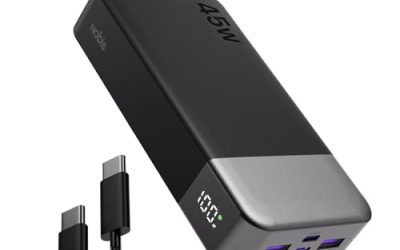
The Baseus Elf offers 65W of input and output, two USB-C input ports, and a set of outputs that includes two USB-C and two USB-A. The manufacturer says the 65W PD output can fast charge mainstream laptops. It weighs about 1.06 pounds, or 480 g, which is heavier than the Free2Pull but gives you more connection options.
Because the Elf has two USB-C input ports, it is easy to refill from whichever wall charger you have to hand. Teachers who share a bank among a few devices at a desk, such as a Chromebook, a tablet and a phone, will appreciate the port count, while students who want a bank to carry alone will prefer a lighter pick.
Who it suits
Teachers, small-office staff and families who use one bank for a Chromebook plus phones and tablets.
Pros and cons
- Pro: four output ports serve several devices.
- Pro: two USB-C input ports make recharging flexible.
- Pro: 65W covers premium Chromebook adapters.
- Con: heavy for its capacity at about 480 g.
- Con: the total of 65W is shared when many devices are connected.
- Con: no built-in cable, so bring a good one.
Decision matrix: choose by your situation
| Situation | Best choice | Reason |
|---|---|---|
| 45W Chromebook, school day with a socket nearby | INIU P50 or Anker Nano 10K | Light, matches 45W, enough for one top-up |
| 65W Chromebook Plus or premium model | Anker 20K 87W or Baseus Free2Pull | 65W-class output |
| Two-day trip without a socket | Anker 20K 87W or INIU 20K | 72Wh to 74Wh of energy |
| Hate carrying cables | Anker Nano, UGREEN Nexode Pro or Anker 20K | Built-in cable |
| Strict budget | INIU P50 or INIU 20K | Lowest cost tier |
| Sharing among several devices | Baseus Elf | Two USB-C and two USB-A outputs |
A worked example: how much extra runtime you actually get
Chromebook batteries are typically in the range of roughly 40 to 55Wh. Assume a model with a 45Wh battery that runs about 10 hours of light work, which means an average draw near 4.5W. In that kind of use, the battery is the limit, not the charger.
- A 10,000mAh bank holds about 37Wh at the nominal 3.7V. With a conversion efficiency of roughly 75 percent, about 28Wh arrives in the Chromebook. That is about 0.6 of a full charge, or around six extra hours at 4.5W.
- A 20,000mAh bank holds about 72Wh, and 75 percent efficiency leaves about 54Wh. That is a bit more than one full Chromebook battery, around 12 extra hours.
- If the same Chromebook runs a video call plus several tabs at about 9W, those hours halve: roughly three extra hours from a small bank and six from a large one.
Charging while using the machine is a different story. A 45W bank connected to a Chromebook drawing 9W leaves about 36W to refill the battery, so a 45Wh battery recovers in a little over an hour. A low-wattage source such as a 20W phone bank leaves only 11W of surplus, and the same recovery takes around four hours.
The recharge side of the bank also matters. Refilling a 72Wh bank from a 65W adapter takes roughly 1.1 hours in theory and about 1.5 to 2 hours in practice. A 10,000mAh bank with a 20W input needs closer to two hours at best, and often longer. In a classroom where the only socket is behind a desk, the speed of that top-up decides whether you start the next day full.
How to choose: practical rules
Match or exceed the adapter wattage
If your adapter says 45W, a 45W bank is enough. If it says 65W, pick a bank with 60W to 65W so the Chromebook gets the same charging speed it normally does. A bank that is much more powerful is fine, though you pay for capability you will not use.
Prefer USB-C Power Delivery, not just “fast charging”
Marketing terms such as quick charge or fast charge often refer to phone protocols that a Chromebook ignores. Look for USB Power Delivery explicitly, ideally with 20V profiles listed in the specification.
Choose capacity by your day
For a normal school day, 10,000mAh is plenty because the Chromebook battery already lasts most of it. For field work, travel or a classroom without sockets, 20,000mAh doubles your safety margin. More than that adds weight without much benefit for a laptop that sips power.
Consider the cable
A built-in cable avoids losing the cord and prevents the common mistake of using a charging cable that only supports low wattage. If you choose a bank without one, use a USB-C cable rated for at least 60W.
Check airline limits
Everything in this guide is below 100Wh, so each bank travels in carry-on luggage without special approval. Never place a power bank in checked baggage.
Ownership realities
School bags are rough on electronics. The first failure point is usually the cable, whether it is a loose cord bent at a sharp angle or a built-in cable pulled by a bag zipper. If you pick a bank with a built-in cable, treat it as part of the device and store it with the cable retracted. If you prefer loose cables, buy a spare so a single failure does not leave you without a charge.
Battery wear is the second reality. Lithium cells slowly lose capacity with each cycle, and a bank used every school day will show a visible drop after a year or two. Keep the bank away from hot cars and avoid leaving it at zero percent for long periods. Store it at roughly half charge during the summer break.
Finally, watch for counterfeit and no-name listings. Labels that claim 30,000mAh at the size of a deck of cards are almost certainly exaggerated, because the cells needed to hold that energy have a physical volume. Stick to established brands, compare the stated watt-hour rating, and register the product for warranty.
Common mistakes
- Buying a phone-oriented 18W or 20W bank and expecting it to keep a Chromebook alive under load.
- Assuming that any USB-C port can charge a laptop; many only provide a basic 5V rate.
- Ignoring that the Chromebook may charge only through one of its two USB-C ports on some models, so test both when a charge fails.
- Using a damaged or very thin cable, which limits power and causes slow charging notices.
- Leaving a bank connected to a laptop in a closed backpack, which traps heat.
- Forgetting to recharge the bank itself before a trip.
Frequently Asked Questions
Can any power bank charge a Chromebook?
No. The bank needs a USB-C port that supports USB Power Delivery at a wattage close to your Chromebook’s adapter. A basic phone bank with 5V output may charge very slowly or not charge at all, and a 20W bank may not keep up with the system when the Chromebook is busy.
Is a 45W power bank enough for a Chromebook?
For most Chromebooks, yes. Many models ship with a 45W adapter, and a 45W bank delivers the same rate. If your Chromebook shipped with a 65W adapter, a 45W bank will still charge it, but more slowly while the machine is in heavy use.
How many times can a power bank charge a Chromebook?
A 10,000mAh bank typically provides about 0.6 of a full charge after conversion losses, and a 20,000mAh bank provides a little more than one full charge. Heavy use, a large screen or an older battery reduce those numbers.
Can I use the Chromebook while it charges from a power bank?
Yes, as long as the bank supplies more power than the Chromebook uses. If the bank’s output is close to or below the system’s draw, the battery will not fill and may even drain slowly. A 45W or 65W bank leaves plenty of room for normal browsing and document work.
Do I need a special cable?
Use a USB-C to USB-C cable that supports charging. For 60W or less, a standard charging cable works. Above that, you need a cable with an electronic marker rated for 5 amps. Built-in cables on banks are already matched to the bank’s output.
Can I take a Chromebook power bank on a plane?
Yes, in your carry-on bag. Banks below 100Wh need no airline approval, and every pick here is at or below about 74Wh. Keep the bank out of checked luggage, and keep the label readable in case staff ask to see it.
More from Amazon
Programs that pair well with the guide above. Offers and eligibility are set by Amazon and may change.
A free business account with business pricing and bulk-buying tools for work, shop or home office.
Create a business accountFree shipping on eligible items, Prime Video and more. Eligible new members can start with a free trial.
Start a Prime free trialAudiobooks and podcasts to listen to on the go. Eligible new members can start with a free trial.
Try Audible freeAd-free music streaming. Eligible new subscribers can start with a free trial.
Try Music Unlimited freeAs an Amazon Associate we earn from qualifying purchases.



Write Your Review
No reviews yet. Be the first to share your experience!