

Key takeaways
- Who it suits: MacBook Pro owners who edit on location and want the fastest possible charge without leaving anything behind.
- Pros: two full-speed 140W ports, extremely fast input, large capacity that stays under the airline cabin limit, app control.
- Cons: no built-in cable, so you must bring a 240W-rated one; premium tier; around 600 grams.
The best portable charger for a MacBook Pro in 2026 is the Anker Prime Power Bank 26K 300W for 16-inch models, because its two 140W USB-C ports match Apple’s fastest adapter, and the UGREEN Nexode 25K 145W for anyone who wants 140W on a tighter budget. Owners of a 14-inch MacBook Pro can drop to a 100W bank such as the Baseus Blade, which charges that model at a speed close to what its own adapter provides.
MacBook Pro charging is more demanding than most laptop charging, so generic advice about power banks often leads people to buy the wrong one. Apple publishes the adapter sizes for each model, and the bank you choose should be judged against those numbers. The picks below rely on manufacturer specifications and published reviews, including Macworld’s roundup of laptop power banks for MacBooks, and they explain which trade-offs matter for a Pro in particular.
Our top picks



As an Amazon Associate we earn from qualifying purchases at no extra cost to you.
What wattage does your MacBook Pro actually need?
Apple’s support documentation separates fast charging by screen size. According to Apple, the 14-inch MacBook Pro fast-charges with a 96W or higher USB-C adapter, and its standard configurations ship with either a 70W or a 96W adapter depending on the chip. The 16-inch MacBook Pro uses a 140W adapter with the USB-C to MagSafe 3 cable, and Apple’s own fast-charge figure of roughly 50 percent in 30 minutes comes from that pairing.
| MacBook Pro | Adapter in the box | Wattage for fast charge | Power bank port you need |
|---|---|---|---|
| 14-inch, base chip | 70W | Around 70W to 96W | 100W port is plenty |
| 14-inch, Pro or Max chip | 96W | 96W or higher | 100W port; 140W also works |
| 16-inch, Pro or Max chip | 140W | 140W (USB Power Delivery 3.1) | 140W port |
A bank that cannot reach those figures still charges a MacBook Pro, only slower. When a Pro is running a heavy export, its draw can approach or exceed what a 65W source provides, and the battery will keep falling even while plugged in. That is the single most common complaint from people who pair a Pro with a small bank.
A worked example for a 16-inch MacBook Pro
Suppose your laptop runs a long video export at an average 85W while the battery sits near 30 percent. A 25,000 mAh bank stores roughly 90 Wh, and after conversion losses of 15 to 20 percent it delivers about 75 Wh. Divide 75 Wh by the 85W draw and the bank covers the export for just under an hour. A 100W port can sustain that draw with a small surplus, while a 65W port cannot, so the laptop battery keeps falling. The sensible planning figure is therefore that a 90 Wh bank adds about one hour of heavy work or three to four hours of light work.
| Workload on a MacBook Pro | Typical draw | Runtime from 75 Wh usable |
|---|---|---|
| Writing, email, browsing | 10W to 15W | 5 to 7 hours |
| Video calls plus a browser | 25W to 35W | 2 to 3 hours |
| Photo editing, light compiling | 45W to 60W | 1.2 to 1.7 hours |
| Long video export or 3D render | 80W to 110W | 0.7 to 0.9 hours |
Quick comparison of the seven picks
| Pick | Best for | Capacity | Top USB-C port | Total | Weight | Price tier |
|---|---|---|---|---|---|---|
| Anker Prime 26K 300W | 16-inch Pro, best overall | 26,250 mAh (99.75 Wh) | 140W x 2 | 300W | about 599 g | Premium |
| Anker 737 PowerCore 24K | Proven 140W with display | 24,000 mAh (88.8 Wh) | 140W | shared | about 630 g | Mid-range to premium |
| UGREEN Nexode 25K 145W | Budget 140W | 25,000 mAh (90 Wh) | 140W | 145W | about 513 g | Budget to mid-range |
| INIU Cougar P64 140W | Value 140W with cable | 25,000 mAh (92.5 Wh) | 140W | 145W | about 496 g | Mid-range |
| CUKTECH 20 | 140W with per-port display | 25,000 mAh (90 Wh) | 140W | 210W | about 630 g | Mid-range |
| Baseus Blade 20K 100W | 14-inch Pro, slim carry | 20,000 mAh (74 Wh) | 100W | 100W | about 445-490 g | Mid-range |
| EcoFlow RAPID Pro 27K 300W | Fast refill, retractable cable | 27,650 mAh (99.54 Wh) | 140W x 2 | 300W | about 699 g | Premium |
Best overall for the 16-inch: Anker Prime Power Bank 26K 300W
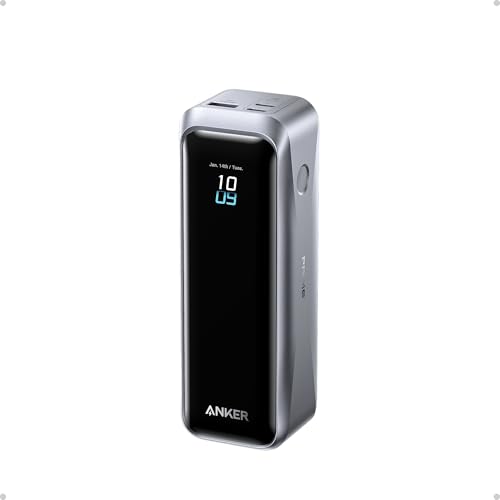
The Anker Prime pairs 26,250 mAh (99.75 Wh) with two USB-C ports that each deliver up to 140W through Power Delivery 3.1, plus a 22.5W USB-A port and a 300W total ceiling. Macworld reports that it fast-charged a 16-inch MacBook Pro at 140W while supplying 65W to an iPad Pro at the same time. A 250W input rating means it can also refill in a fraction of the time most banks need.
- Who it suits: MacBook Pro owners who edit on location and want the fastest possible charge without leaving anything behind.
- Pros: two full-speed 140W ports, extremely fast input, large capacity that stays under the airline cabin limit, app control.
- Cons: no built-in cable, so you must bring a 240W-rated one; premium tier; around 600 grams.
Best proven 140W bank: Anker 737 PowerCore 24K
Sources list the Anker 737 at between 24,000 and 25,600 mAh depending on the revision, but all agree on its 140W USB-C output, two USB-C ports, one USB-A port and a screen that shows live wattage. It has been on the market longer than most 140W banks, which means more owner feedback and frequent availability. A 140W wall charger refills it quickly.
- Who it suits: people who want a bank with a long track record and visible wattage feedback.
- Pros: reliable 140W, display, quick refill with the right charger, a known quantity.
- Cons: it cannot charge two laptops at full speed, and it is somewhat heavy for the capacity at about 630 grams.
Best budget 140W: UGREEN Nexode 25K 145W
This bank delivers 140W from its first USB-C port, 65W from its second port and 22.5W from USB-A, with a combined 145W limit. At roughly 513 grams it is among the lightest 25K banks and its flat profile fits a laptop sleeve. The price is a slow recharge, since only one port accepts input and the rate is modest.
- Who it suits: 16-inch MacBook Pro owners who want 140W without paying for a flagship, and who are happy to charge the bank overnight.
- Pros: full 140W, light, flat, sensible cost.
- Cons: slow to refill; when the main port runs near its limit, there is little left for the second one.
Best value with a ready cable: INIU Cougar P64 140W
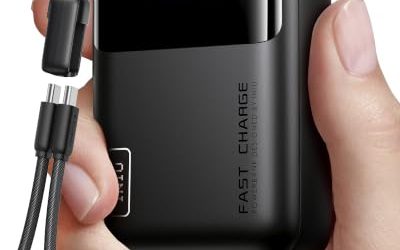
Macworld names the INIU Cougar P64 as its value pick for 140W MacBook charging. It stores 25,000 mAh (92.5 Wh), provides 140W through a USB-C cable on the unit with a 145W total, adds a 45W USB-C port and an 18W USB-A port, and takes 80W of input. At around 496 grams it is the lightest 140W bank in this list.
- Who it suits: people who want a light 140W bank and do not need a premium app or display.
- Pros: low weight for the output, 80W input is better than most budget banks, supplied cable.
- Cons: the total output is modest, so charging a laptop and tablet together slows both.
Best 140W with a power display: CUKTECH 20
The CUKTECH 20 offers 25,000 mAh (90 Wh), a 140W USB-C port and a 210W total across two USB-C ports and one USB-A. Its large display shows per-port power, which makes it easy to confirm that a 16-inch laptop is truly receiving 140W. It is the heaviest of the 25K banks at about 630 grams and a short, chunky shape that fits sleeves less neatly.
- Who it suits: power users who like instrumentation and a higher combined output than most budget 140W options provide.
- Pros: 140W capability at a lower cost than flagship banks, informative display, 210W total.
- Cons: bulky shape, weight, and a brand that is less widely stocked in some regions.
Best slim pick for the 14-inch: Baseus Blade 20K 100W
For a 14-inch MacBook Pro, 100W is enough, and the Baseus Blade delivers that in a body only about 18 mm thick. It holds 20,000 mAh (74 Wh), accepts 65W of input and includes two USB-C and two USB-A ports with a digital display. Macworld calls it the slimmest option for a MacBook Pro.
- Who it suits: 14-inch Pro owners who commute and need a bank that vanishes in a sleeve.
- Pros: slim, 100W, lighter than 25K banks, display.
- Cons: a 16-inch Pro will run slower than from its own adapter, and capacity is lower than the larger banks.
Best for quick refills: EcoFlow RAPID Pro 27K 300W
EcoFlow’s RAPID Pro offers 27,650 mAh (99.54 Wh), two 140W USB-C ports, two 65W USB-C ports, a retractable cable and a 300W total. Its 280W input rating is the headline feature, since a suitable charger can refill the bank far faster than average. It has no USB-A port, which suits a USB-C-only MacBook but not older accessories.
- Who it suits: frequent flyers who often have only a short window at a gate to recharge.
- Pros: four USB-C ports, retractable cable, extremely fast input.
- Cons: premium tier, no USB-A, and the refill speed depends on owning a high-wattage charger.
Other options that deserve a mention
The Sharge Shargeek 300 has two 140W USB-C ports, 24,000 mAh (88.8 Wh), 140W input and an adjustable DC port, although it weighs about 750 grams. The Zendure SuperTank Pro stores 26,800 mAh (99 Wh) with four USB-C ports at up to 100W, which suits a 14-inch Pro. A larger option, the UGREEN 48,000 mAh bank, offers 140W and 300W total, but at 153.6 Wh it falls into the range that requires airline approval and weighs about 1.65 kilograms.
Charging a MacBook Pro safely and efficiently
The cable question
Apple’s fast-charge claims use the USB-C to MagSafe 3 cable. A MacBook Pro also charges over its USB-C or Thunderbolt ports, and for 140W you need a cable certified for 240W. If you plug into a bank with a plain USB-C cable, the laptop may settle on a lower profile. When the screen says the laptop is charging slowly, the first thing to try is a different cable.
Battery health and the bank
macOS has optimized battery charging that learns your routine and holds the battery near 80 percent for periods. Using a bank does not interfere with that. Heat is the more important variable: a bank charging a laptop at 140W warms both devices, so avoid doing it inside a sealed bag.
Charging while working
A Pro under heavy load can draw more than a 100W port provides, and the battery drains slowly even while plugged in. If you must work on battery for hours, lower the screen brightness, close background apps and use Low Power Mode, since those changes reduce the draw by more than switching banks would.
Decision matrix by how you work
| Your situation | What matters most | Pick |
|---|---|---|
| 16-inch Pro plus an iPad, working on location | Two full-speed 140W ports | Anker Prime 26K |
| 16-inch Pro, tight budget | 140W at a low cost | UGREEN Nexode 25K 145W or INIU Cougar P64 |
| 16-inch Pro, want to see wattage | Display with per-port power | CUKTECH 20 or Anker 737 |
| 14-inch Pro, commuter | Slim body, 100W | Baseus Blade 20K |
| Frequent flyer, short gate layovers | Very fast bank refill | EcoFlow RAPID Pro |
Durability and ownership realities
The first parts to give trouble on a laptop bank are usually the USB-C sockets and any integrated cable, not the cells. Plugging a heavy 240W cable into a loose port and carrying the pack in a backpack can wear the contacts over a year or two. A cable with a right-angle end reduces the leverage on the socket, and keeping cables unwound when the bank is stowed spares the strain relief.
The cells themselves lose a little capacity each cycle, and fast charging at high wattage together with heat speeds that up. If you use a bank for flights every week, expect noticeable wear in about two years, which is a reason to prefer a bank with a decent warranty and replaceable cables over the cheapest option. Firmware updates, available on app-enabled models such as the Anker Prime and EcoFlow RAPID Pro, can also change how a bank negotiates power with newer MacBook models.
Common mistakes when buying a MacBook Pro power bank
- Assuming every “laptop” bank is a MacBook bank. Many are rated for 45W to 65W, which suits an Air but leaves a Pro charging slowly or not gaining charge at all while it works.
- Overlooking older MacBook Pro models. Earlier 13-inch and 15-inch Pro laptops charge from lower wattages, so a bank bought for a new 16-inch model may be oversized for them.
- Ignoring the second port. When a bank splits its power, the figure on the box applies only if nothing else is plugged in. Connect a phone and the laptop may drop from 140W to 100W.
- Skipping the cable. A bank that lacks an integrated cable ships with a short, low-rated one or none at all, and a weak cable quietly caps the speed.
- Charging the bank and the laptop together for hours. Pass-through use is fine in a pinch, but it holds both devices warm and wears the cells faster.
Charging a MacBook Pro and an iPad from one bank
Most people carrying a Pro also carry a tablet or phone, so the second port matters. A bank with two 140W ports, such as the Anker Prime or EcoFlow RAPID Pro, has headroom for a laptop at full speed and a tablet at 30W to 65W at once. Banks with a single 140W port and a 65W second port, such as the UGREEN Nexode 25K, handle the same pairing but run closer to their combined limit, so the laptop may be pulled below 140W when both are busy.
Should you charge from the USB-C port or the MagSafe port?
Either works. The MagSafe 3 connector releases if the cable is yanked, which protects the laptop, and it is the connector Apple used for its fast-charge numbers. Charging over USB-C leaves the MagSafe port free, and it lets you use the same cable for an iPad or phone. For airline seats, cafe tables and shared desks, the magnetic release is the safer choice.
Buying checklist for MacBook Pro owners
- Match the bank to your screen size: 100W for a 14-inch, 140W for a 16-inch.
- Confirm that the 140W figure belongs to one port, not the combined total.
- Choose 100 Wh or less if you will fly with it.
- Pick a bank with at least 65W of input if you want to refill it quickly.
- Buy a cable rated for the wattage, ideally a 240W-rated cable for 140W.
Frequently Asked Questions
Which power bank can fast-charge a 16-inch MacBook Pro?
You need a bank with a USB Power Delivery 3.1 port rated at 140W. The Anker Prime 26K, Anker 737, UGREEN Nexode 25K 145W, INIU Cougar P64 and CUKTECH 20 all list that figure. A 100W bank still charges the laptop, but slower under load.
Will a 100W bank damage my MacBook Pro?
No. The laptop and bank negotiate the profile, and the laptop only takes what it can safely accept. A lower-wattage source simply provides less power, which means slower charging, not harm.
How many times can a 25,000 mAh bank charge a MacBook Pro?
A 90 Wh bank delivers about 75 Wh after losses. A 14-inch MacBook Pro battery is roughly 70 Wh, so expect close to one full charge, and less than one for a 16-inch model, whose battery is about 100 Wh.
Can I use any USB-C cable with a MacBook Pro power bank?
You can, but the cable limits the speed. A 60W cable will cap charging at 60W, so use a 100W-rated cable for the 14-inch and a 240W-rated cable or the MagSafe 3 cable for 140W.
Can I take a MacBook Pro power bank on a plane?
Yes, in carry-on baggage. Banks up to 100 Wh are generally allowed without approval, which includes the 99.75 Wh Anker Prime. Larger banks need airline permission, and none belong in checked luggage.
Is it worth buying a power bank instead of a spare charger?
If you always have a socket, a spare wall charger is cheaper and faster. A power bank earns its place on trains, flights, in cafes without outlets and at events where you need hours of extra runtime away from a plug.
More from Amazon
Programs that pair well with the guide above. Offers and eligibility are set by Amazon and may change.
A free business account with business pricing and bulk-buying tools for work, shop or home office.
Create a business accountFree shipping on eligible items, Prime Video and more. Eligible new members can start with a free trial.
Start a Prime free trialAudiobooks and podcasts to listen to on the go. Eligible new members can start with a free trial.
Try Audible freeAd-free music streaming. Eligible new subscribers can start with a free trial.
Try Music Unlimited freeAs an Amazon Associate we earn from qualifying purchases.



Write Your Review
No reviews yet. Be the first to share your experience!