

Key takeaways
- Who it suits: anyone who travels with a USB-C laptop, a camera body or a handheld console and wants one bank to cover all of it.
- Pros: highest single-port and total output here; fast recharge; screen with live wattage; cable and pouch included.
- Cons: heaviest and bulkiest of the seven; premium tier; an earlier 200W version of the Prime 20K has different dimensions, so check the label if you buy secondhand.
The best 20000mAh power bank for most travelers in 2026 is the Anker Prime 20K (220W) if you carry a laptop, and the Anker 20K 87W with a built-in USB-C cable if you mostly charge phones, earbuds and a tablet. Both sit at roughly 72Wh, which is comfortably under the 100Wh per-battery limit that airlines apply to carry-on power banks, so capacity is not the problem; output, cable handling and weight are what separate the good picks from the merely adequate ones.
This guide compares seven real 20000mAh-class models by output, ports, size and weight, explains the watt-hour math that decides whether a bank is allowed on a plane, and ends with a decision table so you can match a bank to the way you actually travel. Specs below follow the manufacturers’ published sheets; where listings disagree, the text says so.
Our top picks



As an Amazon Associate we earn from qualifying purchases at no extra cost to you.
Quick comparison of the seven picks
| Pick | Best for | Max output | Ports | Approx. weight | Price tier |
|---|---|---|---|---|---|
| Anker Prime Power Bank (20K, 220W) | Laptop plus phone | 220W total, 140W single port | 2 USB-C, 1 USB-A | 510 g | Premium |
| Anker Power Bank (20K, 87W, built-in cable) | All-round carry | 87W total, 65W single port | 1 USB-C cable, 1 USB-C, 1 USB-A | about 440 g | Mid-range |
| UGREEN Nexode 20000mAh 130W | Display and three-device charging | 130W total, 100W single port | 2 USB-C, 1 USB-A | about 476 g | Mid-range |
| Baseus Blade 100W 20000mAh | Slipping into a laptop sleeve | 100W single port | 2 USB-C, 2 USB-A | about 490 to 506 g | Mid-range |
| Belkin BoostCharge Pro 20K (BPB020) | Ultrabook and tablet | 65W single port | 2 USB-C, 1 USB-A | not listed in sources checked | Mid-range |
| Anker Zolo Power Bank (20K, 45W, dual cables) | Cable-free commuting | 45W per USB-C output | 2 built-in USB-C cables, 1 USB-C, 1 USB-A | about 366 g | Mid-range |
| Anker Zolo Power Bank (20K, 30W, built-in cable) | Light phone-only trips | 30W | 1 USB-C cable, 1 USB-C, 1 USB-A | about 320 to 360 g | Budget |
Why 20000mAh is the travel sweet spot
A power bank’s mAh rating is quoted at the internal cell voltage, roughly 3.6 to 3.7 volts, not at the 5 volts your phone sees. The figure that matters for flying is watt-hours: multiply milliamp-hours by 3.6 and divide by 1,000. A 20000mAh bank works out to about 72Wh, and most models in this guide print a rating between 72Wh and 74Wh on the label. The usual rule for carry-on baggage is that banks up to 100Wh need no special approval, banks between 100Wh and 160Wh need airline approval and are capped at two per passenger, and anything above 160Wh is not allowed.
That is why 20000mAh is the natural ceiling for travel. A 25000mAh bank lands near 90Wh, which still passes but leaves little margin if a label rounds up, while 30000mAh models cross 100Wh and move into approval territory. Below 20000mAh you give up the multi-day buffer that makes a power bank worth carrying.
What you actually get out of 72Wh
Power banks lose energy as heat during voltage conversion, and independent measurements of 20000mAh models commonly report 60 to 66Wh of deliverable energy from the 72Wh rating. Plan on about 85 to 90 percent of rated energy at the low end of load, less when the bank is pushing a laptop at high wattage or when it is cold.
| Device | Battery size | Full charges from about 62Wh usable |
|---|---|---|
| Typical phone, 4,500mAh | about 17Wh | 3 to 3.5 |
| Large phone or foldable, 5,000mAh | about 19Wh | about 3 |
| Tablet, 8,000 to 10,000mAh | 30 to 38Wh | 1.5 to 2 |
| Thin-and-light laptop, 50Wh battery | 50Wh | about 1.2 |
| Wireless earbuds case | 1 to 2Wh | 30 or more |
The practical reading: a 20000mAh bank covers a long weekend of phone use for two people, or one full tablet day plus a phone top-up each evening, or a laptop at roughly one full charge. It will not run a laptop through a long-haul workweek.
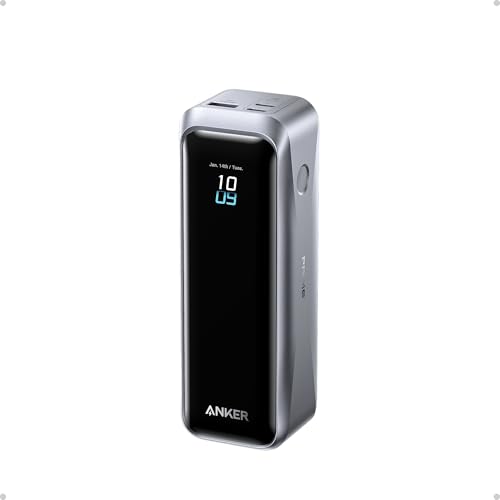
Best overall for laptop travelers: Anker Prime Power Bank (20K, 220W)
Anker’s Prime 20K is the highest-output model in this group. Per Anker’s spec sheet it holds about 20,100mAh (roughly 72Wh), delivers 220W total across two USB-C ports and one USB-A port, and lets a single USB-C port reach 140W through USB Power Delivery 3.1. That is enough for a 16-inch laptop that asks for 100W or more, plus a phone on the second port. Recharging is also fast: the bank accepts up to 100W input and refills in under an hour with a suitable charger, which matters in an airport lounge with one wall outlet.
The body is a tall, narrow block, about 147 mm long and in the neighborhood of 44 to 50 mm on the other two sides, and it weighs about 510 g. A color display shows per-port wattage and remaining capacity, and the companion app over Bluetooth lets you check temperature and adjust behavior. Anker lists ActiveShield 4.0 temperature monitoring and a 24-month warranty, and the box includes a 240W-rated USB-C cable and a travel pouch.
- Who it suits: anyone who travels with a USB-C laptop, a camera body or a handheld console and wants one bank to cover all of it.
- Pros: highest single-port and total output here; fast recharge; screen with live wattage; cable and pouch included.
- Cons: heaviest and bulkiest of the seven; premium tier; an earlier 200W version of the Prime 20K has different dimensions, so check the label if you buy secondhand.
Best all-rounder with a built-in cable: Anker Power Bank (20K, 87W)
The A1383 is the model to buy if you do not want to carry a separate cable. Anker’s specification lists 20,000mAh at 72Wh, an integrated USB-C cable rated for more than ten thousand bends, plus one USB-C port and one USB-A port. Total output is 87W, and both the built-in cable and the USB-C port reach 65W individually, which covers a 13-inch or 14-inch ultrabook at near-full speed. Dimensions are about 157.5 by 73.4 by 25.9 mm and weight is roughly 431 to 440 g depending on whether you read Anker’s service page or its regional listings.
Because the cable lives in the bank, you remove the most common travel failure: arriving with a charged bank and no cable. The compromise is that the built-in cable is fixed in length at a short reach, so charging a phone while it sits on a tray table is slightly awkward, and if the cable ever fails the USB-C port still works.
- Who it suits: commuters, students and anyone who wants a single device to throw in a bag.
- Pros: integrated 65W cable; ultrabook-capable; lighter than the Prime; mid-range tier.
- Cons: no display for exact percentages beyond indicator lights in many listings; 87W total will not keep a 100W-class gaming laptop topped up under load.
Best display and port flexibility: UGREEN Nexode 20000mAh 130W
UGREEN’s Nexode 20000mAh 130W (SKU 35524) is built like a small brick with a TFT screen that reports battery level, remaining charge time, input and output power, voltage and current. The spec sheet lists 72Wh, a combined 130W, a 100W-capable first USB-C port that doubles as the 65W input, a 30W second USB-C port and a 22.5W USB-A port. Dimensions are about 131 by 54 by 50.8 mm and the weight is about 476 g.
Independent measurements of this design report about 55 to 65Wh actually delivered, and note that the full 130W appears only when two ports are in use; a single port is limited to 100W, and that port can ease down under sustained heavy load. None of that is unusual for the class, but it is worth knowing if you plan to run a laptop from the bank for an entire flight. There is no wireless charging pad.
- Who it suits: travelers who want to see wattage per port and charge a laptop, phone and earbuds simultaneously.
- Pros: detailed display; three ports; 65W recharge; mid-range tier.
- Cons: thick, almost square profile that wastes pocket space; near half a kilogram.
Best flat shape for laptop sleeves: Baseus Blade 100W 20000mAh
The Baseus Blade is the unusual one: instead of a brick it is a flat slab designed to lie against the back of a laptop in a sleeve or backpack compartment. Specs vary by version, so check the label. Listings put it at 20000mAh and about 74Wh with 100W maximum output over USB-C, two USB-C and two USB-A ports, 65W input and a digital screen showing percentage, wattage and charge time. Thickness is reported between about 14.7 and 18 mm depending on the revision, and weight runs from roughly 490 to 506 g.
The flat footprint is wide, around 143 mm on one side and 160 mm or more on the other in common listings, so it does not slip into a jeans pocket, but it disappears in a bag. Four output ports make it good for a shared hotel desk with a laptop, two phones and a pair of earbuds.
- Who it suits: people who carry a laptop daily and want the bank stored flat.
- Pros: slab shape; four output ports; display; 100W USB-C.
- Cons: too wide for pockets; spec variation between versions; one of the heavier options.
Best for ultrabooks and tablets on a steady charge: Belkin BoostCharge Pro 20K (BPB020)
Belkin’s BoostCharge Pro 3-Port Laptop Power Bank delivers up to 65W Power Delivery on a single USB-C port, which is enough for a 13-inch or 14-inch ultrabook, an iPad Pro or any phone. It has two USB-C ports and one USB-A, and when both USB-C ports are in use the output splits at 45W and 20W for a 65W total, according to Belkin’s support pages. Belkin lists dimensions of about 130.8 by 85 by 25.5 mm and a full-color display; its Canadian page quotes a rated capacity of 19,200mAh, which still lands near 71Wh. The input is capped at 45W and there is no pass-through charging, so the bank cannot charge a device and recharge itself at the same time. A two-year warranty applies.
- Who it suits: business travelers with a lighter laptop and a tablet, who value brand support.
- Pros: clear display; compact footprint; two-year warranty; a 60W-rated cable in the box.
- Cons: 45W input makes a full recharge slow; no pass-through; no wall charger included.
Best cable-free commuter: Anker Zolo Power Bank (20K, 45W, dual cables)
The Zolo 20K 45W (A1681) has two braided USB-C cables built into the body, plus one USB-C port and one USB-A port, so up to four devices can charge at once. Anker’s spec lists 45W per USB-C output and 22.5W on USB-A, a digital display, pass-through charging and 30W USB-C input. Size is about 120 by 73 by 31 mm and weight is about 366 g (12.9 oz), which is light for 20000mAh because the shell is plastic and the cables replace a loose accessory pouch.
Forty-five watts is plenty for a phone and a tablet; it will also slowly top up a smaller laptop, but not while the laptop is working hard. Pass-through is the unsung feature: you can leave the bank plugged into a hotel outlet overnight and charge phones from it at the same time.
- Who it suits: people who hate loose cables and carry phone, earbuds and tablet.
- Pros: two built-in cables; pass-through; display; light for the capacity.
- Cons: 45W output is not laptop-class; thicker than the Blade.
Best budget option: Anker Zolo Power Bank (20K, 30W, built-in cable)
The A1689 Zolo is the stripped-down entry. It offers 20,000mAh, one built-in USB-C cable of roughly 15 cm, one USB-C port and one USB-A port. Anker lists 30W maximum on the USB-C cable and port, 22.5W on USB-A, and warns that using ports together drops the combined output to 15W. Input is 20W, so a full recharge takes more than five hours. Weight is reported between about 318 g and 362 g depending on the regional page, and the warranty is 18 months. Anker quotes real-world deliverable capacity of about 13,000 to 13,300mAh at 5V, which is the honest way to read any bank’s headline number.
- Who it suits: phone-only travelers who want a lot of reserve at a budget tier.
- Pros: light; built-in cable; budget tier; large reserve for phones.
- Cons: slow recharge; modest output; not suited to laptops.
How to choose: a decision table
| Your situation | Pick | Why |
|---|---|---|
| 16-inch laptop and phone on one bank | Anker Prime 20K 220W | 140W single port covers heavy laptops |
| 13 or 14-inch ultrabook plus phone | Anker 20K 87W or Belkin BPB020 | 65W single port is the practical ceiling for thin laptops |
| Want to see per-port wattage | UGREEN Nexode 130W | TFT shows input, output and time left |
| Bank must live inside a laptop sleeve | Baseus Blade | Flat slab shape |
| Phone, earbuds and tablet only | Anker Zolo 45W dual cables | No loose cables, pass-through |
| Cheapest large reserve for phones | Anker Zolo 30W | Budget tier, built-in cable |
Match the bank to the charger you already own
Before buying, check the wattage printed on your laptop charger. If the laptop asks for 65W and the bank offers 65W on one port, it will charge at full speed when idle and roughly hold its charge when working. If the laptop asks for 100W and the bank offers 65W, the laptop will still accept the charge but may drain slowly when under load. Phones rarely need more than 25W to 45W, so output above that is a laptop feature rather than a phone feature.
Weight versus capacity: the carrying cost
Each of these banks weighs between roughly 320 g and 510 g, which is similar to a hardcover book. Over a week of travel the heavier Prime is hard to notice in a backpack but easy to notice in a jacket pocket. If you tend to carry only a phone and earbuds, the lighter Zolo models save roughly 150 g, about the weight of a large apple.
Flying with a 20000mAh power bank
The rule that matters is the watt-hour rating printed on the bank, not the output wattage. A bank rated 72Wh is under the 100Wh line. Pack it in your carry-on, never in checked luggage, keep the ports visible and protect them from short circuits with the original pouch or a small case. Airlines set their own policies on top of the general rule: some cap the number of banks per passenger, and some restrict using a bank in flight or charging it from seat power. Because these rules have been changing, check your airline’s current policy shortly before departure rather than relying on a general guide.
- Confirm the Wh label is present and legible on each bank.
- Carry no more than two banks unless your airline says otherwise.
- Keep the bank charged to a moderate level if you will store it for long, and charge it fully before the trip.
- Do not use a damaged or swollen bank anywhere; replace it.
Ownership realities that guides rarely mention
Lithium-ion cells in power banks are typically rated for several hundred full cycles before capacity drops to around 80 percent. A bank used weekly will last years; one used daily for charging a laptop may start to show reduced capacity after a year or two. Cold weather cuts deliverable capacity, so on a winter trip keep the bank inside a coat rather than in an outside pocket. Built-in cables are convenient but add a single point of failure; if the cable frays, the bank still works through its ports, which is why the Anker 87W and the Zolo models keep ordinary ports alongside the cable.
Keep ports free of lint, store the bank away from heat, and avoid charging it on a bed or pillow. If a bank gets uncomfortably hot, stop using it. The brands in this guide include temperature monitoring, but monitoring does not replace common sense.
Frequently Asked Questions
Is a 20000mAh power bank allowed on a plane?
Generally yes. A 20000mAh bank is about 72Wh, which is under the 100Wh limit that applies to carry-on power banks without special approval. It must travel in carry-on, not checked baggage, and some airlines add rules on how many banks you can bring or whether you can use them in flight, so confirm with your airline.
How many phone charges does a 20000mAh power bank give?
Expect about three full charges for a typical phone with a 4,500mAh battery. The rated 72Wh drops to roughly 60 to 66Wh after conversion losses, and a phone battery stores about 17Wh, which is where that figure comes from.
Can a 20000mAh bank charge a laptop?
Yes, if it supports USB-C Power Delivery at a wattage your laptop accepts. A 65W bank will run most ultrabooks, while a 140W port is needed for large performance laptops. Expect roughly one full charge of a laptop with a 50Wh battery.
Do I need a bank with a display?
No, but it helps. A display shows wattage per port and exact remaining capacity, which is useful when the bank is the only thing between you and a dead laptop. Indicator lights give only rough quarters.
Which is better for travel, a built-in cable or ports only?
Built-in cables remove the chance of forgetting one and keep the bank tidy, but the cable length is short. Banks with ports and a loose cable are more flexible. Several picks here offer both, which is the safest compromise.
How long does a 20000mAh bank take to recharge?
It depends on input wattage. A model with 100W input like the Anker Prime refills in under an hour with a strong charger; a 45W input takes around two to three hours, and a 20W input, as on the budget Zolo, takes over five hours.
More from Amazon
Programs that pair well with the guide above. Offers and eligibility are set by Amazon and may change.
A free business account with business pricing and bulk-buying tools for work, shop or home office.
Create a business accountFree shipping on eligible items, Prime Video and more. Eligible new members can start with a free trial.
Start a Prime free trialAudiobooks and podcasts to listen to on the go. Eligible new members can start with a free trial.
Try Audible freeAd-free music streaming. Eligible new subscribers can start with a free trial.
Try Music Unlimited freeAs an Amazon Associate we earn from qualifying purchases.



Write Your Review
No reviews yet. Be the first to share your experience!