

Key takeaways
- Who it suits: students, commuters and light travelers who want a laptop-capable bank that does not feel like carrying a brick.
- Pros: small and light, strong output for the size, an additional 35W port for a tablet or second device, and a capacity below the common airline threshold.
- Cons: the 45W input means a full refill takes several hours, there is no built-in cable, and the 65W cap rules out larger Pro laptops.
The best 65W USB-C power bank for most people is the INIU Cougar P62-E1, a 20,000 mAh unit that weighs about 324 grams and can hold a thin laptop at the full 65W that a typical ultrabook charger delivers. If you would rather not carry a separate cable, the Baseus Elf 65W and the Anker Zolo 20K 87W both build a USB-C cable into the body, and for rough conditions the Sandberg Survivor 27000 adds an IP66 shell.
A 65W bank sits in a useful middle position. It is far more capable than the 20W to 30W banks sold for phones, yet it is lighter and easier to fly with than the 140W monsters designed for 16-inch workstations. This guide explains which laptops genuinely need 65W, shows how to size a bank by watt-hours, and walks through seven models whose specifications come from manufacturer pages and published reviews such as Macworld’s laptop power bank roundup.
Our top picks


As an Amazon Associate we earn from qualifying purchases at no extra cost to you.
Quick comparison of 65W-class picks
| Pick | Best for | Capacity | Max USB-C output | Recharge input | Weight | Price tier |
|---|---|---|---|---|---|---|
| INIU Cougar P62-E1 | Smallest and lightest | 20,000 mAh (65 Wh) | 65W | 45W | about 324 g | Budget |
| Baseus Elf 65W 20K | Built-in cable, quick refill | 20,000 mAh | 65W | 65W | mid-weight | Budget to mid-range |
| Anker Zolo 20K 87W | Built-in cable, three devices | 20,000 mAh | 65W (87W total) | 65W | mid-weight | Mid-range |
| Pisen Bolt 67W 20K | Integrated cable, slim body | 20,000 mAh (74 Wh) | 67W | 65W | about 414 g | Mid-range |
| Sandberg Survivor 27000 PD65W | Rugged outdoor use | 27,000 mAh (99.9 Wh) | 65W | 60W | about 805 g | Mid-range |
| Anker 733 GaNPrime 65W | Wall charger plus battery in one | Modest | 65W | Wall-plug | light | Mid-range |
| Baseus Blade 20K 100W | Step-up if you may upgrade laptops | 20,000 mAh (74 Wh) | 100W | 65W | about 445-490 g | Mid-range |
Which laptops are happy with 65W?
Sixty-five watts is the common middle charger size, so a long list of machines fits inside it. Thin Windows ultrabooks, most Chromebooks, many 13-inch and 14-inch business laptops and the lighter Surface and ThinkPad models ship with chargers between 45W and 65W. MacBook Air owners fit here too: a reviewer who connected an M3-class Air to the INIU bank saw the laptop negotiate the full 65W.
Where 65W falls short is anywhere the laptop has a dedicated graphics chip or a large performance processor. A 16-inch creator laptop or a gaming machine can ask for 100W to 240W, and a 65W bank will either charge it extremely slowly or refuse to charge it while it works. Treat 65W as the right size for office, study and travel computing, not for rendering.
| Laptop type | Typical original charger | Does a 65W bank suit it? |
|---|---|---|
| Chromebook (11 to 14 inch) | 45W to 65W | Yes, full speed |
| 13-inch ultrabook, MacBook Air | 45W to 70W | Yes, full or near-full speed |
| 14-inch business laptop | 65W to 100W | Yes for charging; slower under heavy load |
| Thin gaming or creator 15-inch | 100W to 200W | No, only trickle charging |
| 16-inch MacBook Pro class | 140W | No, it will drain slowly at best |
How long will a 65W bank keep you running?
Capacity in milliamp-hours looks big but needs converting. A 20,000 mAh cell holds around 65 to 74 Wh, depending on the cell voltage the maker uses. When the bank boosts that energy up to the 20V a laptop expects, roughly 15 percent is lost as heat, leaving about 55 to 63 Wh for the laptop.
- Find your laptop battery size in watt-hours, printed under the bottom case or on the spec page. A common figure is 50 Wh.
- Divide the usable bank energy by that number. At 58 Wh usable, a 50 Wh laptop gets about 1.15 refills.
- For work-while-charging time, divide usable energy by your average draw. At 15W during note-taking, 58 Wh gives roughly 3.9 extra hours.
The 27,000 mAh Sandberg Survivor, at 99.9 Wh, stretches the same arithmetic to nearly two refills for that 50 Wh laptop, which is why people choose it for long off-grid days.
Best overall: INIU Cougar P62-E1
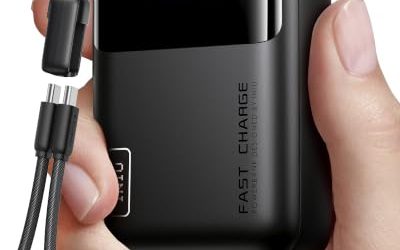
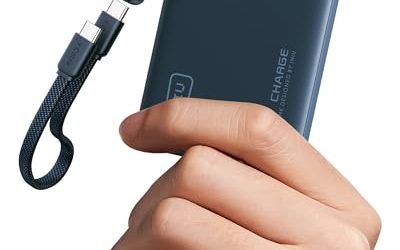
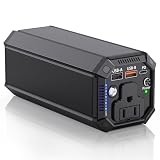
INIU sells this bank as a 20,000 mAh (65 Wh) unit with a 65W PD 3.0 USB-C port, a 35W USB-C port and an 18W USB-A port. Macworld picks it as the most compact 20K laptop bank, and the figures back that up: roughly 324 grams and a body that fits a jacket pocket. The brand claims about 1.2 charges for a MacBook Air and three to four for a phone.
- Who it suits: students, commuters and light travelers who want a laptop-capable bank that does not feel like carrying a brick.
- Pros: small and light, strong output for the size, an additional 35W port for a tablet or second device, and a capacity below the common airline threshold.
- Cons: the 45W input means a full refill takes several hours, there is no built-in cable, and the 65W cap rules out larger Pro laptops.
Best built-in cable with quick refill: Baseus Elf 65W 20K
The Baseus Elf 65W is aimed at people who lose cables. It offers 65W input and 65W output, two USB-C and two USB-A ports and a USB-C cable integrated into the housing. Because the input rating is as high as the output, the manufacturer quotes a refill of about one and a half hours when paired with a compatible 65W charger, which is far faster than most banks of this class.
- Who it suits: travelers who want a self-contained package and who value being able to top up during a short break between meetings.
- Pros: 65W both ways, built-in cable, four ports, quick refill.
- Cons: the integrated cable is a single point of failure if it frays; sharing the output across several ports reduces what the laptop receives.
Best for several devices: Anker Zolo 20K 87W
The 87W variant of Anker’s Zolo family is the one to buy for laptop use, because the lower versions deliver only 30W or 45W and are too weak for fast notebook charging. This model supplies up to 65W from either its built-in USB-C cable or its USB-C port, 87W in total across up to three devices, and accepts 65W of input. A tester who used it with an M5 MacBook Air saw the laptop negotiate 65W and draw about 62W in real use.
- Who it suits: people carrying a laptop, a phone and earbuds who want one pack to handle all three.
- Pros: verified 65W delivery, built-in cable, 87W combined output, 65W recharge.
- Cons: the Zolo name covers several weaker models, so check that the one you choose says 87W; the built-in cable is short.
Best slim integrated-cable option: Pisen Bolt 67W 20K
The Pisen Bolt is a 20,000 mAh (74 Wh) bank with a 67W maximum output, 65W input and an integrated USB-C cable, weighing around 414 grams. The extra two watts above 65W are not a big advantage on their own, but they ensure the bank can offer the full 65W profile with headroom for cable losses.
- Who it suits: anyone who wants an integrated cable in a lean body and who does not need extra ports.
- Pros: slim, integrated cable, reasonable refill speed, 74 Wh rating that is safe for cabin baggage.
- Cons: very limited port selection, and the brand is less widely stocked than the big names so warranty support can differ by region.
Best rugged pick: Sandberg Survivor 27000 PD65W
Sandberg’s Survivor is the outlier here because it is built for the outdoors. It has a 27,000 mAh (99.9 Wh) cell, a 65W output, 60W input, an IP66-rated shell against dust and heavy spray, and a built-in flashlight. At about 805 grams it is the heaviest pick, but it also holds the most energy while staying just under the 100 Wh limit that most airlines allow in cabin baggage without approval.
- Who it suits: field workers, campers, photographers and anyone whose bag gets rained on.
- Pros: tough shell, large capacity, flashlight, near-two refills for a typical ultrabook.
- Cons: heavy and bulky for daily commuting, and 60W input makes the refill take a good while.
Best hybrid with a wall plug: Anker 733 GaNPrime 65W
The Anker 733 solves a different problem. It is a wall charger and a battery in the same casing: plug it into a socket and it charges your laptop at up to 65W, unplug it and it keeps going from its internal cell. Reviewers note that it has two USB-C ports and one USB-A port, a modest capacity and roughly half the weight of Anker’s larger 737 bank.
- Who it suits: travelers who want to pack one item instead of a charger and a bank, particularly for hotel stays and conference days.
- Pros: replaces two devices, light, handles 13- and 14-inch laptops.
- Cons: the cell is small, so it behaves more like a top-up than an all-day supply, and it cannot sustain a laptop under heavy load.
Best step-up option: Baseus Blade 20K 100W
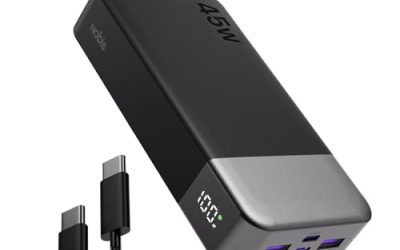
If you might replace your laptop with a more powerful one, the Baseus Blade is a sensible bank to own. It supplies up to 100W from USB-C, accepts 65W of input and offers a 20,000 mAh (74 Wh) battery in a flat body only about 18 mm thick. Because it also negotiates lower wattages, it will happily charge your current 65W laptop today and a 90W machine tomorrow.
- Who it suits: people who want a bank that outlasts their current laptop and fits a slim sleeve.
- Pros: 100W ceiling, display for live wattage, two USB-C and two USB-A ports.
- Cons: pays for headroom you may not use, and the wide footprint is less pocketable than the INIU.
Near misses worth knowing about
Some banks that appear in 65W searches fall short of the mark. The Mophie Powerstation USB-C XXL supplies 60W, which will charge a laptop but more slowly than a 65W profile. Compact 30W and 45W banks often sold under the same brand names can top up a tablet or run a very low-power Chromebook, but they will not keep a modern ultrabook alive under load. Always read the number printed next to the USB-C port, not just the one on the box front.
Buying checklist for a 65W power bank
- Confirm the PD profile. The listing should say USB Power Delivery and give 65W for a single port, not 65W as the combined total of all ports.
- Check capacity in watt-hours. Anything at or below 100 Wh is easy to fly with; 20,000 mAh is the sweet spot between runtime and weight.
- Look at the input rating. A 45W input is fine for overnight charging; a 65W input suits people who top up on the go.
- Decide on a built-in cable. It saves clutter but means a fixed length; a detachable cable can be replaced.
- Use a good cable. A 65W profile at 20V needs about 3.25A, so a cable rated 60W or 100W is fine, while a thin phone cable is not.
Durability and ownership realities
The first thing to wear is rarely the battery cell; it is the connector or the integrated cable. USB-C ports on cheap banks loosen with repeated plugging, and a built-in cable that is yanked at an angle can fail at the strain relief. Treat integrated cables gently and avoid wrapping them tightly around the body.
The cell itself loses capacity gradually. Expect it to hold most of its rated energy for a few hundred cycles of regular use, with the decline speeding up if you routinely drain it to empty or leave it hot. Charging the bank overnight from a modest charger is gentler than fast-charging it daily at maximum wattage, although the difference is small for ordinary users.
Finally, remember that rated capacity is measured at the cell, not at the port. A bank sold as 20,000 mAh will never hand over 20,000 mAh to a 5V phone and certainly not to a 20V laptop. If real-world results look about 15 to 25 percent below the headline figure, that is normal, not a defect.
Decision matrix: pick by how you travel
| If you mostly… | Prioritize | Pick |
|---|---|---|
| Commute with a thin laptop and a phone | Low weight, pocket size | INIU Cougar P62-E1 |
| Hop between meetings and need fast top-ups | 65W input, built-in cable | Baseus Elf 65W |
| Carry laptop, phone and earbuds | Combined output across three devices | Anker Zolo 20K 87W |
| Work outdoors or in a workshop | Water and dust resistance, capacity | Sandberg Survivor 27000 |
| Stay in hotels and want fewer items | Wall charger and bank in one | Anker 733 GaNPrime |
| Expect to upgrade your laptop soon | Wattage headroom | Baseus Blade 100W |
What happens inside the port when a laptop asks for 65W
USB Power Delivery works as a short conversation. When you plug in, the bank announces the voltage and current combinations it can supply, such as 5V, 9V, 15V and 20V. The laptop then requests one of those. For a 65W laptop the usual choice is 20V at 3.25A, and if the bank also advertises a 20V profile at lower current, the laptop falls back to that when the cable or the bank cannot keep up.
This is why you sometimes see a laptop charging at 45W even though the bank says 65W. A single weak link, whether the cable, a shared second port or a bank that is too hot, makes the negotiation settle on a smaller profile. It is not a fault; it is the protocol protecting the hardware. If the laptop reports a message such as slow charger, unplug everything else from the bank first, then try again with a different cable.
Why 65W is a sweet spot for weight
High-wattage ports need larger converter components, thicker internal wiring and more heat management. Each step from 65W up to 100W and then 140W adds weight and size, which is why the 140W banks in this price class usually weigh 500 to 700 grams while the 65W ones sit between roughly 320 and 450 grams. If your laptop will never ask for more than 65W, paying that weight penalty buys you nothing.
Mistakes people make with 65W banks
- Counting total output as port output. A bank listing 65W total might split that among three ports, leaving the laptop with 45W or less when a phone is also connected.
- Charging and using the laptop heavily at once. A laptop that draws 60W while you edit video leaves almost nothing for its own battery, and the bank empties quickly.
- Forgetting the bank needs refilling too. A 20,000 mAh bank with a 45W input needs roughly two and a half to three hours on a matching charger, so plug it in before bed rather than before the airport.
- Storing it full and hot. A bank left fully charged in a hot car ages noticeably faster than one stored half full in a cool bag.
Frequently Asked Questions
Is a 65W power bank enough to charge a MacBook Air?
Yes. Reviewers who plugged a MacBook Air into a 65W bank saw it negotiate the full 65W, and Air models rarely draw more than that. A 65W bank therefore charges an Air at close to its normal speed, although a Pro model with a bigger chip will charge much more slowly.
Can a 65W bank charge a laptop that came with a 100W charger?
It can, but only at up to 65W. If the laptop is idle or lightly used, it will still charge, just more slowly than from its own adapter. Under heavy work the battery may stay flat or drain slowly even while plugged in.
Do I need a special cable for 65W?
Not a special one, but a proper one. USB-C cables rated for 60W or 100W carry a 65W profile without trouble, while the thin cables bundled with some phone chargers do not. A cable with a marked rating on the packaging is the safest choice.
Are 20,000 mAh power banks allowed on airplanes?
Generally yes in carry-on baggage. A 20,000 mAh bank holds roughly 65 to 74 Wh, well under the 100 Wh limit used by most airlines. They must not go in checked luggage, and individual carriers may add their own limits on in-flight use.
Why does my 65W bank only deliver 45W?
The bank and laptop agree on the highest profile that both support, and several things can lower it. Another device on the second port may be sharing the output, the cable may be under-rated, or the bank may reduce output when its charge is low or the casing is hot.
Is 65W or 100W the better choice?
Choose 65W if you want the lightest, cheapest bank for a thin laptop. Choose 100W if you have a 14-inch machine that likes more power or plan to upgrade, accepting a bit more weight in return for headroom.
More from Amazon
Programs that pair well with the guide above. Offers and eligibility are set by Amazon and may change.
A free business account with business pricing and bulk-buying tools for work, shop or home office.
Create a business accountFree shipping on eligible items, Prime Video and more. Eligible new members can start with a free trial.
Start a Prime free trialAudiobooks and podcasts to listen to on the go. Eligible new members can start with a free trial.
Try Audible freeAd-free music streaming. Eligible new subscribers can start with a free trial.
Try Music Unlimited freeAs an Amazon Associate we earn from qualifying purchases.



Write Your Review
No reviews yet. Be the first to share your experience!