Our Short List of 3

- Best for: Anyone who streams, reads, and browses for hours and wants the richest-looking screen in this group.
- Display: 15.6-inch AMOLED Full HD (1920 x 1080)
- Processor: Intel Core 3 100U (up to 4.7 GHz)
- Memory: 8GB RAM
- Storage: 256GB eUFS

- Best for: Students and home workers who want the largest screen and the most storage room at a desk.
- Display: 15.6-inch FHD (1920 x 1080) IPS touchscreen with ComfyView
- Processor: Intel Core i3-1305U (up to 4.5 GHz)
- Memory: 8GB DDR5 RAM
- Storage: 384GB (256GB SSD plus 128GB SD card)

- Best for: Commuters and students who want a light, simple 14-inch Chromebook Plus for everyday work.
- Display: 14-inch Full HD (1920 x 1080) IPS touch display with anti-glare coating
- Processor: Intel Core i3-N305
- Memory: 8GB LPDDR5
- Storage: 128GB SSD
All 3 Picks at a Glance
| Product | Specs | Action |
|---|---|---|
| Samsung Galaxy Chromebook Plus |
| Check price on Amazon |
| Acer Chromebook Plus 515 |
| Check price on Amazon |
| Acer Chromebook Plus 514 |
| Check price on Amazon |
Cyber Monday fills every Chromebook page with event banners, but the real decision is not finding a laptop with a banner. It is telling a current model with years of updates ahead of it from an older or oddly configured listing wearing the same event badge. Model names repeat across model years, storage figures sometimes include a bundled memory card, and two machines with the same name can end software support years apart. The shoppers who come out ahead are the ones who check the configuration, the seller, and the update end date before they check the price.
This roundup is for students, remote workers, and home users who want a Chromebook that still feels quick years from now. Every pick below is a Chromebook Plus model chosen from the name and specifications on its Amazon product page: two compact 14-inch machines and two larger 15.6-inch machines, each with 8GB of memory and a Full HD or sharper screen.
Quick Picks
As an Amazon Associate we earn from qualifying purchases
| Product | Best for | Key spec from title |
|---|---|---|
| Lenovo IdeaPad Flex 5i Chromebook Plus | Remote workers who live on video calls | 14-inch WUXGA IPS touchscreen |
| Samsung Galaxy Chromebook Plus | Watching and reading on a vivid big screen | 15.6-inch AMOLED Full HD display |
| Acer Chromebook Plus 515 | A big screen and roomy storage at a desk | 15.6-inch FHD IPS touchscreen |
| Acer Chromebook Plus 514 | Everyday carry for school or commuting | 14-inch Full HD IPS touch display |
How to Choose
Screen Size and Resolution
Start with the screen, because it decides how the laptop feels every day. A 14-inch panel suits bags and train tables, while a 15.6-inch panel gives documents, spreadsheets, and split-screen study more room. Resolution matters as much as size: Full HD at 1920 by 1080 is the floor worth accepting, and WUXGA at 1920 by 1200 adds vertical space that helps with long pages. Panel type changes the picture too. The Samsung in this roundup uses an AMOLED display with deeper contrast for video, while the IPS panels on the other three trade some contrast for a matte, glare-resistant finish.
Processor and RAM for Multitasking
Chromebooks feel fast or sluggish based on the processor and memory working together. The four picks here use Intel Core i3 or Core 3 chips, the step above the entry-level processors in the cheapest school models, and each pairs that chip with 8GB of memory. That combination keeps a dozen browser tabs, a video call, and a couple of Android apps open without the machine pausing to reload pages. If your day is mostly email and documents, any of these chips is enough. If you keep many tabs and calls running at once, treat 8GB of memory as the minimum and skip cheaper 4GB configurations entirely.
Storage for Offline Files
Most Chromebook work lives in the cloud, but storage still decides how much you can keep offline: downloaded lectures, films for a flight, photos, and Android apps all draw on the same space. A 128GB drive is workable if you stream everything, while 256GB or more is calmer for mixed use. Read the storage line closely before buying. Two picks in this roundup reach their headline figure partly through an included SD card, which is fine for media and documents but slower than the internal drive, so keep apps and the files you open daily on the internal storage.
The Auto Update Expiration Date
Every Chromebook stops receiving ChromeOS updates on a fixed date called the Auto Update Expiration, and that date is set by the model, not by when you buy it. An older model sold during an event can look identical to a current one while having far fewer update years left. Check the date on the product page or in Google’s support list before ordering. The spread is real: in this roundup the Lenovo Flex 5i runs to June 2035 while the Acer Chromebook Plus 515 ends in June 2032, and both are long runways compared with older stock.
The 4 Best Options
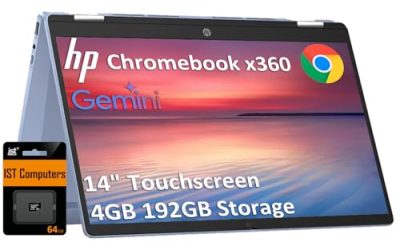
Lenovo IdeaPad Flex 5i Chromebook Plus
The Flex 5i is the most versatile machine here: a 360-degree hinge lets it work as a laptop, fold into a tent for presentations, or lie flat as a tablet for reading and marking up documents. Its 5MP camera is a step above the usual Chromebook webcam, which suits anyone whose workday runs through video calls, and the fingerprint reader speeds up sign-ins. The Intel Core 3 N355 and 8GB of memory handle heavy tab loads calmly, and the June 2035 update date is the longest runway in this roundup, so it should stay current for years.
Specs
- Display: 14-inch WUXGA (1920 x 1200) IPS touchscreen, 300 nits
- Processor: Intel Core 3 N355 (8 cores, up to 3.9 GHz)
- Memory: 8GB DDR5
- Storage: 256GB (128GB UFS plus 128GB SD card)
- Camera: 5MP with privacy shutter
- Connectivity: Wi-Fi 6E and Bluetooth 5.3
- Ports: HDMI 1.4b, USB-C, USB-A, and microSD card reader
- Extras: Backlit keyboard, fingerprint reader, MIL-STD 810H tested design
- Auto Update Expiration: June 2035
- Color: Cosmic Blue
Best for: Remote workers and students who want one convertible for calls, documents, and tablet-style reading.
Watch out for: This listing is a seller-resealed unit opened for its storage upgrade, so read the seller’s warranty terms carefully before ordering.
Samsung Galaxy Chromebook Plus
- Best for: Anyone who streams, reads, and browses for hours and wants the richest-looking screen in this group.
- Display: 15.6-inch AMOLED Full HD (1920 x 1080)
- Processor: Intel Core 3 100U (up to 4.7 GHz)
- Memory: 8GB RAM
- Storage: 256GB eUFS
Anyone who streams, reads, and browses for hours and wants the richest-looking screen in this group.
The listing does not headline an update end date, so confirm the Auto Update Expiration year on the product page before buying.
The Galaxy Chromebook Plus is built around its screen: a 15.6-inch AMOLED panel that makes streamed video, photos, and long reading sessions look richer than the IPS displays on most Chromebooks. The Intel Core 3 100U and 8GB of memory give it proper Chromebook Plus pace for multitasking, and 256GB of internal storage leaves room for offline files and apps without leaning on a memory card. It is a standard clamshell rather than a convertible, so it suits people who work at a desk or on the couch and rarely need a tablet mode.
Acer Chromebook Plus 515
- Best for: Students and home workers who want the largest screen and the most storage room at a desk.
- Display: 15.6-inch FHD (1920 x 1080) IPS touchscreen with ComfyView
- Processor: Intel Core i3-1305U (up to 4.5 GHz)
- Memory: 8GB DDR5 RAM
- Storage: 384GB (256GB SSD plus 128GB SD card)
Students and home workers who want the largest screen and the most storage room at a desk.
The storage is seller-expanded and the warranty is provided by the seller rather than Acer, so check those terms on the listing first.
The Chromebook Plus 515 is the big-screen workhorse of the group. Its 15.6-inch touchscreen gives spreadsheets, documents, and split-screen classes room to breathe, and the Intel Core i3-1305U is the strongest multitasking chip here for people who keep many tabs open beside a video call. Storage is the headline figure in this roundup, although part of it arrives on an included SD card rather than the internal SSD. A 1080p camera with a privacy shutter, Wi-Fi 6E, and a June 2032 update date round out a desk-friendly package.
Acer Chromebook Plus 514
- Best for: Commuters and students who want a light, simple 14-inch Chromebook Plus for everyday work.
- Display: 14-inch Full HD (1920 x 1080) IPS touch display with anti-glare coating
- Processor: Intel Core i3-N305
- Memory: 8GB LPDDR5
- Storage: 128GB SSD
Commuters and students who want a light, simple 14-inch Chromebook Plus for everyday work.
Storage is the smallest here, and the listing does not state an update end date, so check the capacity and the Auto Update Expiration year before ordering.
The Chromebook Plus 514 is the straightforward carry-everywhere pick. Its 14-inch Full HD touch display has an anti-glare coating that stays readable in bright classrooms and cafes, and the Intel Core i3-N305 with 8GB of memory covers schoolwork, office documents, and video calls without fuss. Acer rates the battery for up to 11 hours, the longest claim in this roundup, which suits full days away from a charger. Storage is the modest part of the package at 128GB, so it fits people whose files live in Google Drive rather than on the machine.
Which One Fits Your Situation
You Work From Home and Live on Video Calls
Choose the Lenovo IdeaPad Flex 5i Chromebook Plus. Its 5MP camera is the clearest here for daily meetings, the privacy shutter covers you between calls, and the fingerprint reader makes signing back in painless. The hinge folds flat for reviewing documents or presenting in tent mode, and the June 2035 update date means this is the machine you can keep the longest.
You Want a Big Screen for Classes and Documents
Choose the Acer Chromebook Plus 515. The 15.6-inch touchscreen leaves room for a lecture on one side and notes on the other, the Core i3-1305U keeps heavy tab loads moving, and the storage figure is the largest here for downloaded course files. It is a desk-first machine, so pick it when the laptop mostly stays in one place.
You Carry Your Laptop All Day
Choose the Acer Chromebook Plus 514. The 14-inch body is the easiest here to slip into a bag, the anti-glare screen stays readable in bright rooms and cafes, and the battery claim of up to 11 hours is the longest in this roundup. It covers everyday school and office work without the weight or size of the 15.6-inch models.
You Mostly Watch, Read, and Browse
Choose the Samsung Galaxy Chromebook Plus. The 15.6-inch AMOLED screen gives films, photos, and long articles deeper contrast and richer color than the IPS panels on the other picks, and 256GB of internal storage holds plenty of offline downloads. It is a clamshell, so it suits a desk, table, or lap rather than tablet-style use.
How to Hunt Cyber Monday Deals
- Check the current price on the Amazon product page before you order, not the figure on a roundup or search page. Event prices move during the day as stock shifts, and the price on the product page at checkout is the only one that counts.
- Compare the event price against the price history shown by a price-tracking tool rather than trusting a struck-through list price. A line through a number proves nothing on its own; the recent history shows whether the event price is genuinely lower than what the model has been selling for.
- Confirm who is selling the laptop before you buy. A listing sold by Amazon or the brand’s own store is the simplest route for returns and warranty questions. Third-party seller listings can be legitimate, but their warranty and reseal terms are their own, so read them on the page.
- Check the Auto Update Expiration year on the listing before buying an older model at an event price. Two Chromebooks with the same name can end ChromeOS support years apart, and the update date, not the event banner, decides how long the machine stays secure and current.
- Watch for renewed listings mixed into event pages. Event roundups often place new, renewed, and seller-refurbished machines side by side with similar titles. Read the condition line and the product name in full so the laptop that arrives matches the condition you meant to buy.
Common Mistakes
- Judging a Chromebook by screen size alone and ignoring resolution, so a large but blurry panel ends up doing daily document work.
- Buying the cheapest configuration of a model name, with less memory or storage than the version you read about, because the event page defaults to it.
- Skipping the update check and buying an older model whose ChromeOS support ends long before you planned to replace the laptop.
- Assuming the full storage figure is internal drive space when part of it is an included SD card that is slower and easier to misplace.
- Forgetting to check the seller and condition, then discovering the warranty comes from a third-party seller or the unit is renewed only after it arrives.
Frequently Asked Questions
Are these Chromebook prices guaranteed to drop on Cyber Monday?
No price is guaranteed during an event, and this guide does not quote prices for that reason. These four models are worth checking because they are current Chromebook Plus machines with strong specifications and long update runways. Open the product page, compare the price there with the model’s recent price history, and decide from real numbers rather than banners.
How much memory does a Chromebook need for everyday multitasking?
For a machine you plan to keep for years, 8GB is the sensible floor. It keeps many browser tabs, a video call, documents, and a few Android apps open at once without constant reloading. Every pick in this roundup has 8GB. Cheaper 4GB models still work for light browsing and single tasks, but they feel cramped much sooner.
What is the Auto Update Expiration date, and why does it matter?
It is the date when a Chromebook model stops receiving ChromeOS updates, including security fixes and new features. The date is fixed for each model, so an older laptop bought new during an event still carries its original end date. Check it on the product page before buying, and favor a date that covers your whole planned ownership.
Is a Chromebook Plus model worth choosing over a standard Chromebook?
For most buyers, yes. Chromebook Plus is Google’s higher baseline for hardware, bringing faster Intel or AMD processors, at least 8GB of memory, at least 128GB of storage, Full HD or sharper screens, and better cameras than entry-level models. That headroom is what keeps a Chromebook feeling quick several years in, which matters most when an event price tempts you toward older, weaker stock.
More from Amazon
Programs that pair well with the guide above. Offers and eligibility are set by Amazon and may change.
Send a Prime gift membership to someone who would use free shipping and Prime Video.
Gift Amazon PrimeGive audiobooks to someone who loves to listen. Plans and prices are set by Amazon.
Gift AudibleA free business account with business pricing and bulk-buying tools for work, shop or home office.
Create a business accountFree shipping on eligible items, Prime Video and more. Eligible new members can start with a free trial.
Start a Prime free trialAs an Amazon Associate we earn from qualifying purchases.
Write Your Review
No reviews yet. Be the first to share your experience!