

Our Top Picks


Let’s be honest about what $200 buys in a Chromebook in November 2026: an entry-level machine for browsing, schoolwork, email, and streaming — not a powerhouse. Every laptop in this guide has 4GB of RAM, a modest processor, and slow eMMC storage. None of them will feel fast with twenty tabs open. But if your life lives in a browser, a Chromebook under $200 can be a genuinely good purchase — as long as you buy the right one.
The trap at this price is not the hardware. It is the support clock. Chromebooks stop receiving ChromeOS updates on a fixed date set by Google, and many of the cheapest listings on Amazon are 2020-era machines with only a year or two of updates left. A $180 Chromebook that stops getting security patches in 2027 is a worse buy than a $199 Chromebook supported until 2031.
Our top picks

Best for: Students and home users who want the most usable everyday Chromebook for $200
Check price on Amazon
Best for: Anyone who wants a full-size laptop screen and the longest guaranteed support life for the least money
Check price on Amazon
Best for: Students who carry their laptop everywhere and want the lightest machine with a long support life
Check price on Amazon
Best for: A second or spare laptop, a young child’s first computer, or anyone whose budget genuinely stops at $100
Check price on AmazonQuick Picks
| Chromebook | Best for | Price (Nov 2026) | Screen | RAM / Storage | Updates through |
|---|---|---|---|---|---|
| Lenovo Chromebook M | Best overall | $199 at Best Buy | 15.3″ 1920×1200 | 4GB / 64GB | 2026 model — long runway |
| Acer Gateway Chromebook 314 | Best 14-inch value | $188.99 on Amazon | 14″ Full HD | 4GB / 64GB | June 2031 |
| ASUS Chromebook CM14 | Best for younger kids | ~$180 | 14″ | 4GB / 64GB | Check the exact model |
| Acer Chromebook 311 | Best compact pick | $179 at Best Buy | 11.6″ HD | 4GB / 64GB | June 2031 |
| Dell Chromebook 11 3100 (Renewed) | Best under $100 | $95 on Amazon | 11.6″ 768p | 4GB / 16GB | Shortest runway here |
How to Choose a Chromebook Under $200
1. Check the update end date first
Every Chromebook has an Auto Update Expiration (AUE) date — the month Google stops sending it ChromeOS updates, including security patches. Google publishes the date for every model on its Auto Update policy page, and it is the single most important number in this guide. A Chromebook with updates through June 2031 has roughly five years of life left. One expiring in 2027 has barely one.
2. 4GB of RAM is the floor — and the ceiling
There is no 8GB Chromebook under $200 from a major brand in November 2026. Every pick here has 4GB, which is enough for ChromeOS if you are realistic: a handful of tabs, Google Docs, Gmail, and a video stream. It is not enough for heavy multitasking, and you cannot upgrade it — the RAM is soldered in every machine on this list.
3. Storage: 64GB is the minimum that makes sense
64GB of eMMC storage sounds small, and it is, but ChromeOS is built around the cloud, so it works for most people. 32GB is workable only if you stream everything and store nothing locally. 16GB — found on the cheapest renewed machines — is genuinely tight: ChromeOS itself takes a large share, and you will be fighting “storage full” warnings.
4. Screen size matters more than the processor
At this price, every processor is entry-level — a dual-core Intel Celeron N4500 or an 8-core MediaTek Kompanio chip — and the differences between them matter less than the screen in front of you. A 14-inch or 15.3-inch Full HD display is far more pleasant for schoolwork than an 11.6-inch 768p panel. If the laptop will sit on a desk, buy the biggest screen you can. If it will live in a backpack, the 11.6-inch models earn their keep.
1. Lenovo Chromebook M — Best Overall
Specs: MediaTek Kompanio 540 (8-core, up to 2.6 GHz), 4GB RAM, 64GB storage, 15.3-inch 1920×1200 display, Wi-Fi 6E, 5MP webcam with privacy shutter, up to 16 hours of battery (Lenovo), 2026 model
Price: $199 at Best Buy (November 2026 snapshot — it was $179 earlier in the month, so watch for it to dip again; check the current price on Amazon before buying)
The Lenovo Chromebook M is the best Chromebook under $200 because it is the only one here that does not feel like a compromise in the ways that matter most. The 15.3-inch screen is the largest in this guide and, at 1920×1200, the sharpest — more of a Google Doc fits on screen at once. The MediaTek Kompanio 540 is the strongest chip in this price range, and in everyday browsing it feels noticeably less sluggish than the dual-core Celerons.
There are real limits. 4GB of RAM is 4GB of RAM, and 64GB of storage fills up if you download much. But for the core job — schoolwork, browsing, streaming, video calls — this is the most machine $200 buys right now.
Pros: Biggest, sharpest screen in this guide; fastest processor under $200; Wi-Fi 6E; good webcam with privacy shutter; long battery life.
Cons: Still only 4GB of RAM and 64GB of storage; plastic build; the $199 price has fluctuated between $179 and $199 in November.
Best for: Students and home users who want the most usable everyday Chromebook for $200.
2. Acer Gateway Chromebook 314 — Best 14-Inch Value
Specs: Intel Celeron N4500 (dual-core, up to 2.8 GHz), 4GB LPDDR4X RAM, 64GB eMMC storage, 14-inch Full HD display, up to 10.5 hours of battery (Acer), ChromeOS updates through June 2031
Price: $188.99 on Amazon (November 2026 snapshot; list price $269.99 — check the current price on Amazon before buying)
The Gateway Chromebook 314 is the Gateway-branded version of Acer’s long-running 14-inch Chromebook 314 line, and it is the value sweet spot of this guide. You get a full-size 14-inch Full HD screen — the same screen size as laptops costing twice as much — in a machine that costs less than $190. The Celeron N4500 is a dual-core chip, so it is slower than the Kompanio 540 in the Lenovo above, but for one task at a time it is perfectly adequate.
The real reason this machine makes the list is its update clock. Google supports the Chromebook 314 platform through June 2031, which means roughly five years of security patches and feature updates from today. That is the longest confirmed support window of any pick here.
Pros: 14-inch Full HD screen for under $190; updates confirmed through June 2031; light and portable; good battery life.
Cons: Dual-core Celeron is the slowest chip here; 4GB of RAM and 64GB of storage are not upgradeable; plastic chassis flexes a little.
Best for: Anyone who wants a full-size laptop screen and the longest guaranteed support life for the least money.
3. ASUS Chromebook CM14 — Best for Younger Kids

Specs: MediaTek Kompanio processor, 4GB RAM, 64GB storage, 14-inch display, ChromeOS
Price: ~$180 (November 2026 snapshot from deal coverage — budget CM14 models have been selling between $109 and $199; check the current price on Amazon before buying)
The ASUS Chromebook CM14 is the cheapest new 14-inch Chromebook in this guide, and it is the one we would hand to a younger child. It covers the basics — web browsing, video, Google Classroom — in a 14-inch body that is big enough to type on comfortably and cheap enough that a drop or a spilled drink is annoying rather than catastrophic.
The catch, and it is an important one, is that the CM14 name covers several different configurations, and the update end date depends on the exact model number. Before you buy, find the model number on the listing and look it up on Google’s Auto Update policy page. If the seller does not show a model number, buy the Acer Gateway 314 instead, where the June 2031 date is confirmed.
Pros: Cheapest new 14-inch Chromebook here; simple and durable enough for kids; full-size keyboard.
Cons: Update end date varies by model — you must check it; MediaTek chip is entry-level; screen and build are basic.
Best for: A first laptop for a younger child, or a spare machine for light use.
4. Acer Chromebook 311 — Best Compact Pick
Specs: Intel Celeron N4500, 4GB LPDDR4X RAM, 64GB eMMC storage, 11.6-inch HD display, ChromeOS updates through June 2031
Price: $179 at Best Buy (November 2026 snapshot — check the current price on Amazon before buying)
If the Chromebook needs to live in a backpack, the Acer Chromebook 311 is the pick. It is the same proven N4500 platform as the Gateway 314 — same processor, same memory, same 64GB of storage, same updates through June 2031 — squeezed into an 11.6-inch body that weighs noticeably less and takes up far less space on a desk or in a bag.
The trade-off is the screen. 11.6 inches at 1366×768 is cramped for split-screen work. If this laptop will mostly sit on a desk, spend the extra $10 on the Gateway 314. If it will be carried daily, the smaller size is worth more than the sharper screen.
Pros: Light and genuinely portable; same reliable N4500 platform and June 2031 updates as the bigger Acer; good battery life.
Cons: Small 11.6-inch 768p screen is cramped for multitasking; same 4GB/64GB limits as everything else here.
Best for: Students who carry their laptop everywhere and want the lightest machine with a long support life.
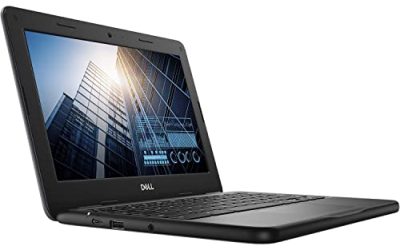
5. Dell Chromebook 11 3100 (Renewed) — Best Under $100
Specs: Intel Celeron N4020, 4GB RAM, 16GB flash storage, 11.6-inch 768p display, ChromeOS
Price: $95 on Amazon, renewed (November 2026 snapshot from PCWorld’s Black Friday coverage — check the current price on Amazon before buying)
At $95, the renewed Dell Chromebook 11 3100 is the cheapest way to get a working laptop from a major brand. It is a classroom machine — built to survive being dropped by students — and Amazon’s renewed program means it has been tested and comes with a return window. For a second machine or a homework laptop for a young child, $95 is hard to argue with.
But go in with your eyes open. 16GB of storage is genuinely tight, the 768p screen is dim and cramped, and this is the oldest platform in this guide, so its remaining update runway is the shortest of the five — verify the exact AUE date on Google’s policy page before buying. If you can stretch to $179, the Acer Chromebook 311 is a much better machine.
Pros: $95 for a working laptop from Dell; rugged classroom build; renewed with a return window.
Cons: Only 16GB of storage; dim 768p screen; oldest platform here with the shortest remaining support; renewed, not new.
Best for: A second or spare laptop, a young child’s first computer, or anyone whose budget genuinely stops at $100.
What to Avoid
Old “2020 Newest” listings. Amazon is full of Chromebooks marketed as “2020 Newest” with Celeron N4000 or N3350 processors. These machines were cheap when they launched, and they are still cheap — but their update clocks are nearly run out. The HP Chromebook 14-na, for example, was still listed at $188.50 in November 2026 with a Celeron N4000 from 2019. At that price you are paying new-machine money for a machine with almost no supported life left. Always check the AUE date.
Anything with 2GB of RAM. Some ultra-cheap Chromebooks still ship with 2GB. ChromeOS can technically run on it, but tabs reload constantly and the machine stutters on basic tasks. 4GB is the floor. No exceptions.
Paying over $200 for a 4GB Chromebook. If a listing asks $220 or more for a 4GB/64GB machine, stop. At that price you are in range of 8GB Chromebooks and Chromebook Plus models, which are dramatically better machines.
FAQ
What is the best Chromebook under $200?
The Lenovo Chromebook M at $199 is our top pick. It has the biggest and sharpest screen in this price range (15.3 inches, 1920×1200), the fastest processor (MediaTek Kompanio 540), Wi-Fi 6E, and a good 5MP webcam. If you want the longest confirmed support life instead, the Acer Gateway Chromebook 314 at $188.99 is supported through June 2031.
How long will a Chromebook under $200 receive updates?
It depends entirely on the model. The Acer Gateway Chromebook 314 and Acer Chromebook 311 are supported through June 2031 — about five years from November 2026. The Lenovo Chromebook M is a 2026 model, so it should also have a long runway, but confirm the exact date on Google’s Auto Update policy page. Older machines, especially 2020-era models still sold on Amazon, may have only a year or two left.
Is 4GB of RAM enough on a Chromebook?
For the things Chromebooks are good at — browsing, Google Docs, Gmail, streaming, video calls — yes, 4GB is enough, as long as you keep your tab count reasonable. It is not enough for heavy multitasking or Android games. Every Chromebook under $200 has 4GB, and none of them let you add more, so this is a limit you accept at this price.
Is it worth buying a renewed Chromebook under $200?
Only at a steep discount. The renewed Dell Chromebook 11 3100 at $95 makes sense — it is less than half the price of the cheapest new pick. Above $150, buy new: you get a full warranty, a known update clock, and a battery that has not already lived a classroom life.
Verdict
The best Chromebook under $200 in November 2026 is the Lenovo Chromebook M at $199. It is the only pick here that feels like a modern laptop rather than a compromise: a big, sharp 15.3-inch screen, the fastest chip in the class, and Wi-Fi 6E. Buy it if you want the most usable everyday machine for the money.
If long-term support matters most to you — and it should, because a Chromebook without updates is a Chromebook on borrowed time — buy the Acer Gateway Chromebook 314 at $188.99 instead. Its 14-inch Full HD screen and confirmed updates through June 2031 make it the safest cheap Chromebook you can buy today. And if your budget genuinely stops at $100, the renewed Dell Chromebook 11 3100 at $95 is the only pick that makes sense.
As an Amazon Associate, we earn from qualifying purchases.
Suggested internal links for topbestlaptops.com
- Best Chromebook Under $300 — if you can stretch $100 further, the HP Chromebook 14a with an Intel N100 is a meaningful step up.
- Best Chromebook Under $400 — the Lenovo IdeaPad Slim 3 Chromebook 14 and ASUS CM30 Detachable show what the next tier buys.
- Best Laptop for Students Under $500 — for students who need Windows software a Chromebook cannot run.
More from Amazon
Programs that pair well with the guide above. Offers and eligibility are set by Amazon and may change.
A free business account with business pricing and bulk-buying tools for work, shop or home office.
Create a business accountFree shipping on eligible items, Prime Video and more. Eligible new members can start with a free trial.
Start a Prime free trialAudiobooks and podcasts to listen to on the go. Eligible new members can start with a free trial.
Try Audible freeAd-free music streaming. Eligible new subscribers can start with a free trial.
Try Music Unlimited freeAs an Amazon Associate we earn from qualifying purchases.

Write Your Review
No reviews yet. Be the first to share your experience!