
Our Short List of 3

- Best for: students and home users who want a fold-flat touchscreen for reading and annotation.
- 14-inch HD touchscreen display, 1366 x 768, IPS
- Intel Processor N200, up to 3.7 GHz, 4 cores
- 4GB LPDDR5 RAM
- 192GB storage: 128GB SSD plus 64GB SD card

- Best for: students and workers who need a sharp touchscreen and the longest battery life here.
- 14-inch FHD touchscreen display
- 8-core processor, 2.0GHz
- 4GB RAM
- 192GB storage: 64GB eMMC plus 128GB SD card

- Best for: families who want a larger screen for shared homework and video lessons.
- 15.6-inch FHD display
- Intel Celeron N4500 processor
- 4GB RAM
- 128GB storage: 64GB eMMC plus 64GB SD card
All 3 Picks at a Glance
| Product | Specs | Action |
|---|---|---|
| HP Chromebook x360 14b |
| Check price on Amazon |
| Lenovo IdeaPad Slim 3 Chromebook 14 (192GB) |
| Check price on Amazon |
| Acer Chromebook 315 |
| Check price on Amazon |
The CTL Chromebook PX141EXT is a 14-inch touchscreen Chromebook built for classrooms and frontline work, with a full HD display, 8GB of memory, and 128GB of storage. The real decision is not whether that shape works, because it does for Docs, video lessons, and browser-based apps. The decision is where to buy it, since CTL sells through its own store and education resellers, and what to choose when an Amazon checkout matters more than the badge.
This guide is for students, teachers, families, and workers who want that same 14-inch touch Chromebook shape without waiting on an education order. It covers three alternatives with verified Amazon listings, each one a touchscreen or large-screen Chromebook running ChromeOS. Every specification below comes from the Amazon listing for that model, so you can compare memory, storage, display, and battery life on the same terms.
Quick Picks
As an Amazon Associate we earn from qualifying purchases
| Product | Best for | Key spec from title |
|---|---|---|
| HP Chromebook x360 14b | Folding flat for tablet-style use | 14-inch HD touchscreen, Intel N200 |
| Lenovo IdeaPad Slim 3 Chromebook 14 (192GB) | Long days away from a charger | 14-inch FHD touchscreen, 13-hour battery |
| Acer Chromebook 315 | A bigger screen for home study | 15.6-inch FHD display, 10-hour battery |
How to Choose
Touchscreen and display quality
Start with the screen, because it decides how the machine feels every day. A full HD panel shows sharper text than a 1366 by 768 panel, which matters when you read documents for hours or split two windows side by side. Touch adds a second way to work: tapping links, scrolling long pages, and using Android apps built for fingers. An anti-glare coating helps in bright classrooms and near windows. An IPS panel also holds its colors when viewed from the side, which helps when two students share one screen. If the listing only says HD, expect softer text, and if touch is missing, younger students lose the easiest way to interact with learning apps.
Memory and storage
Memory decides how many tabs and apps stay smooth at once. The CTL model ships with 8GB, while the Amazon alternatives here ship with 4GB, so expect a clear step down when dozens of tabs stay open. Storage is the trap: a listing that says 192GB may combine 64GB of built-in eMMC with a bundled card, and a card is slower and easier to lose than internal storage. A 128GB SSD is faster than eMMC for opening apps and files, so the storage type matters as much as the size. Check whether the headline number is one drive or two parts, keep large files in cloud storage, and treat a bundled card as a bonus rather than the main drive.
Processor and battery life
The processor in this class only needs to keep ChromeOS, video calls, and a handful of tabs moving without stutter. An Intel N200 or an eight-core MediaTek Kompanio chip both handle that load, and the difference shows up in heavy web apps and long video meetings rather than in email. Battery life matters more day to day: a 13-hour claim beats a 10-hour claim when the charger stays at home. Read the battery figure on the listing, then knock off a little for video calls and bright screens, because those two drain any Chromebook faster than plain reading. A fanless design also stays silent in quiet rooms, which suits libraries and exams.
Build, ports, and support lifetime
A Chromebook built for school bags needs a sturdy hinge, a keyboard that survives daily typing, and ports that match the gear already on the desk. Look for two USB-C ports, at least one USB-A port, and a headphone jack before ordering, because a single-port machine turns every accessory into a dongle hunt. Wi-Fi 6 or 6E keeps crowded school networks usable. A spill-resistant keyboard is worth asking about when the laptop rides in a school bag every day. Finally, check the automatic update end date on the listing: once updates stop, the machine still works, but it stops receiving new ChromeOS features and security fixes, which shortens its useful life.
The 3 Best Options
HP Chromebook x360 14b
- Best for: students and home users who want a fold-flat touchscreen for reading and annotation.
- 14-inch HD touchscreen display, 1366 x 768, IPS
- Intel Processor N200, up to 3.7 GHz, 4 cores
- 4GB LPDDR5 RAM
- 192GB storage: 128GB SSD plus 64GB SD card
students and home users who want a fold-flat touchscreen for reading and annotation.
the HD panel is less sharp than full HD, and 4GB of memory limits heavy multitasking.
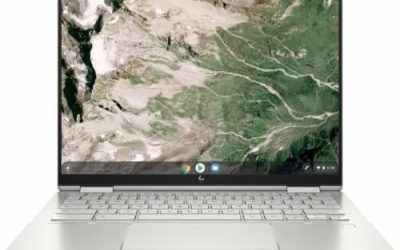
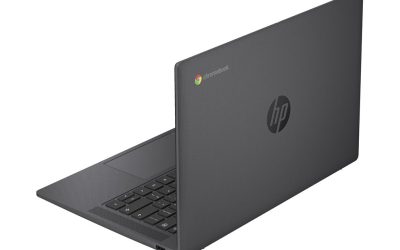
The HP Chromebook x360 14b is the closest match in spirit to the CTL, because it folds flat and turns a 14-inch touchscreen into a tablet for reading and annotation. The Intel N200 keeps everyday schoolwork moving, and the 192GB of total storage gives more room than the 64GB base found on many budget Chromebooks. Wi-Fi 6E and a camera privacy shutter cover the two details families ask about most. The hinge also hides the keyboard during video lessons. The trade is the display: HD resolution is softer than full HD, so long reading sessions feel a little less crisp.
Watch out for: the HD panel is less sharp than full HD, and 4GB of memory limits heavy multitasking.
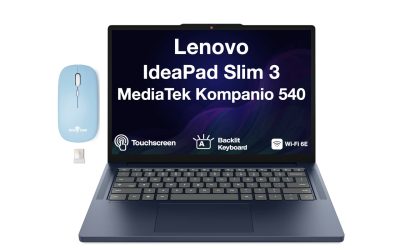
Lenovo IdeaPad Slim 3 Chromebook 14 (192GB)
- Best for: students and workers who need a sharp touchscreen and the longest battery life here.
- 14-inch FHD touchscreen display
- 8-core processor, 2.0GHz
- 4GB RAM
- 192GB storage: 64GB eMMC plus 128GB SD card
students and workers who need a sharp touchscreen and the longest battery life here.
part of the storage is a bundled card, so confirm what ships in the box before ordering.
The Lenovo IdeaPad Slim 3 Chromebook 14 is the pick for buyers who want the CTL shape with the sharpest screen in this group. Its 14-inch full HD touchscreen pairs with an anti-glare coating, so text stays readable under classroom lights. The eight-core processor and 13-hour battery cover long days of lessons, video calls, and homework without hunting for an outlet. Storage totals 192GB across built-in eMMC and a bundled card, which suits offline files and downloaded lessons. Google AI features on ChromeOS add writing help and quick answers without extra software. The 4GB of memory is the main limit, so keep tab counts modest.
Watch out for: part of the storage is a bundled card, so confirm what ships in the box before ordering.
Acer Chromebook 315
- Best for: families who want a larger screen for shared homework and video lessons.
- 15.6-inch FHD display
- Intel Celeron N4500 processor
- 4GB RAM
- 128GB storage: 64GB eMMC plus 64GB SD card
families who want a larger screen for shared homework and video lessons.
this listing does not show a touchscreen, so touch buyers should choose one of the two options above.
The Acer Chromebook 315 trades the touchscreen for a bigger canvas, and that trade suits a shared family laptop that mostly stays at a desk. Its 15.6-inch full HD display gives more room for two windows side by side, which helps with homework, forms, and video lessons. The Celeron N4500 and 4GB of memory handle browser work and streaming, while 128GB of total storage covers documents and a modest set of downloads. The bigger chassis also leaves more room for ports and a full-size keyboard. A 10-hour battery and Wi-Fi 6 round out a straightforward home-study machine that stays put on the kitchen table.
Watch out for: this listing does not show a touchscreen, so touch buyers should choose one of the two options above.
Which One Fits Your Situation
For classroom and homework on the move
Choose the HP Chromebook x360 14b. It folds flat for reading and annotation, weighs just over three pounds, and covers the basics with Wi-Fi 6E and a privacy shutter. The HD screen is the compromise, so pick it when portability and touch matter more than the sharpest text. It suits a bag that moves between rooms all day.
For long days away from a charger
Choose the Lenovo IdeaPad Slim 3 Chromebook 14 with 192GB of storage. Its 13-hour battery is the longest here, and the full HD touchscreen stays readable in bright rooms. The split storage needs a quick check, but the screen and stamina make it the best fit for lessons, library sessions, and travel days. It also handles offline files well, thanks to the larger total storage.
For a shared family laptop at home
Choose the Acer Chromebook 315. The 15.6-inch full HD display fits two windows side by side, which helps when homework, forms, and video lessons share one screen. It stays at a desk or kitchen table most of the time, so the larger body is a fair trade for the extra space. The bigger display also makes video lessons easier to follow from across the room.
For buyers set on the CTL itself
Order the CTL Chromebook PX141EXT through CTL.net or an education reseller, since no verified Amazon US listing was found for it. That route also opens fleet services and warranty plans that schools need. If an Amazon checkout matters more than the badge, the Lenovo IdeaPad Slim 3 is the closest match, with the same 14-inch full HD touchscreen shape. Volume buyers should ask CTL about fleet pricing and support plans before ordering.
Common Mistakes
- Buying on screen size alone without checking whether the panel is touch and full HD, since a big soft screen disappoints faster than a smaller sharp one.
- Assuming 4GB of memory handles dozens of open tabs the way 8GB does, then blaming the Wi-Fi when tabs slow down.
- Treating a headline storage number as one drive when it combines built-in storage with a bundled card that can be lost or removed.
- Skipping the automatic update end date, which decides how long the Chromebook keeps receiving new features and security fixes.
- Picking a non-touch model for a younger student who learns best by tapping, drawing, and using touch-first apps.
Frequently Asked Questions
Can I buy the CTL Chromebook PX141EXT on Amazon?
No verified Amazon US listing was found for the CTL Chromebook PX141EXT, which CTL sells through its own store and education resellers. The three Chromebooks above are the closest verified Amazon matches, with the Lenovo IdeaPad Slim 3 mirroring the 14-inch full HD touchscreen shape most closely. Check CTL.net for the current buying route and configuration options.
Is 4GB of memory enough for schoolwork?
Yes, for Docs, slides, email, video lessons, and a modest set of tabs. It struggles when dozens of tabs stay open alongside video calls, so close what you finish and keep heavy files in cloud storage. Buyers who live in a browser with many tabs open should look for 8GB instead. Closing unused tabs is the simplest habit that keeps a 4GB machine feeling fast.
Does a touchscreen matter on a Chromebook?
Touch helps with Android apps, drawing, annotation, and younger students who tap before they type. It matters less for typing-heavy work, where the keyboard and trackpad do most of the job. If the laptop folds flat, touch becomes far more useful, since the screen turns into a reading and sketching surface. For everyone else, a good trackpad and keyboard matter more than touch.
How long will these Chromebooks keep getting updates?
Every Chromebook has an automatic update end date set by Google, and it varies by model and production date. Check the date on the listing before ordering, and prefer a model with several years left. Once updates stop, the machine still runs, but it stops receiving new features and security fixes. The CTL model lists updates through June 2033, which sets a useful benchmark for the alternatives.
More from Amazon
Programs that pair well with the guide above. Offers and eligibility are set by Amazon and may change.
A free business account with business pricing and bulk-buying tools for work, shop or home office.
Create a business accountFree shipping on eligible items, Prime Video and more. Eligible new members can start with a free trial.
Start a Prime free trialAudiobooks and podcasts to listen to on the go. Eligible new members can start with a free trial.
Try Audible freeAd-free music streaming. Eligible new subscribers can start with a free trial.
Try Music Unlimited freeAs an Amazon Associate we earn from qualifying purchases.
Write Your Review
No reviews yet. Be the first to share your experience!