

Our Top Picks
Five hundred dollars is the first budget where a Chromebook stops feeling like a compromise. Below $300, you are shopping for 4GB of RAM and 64GB of slow storage. At $500, you can buy a Chromebook Plus — Google’s badge for machines with at least 8GB of RAM, 128GB of storage, a 1080p webcam, and a processor fast enough for Gemini.
But $500 is also where the traps get expensive: the same model name can hide three different processors, a “deal” price can be a Black Friday doorbuster that vanishes in a week, and a laptop that looks premium can have an update end date that cuts its life short. This guide sorts that out with five verified picks, priced from Amazon US and major retailers in November 2026. Prices are snapshots — check the current price on Amazon.
Our top picks
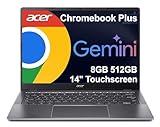
Best for: Students and home users who want the most Chromebook for the money
Check price on Amazon
Best for: Desk workers who want the roomiest, brightest screen under $500
Check price on Amazon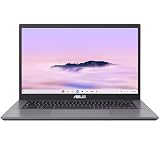
Best for: Power users who want the fastest Chromebook under $500
Check price on Amazon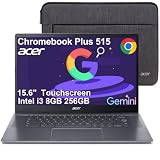
Best for: Buyers who want the largest screen under $500 for indoor use
Check price on AmazonBest for: Note-takers who want a tablet, a laptop, and a stylus in one machine
Check price on AmazonQuick Picks
| Chromebook | Best for | Processor | RAM / Storage | Screen | Price (Nov 2026) |
|---|---|---|---|---|---|
| Acer Chromebook Plus 514 | Best overall | Intel Core 3 N355 | 8GB / 512GB SSD | 14″ FHD touchscreen | $319 at Walmart |
| Lenovo Chromebook Plus i 15 | Best big screen | Intel Core 3 N355 | 8GB / 128GB | 15.3″ 1920×1200 | $349 at Walmart |
| ASUS Chromebook Plus CX34 | Best premium performance | Intel Core i5-1335U | 8GB / 128GB UFS | 14″ FHD | $429.99 at ASUS |
| Acer Chromebook Plus 515 | Best 15.6-inch | Intel Core i3-1215U/1305U | 8GB / 128GB–256GB | 15.6″ FHD touchscreen | From $399.99 at Acer |
| ASUS Chromebook Plus CM34 Flip | Best convertible | AMD Ryzen 3 7320C | 8GB / 128GB NVMe | 14″ WUXGA touchscreen | $449.99 at Electronic Express |
How to Choose a Chromebook Under $500
1. Buy a Chromebook Plus, not just a Chromebook
The Chromebook Plus badge is the most useful filter at this budget: Google requires 8GB of RAM, 128GB of storage, a 1080p webcam, and a processor that can run its AI features. Every pick here carries the badge. Non-Plus models under $500 usually pair a weak processor with 4GB of RAM — the combination that makes a Chromebook feel slow within a year.
2. Check the update end date first
Every Chromebook has an Auto Update Expiration (AUE) date — the month Google stops sending it ChromeOS updates. After that date, the machine still works but stops getting security patches, a real problem for a laptop a student might use for four years. Models launched in 2025 and later get a ten-year runway, so the newest picks here run into the mid-2030s. Older platforms do not: the Acer Chromebook Plus 515 is a 2023 platform whose updates end in June 2032.
3. 8GB of RAM and 128GB of storage are the floor
At $200, 4GB is what the money buys. At $500, there is no excuse for it: 8GB lets you keep twenty browser tabs, a Google Docs window, and a video call open at once without stuttering, and every pick here has 8GB. Storage is the same story — the Chromebook Plus minimum is 128GB, and three of our picks meet it exactly. The Acer Chromebook Plus 514 stands out with a 512GB PCIe Gen4 SSD, four times the storage of most rivals at this price. Storage type matters too: NVMe is faster than UFS, which is faster than eMMC.
4. Screen: brightness and size decide
All five picks have at least a 1080p display, so brightness and size decide. A 250-nit screen, like the one on the Acer 515, is fine indoors but washes out near a window. The Lenovo Plus i 15’s 400-nit panel is the brightest here. Touchscreens are common at this price and genuinely useful on ChromeOS.
1. Acer Chromebook Plus 514 — Best Overall
Specs: Intel Core 3 N355 (8-core) · 8GB LPDDR5X · 512GB PCIe Gen4 SSD · 14″ FHD touchscreen · Wi-Fi 6E · Updates into the mid-2030s
Price checked November 2026: $319 at Walmart (Black Friday deal; list $449.98). Check the current price on Amazon — the sale price may end when the event closes.
The Acer Chromebook Plus 514 pairs Intel’s Core 3 N355 — a proper 8-core chip, not the cut-down processor in budget Chromebooks — with 8GB of LPDDR5X memory and a 512GB PCIe Gen4 SSD. That storage figure is the headline: most Chromebook Plus machines at this price ship with 128GB, so the 514 gives you four times the room. It also gets Google’s AI features built in, including Gemini in Docs and Gmail and a year of the Google One AI Premium plan.
Pros:
– 512GB PCIe Gen4 SSD — four times the storage of most rivals
– Core 3 N355 is a genuine 8-core chip, fast for everyday work
– Touchscreen and Chromebook Plus AI features included
– Long update runway as a 2025 model
Cons:
– $319 is a Walmart Black Friday deal — it may rise toward $450 after the sale
– No backlit keyboard on the base build
– Solid but plain build
Best for: Students and home users who want the most Chromebook for the money.
2. Lenovo Chromebook Plus i 15 — Best Big Screen
Specs: Intel Core 3 N355 (8-core) · 8GB · 128GB · 15.3″ 1920×1200 IPS, 400 nits · 65Wh battery, up to 11 hours
Price checked November 2026: $349 at Walmart (list $399). Check the current price on Amazon.
If the Acer 514 is the value pick, the Lenovo Chromebook Plus i 15 is the comfort pick. Its 15.3-inch display is the largest in this guide, and at 400 nits it is also the brightest — noticeably easier to read in a sunlit room than the 250-nit panels on some rivals. The 1920×1200 resolution gives you more vertical room for documents than a 1080p screen. Underneath, it runs the same Core 3 N355 chip as the Acer 514, so everyday performance is identical. The trade-off is storage: 128GB is the Chromebook Plus minimum, and it fills up faster than the Acer’s 512GB. Lenovo rates the battery at up to 11 hours.
Pros:
– Biggest and brightest screen here — 15.3 inches, 400 nits
– Same fast Core 3 N355 chip as the top pick
– Up to 11 hours of battery life
– Launched in 2026, so a long update runway
Cons:
– Only 128GB of storage — the smallest here
– Larger and heavier than the 14-inch picks
– 120Hz touchscreen is an optional upgrade, not standard
Best for: Desk workers who want the roomiest, brightest screen under $500.
3. ASUS Chromebook Plus CX34 — Best Premium Performance
Specs: Intel Core i5-1335U (10-core) · 8GB · 128GB UFS · 14″ FHD display · Wi-Fi 6
Price checked November 2026: $429.99 at ASUS direct; $479.99 at Best Buy. Check the current price on Amazon.
The ASUS Chromebook Plus CX34 is the fastest Chromebook in this guide. Its Core i5-1335U is a 10-core chip from Intel’s 13th generation, a clear step above the Core 3 N355 in the first two picks — it handles heavy multitasking, large spreadsheets, and photo editing with more headroom. If you plan to run Linux apps or keep fifty tabs open, this is the machine that will feel the least strained two years from now. The catch is that the CX34 is a 2023 platform, so it has fewer update years left than the 2025 and 2026 models here — verify the end date on Google’s list before buying. Its 128GB of UFS storage is also slower than the NVMe SSDs in the Acer 514 and the CM34 Flip.
Pros:
– Fastest processor here — a 10-core Core i5
– Slim, well-built chassis
– Chromebook Plus AI features included
Cons:
– A 2023 platform, so a shorter update runway
– 128GB of UFS storage — slower and smaller than the Acer 514’s SSD
– $479.99 at Best Buy versus $429.99 at ASUS
Best for: Power users who want the fastest Chromebook under $500.
4. Acer Chromebook Plus 515 — Best 15.6-Inch
Specs: Intel Core i3-1215U or i3-1305U, depending on build · 8GB LPDDR5X · 128GB or 256GB · 15.6″ FHD touchscreen · Updates through June 2032
Price checked November 2026: From $399.99 at Acer. Check the current price on Amazon.
The Acer Chromebook Plus 515 is the big-screen alternative for buyers who want a 15.6-inch display without Lenovo’s prices. The touchscreen build with a 13th-generation Core i3-1305U, 8GB of LPDDR5X memory, and 256GB of storage is the one to look for. The base build, with a 12th-generation Core i3-1215U and 128GB of storage, costs the same $399.99 at Acer but gives you less — check the exact model number (CB515-2HT-33M4 is the 256GB touchscreen build) before ordering. Two honest caveats: the screen tops out at around 250 nits, dimmer than the Lenovo’s 400-nit panel, and updates end in June 2032, the shortest runway in this guide.
Pros:
– Roomy 15.6-inch touchscreen at a fair price
– 256GB build for the same $399.99 as the 128GB base
– 8GB of fast LPDDR5X memory
Cons:
– Updates end in June 2032 — the shortest runway here
– Dim ~250-nit screen next to the Lenovo’s 400 nits
– Several builds share the same name — check the model number
Best for: Buyers who want the largest screen under $500 for indoor use.
5. ASUS Chromebook Plus CM34 Flip — Best Convertible
Specs: AMD Ryzen 3 7320C (4-core) · 8GB LPDDR5 · 128GB NVMe SSD (user-replaceable) · 14″ WUXGA touchscreen, 360° hinge · Garaged stylus · 63Wh battery, up to 13 hours · Updates through June 2033
Price checked November 2026: $449.99 at Electronic Express (list $499). Check the current price on Amazon.
The ASUS Chromebook Plus CM34 Flip is the only convertible here with a stylus in the box. The 360-degree hinge turns it into a tablet, a tent for watching video, or a stand for video calls, and the garaged USI stylus charges in its slot — fifteen seconds of charging gives about forty-five minutes of use. A fingerprint reader and a 1080p webcam with a privacy shutter round out a generous feature list. The Ryzen 3 7320C is a capable everyday chip, though not as fast as the Core i5 in the CX34 or the Core 3 N355 in the Acer and Lenovo picks. The 128GB SSD is small, but it is a standard M.2 drive you can replace yourself — the only pick here with an upgrade path. Battery life is the best here at up to 13 hours, and updates run through June 2033.
Pros:
– Convertible design with a garaged stylus and fingerprint reader
– Best battery life here — up to 13 hours
– User-replaceable 128GB NVMe SSD
– Updates through June 2033
Cons:
– Ryzen 3 7320C is the slowest processor here
– 128GB of storage out of the box
– At 4.08 pounds, heavier than the other 14-inch picks
Best for: Note-takers who want a tablet, a laptop, and a stylus in one machine.
What to Avoid
The premium Chromebook Plus models above $500. The Lenovo Chromebook Plus 14 OLED is superb — a 14-inch OLED display, a MediaTek Kompanio Ultra chip, 16GB of RAM — but it starts at $649, and the touchscreen build lists at $749. The Acer Chromebook Plus Spin 714 is $630 to $699, and the Samsung Galaxy Chromebook Plus is $675.99. All three are over budget.
Chromebooks with 4GB of RAM at this price. Walmart and Best Buy both run doorbuster deals on 4GB Chromebooks — the Lenovo Chromebook m 15 at $199 and the Acer Chromebook 311 at $179. Those are fine for one small job, and we covered them in our under-$200 guide. But a 4GB machine sold for $400 or more is last year’s hardware at this year’s price.
The wrong model with the right name. This is the most expensive trap in Chromebook shopping. Lenovo sells a Chromebook 2-in-1 in the same chassis as the Chromebook Plus 2-in-1 14 — but the non-Plus version (model 83LN001EUS) has an Intel N150 chip and 4GB of RAM, and it is not a Chromebook Plus at all. Acer sells several Chromebook Plus 515 builds with different processors and storage at the same price. Always check the model number.
Old stock with a short update runway. A Chromebook that looks like a bargain can be a machine whose updates end in 2027 or 2028. Renewed and clearance models are the usual suspects. If the listing does not state the update end date, look it up on Google’s Auto Update list.
FAQ
What is the best Chromebook under $500?
The Acer Chromebook Plus 514 at $319 is the best overall pick: a Core 3 N355 processor, 8GB of RAM, a 512GB SSD, and a touchscreen, all under a Black Friday deal price at Walmart. For the biggest screen, get the Lenovo Chromebook Plus i 15 at $349. For the fastest processor, get the ASUS Chromebook Plus CX34 at $429.99.
Is 8GB of RAM enough on a Chromebook under $500?
Yes — 8GB is the Chromebook Plus minimum and the right amount for school, work, and everyday use. It handles twenty or more browser tabs, Google Docs, video calls, and Android apps at once. Do not accept 4GB at this price.
How long will a Chromebook under $500 keep getting updates?
It depends on the model. Chromebooks launched in 2025 and later get ten years of updates, so the Acer 514 and the Lenovo Plus i 15 run into the mid-2030s. Older platforms are shorter: the ASUS CM34 Flip runs through June 2033 and the Acer 515 through June 2032. Check the model number on Google’s Auto Update list before buying.
Verdict
The best Chromebook under $500 is the Acer Chromebook Plus 514 at $319. It is the only pick that gives you a fast 8-core processor, 8GB of RAM, and a 512GB SSD for little more than a budget Chromebook. Buy it while the Walmart Black Friday price holds.
If the Acer sells out or the price rises, the Lenovo Chromebook Plus i 15 at $349 is the next-best choice — same processor, a bigger and brighter screen, and only 128GB of storage as the trade-off. If raw speed matters most, the ASUS Chromebook Plus CX34 at $429.99 has the fastest chip in this guide. Check the model number and its update end date before you pay.
As an Amazon Associate, we earn from qualifying purchases.
Suggested internal links for topbestlaptops.com
- Best Chromebook Under $200 — /best-chromebook-under-200/
- Best Chromebook Under $300 — /best-chromebook-under-300/
- Best Chromebook Under $400 — /best-chromebook-under-400/
More from Amazon
Programs that pair well with the guide above. Offers and eligibility are set by Amazon and may change.
A free business account with business pricing and bulk-buying tools for work, shop or home office.
Create a business accountFree shipping on eligible items, Prime Video and more. Eligible new members can start with a free trial.
Start a Prime free trialAudiobooks and podcasts to listen to on the go. Eligible new members can start with a free trial.
Try Audible freeAd-free music streaming. Eligible new subscribers can start with a free trial.
Try Music Unlimited freeAs an Amazon Associate we earn from qualifying purchases.


Write Your Review
No reviews yet. Be the first to share your experience!