

Our Top Picks
Six hundred dollars is the first budget where a Chromebook stops feeling like a compromise. Below $300, you are buying a machine that does one job well and begs for patience on everything else. At $500, the Chromebook Plus badge appears and the experience gets genuinely good. At $600, you can buy a Core i5 convertible with 512GB of storage, a 16-inch screen for less than $400 on sale, or a detachable with the brightest display in this guide.
The premium tier — OLED screens, Core Ultra chips, aluminum unibodies — still sits just above this budget. But every machine below clears Google’s Chromebook Plus floor of 8GB of RAM and 128GB of storage, and every one was verified against real November 2026 listings. All prices are November 2026 snapshots — check the current price on Amazon before buying.
Our top picks
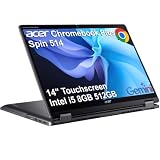
Best for: Students and workers who want one Chromebook for everything
Check price on Amazon
Best for: Anyone who wants the biggest screen for documents and split-screen work on a tight budget
Check price on Amazon
Best for: School, office work, and everyday use — the safe default
Check price on Amazon
Best for: Students and families who want a touchscreen convertible without paying convertible prices
Check price on Amazon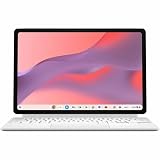
Best for: Note-taking, reading, media, and travel
Check price on AmazonQuick Picks
| Chromebook | Best for | Processor | RAM / Storage | Screen | Price checked Nov 2026 |
|---|---|---|---|---|---|
| Acer Chromebook Plus Spin 514 | Best overall | Core i5-1334U | 8GB / 512GB SSD | 14″ 1920×1200 touch | $595 |
| Acer Chromebook Plus 516 | Best big screen | Core i3-1315U | 8GB / 128GB | 16″ 1920×1200 | $399 (sale) |
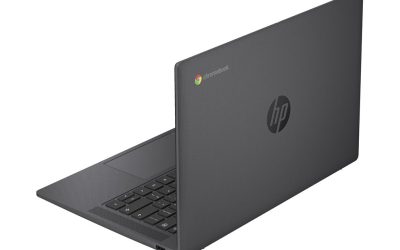
| HP Chromebook Plus 14 | Best HP everyday | Core i3-N305 | 8GB / 256GB | 14″ FHD touch | $449 (sale) |
| HP Chromebook Plus x360 14 | Best 2-in-1 | Core 3 N355 | 8GB / 128GB | 14″ touch | $449 (sale) |
| ASUS Chromebook CM32 Detachable | Best detachable | Kompanio 540 | 8GB / 128GB | 12.1″ 2560×1600 120Hz | $459 (sale) |
How to Choose a Chromebook Under $600
Start with the Chromebook Plus badge
The most useful filter at this budget is the Chromebook Plus badge, awarded only to machines with at least 8GB of RAM, at least 128GB of storage, a 1080p webcam, and a recent processor — plus Google’s on-device AI features. Every pick here carries it, which matters because the $600 shelf is crowded with machines that look similar but quietly ship with 4GB of RAM and 64GB of slow eMMC storage.
Check the update end date before anything else
A Chromebook’s most important number is not its processor — it is the date Google stops sending it ChromeOS updates. Google publishes the date for every model on its Auto Update list, and once it passes, the machine stops getting security patches. The picks below run from June 2032 to June 2036. The trap is a machine that looks like a bargain and dies in nine months — the Samsung Chromebook Plus V2 360, still selling for $359, stops getting updates in August 2027. Always check the exact model number, not just the family name.
8GB of RAM and 128GB of storage are the floor
ChromeOS is light, but 4GB of RAM still chokes once you have a dozen tabs, a video call, and a document open at once. At $600, accept nothing less than 8GB of RAM and 128GB of storage — ideally 256GB or more. Note the storage type too: a 512GB PCIe SSD, like the one in our top pick, is dramatically faster than 128GB of eMMC, the slower flash in the detachable pick below.
Screen and form factor
At this price you can choose a 14-inch touchscreen convertible, a 16-inch clamshell, or a 12-inch detachable tablet. Touch matters more here than on Windows, because Android apps and tablet mode assume it. Brightness matters near a window: 250 nits is usable indoors and miserable outdoors, while the 600-nit panel on our detachable pick works in bright rooms. A convertible is the most versatile shape; a clamshell is the only way to get a 16-inch display; a detachable is a tablet first, brilliant for notes but weaker for long typing sessions.
1. Acer Chromebook Plus Spin 514 — Best Overall
Specs: Intel Core i5-1334U (10 cores, up to 4.6GHz); 8GB RAM; 512GB PCIe Gen 4 SSD; 14″ 1920×1200 IPS touchscreen, 100% sRGB; Wi-Fi 6E; backlit keyboard; up to 10 hours of battery. Price checked November 2026: $595 — check the current price on Amazon before buying.
This is the only pick that combines a Chromebook Plus badge, a Core i5, 8GB of RAM, 512GB of storage, a 14-inch touchscreen, and a 360-degree hinge. The ten-core Core i5-1334U handles the workload that kills cheaper Chromebooks: twenty tabs, a Meet call, and a spreadsheet at once. The 512GB PCIe SSD is the largest storage here by a wide margin, and the screen covers 100% of sRGB — rare at this price.
The catch is Acer’s naming. The machine here is the CP514-4HN, the Intel model, with updates through June 2032. The newer CP514-5HN uses a MediaTek ARM chip, a different screen, and a price closer to $700–$800. Buy the Intel model and check the number on the box.
Pros: Fastest processor here; 512GB fast SSD; color-accurate touchscreen; convertible hinge; updates through June 2032.
Cons: Other listings run $659–$680; two Spin 514 models share the name; RAM is soldered.
Best for: Students and workers who want one Chromebook for everything.
2. Acer Chromebook Plus 516 — Best Big Screen
Specs: Intel Core i3-1315U; 8GB LPDDR5 RAM; 128GB UFS storage; 16″ 1920×1200 display; Wi-Fi 6E. Price checked November 2026: $399 at Best Buy (list price $649) — check the current price on Amazon before buying.
The 516 is the value shock of this guide: a 16-inch Chromebook Plus for $399, $250 below its $649 list price. Nothing else under $600 gives you this much screen, and for split-screen work — a document beside a video call, or two browser windows side by side — the extra inches matter more than any processor upgrade. The Core i3-1315U is a genuine 13th-generation Intel chip, and 8GB of LPDDR5 keeps up with everyday work.
The trade-offs are honest ones. Storage is 128GB of UFS, the minimum this guide accepts. This is a clamshell: no touchscreen, no tablet mode. And $399 is a sale price — TechRadar had the same machine at $499 on November 6, so it can climb back.
Pros: Biggest screen for the money; real Core i3; $250 off list; updates through June 2033.
Cons: Only 128GB of storage; no touchscreen or convertible hinge; $399 is a sale price.
Best for: Anyone who wants the biggest screen for documents and split-screen work on a tight budget.
3. HP Chromebook Plus 14 — Best HP Everyday Pick
Specs: Intel Core i3-N305; 8GB RAM; 256GB UFS storage; 14″ Full HD touchscreen; 1080p webcam; backlit keyboard. Price checked November 2026: $449 at Best Buy (list price $599) — check the current price on Amazon before buying.
The HP Chromebook Plus 14 is the most balanced machine in this guide. The Core i3-N305 is an efficient eight-core chip, the 256GB of UFS storage is double the minimum, and the 14-inch touchscreen is the size most people actually want. The 1080p webcam is a genuine upgrade over the 720p cameras still common on cheaper Chromebooks, and at 3.05 pounds it is light enough to carry every day.
The warning: HP sells several machines that look like this one. The HP Chromebook 14a with the Intel N100 is a different, cheaper machine that topped our under-$300 guide — do not pay $449 for it. The Plus 14 you want has the Core i3-N305, 8GB of RAM, and 256GB of storage.
Pros: Best all-round balance; 256GB of storage; sharp 1080p webcam; updates through June 2033.
Cons: N305 is efficient, not fast; HP’s naming makes it easy to buy the wrong machine; $449 is a sale price.
Best for: School, office work, and everyday use — the safe default.
4. HP Chromebook Plus x360 14 — Best 2-in-1
Specs: Intel Core 3 N355; 8GB RAM; 128GB UFS storage; 14″ touchscreen; 360-degree hinge. Price checked November 2026: $449 at Best Buy (list price $679) — check the current price on Amazon before buying.
If the Spin 514 is the convertible for power users, the HP x360 14 is the convertible for everyone else — $146 cheaper at $449. The Core 3 N355 is newer than the N305 in the HP Plus 14, the 360-degree hinge turns the machine into a tablet for reading and a tent for video, and the touchscreen is standard. Best Buy’s price is $230 below the $679 list price, the deepest discount on any convertible here.
The compromise is storage: 128GB is the floor, and on a machine you might keep for five years, that gets uncomfortable. The N355 is also a step below the Spin 514’s Core i5 for heavy multitasking. Check the exact model’s update end date on Google’s Auto Update page first.
Pros: Convertible hinge and touchscreen for $449; newer Core 3 chip; $230 off list.
Cons: Only 128GB of storage; slower than the Spin 514; confirm the update end date first.
Best for: Students and families who want a touchscreen convertible without paying convertible prices.
5. ASUS Chromebook CM32 Detachable — Best Detachable
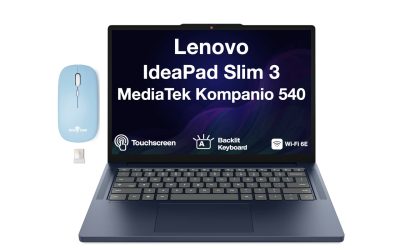
Specs: MediaTek Kompanio 540 (8 cores, up to 2.6GHz); 8GB LPDDR5X RAM; 128GB eMMC storage; 12.1″ 2560×1600 touchscreen, 120Hz, 600 nits; USI 2.0 stylus included; Wi-Fi 7; up to 12 hours of battery; 1.41 lb. Price checked November 2026: $459 at Best Buy (list price $579) — check the current price on Amazon before buying.
The CM32 has the best screen in this guide by a clear margin. Its 12.1-inch panel runs at 2560×1600, refreshes at 120Hz, and hits 600 nits. It is the only pick here with Wi-Fi 7, the only one with a stylus in the box, and the lightest at 1.41 pounds. The detachable keyboard and magnetic stand turn it into a laptop when you need one, and its support window is the longest here: updates through June 2036.
The trade-offs are real. The Kompanio 540 is an ARM chip built for efficiency, not speed — fine for a dozen tabs and a video call, not for heavy Linux work or Steam games. Storage is 128GB of eMMC, the slowest type here. ASUS also sells a 4GB/64GB version at Walmart: not a bargain at any price in 2026. Buy the 8GB model and check the box.
Pros: Best display here — 2.5K, 120Hz, 600 nits; stylus and keyboard included; Wi-Fi 7; updates through June 2036.
Cons: ARM chip limits some Linux and Steam software; slow eMMC storage; a 4GB version must be avoided.
Best for: Note-taking, reading, media, and travel.
What to Avoid
The premium tier that does not fit — yet. Three excellent Chromebooks sit just above this budget: the Lenovo Chromebook Plus 14 OLED at $749, the Acer Chromebook Plus Spin 714 at $699 (around $630 on sale), and the Samsung Galaxy Chromebook Plus at $774.99 ($675.99 at Best Buy in mid-November). If any drops under $600 during Black Friday week, the calculation changes.
4GB doorbusters. At $600 you should never buy a Chromebook with 4GB of RAM or 64GB of storage — it will struggle with the workload a $600 buyer expects, and the Chromebook Plus badge exists precisely to filter these out.
Short update runways. The Samsung Chromebook Plus V2 360 still sells for $359, and it looks like a deal until you learn its updates end in August 2027 — nine months from now, or about $40 per remaining month of support. Any machine with under three years of updates left is a short-term rental, not a purchase.
Same-name traps. The Spin 514 comes in Intel (CP514-4HN) and ARM (CP514-5HN) versions. The CM32 comes in 8GB and 4GB versions. HP’s 14a line mixes N100 and N305 chips in the same chassis. The model number on the box is the truth — check it before you buy.
FAQs
Is $600 enough for a good Chromebook?
Yes — and it is the first budget where that is true without caveats. At $600 every pick here is a Chromebook Plus machine with 8GB of RAM, at least 128GB of storage, and a touchscreen or a large screen. What $600 does not buy is the premium tier: OLED displays, Core Ultra processors, and aluminum unibodies start around $630–$750.
What does the Chromebook Plus badge actually guarantee?
At least 8GB of RAM, at least 128GB of storage, a 1080p webcam, and a processor new enough to run Google’s on-device AI features. It does not guarantee a good screen, a fast chip, or a long battery. Think of it as a floor, not a ranking.
How do I check a Chromebook’s update end date?
Search Google’s Auto Update policy page for the exact model number — the code on the box, not the family name. The listed Auto Update Expiration (AUE) date is the last month the machine receives ChromeOS updates. The picks in this guide run from June 2032 to June 2036.
Can a Chromebook replace a Windows laptop for school or work?
For most school and office work — documents, spreadsheets, video calls, web apps, and Android apps — yes. The exceptions are Windows-only software, heavy desktop apps like full Photoshop or CAD, and PC games. If your work depends on any of those, a Chromebook is the wrong tool at any price.
Are these Black Friday prices real?
Mostly, with one warning. The $399 Acer 516, the $449 HP models, and the $459 CM32 are genuine November 2026 sale prices — but they are early Black Friday deals, and Best Buy’s early sale ends November 15, with the main sale running November 19–28.
Verdict
If you buy one Chromebook under $600, buy the Acer Chromebook Plus Spin 514 at $595. It is the only machine here with a Core i5, 512GB of fast storage, a color-accurate touchscreen, and a convertible hinge — and it is $5 under budget. Just be certain you are buying the Intel CP514-4HN, not the ARM version that shares its name.
If you want the biggest screen for the least money, the Acer Chromebook Plus 516 at $399 is the deal of the guide, while the Black Friday price holds. The HP Chromebook Plus 14 at $449 is the safest everyday laptop. And if your work is notes, reading, and travel, the ASUS CM32 Detachable at $459 has the best screen at this price.
As an Amazon Associate, we earn from qualifying purchases.
Suggested internal links
More from Amazon
Programs that pair well with the guide above. Offers and eligibility are set by Amazon and may change.
A free business account with business pricing and bulk-buying tools for work, shop or home office.
Create a business accountFree shipping on eligible items, Prime Video and more. Eligible new members can start with a free trial.
Start a Prime free trialAudiobooks and podcasts to listen to on the go. Eligible new members can start with a free trial.
Try Audible freeAd-free music streaming. Eligible new subscribers can start with a free trial.
Try Music Unlimited freeAs an Amazon Associate we earn from qualifying purchases.


Write Your Review
No reviews yet. Be the first to share your experience!