
Our Short List of 3
All 5 Picks at a Glance
| Product | Specs | Action |
|---|---|---|
 Apple MacBook Air 13 (M4) | Check price on Amazon | |
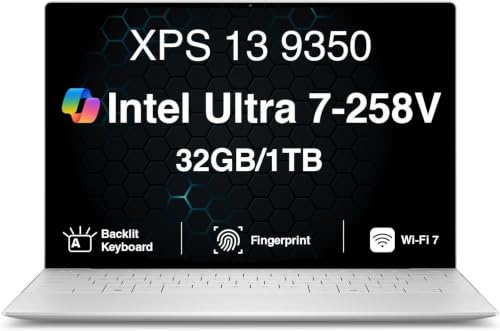 Dell XPS 13 9350 | Check price on Amazon | |
 ASUS ROG Zephyrus G14 (2024) | Check price on Amazon | |
 HP Victus 15 | Check price on Amazon | |
 Lenovo LOQ 15 | Check price on Amazon |
Dead Cells is built around short, intense runs. You drop into the castle, fight through branching levels, die, and immediately start again a little wiser. That loop rewards a laptop that feels responsive: quick loads between attempts, a screen that keeps fast movement easy to read, and controls that never get in the way of a dodge roll.
The good news is that Dead Cells is a light 2D game, so the hardware bar is genuinely low. Almost any modern laptop can run it well, which means your choice comes down to comfort rather than raw power: screen quality, weight, storage speed, and how the machine fits the rest of your day. The five picks below span both platforms, from silent fanless designs to gaming builds with headroom to spare.
As an Amazon Associate, we earn from qualifying purchases.
How to Choose a Laptop for Dead Cells
Start with the platform, because Dead Cells is flexible here: the game runs natively on both Windows and macOS, so Mac laptops are a fair pick and nobody needs to switch operating systems just for this title.
Next, be honest about graphics. Dead Cells uses hand-drawn 2D art and modest effects, and modern integrated graphics genuinely are enough to play it well. A dedicated graphics card is not a requirement for this game; it only matters if the rest of your library includes heavier 3D titles on the same machine.
What actually shapes your runs is the screen and the storage. A higher refresh rate panel makes fast combat easier to follow, and strong color helps moody palettes and bright effects stand apart. An SSD keeps the die-and-retry loop snappy, with levels loading in moments. Weight matters too: a light build suits couch sessions and travel, while a larger chassis trades portability for a bigger screen and a fuller keyboard.
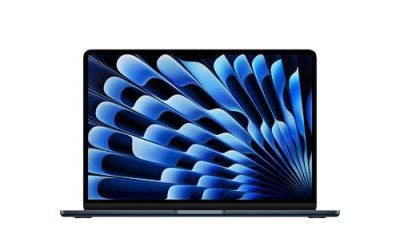
Apple MacBook Air 13 (M4)
The MacBook Air is the natural pick for Mac players. Dead Cells has a native macOS version, and the M4 chip’s integrated graphics handle this light 2D game with ease, so runs feel fluid while the machine stays completely silent. There is no fan inside, which suits late-night sessions.
Portability is the other half of the appeal. At about 2.7 pounds as listed, the Air slips into a bag and disappears, and its 13.6-inch Liquid Retina display does the game’s colors justice. Battery life is listed at up to 18 hours, so unplugged runs are easy. The 256GB SSD is fine for a game this small, though heavy media libraries will fill it faster.
Dell XPS 13 9350
The XPS 13 9350 is the Windows counterpart to the Air’s formula: a slim, light ultraportable that treats Dead Cells as the light workload it is. Its Intel Arc 140V integrated graphics are honestly enough for this game, and the 13.4-inch FHD+ panel refreshes at 120Hz as listed, which keeps fast platforming movement easy to track.
This configuration pairs the Core Ultra 7 258V with 32GB of memory and a 1TB SSD, so installs are quick and a browser full of tabs between runs is no problem. Dell’s listing claims up to 26 hours of battery life, and the 9350 is built for long unplugged days. Two Thunderbolt 4 ports are the main compromise, so dock and hub users should plan around that.
ASUS ROG Zephyrus G14 (2024)
The Zephyrus G14 is the pick for players who want Dead Cells to look its absolute best and still have power in reserve. Its 14-inch OLED display runs at 2880 x 1800 with a 120Hz refresh rate as listed, so deep shadows get true blacks, glowing effects pop, and fast fights stay sharp.
Under the hood, a Ryzen 9 8945HS and a GeForce RTX 4060 are far more than this game asks for, which is the point: the same machine handles demanding modern titles too. ASUS keeps that in a 3.31-pound aluminum chassis as listed, so it travels like an ultraportable, not a gaming brick. The 1TB SSD leaves room for a large library.
HP Victus 15
The Victus 15 goes the other way: a bigger 15.6-inch screen and a full-size keyboard with a numeric keypad, in a chassis built for desk and couch gaming. Its 144Hz FHD display as listed gives Dead Cells’ combat a smooth, responsive feel, and the larger panel makes the detailed pixel art easier to appreciate.
Performance comes from a Ryzen 5 7535HS paired with a Radeon RX 6550M dedicated graphics chip, comfortable headroom for this game and plenty of other titles. The 1TB SSD is generous for a growing library, and ports include an SD card reader and HDMI. At this size it is a machine that mostly lives at home.
Lenovo LOQ 15
The LOQ 15 is a purpose-built gaming laptop that keeps the essentials Dead Cells players care about: a fast screen, a responsive keyboard, and quick storage. The 15.6-inch IPS display refreshes at 144Hz with 100% sRGB color coverage as listed, so runs look smooth and colors land as the artists intended.
A Ryzen 7 170 processor and a GeForce RTX 4050 give it real gaming credentials well beyond this title, while the backlit keyboard includes a numeric keypad for work between sessions. The 512GB SSD loads levels quickly, and Lenovo leaves the memory and storage upgradeable as listed, which helps the machine grow with your library. It is the heaviest style of pick here, but as a stay-at-home setup it makes sense.
Comparison Table
| Product | Best for | Key spec |
|---|---|---|
| Apple MacBook Air 13 (M4) | Mac players who want silence | Fanless M4 design, about 2.7 lb as listed |
| Dell XPS 13 9350 | Windows ultraportable fans | 13.4-inch FHD+ 120Hz screen as listed |
| ASUS ROG Zephyrus G14 (2024) | Best screen plus gaming headroom | 14-inch OLED 120Hz with RTX 4060 as listed |
| HP Victus 15 | Big-screen desk gaming | 15.6-inch 144Hz display, 1TB SSD as listed |
| Lenovo LOQ 15 | A dedicated gaming setup | 15.6-inch 144Hz IPS, RTX 4050 as listed |
FAQ
Does Dead Cells run on a Mac?
Yes. Dead Cells has a native macOS version alongside the Windows release, so a MacBook Air or any current Mac laptop plays the same game with the same content.
Do I need a dedicated graphics card for Dead Cells?
No. Dead Cells is a light 2D game, and integrated graphics from Apple, Intel, and AMD handle it well. A dedicated card like the RTX 4060 or RTX 4050 only becomes useful when the same laptop also needs to run heavier 3D games.
What should I look for in a screen for this game?
Refresh rate and color matter most. Panels listed at 120Hz or 144Hz keep fast combat looking smooth, and strong color coverage or an OLED panel helps dark scenes and bright effects read clearly. Size is a comfort choice: 13-inch models travel better, 15.6-inch models fill your view at a desk.
Conclusion
Dead Cells forgives modest hardware, so buy for the way you play: the MacBook Air or XPS 13 for silent, light, anywhere sessions, the Zephyrus G14 for the finest screen and real gaming headroom, and the Victus 15 or LOQ 15 for a bigger, desk-friendly setup. Any of the five loads fast, shows the game’s art beautifully, and keeps the next run one click away.
More from Amazon
Programs that pair well with the guide above. Offers and eligibility are set by Amazon and may change.
A free business account with business pricing and bulk-buying tools for work, shop or home office.
Create a business accountFree shipping on eligible items, Prime Video and more. Eligible new members can start with a free trial.
Start a Prime free trialAudiobooks and podcasts to listen to on the go. Eligible new members can start with a free trial.
Try Audible freeAd-free music streaming. Eligible new subscribers can start with a free trial.
Try Music Unlimited freeAs an Amazon Associate we earn from qualifying purchases.
Write Your Review
No reviews yet. Be the first to share your experience!