

Key takeaways
- Who it suits: iPhone owners who want a magnetic top-up without turning the phone into a brick.
- Pros: by far the thinnest; kickstand; Qi2 15W; light; wired port as a backup.
- Cons: about one charge only; Android phones need a magnetic ring case to get the wireless benefit; one wired port.
The best slim power bank in 2026 is the Anker Nano Power Bank (5K, MagGo, Slim) if you want the thinnest option that still charges an iPhone magnetically, and the Anker MagGo Power Bank (10K, Slim) if you want a full day of reserve in a body under 15 mm thick. For a laptop, the only truly thin choice is a flat 20000mAh slab such as the Baseus Blade. Everything slimmer than that trades capacity for thickness, and this guide shows exactly how much.
Five real models are compared below by thickness, capacity, output and weight, followed by a worked energy calculation, a pocket-fit table and a short section on what wears out first in a thin battery. Dimensions and ratings come from manufacturers’ spec pages, and where retailer listings disagree the text notes the range.
As an Amazon Associate we earn from qualifying purchases at no extra cost to you.

Quick comparison of the five slim picks
| Pick | Best for | Capacity | Thickness | Output | Approx. weight | Price tier |
|---|---|---|---|---|---|---|
| Anker Nano Power Bank (5K, MagGo, Slim) | Thinnest magnetic pick | 5,000mAh (19.35Wh) | 8.6 mm | 15W Qi2 wireless, 20W wired | about 122 g | Mid-range |
| Anker MagGo Power Bank (10K, Slim) | Full-day phone reserve | 10,000mAh | 14.7 mm | 15W wireless, 30W wired | about 200 g | Mid-range |
| UGREEN Wireless Magnetic Power Bank 10000mAh | Magnetic with wired 20W | 10,000mAh | 13 to 19 mm by variant | 15W Qi, 20W USB-C | 145 to 220 g by variant | Mid-range |
| INIU B41 10000mAh | Plain wired slab | 10,000mAh | about 14 mm | up to 15W | about 198 g | Budget |
| Baseus Blade 100W 20000mAh | Laptop in a thin shell | 20,000mAh (about 74Wh) | about 14.7 to 18 mm | 100W USB-C | about 490 to 506 g | Mid-range |
What “slim” really costs in capacity
Lithium-polymer cells have a fixed volume per watt-hour, so a power bank can only get thinner by shrinking in capacity, width or both. The thinnest model here, at 8.6 mm, holds 19.35Wh. The next step up, at 14.7 mm, holds roughly double that at about 37Wh. A laptop-class slab reaches 74Wh but needs more than 140 mm in two directions to hide its thickness.
That means the right question is not “which is thinnest?” but “what do I need the energy for?” A slim pack lives in a back pocket or on the back of a phone; a slab lives in a bag. Choosing the wrong form factor is the most common mistake with this category: buyers pick a pocketable bank, then find it only gives one phone charge.
| Capacity class | Rated Wh | Realistic phone charges (4,500mAh phone, about 17Wh) | Typical thickness |
|---|---|---|---|
| 5,000mAh | about 19Wh | about 0.8 to 1 over cable, less wirelessly | 8 to 10 mm |
| 10,000mAh | about 37Wh | 1.5 to 1.8 | 13 to 19 mm |
| 20,000mAh | about 74Wh | 3 or more | 14 to 18 mm, but very wide |
A worked example
Take a phone with a 4,500mAh battery at 3.85 volts. That is about 17.3Wh. A 10,000mAh bank is rated near 37Wh, but conversion to 5 volts and the heat lost in the process leave about 70 to 80 percent usable, so roughly 26 to 30Wh. Divide by 17.3 and you get 1.5 to 1.7 full phone charges. For wireless charging, losses are higher still because the magnetic coil wastes more energy as heat, so plan on closer to 1.2 to 1.4 charges. The 5,000mAh Nano therefore gives you about one wired top-up or two thirds of a wireless one.
Best thinnest magnetic: Anker Nano Power Bank (5K, MagGo, Slim)
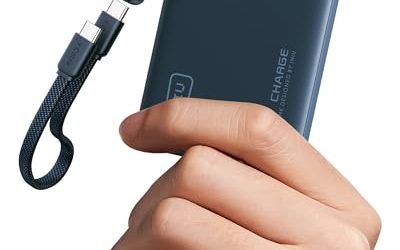
Anker’s slim Nano is the thinnest power bank in this guide at 8.6 mm, with a footprint of roughly 102 by 70.6 mm, essentially a credit card. According to the manufacturer’s page it holds 5,000mAh (19.35Wh), supports Qi2 15W wireless charging for MagSafe-compatible iPhones and 5W for compatible earbuds cases, and also charges and recharges over USB-C at 20W. A built-in foldable metal kickstand lets you prop the phone up while it charges, and the app reports charge and temperature. Anker says the back shell stays below 38 degrees Celsius. Weight is about 122 g, so the phone stays comfortable to hold.
- Who it suits: iPhone owners who want a magnetic top-up without turning the phone into a brick.
- Pros: by far the thinnest; kickstand; Qi2 15W; light; wired port as a backup.
- Cons: about one charge only; Android phones need a magnetic ring case to get the wireless benefit; one wired port.
Best everyday slim: Anker MagGo Power Bank (10K, Slim)
This is the sensible middle of the category. Anker lists 10,000mAh, 30W wired output on USB-C, 15W wireless Qi2 charging, and dimensions of 70.6 by 104 by 14.7 mm. Weight is about 200 g (7.05 oz). Thermal protection uses an aerogel insulation layer along with Anker’s ActiveShield 2.0 monitoring, which is useful because magnetic charging generates more heat than a cable.
At 14.7 mm it is about as thick as a smartphone case, and the weight is noticeable but not annoying. Thirty watts wired also means it will refuel a tablet at a steady pace, though it is not a laptop charger.
- Who it suits: commuters and students who want a full day plus a spare charge in a pocket-sized form.
- Pros: 10,000mAh in a slim body; wireless and wired; thermal design; matte finish that resists fingerprints.
- Cons: single USB-C port; wireless charging is slower than wired; heavier on the back of a phone.
Best magnetic alternative: UGREEN Wireless Magnetic Power Bank 10000mAh
UGREEN sells a 10,000mAh magnetic power bank under part numbers PB561 and 25208, and the spec table lists two variants: one about 106 by 69 by 19 mm at 220 g and a slimmer one near 105 by 68 by 13 mm at 145 g. Both support 15W Qi wireless charging and 20W through USB-C. Because the two variants differ so much in thickness and weight, confirm the dimensions on the product page before you buy.
- Who it suits: buyers who want a non-Anker magnetic option with wired 20W output.
- Pros: slim variant is under 13 mm; magnetic; two charging methods.
- Cons: variant confusion in listings; 20W wired is slower than the Anker 30W.
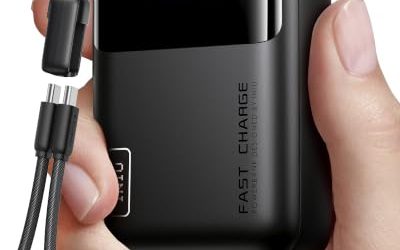
Best budget slab: INIU B41 10000mAh
INIU positions the B41 as a thin slab. Its own shop page gives about 133 by 70 by 14 mm, with a weight near 198 g, and a review measurement confirms 14.7 mm of thickness. The USB-C port is rated at 5V/3A, so the model tops out at 15W and does not offer fast protocols for newer phones. There is no wireless pad and no magnet. What you get is a plain, light, inexpensive 10,000mAh bank that slips behind a phone in a back pocket.
One caution: INIU also sells other 10000mAh banks with higher 22.5W output that are thicker, up to roughly 24 mm. Search by exact model number so that you do not receive the thick one by mistake.
- Who it suits: anyone who wants cheap, flat and simple, and does not need wireless or fast charging.
- Pros: budget tier; thin; light for 10,000mAh.
- Cons: 15W ceiling; older design; no wireless.
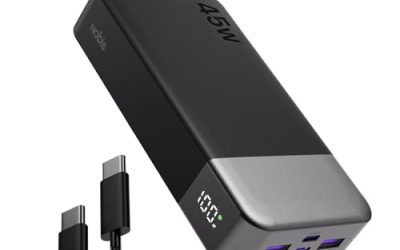
Best thin for laptops: Baseus Blade 100W 20000mAh
If you need real power, the Blade is the only slim choice in this list. It carries about 74Wh in a shell that is roughly 14.7 to 18 mm thick depending on version, with a digital display showing percent, wattage and time left. Output is 100W on USB-C, with two USB-C and two USB-A ports in all, and 65W input. It is a laptop bank that happens to be flat.
The trade-off is surface area: sources list roughly 143 mm by 160 mm or similar, so it is a bag item, not a pocket item. At around 490 to 506 g it also weighs as much as a small paperback.
- Who it suits: people who carry a laptop and want one thin bank rather than a thick brick.
- Pros: 74Wh; 100W; four ports; display; flat storage.
- Cons: large footprint; heavier; version differences between listings.
Pocket-fit guide
| Where it needs to go | Best match | Reason |
|---|---|---|
| Back of an iPhone, all day | Anker Nano 5K | 8.6 mm and light |
| Jacket or jeans pocket | Anker MagGo 10K Slim or INIU B41 | 14 to 15 mm |
| Small cross-body bag | UGREEN 10000mAh magnetic | Two charging methods |
| Laptop sleeve | Baseus Blade | Flat 74Wh slab |
How to choose a slim power bank
- Start with the device. A phone-only plan points to 5,000mAh or 10,000mAh. A tablet or a laptop pushes you to a slab with 20,000mAh and at least 45W to 65W output.
- Decide on wireless. Magnetic Qi2 charging is convenient for iPhones but slower and less efficient than a cable. Android users need a magnetic ring case. If you will mostly use a cable, skip wireless and save weight.
- Check the thickness on the spec page. Listings sometimes show packaging dimensions. The manufacturer’s size is the number that counts.
- Look for a USB-C port that also recharges the bank. Slim banks have only one port, so charging the bank and a phone at the same time is a common limit.
- Check temperature protection. Thin cells heat quickly when pushed. Look for built-in thermal monitoring, and avoid charging a thin bank under a pillow.
Output matters more than you think
A bank that outputs 15W will fill a modern phone in a little over two hours; a 30W bank can add roughly half a charge in about half an hour on supported phones. If you often top up in short stops, such as between meetings, the faster output matters more than the extra capacity.
What wears out first in a thin bank
The pouch cell in a thin power bank flexes slightly with temperature, and heat is the main enemy. Leaving a bank in a car, on a dashboard or in a pocket beside a hot phone shortens cell life. After a year of daily use, a thin bank may deliver 10 to 20 percent less than when new, which is normal. Magnetic surfaces pick up scratches and the Qi2 pad can lose its grip if the magnet face is dusty, so wipe it occasionally with a dry cloth.
If you fly with a slim bank, the numbers are friendly: 5,000mAh is about 19Wh and 10,000mAh about 37Wh, far under the usual 100Wh carry-on limit, while the 20000mAh Blade is about 74Wh and still passes. In all cases the bank should travel in carry-on, never checked luggage, and airline rules about use in flight vary, so check the carrier’s current policy.
Magnetic banks and phone cases: the compatibility check
Qi2 magnetic charging relies on a ring of magnets in the phone or its case. Recent iPhones have the ring built in, so a magnetic bank snaps on directly. A thick case without magnets breaks the connection: the bank slides off, or the coil sits too far from the phone and charging becomes slow or stops. Cases advertised as MagSafe-compatible include their own magnet ring and are safe choices. Many Android phones do not have magnets, so the magnetic Anker and UGREEN packs need a ring case or a stick-on ring before they hold in place. If you are not sure, use the USB-C port; every slim pack here has one, and cable charging is faster and more efficient than wireless.
Metal plates, wallet cards and pop-up grips between the phone and the bank can also interfere. A card with an RFID chip may be affected by the magnet, so keep wallets and key cards off the back of the phone while it is charging magnetically.
Three daily routines and the bank that fits each
The commuter
A commuter on a train for an hour each way uses a phone for music, messages and maps, and needs about 20 to 30 percent of a phone battery per day beyond normal use. The 5,000mAh Nano covers that and slips into a trouser pocket. The kickstand is useful on a train table for video. The 10,000mAh models only pay off if the commuter also charges earbuds, a smartwatch or a tablet.
The student
A student charges a phone and earbuds between lectures and sometimes tops up a tablet. A 10,000mAh bank with 20W to 30W output gives about a day and a half of extra phone life, and the thin body fits in the same pocket as a notebook. The Anker MagGo 10K Slim suits this routine; the INIU B41 suits the same routine on a tighter budget if wireless is not needed.
The remote worker on the move
Someone who works from cafes needs a laptop charge when outlets are scarce. Phone-class banks will not do that, so a flat 65W to 100W slab is the right tool. The Blade lies against the laptop in a sleeve, adds little thickness to the bag and carries roughly one full laptop charge for a thin-and-light machine. Heavier gaming laptops that draw more than 100W under load will still drain while plugged in.
Common mistakes when buying a slim bank
- Judging by the headline mAh only. Capacity is quoted at cell voltage. The usable amount at 5 volts is commonly 65 to 80 percent of the headline number, which is why a 10,000mAh bank usually gives less than two phone charges.
- Ignoring thickness when it matters. A bank that is 8.6 mm thick sits flush behind a phone; one that is 19 mm thick makes the phone awkward to grip. Check the actual millimeters.
- Buying a magnet bank without a magnetic phone. If your phone or case has no ring, the bank will not stay on.
- Expecting laptop charging from phone-class banks. Look at the USB-C output wattage: 15W to 30W will not charge a laptop.
- Using damaged cables. Slim banks often use short cables; a frayed cable is a safety issue and can slow charging dramatically.
Frequently Asked Questions
What is the thinnest power bank available?
Among the models compared here, Anker’s Nano Power Bank (5K, MagGo, Slim) is the thinnest at 8.6 mm. It holds 5,000mAh and supports Qi2 15W magnetic charging. Thinner models mean smaller batteries, so you will typically get about one phone charge from it.
Is a slim power bank worth it over a regular one?
It is worth it if you carry the bank in a pocket or attach it to a phone. If it lives in a bag, a thicker bank offers more capacity for the same weight, so the slim design adds little. The Baseus Blade is the exception, because its thin shape makes it fit a laptop sleeve.
Does wireless charging waste more energy?
Yes. Magnetic wireless charging loses more energy as heat than a cable, so the same battery gives you fewer phone charges. The convenience is real, but if you are trying to stretch every watt-hour, use the cable.
Can a slim power bank charge a laptop?
Only a laptop-class model with USB-C Power Delivery of 45W or more, such as the Baseus Blade at 100W. The 5,000mAh and 10,000mAh banks here top out at 15W to 30W, which can slowly charge a tablet but not a laptop.
Can I take a slim power bank on a plane?
Yes. Every pick here is well under 100Wh, which is the usual carry-on threshold, but it must be in your carry-on rather than checked baggage. Some airlines restrict in-flight use, so confirm the current rule before departure.
Do slim power banks overheat?
They can run warmer than thick ones because there is less surface to shed heat, especially during wireless charging. Choose models with temperature monitoring such as Anker’s ActiveShield system, keep them out of direct sun and stop using any bank that feels hot or looks swollen.
More from Amazon
Programs that pair well with the guide above. Offers and eligibility are set by Amazon and may change.
A free business account with business pricing and bulk-buying tools for work, shop or home office.
Create a business accountFree shipping on eligible items, Prime Video and more. Eligible new members can start with a free trial.
Start a Prime free trialAudiobooks and podcasts to listen to on the go. Eligible new members can start with a free trial.
Try Audible freeAd-free music streaming. Eligible new subscribers can start with a free trial.
Try Music Unlimited freeAs an Amazon Associate we earn from qualifying purchases.


Write Your Review
No reviews yet. Be the first to share your experience!