
Our Short List of 3

- Best for: Mac players who want the lightest machine here for daily carry and short sessions between other tasks.
- Processor: Apple M4 chip
- Display: 13.6-inch Liquid Retina display, 2560 by 1664, 500 nits
- Memory: 16GB unified memory
- Storage: 256GB SSD storage

- Best for: Mac households that play at a table or desk and want the bigger canvas without leaving the Air line.
- Processor: Apple M4 chip
- Display: 15.3-inch Liquid Retina display, 2880 by 1864
- Memory: 16GB unified memory
- Storage: 512GB SSD storage

- Best for: Travellers who want the sharpest screen in this guide and are comfortable running the Windows edition on an ARM laptop.
- Processor: Snapdragon X Elite X1E-78-100, 12 cores, up to 3.4 GHz
- Graphics: integrated Qualcomm Adreno GPU
- Display: 14.5-inch 3K OLED touch display, 2944 by 1840, 90Hz
- Memory: 32GB LPDDR5X, soldered
All 4 Picks at a Glance
| Product | Specs | Action |
|---|---|---|
| Apple MacBook Air 13 (M4) |
| Check price on Amazon |
| Apple MacBook Air 15 (M4) |
| Check price on Amazon |
| Lenovo Yoga Slim 7x |
| Check price on Amazon |
 ASUS Zenbook 14 OLED |
| Check price on Amazon |
The real decision with Pilgrims is not power, because Amanita Design asks for very little: 4 GB of memory and 800 MB of storage on every platform. The puzzle sits in the graphics wording, which changes shape three times on one page. Windows prints just “Dedicated GPU” with no model named, the Mac block answers with a full paragraph of Metal wording that welcomes integrated chips, and the Linux block prints no graphics line at all.
This guide is for Mac players who want the native edition, Windows users picking a portable second machine, and anyone who reads requirements pages closely. The picks are two M4 MacBook Air models with 16GB of unified memory, a Snapdragon X Elite Yoga Slim 7x with a 3K OLED touch display, a Ryzen 7 8840HS Zenbook 14 OLED, and a Victus 15 carrying the only dedicated graphics card in the group.
Quick Picks
As an Amazon Associate we earn from qualifying purchases
| Product | Best for | Key spec from title |
|---|---|---|
| Apple MacBook Air 13 (M4) | Mac players who carry the game between rooms and trains | Apple M4 chip, 16GB unified memory, 256GB SSD |
| Apple MacBook Air 15 (M4) | Long evening sessions at home on a bigger Mac screen | Apple M4 chip, 15.3-inch Liquid Retina, 512GB SSD |
| Lenovo Yoga Slim 7x | A bright OLED touch screen for the hand-drawn artwork | Snapdragon X Elite, 32GB memory, 1TB SSD |
| ASUS Zenbook 14 OLED | One slim Windows laptop shared between work and play | Ryzen 7 8840HS, Radeon 780M graphics |
| HP Victus 15 | Buyers who want the literal dedicated GPU the Windows block names | Ryzen 5 7535HS, Radeon RX 6550M, 32GB memory |
How to Choose
Read the Three Graphics Lines Side by Side
Each platform describes graphics in its own dialect, and none of the three agrees with the others. Windows prints a two-word line, “Dedicated GPU”, and names no card. The Mac block prints a paragraph: “Metal supported GPU: Intel HD and Iris Graphics from the HD 4000 series or newer, Metal supported: AMD GCN-based GPUs, and Nvidia Kepler-based GPUs or newer”. Linux prints nothing at all between its memory and storage lines. Read all three before deciding what your machine needs to be.
Respect the Age of the Mac Block
The Mac minimum names macOS Sierra and a 2 GHz Intel i5, wording from an older Intel era, and the page prints no Catalina-incompatibility notice and no Apple-silicon exclusion anywhere. That silence is exactly why current Apple silicon laptops appear below as native picks rather than workarounds. The same caution applies on Windows: the OS line reads “Windows 7 SP1 or better”, yet a footnote on the page states that, starting January 1st, 2024, the Steam Client will only support Windows 10 and later versions.
Treat Memory and Storage as Settled Questions
Every platform asks for the same two figures: 4 GB RAM and 800 MB of available storage. Nothing in this guide comes close to those floors, since the picks run from 16GB to 32GB of memory and from 256GB to 1TB of storage. Even the smallest drive here, the 256GB SSD in the MacBook Air 13, holds the 800 MB install hundreds of times over. Spend your attention on the screen, the keyboard and the ecosystem instead of chasing headroom this game never requests.
Match the Screen to a Hand-Drawn Card Game
Pilgrims is played by reading scenes and trying cards from your hand against whatever a character wants, so the display carries more weight than the processor. The two Air models use Liquid Retina panels at 2560 by 1664 and 2880 by 1864, the Yoga Slim 7x and the Zenbook answer with OLED panels, and the Victus counters with a larger 15.6-inch 144Hz screen. Glossy artwork, small text labels and long unhurried sessions reward the panel you enjoy looking at, whichever platform you choose.
The 5 Best Options
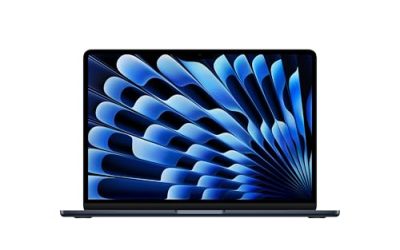
Apple MacBook Air 13 (M4)
- Best for: Mac players who want the lightest machine here for daily carry and short sessions between other tasks.
- Processor: Apple M4 chip
- Display: 13.6-inch Liquid Retina display, 2560 by 1664, 500 nits
- Memory: 16GB unified memory
- Storage: 256GB SSD storage
Mac players who want the lightest machine here for daily carry and short sessions between other tasks.
Memory and storage are fixed in the configuration you order, and 256GB is the smallest drive in this guide, so count your installed library before choosing this capacity.
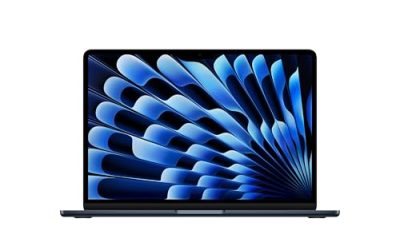
Pilgrims ships with a native macOS edition, and this is the lightest way into it. The published Mac minimum asks for macOS Sierra, a 2 GHz Intel i5 or better, 4 GB of memory and 800 MB of storage, and its graphics paragraph welcomes Metal-capable chips as old as the Intel HD 4000 series. The M4 Air clears every printed figure comfortably: 16GB of unified memory, a 256GB SSD and a 13.6-inch Liquid Retina display for the hand-drawn scenes, all in a fanless body of 2.73 pounds that suits a train table or a sofa arm.
Apple MacBook Air 15 (M4)
- Best for: Mac households that play at a table or desk and want the bigger canvas without leaving the Air line.
- Processor: Apple M4 chip
- Display: 15.3-inch Liquid Retina display, 2880 by 1864
- Memory: 16GB unified memory
- Storage: 512GB SSD storage
Mac households that play at a table or desk and want the bigger canvas without leaving the Air line.
The configuration is fixed at order time, so the 16GB of memory and 512GB of storage on this listing are what you keep for the life of the machine.
Choose the larger Air when Pilgrims mostly happens at home. It runs the same native macOS edition against the same Sierra-era minimum block, a 2 GHz Intel i5, 4 GB of memory and that long Metal graphics paragraph, but doubles the storage to 512GB and stretches the display to 15.3 inches, which gives each painted scene and your row of cards more room. The listing adds two Thunderbolt 4 ports, a MagSafe charging port and up to 18 hours of battery life, in the same fanless design at 3.32 pounds.
Lenovo Yoga Slim 7x
- Best for: Travellers who want the sharpest screen in this guide and are comfortable running the Windows edition on an ARM laptop.
- Processor: Snapdragon X Elite X1E-78-100, 12 cores, up to 3.4 GHz
- Graphics: integrated Qualcomm Adreno GPU
- Display: 14.5-inch 3K OLED touch display, 2944 by 1840, 90Hz
- Memory: 32GB LPDDR5X, soldered
Travellers who want the sharpest screen in this guide and are comfortable running the Windows edition on an ARM laptop.
The memory is soldered and the Windows edition runs through translation on this platform, so check any must-have older Windows software before ordering.
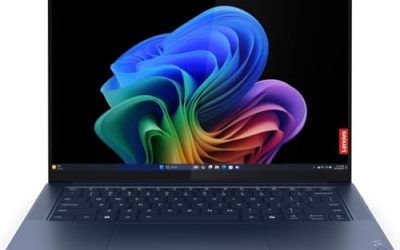
The Yoga Slim 7x is the artwork pick: a 14.5-inch 3K OLED touch panel at 2944 by 1840 for scenes that reward a close look, driven by a Snapdragon X Elite with 32GB of memory and a 1TB SSD. One honest note belongs up front. This machine runs Windows 11 Pro on ARM, and the Windows block for Pilgrims prints no architecture line, so the standard Windows build reaches this laptop through the built-in translation layer rather than natively. The published minimum itself, a 2 GHz Intel i5 class processor and 4 GB of memory, stays far below what this hardware carries.
ASUS Zenbook 14 OLED
- Best for: Windows users who want one light OLED laptop for work documents by day and card adventures in the evening.
- Processor: AMD Ryzen 7 8840HS, 8 cores, up to 5.1 GHz
- Graphics: integrated AMD Radeon 780M
- Display: 14-inch WUXGA OLED touchscreen, 1920 by 1200, as listed
- Memory: 16GB LPDDR5X
Windows users who want one light OLED laptop for work documents by day and card adventures in the evening.
The listing describes a touchscreen while maker material for this model line also lists a non-touch panel, so confirm the panel on the exact configuration before ordering.
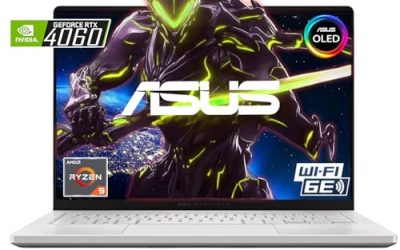
The Zenbook is the slim Windows all-rounder, built around a Ryzen 7 8840HS and a 14-inch WUXGA OLED panel with 16GB of memory and a 512GB SSD. Its graphics need a plain statement: the Radeon 780M is integrated, while the Windows minimum for Pilgrims prints the words “Dedicated GPU” and names no model. The game’s own Mac block accepts integrated Intel HD graphics from the 4000 series upward, which shows how light the underlying demand is, but buyers who want the Windows wording matched literally should look at the Victus below instead.
HP Victus 15
The Victus is the literal answer to the Windows block. Its Radeon RX 6550M is a dedicated graphics card with its own 4 GB of GDDR6 memory, which matches the two words Steam prints, “Dedicated GPU”, without any reading between the lines. Around it sit a Ryzen 5 7535HS, 32GB of DDR5 memory and a 1TB NVMe SSD, far past the published 4 GB and 800 MB figures, behind a 15.6-inch Full HD 144Hz display. At 5.06 pounds it is the desk-bound option here, and the only pick that also suits a wider gaming library.
Specs
- Processor: AMD Ryzen 5 7535HS, 6 cores, up to 4.55 GHz
- Graphics: AMD Radeon RX 6550M, 4 GB GDDR6 dedicated
- Display: 15.6-inch FHD IPS, 1920 by 1080, 144Hz, micro-edge, anti-glare
- Memory: 32GB DDR5
- Storage: 1TB NVMe SSD
- Keyboard: backlit keyboard with numeric pad
- Wireless: Wi-Fi 6
- Operating system: Windows 11 Pro
- Color: Mica Silver
- Weight: 5.06 pounds
Best for: Windows buyers who want the published graphics wording matched exactly, plus headroom for a larger library.
Watch out for: This configuration is fitted by the seller in an opened box, so confirm the 32GB memory and 1TB SSD combination on the listing before ordering.
ASIN: B0DK1JHG13
Which One Fits Your Situation
You Play on a Mac and Move Around the House
Take the MacBook Air 13. The native macOS edition asks for Sierra-era hardware and integrated Metal graphics, and the M4 model answers with 16GB of unified memory and a fanless 2.73-pound body. It slips into a bag for a train ride, opens on a sofa arm, and the 256GB SSD still swallows the 800 MB install many times over.
Your Sessions Happen at One Big Table
Take the MacBook Air 15. The 15.3-inch Liquid Retina screen gives the painted scenes and your hand of cards the most room of any Mac here, the storage doubles to 512GB, and the battery is listed at up to 18 hours. It stays fanless and light enough to move between rooms when the table changes.
You Travel for Work and Play in Hotels
Take the Yoga Slim 7x. The 3K OLED touch panel is the sharpest display in this guide, 32GB of memory and a 1TB SSD cover a whole working trip, and the body weighs 2.82 pounds. Accept the one condition plainly: on this ARM laptop the Windows edition of the game runs through the built-in translation layer.
You Want One Windows Laptop for Everything Else Too
Take the Victus 15 if a wider library matters, since its dedicated RX 6550M matches the Windows wording exactly and the 144Hz screen suits faster games. Take the Zenbook 14 OLED if the laptop mostly carries documents and media, and you accept integrated graphics against a minimum block that the Mac edition answers with HD 4000-era integrated chips.
Common Mistakes
- Reading the Windows line “Dedicated GPU” as a named card requirement, when the page names no model and the Mac block accepts integrated graphics from the HD 4000 series.
- Filling in the missing Linux graphics line from a mirror page, instead of accepting that Steam publishes no graphics line for Linux at all.
- Waiting for a recommended tier that does not exist, because all three platforms publish minimum blocks only.
- Treating “Windows 7 SP1 or better” and macOS Sierra as current support statements, when both blocks date from an older era and the Steam Client itself now requires Windows 10 or later.
- Ordering the Yoga Slim 7x without noticing it runs Windows on ARM, so the game’s Windows build arrives through translation rather than natively.
Frequently Asked Questions
Does Pilgrims run on a current Apple silicon Mac?
Yes. Steam publishes a native macOS edition, and its minimum block is Sierra-era Intel wording with no Catalina-incompatibility notice and no Apple-silicon exclusion printed anywhere on the page. The graphics paragraph welcomes Metal-capable chips, a family that includes the integrated graphics in current Apple silicon, so the M4 MacBook Air models in this guide are native picks.
Which graphics card does Pilgrims actually require?
It depends which block you read. Windows prints just “Dedicated GPU” with no model named, the Mac block prints a Metal paragraph that accepts Intel HD and Iris graphics from the HD 4000 series or newer alongside AMD and Nvidia families, and Linux prints no graphics line at all. No platform names a specific card you must own.
How much memory and storage does the game need?
The figures are identical on all three platforms: 4 GB RAM and 800 MB of available storage. Every laptop in this guide passes both by a wide margin, starting at 16GB of memory and 256GB of storage, so your wider library and other work should drive the configuration choice rather than this one small install.
Is there a recommended tier to aim for?
No. Windows, macOS and Linux each publish a minimum block and nothing above it, so there is no official step-up target for processor, memory or graphics. Buyers sometimes fill that gap with figures from mirror pages, but those numbers are not the publisher’s. The five picks here were chosen on screen, weight and ecosystem instead.
More from Amazon
Programs that pair well with the guide above. Offers and eligibility are set by Amazon and may change.
A free business account with business pricing and bulk-buying tools for work, shop or home office.
Create a business accountFree shipping on eligible items, Prime Video and more. Eligible new members can start with a free trial.
Start a Prime free trialAudiobooks and podcasts to listen to on the go. Eligible new members can start with a free trial.
Try Audible freeAd-free music streaming. Eligible new subscribers can start with a free trial.
Try Music Unlimited freeAs an Amazon Associate we earn from qualifying purchases.



Write Your Review
No reviews yet. Be the first to share your experience!