
Our Short List of 3

- Processor: AMD Ryzen 9 8945HS
- Graphics: NVIDIA GeForce RTX 4060 Laptop GPU
- Memory: 16GB LPDDR5X
- Storage: 1TB PCIe SSD

- Processor: AMD Ryzen 7 260
- Graphics: NVIDIA GeForce RTX 5060, 8GB GDDR7 as listed
- Memory: 16GB DDR5-5600
- Storage: 1TB SSD M.2 PCIe Gen4
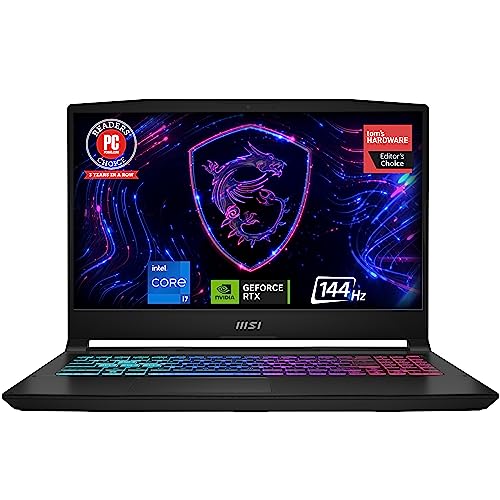
- Processor: Intel Core i7-13620H
- Graphics: NVIDIA GeForce RTX 4070, 8GB as listed
- Memory: 16GB DDR5
- Storage: 1TB NVMe SSD
All 4 Picks at a Glance
| Product | Specs | Action |
|---|---|---|
| ASUS ROG Zephyrus G14 (2024) |
| Check price on Amazon |
| Lenovo Legion 5 Gen 10 |
| Check price on Amazon |
| MSI Katana 15 |
| Check price on Amazon |
 Razer Blade 16 (2026) |
| Check price on Amazon |
Hogwarts Legacy puts you in the robes of a fifth-year student arriving at the castle in the late 1800s, with the grounds, Hogsmeade village, and the highlands open to explore. It is a big, detailed open world: moving staircases, greenhouses, broom flights over the lake, and duels in forest clearings. On a laptop, that world lives or dies on the hardware underneath it.
The good news is that every machine in this guide pairs dedicated graphics with a fast modern processor and quick solid-state storage, the three things this game leans on hardest. The picks range from a compact 14-inch traveler to a 16-inch flagship, so there is a fit for a dorm desk, a living-room table, or a bag you carry every day.
As an Amazon Associate, we earn from qualifying purchases.
How to Choose a Laptop for Hogwarts Legacy
Start with graphics. Hogwarts Legacy renders a dense open world with long sight lines, candlelit interiors, and weather that rolls across the highlands, so a dedicated graphics chip with its own memory matters far more here than integrated graphics. Every laptop below lists an NVIDIA GeForce RTX chip; the higher tiers add graphics memory and headroom for the game’s heavier scenes, while the entry picks ask you to lean on the settings menu a little more.
Processor and storage come next. The game streams assets as you sprint through the castle or dive on a broom, and a fast multi-core chip keeps that streaming smooth while quick NVMe storage shortens the pause at load transitions between the castle, Hogsmeade, and the open map. Sixteen gigabytes of memory is the working floor in this guide, and two picks double that for players who keep guides and chat open alongside the game.
Screens and cooling finish the picture. A sharp panel with a high refresh figure, as each listing states it, makes spell effects and torchlit corridors easier to read, and the OLED panels in this group give the castle’s darker corners deep, clean blacks. Gaming laptops run warm under a long session, so the cooling each maker lists — vapor chambers, dual fans, liquid metal — is worth a look before you settle.
ASUS ROG Zephyrus G14 (2024)
- Processor: AMD Ryzen 9 8945HS
- Graphics: NVIDIA GeForce RTX 4060 Laptop GPU
- Memory: 16GB LPDDR5X
- Storage: 1TB PCIe SSD
The Zephyrus G14 is the traveler’s pick in this group. Its 14-inch OLED panel runs at 2880 by 1800 with a 120Hz refresh figure as listed, so the castle’s stained glass and the lake at dusk look crisp on a screen you can carry anywhere, and the whole machine weighs 3.31 pounds as listed.
Inside, the listing pairs a Ryzen 9 8945HS with an RTX 4060 and 16GB of memory, a combination aimed at playing at the panel’s native sharpness with settings tuned to suit. The 1TB solid-state drive holds the game and a working library beside it, and the slim shell slips into a backpack for a weekend away.
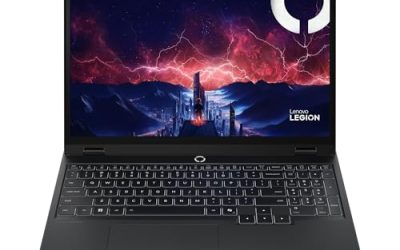
Lenovo Legion 5 Gen 10
- Processor: AMD Ryzen 7 260
- Graphics: NVIDIA GeForce RTX 5060, 8GB GDDR7 as listed
- Memory: 16GB DDR5-5600
- Storage: 1TB SSD M.2 PCIe Gen4
The Legion 5 Gen 10 brings a current-generation RTX 5060 with 8GB of GDDR7 graphics memory as listed, driven by a Ryzen 7 260. That pairing sits in the middle of this group: new graphics hardware, a fast eight-core chip, and Lenovo’s Coldfront cooling working behind a 15.1-inch chassis.
Its screen is a highlight — a WQXGA OLED at 2560 by 1600 and 165Hz with 500 nits as listed, which suits a game that spends half its hours in torchlit stone corridors. Wi-Fi 7, an Ethernet port, and HDMI 2.1 round out a port set that makes docking at a desk simple.
MSI Katana 15
- Processor: Intel Core i7-13620H
- Graphics: NVIDIA GeForce RTX 4070, 8GB as listed
- Memory: 16GB DDR5
- Storage: 1TB NVMe SSD
The Katana 15 is the straightforward power pick. MSI lists an RTX 4070 with 8GB of graphics memory and a Core i7-13620H, and that graphics tier is the strongest step in this guide for players who want the settings menu opened wide at the panel’s 1080p resolution.
The 15.6-inch screen runs at 144Hz as listed, and MSI’s Cooler Boost 5 dual-fan system handles the heat of long sessions in the Forbidden Forest. Sixteen gigabytes of DDR5 memory and a 1TB NVMe drive cover the basics well, and the full-size keyboard with a numeric keypad earns its keep outside the game too.
Acer Nitro V 15
The Nitro V 15 pairs the same Core i7-13620H found in the Katana with an RTX 5060, making it the newer-graphics route into this list. Its 15.6-inch IPS panel runs at 165Hz with 300 nits as listed, a bright, quick screen for a game full of fast broom work.
Sixteen gigabytes of memory and a 1TB solid-state drive are fitted as listed, and at 4.7 pounds the Nitro is light enough to move between rooms without a second thought. A backlit keyboard and Wi-Fi 6 finish a spec sheet that keeps the focus on the game rather than the extras.
Specs
- Processor: Intel Core i7-13620H
- Graphics: NVIDIA GeForce RTX 5060, 8GB as listed
- Memory: 16GB
- Storage: 1TB SSD
- Display: 15.6-inch FHD IPS, 1920 x 1080, 165Hz, 300 nits as listed
- Wireless: Wi-Fi 6 as listed
- Weight: 4.7 lb as listed
- ASIN: B0FRNMJGJR
Razer Blade 16 (2026)
- Processor: Intel Core Ultra 9 386H
- Graphics: NVIDIA GeForce RTX 5070 Ti, 12GB GDDR7 as listed
- Memory: 32GB LPDDR5X
- Storage: 1TB SSD
The Blade 16 is the flagship of this group. Razer’s 2026 model lists a Core Ultra 9 386H and an RTX 5070 Ti with 12GB of GDDR7 graphics memory, plus 32GB of system memory — the most graphics headroom and the most multitasking room of any pick here.
The 16-inch QHD+ OLED panel refreshes at 240Hz as listed, giving the Great Hall’s floating candles and fast duels a very sharp, fluid canvas. Thunderbolt 5 and Thunderbolt 4 ports cover docks and fast external drives, and the thin aluminum shell keeps that power in a machine that still looks at home on a desk.
FAQ
Can a laptop with integrated graphics play Hogwarts Legacy?
It is a demanding open-world game, and integrated graphics leave you turning settings down hard. Every pick in this guide uses a dedicated RTX graphics chip with its own memory, which is the practical route to the castle as its makers drew it.
How much storage should I set aside for the game?
Plan for a large install plus room for updates and save files. Each laptop here ships with a 1TB solid-state drive as listed, which holds the game comfortably alongside a handful of other titles and your everyday files.
Is a high-refresh screen worth it for a story game?
It helps more than you might expect. Broom flight, spell duels, and camera pans all look smoother on the 120Hz to 240Hz panels listed here, and the sharper resolutions make the castle’s detail easier to take in.
Conclusion
Each of these five laptops will carry you through a full school year at the castle; the choice comes down to how you play. Pick the Zephyrus G14 for travel, the Legion 5 or Nitro V for current-generation graphics in the middle of the group, the Katana 15 for RTX 4070 power, and the Blade 16 if you want the flagship screen and headroom. Match the graphics tier to your expectations, keep the settings menu honest, and the wizarding world will do the rest.
More from Amazon
Programs that pair well with the guide above. Offers and eligibility are set by Amazon and may change.
A free business account with business pricing and bulk-buying tools for work, shop or home office.
Create a business accountFree shipping on eligible items, Prime Video and more. Eligible new members can start with a free trial.
Start a Prime free trialAudiobooks and podcasts to listen to on the go. Eligible new members can start with a free trial.
Try Audible freeAd-free music streaming. Eligible new subscribers can start with a free trial.
Try Music Unlimited freeAs an Amazon Associate we earn from qualifying purchases.



Write Your Review
No reviews yet. Be the first to share your experience!