
Balatro turns familiar poker hands into a scoring puzzle. You play pairs, flushes, and full houses, then bend the rules with Joker cards that multiply your score in ways a normal deck never allows. It is a single-player video game about building a deck and chasing bigger hand scores, with no real-money play involved, and it has become a favorite for short sessions that quietly turn into long ones.
Because the game is a lightweight 2D title, almost any modern laptop runs it well. That makes this roundup less about raw power and more about screens, battery life, portability, and how pleasant a machine is to live with every day. As an Amazon Associate, we earn from qualifying purchases.
How to Choose a Laptop for Balatro
Start with the good news: Balatro runs natively on both Windows and macOS, so Mac picks are completely fair here and nobody needs a workaround to play. The system demands are tiny by modern standards. Any current integrated graphics chip handles the game’s flat art and animations, and a modest processor is all the deck-building math requires.
What actually shapes your experience is the screen. Balatro is a game you read: card faces, Joker descriptions, and score tallies all live in text and small print. A bright, sharp display with good contrast makes long sessions easier on the eyes, and OLED panels make the game’s colors pop nicely. Storage speed matters only at the margins, since the game itself is small and loads quickly from any SSD.
Battery life and weight matter more than usual because this is the kind of game people play on trains, in bed, and during lunch breaks. A light machine with a long-lasting battery suits it better than a heavy gaming rig. The two gaming laptops at the end of this list are here for players with big libraries who want one machine for everything; for Balatro alone, they are far more than the game asks for, and we say so honestly in their sections.
Apple MacBook Air 13 (M4)

The MacBook Air is the natural home for Balatro. The native macOS version runs without fuss on Apple silicon, the fanless design stays silent during play, and the listed battery figure of up to 18 hours means you can leave the charger at home for a day of runs. It is the pick for anyone who wants a thin machine that disappears into a bag.
The 13.6-inch Liquid Retina display is sharp and bright, which suits a text-heavy card game well. The M4 chip is far beyond what Balatro needs, so the game opens instantly and the machine stays cool and quiet. If your laptop doubles as your everyday work computer, this is the easiest recommendation on the list.
Specs
- Chip: Apple M4
- Memory: 16GB unified memory
- Storage: 256GB SSD
- Display: 13.6-inch Liquid Retina
- Battery: up to 18 hours, as listed
- Ports: 2x Thunderbolt / USB 4, MagSafe 3 charging
- Operating system: macOS
- ASIN: B0F3KM4LYH
ASUS Zenbook 14 OLED (UM3406HA)

The Zenbook 14 OLED is the Windows counterpart to the Air: a slim, light ultraportable whose screen is the headline. Its 14-inch OLED touchscreen renders Balatro’s colorful Jokers and card art with deep contrast, and at about 2.65 lb as listed it is easy to carry everywhere.
The Ryzen 7 8840HS and its integrated Radeon 780M graphics are much more than this game requires, so runs stay smooth while the machine handles everyday work with ease. The 75Wh battery is generous for the size. Choose this one if you want a Windows laptop with a standout display for a game you mostly read.
Specs
- Processor: AMD Ryzen 7 8840HS, up to 5.1 GHz as listed
- Graphics: AMD Radeon 780M integrated
- Memory: 16GB LPDDR5X
- Storage: 512GB M.2 NVMe PCIe 4.0 SSD
- Display: 14-inch WUXGA OLED touchscreen, 1920 x 1200
- Battery: 75Wh
- Wireless: Wi-Fi 6E
- Operating system: Windows 11 Home
- ASIN: B0DFWZ77LB
Dell XPS 13 9350

The XPS 13 is the premium Windows option, built around a 13.4-inch 3K OLED touchscreen that makes small text and card details exceptionally crisp. The Core Ultra 7 258V uses integrated Intel Arc graphics, which are comfortably sufficient for a light 2D game like this one.
With 32GB of memory and a 1TB SSD in this configuration, the XPS 13 is really a high-end everyday ultraportable that happens to be excellent for Balatro on the move. The trade-off is the two-port design, so a small hub helps at a desk. Pick it if build quality and screen sharpness top your list.
Specs
- Processor: Intel Core Ultra 7 258V
- Graphics: Intel Arc 140V integrated
- Memory: 32GB LPDDR5X
- Storage: 1TB SSD
- Display: 13.4-inch 3K OLED touchscreen, 2880 x 1800
- Ports: 2x Thunderbolt 4
- Wireless: Wi-Fi 7, as listed
- Operating system: Windows 11 Pro
- ASIN: B0F1FDRLZ1
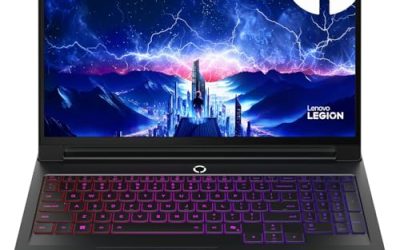
Lenovo Legion 5 Gen 10

The Legion 5 is a true gaming laptop, and honesty matters here: Balatro uses a small fraction of what this machine offers. The RTX 5060, the 165Hz OLED display, and the Ryzen 7 260 are aimed at demanding modern games. If Balatro is one stop in a large and varied library, that headroom makes sense.
For the game itself, the 15.1-inch WQXGA OLED screen is the real draw, giving cards and menus plenty of room at high sharpness. Memory sits in slots as listed, so upgrading later is an option. Buy this if you want one laptop that covers Balatro and far heavier titles alike.
Specs
- Processor: AMD Ryzen 7 260, up to 5.1 GHz as listed
- Graphics: NVIDIA GeForce RTX 5060, 8GB GDDR7
- Memory: 16GB DDR5-5600 in slots, as listed
- Storage: 1TB SSD M.2 PCIe Gen4
- Display: 15.1-inch WQXGA OLED, 2560 x 1600, 165Hz, 500 nits as listed
- Keyboard: 24-zone RGB backlit, as listed
- Ports: USB4, USB-C, USB-A, HDMI 2.1, Ethernet
- Operating system: Windows 11 Home
- ASIN: B0FXMY8FYW
HP Victus 15

The Victus 15 is the second gaming pick, with a larger 15.6-inch screen and an RTX 5060 inside. Like the Legion, it is far more powerful than Balatro needs, and we will not pretend otherwise. Its place here is for players who split time between this game and bigger titles on the same machine.
The bigger display gives the game’s interface room to breathe, and the 32GB of memory in this configuration keeps heavy multitasking smooth between sessions. If a single all-purpose gaming laptop is the goal and Balatro is your current obsession, the Victus covers both ends of that library.
Specs
- Processor: AMD Ryzen AI 7 350
- Graphics: NVIDIA GeForce RTX 5060, 8GB GDDR7
- Memory: 32GB DDR5
- Storage: 1TB SSD
- Display: 15.6-inch FHD, 1920 x 1080, 144Hz
- Keyboard: RGB backlit, as listed
- Ports: USB-C, USB-A, HDMI, Ethernet
- Operating system: Windows 11 Home
- ASIN: B0G1N8R9Z4
Comparison Table
| Product | Best for | Key spec |
|---|---|---|
| Apple MacBook Air 13 (M4) | Mac players and battery life | M4 chip, up to 18 hours as listed |
| ASUS Zenbook 14 OLED | Windows ultraportable with OLED | 14-inch OLED touchscreen |
| Dell XPS 13 9350 | Premium build and sharp text | 13.4-inch 3K OLED touchscreen |
| Lenovo Legion 5 Gen 10 | One laptop for a big library | RTX 5060, 165Hz OLED |
| HP Victus 15 | Larger screen gaming pick | 15.6-inch FHD 144Hz, RTX 5060 |
FAQ
Does Balatro need a gaming laptop?
No. Balatro is a lightweight 2D game with modest system demands, and any modern laptop with integrated graphics runs it well. The gaming laptops in this roundup are included for players who also play demanding titles, not because this game requires them.
Can I play Balatro on a Mac?
Yes. Balatro runs natively on macOS as well as Windows, so an Apple silicon Mac like the MacBook Air plays the full game with no workarounds. Your choice between the two platforms can come down to the laptop you prefer for everything else.
Can I play Balatro offline?
Yes. Balatro is a single-player game built around solo runs against escalating score targets, so it plays happily without a connection. That makes any of the lighter picks here a good travel companion for flights and commutes.
Conclusion
For Balatro alone, the MacBook Air 13 and Zenbook 14 OLED are the sweet spot: light, quiet, sharp-screened machines with the battery to match the game’s one-more-run pull. The XPS 13 adds a premium build, while the Legion 5 and Victus 15 serve players whose libraries reach far beyond one card game.
More from Amazon
Programs that pair well with the guide above. Offers and eligibility are set by Amazon and may change.
A free business account with business pricing and bulk-buying tools for work, shop or home office.
Create a business accountFree shipping on eligible items, Prime Video and more. Eligible new members can start with a free trial.
Start a Prime free trialAudiobooks and podcasts to listen to on the go. Eligible new members can start with a free trial.
Try Audible freeAd-free music streaming. Eligible new subscribers can start with a free trial.
Try Music Unlimited freeAs an Amazon Associate we earn from qualifying purchases.









Write Your Review
No reviews yet. Be the first to share your experience!