
The Witness drops you alone on a bright, quiet island and lets you wander. There is no combat, no dialogue, and no checklist pushing you along; progress comes from finding puzzle panels set into cliffs, groves, buildings, and shorelines, and working through them in whatever order you like. Sessions stretch or shrink to fit your day, and the game asks for modest hardware by modern standards, so the better question is which laptop makes long, unhurried exploration comfortable.
Screen size and clarity matter most here, because so much of the island is read at a distance: colors, shapes, and sightlines carry the information. Fast storage keeps loading brief when you move between areas, and a machine you can carry from desk to sofa suits a game built around wandering. As an Amazon Associate, we earn from qualifying purchases. The five Windows laptops below cover that range, from a wide OLED flagship to simpler machines that still give the island room to breathe.
How to Choose a Laptop for The Witness
Start with the platform: on PC, The Witness is a Windows-only release, so every pick in this guide runs Windows and there is no Mac version to plan around. Any current Windows laptop with a discrete GPU or recent integrated graphics covers the game’s modest demands; what separates the picks is the screen, the storage, and how the machine feels over long sessions.
Look for a display you enjoy studying. The island communicates through color and line, so a higher resolution panel or an OLED screen makes distant detail easier to pick out, while a larger 16-inch panel suits desk play and a 15-inch panel travels better. An SSD is standard across this list and keeps area transitions quick. Memory of 16GB or more leaves room for a browser full of notes alongside the game, and a full-size keyboard with a numeric keypad helps if you sketch grids or jot down observations in a notes app.
ASUS ROG Zephyrus G16 (2025)

The Zephyrus G16 is the pick for players who want the island on the widest, richest screen in this guide. Its 16-inch ROG Nebula OLED panel runs at 2560 x 1600 with a 240Hz refresh rate and G-SYNC as listed, and OLED color suits a game where a shift in hue can be the whole point of a scene. The chassis stays slim at 0.59 inches and 4.30 lb as listed, so it still moves between rooms easily.
This configuration pairs a Core Ultra 9 285H with an RTX 5070 Ti and 32GB of memory, far beyond what the game asks, which makes it a better fit for players who also run demanding titles or creative work on the same machine. It is a seller-configured listing, so check that the configuration summary on the page matches the specs below before ordering.
Specs
- Processor: Intel Core Ultra 9 285H
- Graphics: NVIDIA GeForce RTX 5070 Ti Laptop GPU, 12GB GDDR7
- Memory: 32GB LPDDR5X
- Storage: 2TB SSD
- Display: 16″ ROG Nebula OLED, 2560 x 1600, 240Hz, G-SYNC
- Weight: 4.30 lb as listed
- Operating system: Windows 11 Pro
- ASIN: B0G1W7V6VP
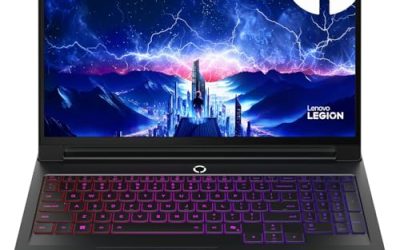
Lenovo Legion 5 Gen 10

The Legion 5 Gen 10 brings OLED to a 15.1-inch frame. The WQXGA panel lists 500 nits, full DCI-P3 coverage, and a 165Hz refresh rate, so the island’s gardens and stonework read clearly even in a bright room. At this size it is the easier carry of the two OLED picks, and it suits players who split time between a desk and the sofa.
Inside, a Ryzen 7 260 and an RTX 5060 with 16GB of DDR5-5600 memory and a 1TB SSD give the game ample headroom, and the port mix includes a USB4 port as listed for fast docks and drives. The 24-zone RGB backlit keyboard is easy to tone down to a single soft color for evening sessions.
Specs
- Processor: AMD Ryzen 7 260, up to 5.1 GHz as listed
- Graphics: NVIDIA GeForce RTX 5060 Laptop GPU, 8GB GDDR7
- Memory: 16GB DDR5-5600
- Storage: 1TB PCIe Gen4 SSD
- Display: 15.1″ WQXGA OLED, 2560 x 1600, 165Hz, 500 nits as listed
- Keyboard: 24-zone RGB backlit as listed
- Operating system: Windows 11 Home
- ASIN: B0FXMY8FYW
HP Victus 15

The Victus 15 is the straightforward middle path: a 15.6-inch FHD screen at 144Hz as listed, an RTX 5060, and the most memory in this guide at 32GB. The panel trades the OLED picks’ depth for a larger, library-friendly machine that also handles everyday work without fuss.
This listing bundles a 7-in-1 USB-C hub, which adds handy ports for a mouse, a drive, or a second screen; confirm the bundle contents on the page before ordering, since bundles change. Wired networking is built in through the RJ-45 port as listed, which helps when you download a bigger library over a weekend.
Specs
- Processor: AMD Ryzen AI 7 350, up to 5.0 GHz as listed
- Graphics: NVIDIA GeForce RTX 5060, 8GB GDDR7
- Memory: 32GB DDR5
- Storage: 1TB SSD
- Display: 15.6″ FHD, 144Hz as listed
- Networking: RJ-45 Ethernet as listed
- Operating system: Windows 11 Home
- ASIN: B0G1N8R9Z4
Lenovo LOQ 15

The LOQ 15 is the simplest route onto the island. Its 15.6-inch FHD IPS panel runs at 144Hz with 300 nits and full sRGB coverage as listed, and the RTX 4050 covers the game’s needs with room left for lighter titles in the same library.
Two details suit puzzle players who take notes: the backlit keyboard includes a numeric keypad as listed, and the 16GB of DDR5 memory can be upgraded to 64GB as listed if your habits grow. Storage starts at 512GB, which still leaves plenty of room for a modest collection alongside the game.
Specs
- Processor: AMD Ryzen 7 170, up to 4.75 GHz as listed
- Graphics: NVIDIA GeForce RTX 4050, 6GB GDDR6
- Memory: 16GB DDR5, upgradeable to 64GB as listed
- Storage: 512GB PCIe SSD
- Display: 15.6″ FHD IPS, 144Hz, 300 nits as listed
- Keyboard: backlit with numeric keypad as listed
- Operating system: Windows 11 Home
- ASIN: B0GZJXCT3P
MSI Katana 15

The Katana 15 rounds out the list with an Intel route: a Core i7-13620H, an RTX 4050, and a 1TB NVMe SSD, the joint-largest storage here alongside the Legion and the Victus. Its 15.6-inch FHD IPS screen runs at 144Hz as listed, and the layout is a familiar full-size design.
At 4.96 lb as listed it is the lighter of the two RTX 4050 picks, and the full-size keyboard with a numeric keypad mirrors the LOQ’s note-taking appeal. Choose it if you prefer Intel hardware, or if you want the bigger drive for a growing backlog of slow, thoughtful games.
Specs
- Processor: Intel Core i7-13620H
- Graphics: NVIDIA GeForce RTX 4050, 6GB GDDR6
- Memory: 16GB DDR5-4800
- Storage: 1TB NVMe SSD
- Display: 15.6″ FHD IPS, 144Hz as listed
- Weight: 4.96 lb as listed
- Operating system: Windows 11 Home
- ASIN: B0BZBN3857
Comparison Table
| Product | Best for | Key spec |
|---|---|---|
| ASUS ROG Zephyrus G16 (2025) | Widest OLED view | 16″ OLED 2560 x 1600, 240Hz |
| Lenovo Legion 5 Gen 10 | OLED in a smaller frame | 15.1″ WQXGA OLED, 165Hz |
| HP Victus 15 | Memory and ports | 32GB DDR5, bundled USB-C hub |
| Lenovo LOQ 15 | Simplest entry | RTX 4050, upgradeable memory |
| MSI Katana 15 | Intel hardware, big drive | Core i7-13620H, 1TB SSD |
FAQ
Does The Witness run on a Mac?
No. The PC release is Windows-only, which is why every pick in this guide runs Windows. If your household is Mac-based, plan on a Windows laptop for this one rather than waiting for a port.
Do I need a gaming laptop for The Witness?
The game asks for modest hardware, so a gaming model is not required for the game alone. The picks here are gaming laptops because their screens, storage, and build suit long sessions and leave room for the rest of a library; a modern thin laptop with recent integrated graphics can also handle the island.
How long does The Witness take to finish?
It varies widely by player, since the island is open and its panels can be visited in many orders. Plan on dozens of hours if you explore thoroughly, and expect some panels to sit unfinished while you wander elsewhere and come back to them later.
Conclusion
The Witness rewards patience and a good screen more than raw power. Pick the Zephyrus G16 for the widest OLED view, the Legion 5 for OLED in a smaller frame, the Victus 15 for memory and ports, the LOQ 15 for the simplest entry, or the Katana 15 for Intel hardware with a large drive — each one runs Windows, carries the island on an SSD, and leaves you free to wander at your own pace.
More from Amazon
Programs that pair well with the guide above. Offers and eligibility are set by Amazon and may change.
A free business account with business pricing and bulk-buying tools for work, shop or home office.
Create a business accountFree shipping on eligible items, Prime Video and more. Eligible new members can start with a free trial.
Start a Prime free trialAudiobooks and podcasts to listen to on the go. Eligible new members can start with a free trial.
Try Audible freeAd-free music streaming. Eligible new subscribers can start with a free trial.
Try Music Unlimited freeAs an Amazon Associate we earn from qualifying purchases.









Write Your Review
No reviews yet. Be the first to share your experience!