
Grim Dawn rewards patience like few action RPGs do. Its dual-class builds, faction choices, and dense loot tables can hold a player for hundreds of hours, and the Ashes of Malmouth and Forgotten Gods expansions add whole regions to the base campaign. As an Amazon Associate, we earn from qualifying purchases.
The friendly part for laptop buyers is that Grim Dawn launched in 2016 on an already mature engine, so it asks very little of modern hardware. Integrated graphics genuinely run it, an SSD keeps area transitions quick, and every laptop below runs Windows, because the PC version is Windows-only.
How to Choose a Laptop for Grim Dawn
Start with the platform fact: Grim Dawn on PC is Windows-only. There is no macOS version, so all five picks here run Windows, and Mac owners need a Windows laptop like these for this game.
Graphics needs are modest. The Radeon 780M and Intel Arc integrated graphics in the two smaller picks handle the game at sensible settings, an honest fit for a title of this age. A dedicated GPU such as the RX 6550M or RTX 4050 is not required, but it gives headroom for higher settings, crowded endgame fights, and a wider game library.
The rest is comfort. The game’s engine leans on a small number of CPU threads, and any current processor here covers that easily. An SSD shortens loading pauses between areas, 16GB of memory is comfortable for the game plus a browser or voice chat alongside, and the real choice is size: a light 13- or 14-inch laptop for playing anywhere, or a 15.6-inch gaming model with a larger, faster screen at a desk.
ASUS Zenbook 14 OLED (UM3406HA)

The Zenbook 14 OLED is the pick for players who want Grim Dawn on a laptop that also disappears into a work bag. Its Ryzen 7 8840HS processor pairs with Radeon 780M integrated graphics, a combination that genuinely suits this game, and the 14-inch OLED touchscreen renders Cairn’s burnt villages and dark cellars with the deep contrast the art style deserves. At about 2.65 lb in Jade Black, it is easy to carry between rooms or on trips.
The supporting hardware is sensible rather than flashy: 16GB of LPDDR5X memory, a 512GB NVMe SSD for the game and its expansions, and a 75Wh battery for sessions away from an outlet. The honest framing is that this is an ultrabook first, so you keep settings modest and accept integrated graphics as the trade for the size and screen — a fair trade for a light game like this.
Specs
- CPU: AMD Ryzen 7 8840HS, 8 cores, up to 5.1 GHz
- Graphics: AMD Radeon 780M integrated
- Memory: 16GB LPDDR5X
- Storage: 512GB NVMe M.2 SSD
- Display: 14-inch OLED touchscreen, 1920 x 1200
- Battery: 75Wh
- Wireless: Wi-Fi 6E
- Operating system: Windows 11 Home
- ASIN: B0DFWZ77LB
Dell XPS 13 9350
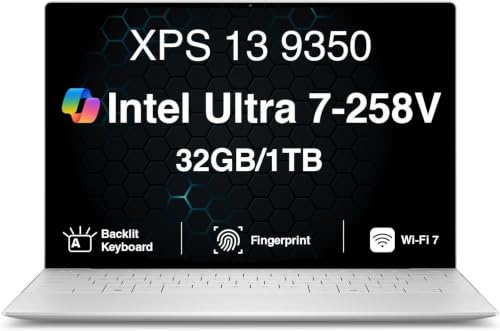
The XPS 13 9350 is the smallest laptop in this roundup, built around Intel’s Core Ultra 7 258V and its Arc 140V integrated graphics. That graphics chip is a step beyond older integrated designs, and it fits Grim Dawn well. This configuration carries 32GB of memory and a 1TB SSD, generous amounts for a 13.4-inch machine, and its FHD+ screen runs at 120Hz with 500 nits of brightness as listed.
Portability is the point here. The XPS weighs about 2.6 lb, the listing claims up to 26 hours of battery life, and a fingerprint reader sits in the power button as listed. The compromise is connectivity: two Thunderbolt 4 ports are all you get, so a small dock helps at a desk. Buyers who want the lightest possible Windows laptop for this game will accept that trade happily.
Specs
- CPU: Intel Core Ultra 7 258V, up to 4.8 GHz
- Graphics: Intel Arc 140V integrated
- Memory: 32GB LPDDR5X
- Storage: 1TB PCIe SSD
- Display: 13.4-inch FHD+ 1920 x 1200, 120Hz, 500 nits as listed
- Ports: 2x Thunderbolt 4
- Wireless: Wi-Fi 7, Bluetooth 5.4
- Operating system: Windows 11 Pro
- ASIN: B0H5TKFRVM
HP Victus 15

The Victus 15 is the step up to dedicated graphics. Its Ryzen 5 7535HS processor works alongside a Radeon RX 6550M, which is more graphics hardware than Grim Dawn asks for, and that headroom is the honest reason to pick it: higher settings here, and room for newer games later. The 15.6-inch Full HD screen refreshes at 144Hz, and the backlit keyboard includes a numeric keypad.
Storage and memory are comfortable at 16GB of DDR5 and a 1TB SSD, enough for the full game, both expansions, the Crucible mode, and a wider library besides. The Victus is a larger, desk-friendly machine rather than a travel companion, and its fan noise under load is part of that bargain.
Specs
- CPU: AMD Ryzen 5 7535HS, 6 cores, up to 4.55 GHz
- Graphics: AMD Radeon RX 6550M dedicated
- Memory: 16GB DDR5
- Storage: 1TB PCIe NVMe SSD
- Display: 15.6-inch FHD 1920 x 1080, 144Hz
- Keyboard: Backlit with numeric keypad
- Wireless: Wi-Fi 6
- Operating system: Windows 11 Home
- ASIN: B0DB96MQKR
Lenovo LOQ 15

The LOQ 15 pairs a Ryzen 7 170 processor with an RTX 4050 carrying 6GB of GDDR6 memory, the strongest graphics setup among the 15.6-inch picks here. Its screen is a 15.6-inch FHD IPS panel at 144Hz with 300 nits and 100% sRGB coverage as listed, a good match for long sessions in Grim Dawn’s darker zones, and the white backlit keyboard includes a numeric keypad.
What sets the LOQ apart is room to grow. The listing describes memory as upgradeable and the chassis offers dual storage slots, so the fitted 16GB of DDR5 and 512GB SSD are a starting point rather than a ceiling. At 5.29 lb as listed it is a desk-first laptop, but that weight buys real flexibility for heavier games later.
Specs
- CPU: AMD Ryzen 7 170, 8 cores, up to 4.75 GHz
- Graphics: NVIDIA GeForce RTX 4050, 6GB GDDR6
- Memory: 16GB DDR5, upgradeable as listed
- Storage: 512GB PCIe SSD
- Display: 15.6-inch FHD IPS 1920 x 1080, 144Hz, 300 nits, 100% sRGB as listed
- Keyboard: White backlit with numeric keypad
- Wireless: Wi-Fi 6
- Operating system: Windows 11 Home
- ASIN: B0GZJXCT3P
MSI Katana 15

The Katana 15 takes a traditional gaming-laptop route: an Intel Core i7-13620H processor, an RTX 4050 with 6GB of GDDR6 memory, and a 15.6-inch Full HD IPS screen at 144Hz. That combination covers Grim Dawn with plenty to spare, and the 1TB NVMe SSD fitted as standard means the game, its expansions, and a backlog all fit without juggling installs.
The supporting details are practical. You get 16GB of DDR5-4800 memory, Wi-Fi 6 with Bluetooth 5.2, and a weight of 4.85 lb as listed, lighter than many 15.6-inch gaming models. The Katana makes no attempt to be an ultrabook: it is a focused gaming laptop that runs this game and far more demanding ones.
Specs
- CPU: Intel Core i7-13620H, 10 cores
- Graphics: NVIDIA GeForce RTX 4050, 6GB GDDR6
- Memory: 16GB DDR5-4800
- Storage: 1TB NVMe SSD
- Display: 15.6-inch Full HD IPS 1920 x 1080, 144Hz
- Wireless: Wi-Fi 6, Bluetooth 5.2
- Weight: 4.85 lb as listed
- Operating system: Windows 11 Home
- ASIN: B0BZBN3857
Comparison Table
| Product | Best for | Key spec |
|---|---|---|
| ASUS Zenbook 14 OLED (UM3406HA) | Portable play with an OLED screen | Radeon 780M integrated graphics |
| Dell XPS 13 9350 | The lightest Windows option | Intel Arc 140V integrated graphics |
| HP Victus 15 | A dedicated GPU step-up | Radeon RX 6550M |
| Lenovo LOQ 15 | Upgrades over time | RTX 4050 with upgradeable memory |
| MSI Katana 15 | Storage fitted as standard | RTX 4050 with 1TB SSD |
FAQ
Does Grim Dawn run on a Mac?
No. The PC version of Grim Dawn is Windows-only, and there is no macOS edition. Mac owners need a Windows laptop for it, and any of the five machines above runs the game.
Can integrated graphics really run Grim Dawn?
Yes. Grim Dawn launched in 2016 with light hardware demands, and modern integrated graphics such as the Radeon 780M and Intel Arc 140V are a genuine match for it at sensible settings. A dedicated GPU adds headroom rather than unlocking the game.
How much storage do I need for Grim Dawn and its expansions?
The base game plus the Ashes of Malmouth and Forgotten Gods expansions stays modest next to modern releases, so even the 512GB drives in this roundup hold the full package with ample room left for other games and files.
Conclusion
Grim Dawn is one of the easiest games to shop for, because honest, modest hardware runs it well. Pick the Zenbook 14 OLED or XPS 13 if portability matters most, and the Victus 15, LOQ 15, or Katana 15 if you want a bigger screen and dedicated graphics headroom for your library.
More from Amazon
Programs that pair well with the guide above. Offers and eligibility are set by Amazon and may change.
A free business account with business pricing and bulk-buying tools for work, shop or home office.
Create a business accountFree shipping on eligible items, Prime Video and more. Eligible new members can start with a free trial.
Start a Prime free trialAudiobooks and podcasts to listen to on the go. Eligible new members can start with a free trial.
Try Audible freeAd-free music streaming. Eligible new subscribers can start with a free trial.
Try Music Unlimited freeAs an Amazon Associate we earn from qualifying purchases.









Write Your Review
No reviews yet. Be the first to share your experience!