
Gorogoa tells its story through pictures. Every scene is a hand-drawn panel, and play consists of dragging those panels around a grid, stacking one illustration on top of another, and lining up doorways, windows, and landscapes so the scenes connect. There is no dialogue and almost no text, so the artwork does all the talking, and the laptop you choose matters mostly for how good those illustrations look on screen.
The game’s hardware demands are tiny, which means nearly any modern laptop qualifies on paper. The five picks below cover both platforms the game supports, from a light Mac notebook to full Windows gaming machines for players who want one laptop for their whole library. As an Amazon Associate, we earn from qualifying purchases.
How to Choose a Laptop for Gorogoa
Start with the platform. Gorogoa’s Steam page lists native versions for both Windows and macOS, so Mac owners are not left out. The published Windows minimums ask for a 1 GHz processor, 512 MB of memory, and 680 MB of free storage, while the macOS version lists OS X 10.9 or later and 1800 MB of free storage. Every laptop in this guide sits far above those figures, so compatibility, rather than raw power, is the real filter.
Next, look at the screen. The panels are dense with fine line work and soft color, and small details in one illustration often belong to a scene in another. A display with accurate color and enough resolution to keep thin lines crisp makes the artwork easier to read, and a matte or anti-glare finish helps when you play near a window.
Input is simple: the whole game is played by pointing, clicking, and dragging panels, so a precise trackpad or a comfortable mouse matters more than any special controller. Because a full playthrough is short and the install is small, portability and battery life are worth weighing if you plan to play on a couch, in bed, or while traveling.
Apple MacBook Air 13 M4

The MacBook Air is the natural pick for Mac players. Gorogoa has a native macOS version, and this model’s M4 chip and 16GB of unified memory are far beyond the game’s listed minimums. The 13.6-inch Liquid Retina display supports one billion colors as listed, which suits the game’s watercolor-style panels, and the fanless design keeps play completely silent.
At 256GB, the SSD holds the small install many times over alongside a working library of other titles. The Air is also the most portable machine here, so it fits players who want to carry the game between rooms or on trips and play in short sessions.
Specs
- Processor: Apple M4 chip
- Memory: 16GB unified memory
- Storage: 256GB SSD
- Display: 13.6-inch Liquid Retina display with support for one billion colors, as listed
- Operating system: macOS
- Battery life: Up to 18 hours, as listed
- Color: Silver
- ASIN: B0F3KM4LYH
ASUS ROG Zephyrus G16 (2025)

The ROG Zephyrus G16 is the pick for players who want Gorogoa on the same machine as the rest of a demanding Windows library. Its Intel Core Ultra 9 285H processor and GeForce RTX 5070 Ti graphics are far more than this puzzle game asks for, and the 16-inch ROG Nebula OLED 2.5K display gives the hand-drawn panels deep contrast and fine detail.
With 32GB of memory and a 2TB SSD, there is room for a large game collection next to Gorogoa’s small footprint. The chassis is slim at 0.59 inches and 4.30 pounds as listed, so despite the gaming hardware it still travels well between desk and couch.
Specs
- Processor: Intel Core Ultra 9 285H
- Graphics: NVIDIA GeForce RTX 5070 Ti Laptop GPU
- Memory: 32GB RAM
- Storage: 2TB SSD
- Display: 16-inch ROG Nebula OLED 2.5K with 0.2ms response time and G-SYNC, as listed
- Operating system: Windows 11 Pro
- Weight: 4.30 lb, as listed
- ASIN: B0G1W7V6VP
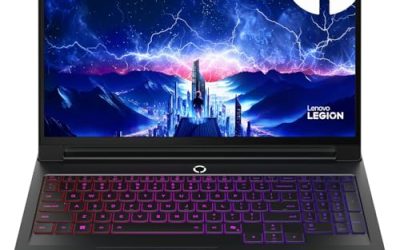
Lenovo Legion 5 Gen 10

The Legion 5 Gen 10 pairs an AMD Ryzen 7 260 processor with GeForce RTX 5060 graphics, which is far more power than Gorogoa needs, but the real draw here is the screen. The 15.1-inch WQXGA OLED panel runs at 2560 x 1600 with 500 nits of brightness as listed, a combination that flatters the game’s layered illustrations.
Sixteen gigabytes of DDR5 memory and a 1TB SSD cover the install and a healthy backlog, and the port selection includes a USB4 connection for docks and external displays. This is a good middle path for players who split time between quiet puzzle games and heavier titles.
Specs
- Processor: AMD Ryzen 7 260, 3.8 GHz up to 5.1 GHz, as listed
- Graphics: NVIDIA GeForce RTX 5060 Laptop GPU 8GB GDDR7
- Memory: 16GB DDR5-5600
- Storage: 1TB SSD M.2 PCIe Gen4
- Display: 15.1-inch WQXGA OLED 2560 x 1600, 165Hz, 500 nits, as listed
- Keyboard: 24-zone RGB backlit, as listed
- Operating system: Windows 11 Home
- ASIN: B0FXMY8FYW
HP Victus 15

The Victus 15 is a straightforward Windows option built around an AMD Ryzen AI 7 350 processor and GeForce RTX 5060 graphics. For Gorogoa, the hardware is more than sufficient, and the 15.6-inch Full HD display at 144Hz gives you a large, clear canvas for arranging panels.
This configuration lists 32GB of DDR5 memory and a 1TB SSD, so the game sits comfortably beside a much bigger library. An RGB backlit keyboard and an RJ-45 Ethernet port round out a practical package for a desk setup that also handles everyday work.
Specs
- Processor: AMD Ryzen AI 7 350
- Graphics: NVIDIA GeForce RTX 5060
- Memory: 32GB DDR5
- Storage: 1TB SSD
- Display: 15.6-inch FHD 144Hz, 1920 x 1080, as listed
- Keyboard: RGB backlit, as listed
- Operating system: Windows 11 Home
- ASIN: B0G1N8R9Z4
MSI Katana 15

The MSI Katana 15 rounds out the Windows picks with an Intel Core i7-13620H processor and GeForce RTX 4050 graphics. That pairing is well beyond Gorogoa’s minimums, and the 15.6-inch Full HD IPS screen at 144Hz shows the illustrated panels at a comfortable size for longer sessions.
It carries 16GB of DDR5 memory and a 1TB NVMe SSD, and at 4.96 pounds as listed it stays reasonable to move around the house. For players who want a single machine for both gentle puzzle games and faster action titles, the Katana covers both ends of that range.
Specs
- Processor: Intel Core i7-13620H
- Graphics: NVIDIA GeForce RTX 4050 6GB GDDR6
- Memory: 16GB DDR5-4800
- Storage: 1TB NVMe SSD
- Display: 15.6-inch Full HD IPS 144Hz
- Operating system: Windows 11 Home
- Weight: 4.96 lb, as listed
- ASIN: B0BZBN3857
Comparison Table
| Product | Best for | Key spec |
|---|---|---|
| Apple MacBook Air 13 M4 | Native Mac play and portability | 13.6-inch Liquid Retina display, M4 chip |
| ASUS ROG Zephyrus G16 (2025) | A premium all-round gaming library | 16-inch ROG Nebula OLED 2.5K display |
| Lenovo Legion 5 Gen 10 | Screen quality on Windows | 15.1-inch WQXGA OLED 2560 x 1600, 500 nits |
| HP Victus 15 | Memory and storage headroom | 32GB DDR5 memory, 1TB SSD |
| MSI Katana 15 | A balanced Windows gaming pick | GeForce RTX 4050, 15.6-inch FHD 144Hz |
FAQ
Does Gorogoa run on a Mac?
Yes. The Steam page lists a native macOS version alongside the Windows version, with minimum requirements beginning at OS X 10.9. Because those Mac requirements date back several years, check the store page notes for your current macOS version before buying.
Do I need a gaming laptop to play Gorogoa?
No. The published minimums call for a 1 GHz processor and 512 MB of memory, so integrated graphics on a modern laptop are enough for this game alone. The gaming models in this guide are there for players who want one machine for a wider library.
Is a touchscreen helpful for Gorogoa?
It is optional. The game is played entirely by pointing at panels and dragging them into place, which works well with a trackpad or mouse. A touchscreen can mimic that dragging directly, but none of the picks here depends on it.
Conclusion
Gorogoa asks very little of hardware and gives back a short, beautiful puzzle experience, so the best laptop for it is the one whose screen and size fit how you like to play. Mac players can stay native with the MacBook Air, while the Windows picks add headroom for everything else in your library.
More from Amazon
Programs that pair well with the guide above. Offers and eligibility are set by Amazon and may change.
A free business account with business pricing and bulk-buying tools for work, shop or home office.
Create a business accountFree shipping on eligible items, Prime Video and more. Eligible new members can start with a free trial.
Start a Prime free trialAudiobooks and podcasts to listen to on the go. Eligible new members can start with a free trial.
Try Audible freeAd-free music streaming. Eligible new subscribers can start with a free trial.
Try Music Unlimited freeAs an Amazon Associate we earn from qualifying purchases.









Write Your Review
No reviews yet. Be the first to share your experience!