
7 Days to Die mixes first-person combat, crafting, and base building in a voxel world where nearly every block can be dug, broken, or built on. Every seventh in-game day, a horde descends on your base at night, so the game asks as much of the processor and memory as of the graphics hardware. Long sessions and large generated worlds reward a balanced machine rather than a single headline part.
This guide gathers five laptops that cover the main ways people play, from a silent Mac to full Windows gaming machines. As an Amazon Associate, we earn from qualifying purchases. Each pick lists the hardware exactly as its product page states it.
How to Choose a Laptop for 7 Days to Die
Start with the platform. 7 Days to Die runs natively on Windows and on macOS, so both Windows laptops and Macs are fair picks here, and the MacBook Air in this guide plays the native Mac version. There is no need for translation layers or workarounds on either side.
Next, think about the processor and memory. The voxel terrain, physics, and horde pathfinding all lean on the CPU, and big worlds with several players in co-op keep memory busy. Sixteen gigabytes is a sensible floor for this game, and configurations with more, or with memory slots you can upgrade later, give a world room to grow over a long save.
Storage matters more than players expect. Generated worlds and save files are large, and a fast SSD keeps loading smooth when you cross the map. A 1TB drive is comfortable if the game shares space with other titles; 512GB works when this is your main one.
Finally, match the graphics card to your settings. The game runs on modest hardware at reduced settings, while higher detail and shadows ask for a dedicated GPU. The core advice stays the same: a capable GPU, fast storage, and steady memory carry a save from the first night to the hundredth horde.
Apple MacBook Air 15 M4

The MacBook Air 15 is the Mac pick in this guide, playing the native macOS version of the game. Its M4 chip and 24GB of unified memory suit the game’s CPU and memory appetite, and the fanless design means horde night plays out in complete silence, which suits a laptop that also lives on a desk for work.
The 15.3-inch Liquid Retina display gives the wasteland more room than the smaller Air, and Touch ID plus the 12MP Center Stage camera keep it a complete everyday machine. The honest note is graphics: the Air uses integrated graphics, so plan on moderate settings, and memory and storage are fixed at purchase.
Specs
- Processor: Apple M4 chip
- Memory: 24GB unified memory
- Storage: 512GB SSD
- Display: 15.3-inch Liquid Retina display
- Graphics: Integrated graphics
- Battery: Up to 18 hours as listed
- Operating system: macOS
- ASIN: B0DZD8BT7N
ASUS ROG Zephyrus G16 (2025)

The Zephyrus G16 is the premium Windows pick, pairing an Intel Core Ultra 9 285H with an RTX 5070 Ti in a slim aluminum chassis that weighs 4.30 lb as listed. That combination gives the game headroom for high settings and for the denser horde nights of a long-running save, while staying easy to carry between rooms.
Its 16-inch ROG Nebula OLED screen runs at 2560×1600 with a 240Hz refresh rate and G-SYNC as listed, so torch-lit nights stay deep and clean. With 32GB of memory and a 2TB SSD, this is the pick for players who want one machine for big worlds, co-op hosting, and everything else they play.
Specs
- Processor: Intel Core Ultra 9 285H
- Graphics: NVIDIA GeForce RTX 5070 Ti, 12GB GDDR7
- Memory: 32GB LPDDR5X
- Storage: 2TB SSD
- Display: 16-inch ROG Nebula OLED, 2560×1600, 240Hz, G-SYNC
- Weight: 4.30 lb as listed
- Operating system: Windows 11 Pro
- ASIN: B0G1W7V6VP
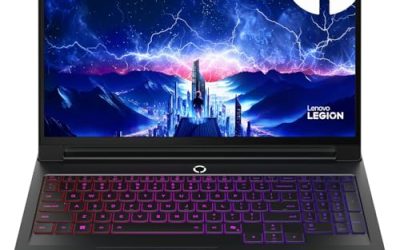
Lenovo Legion 5 Gen 10

The Legion 5 Gen 10 is the balanced gaming pick. A Ryzen 7 260 and an RTX 5060 drive a 15.1-inch WQXGA OLED panel at 165Hz with 500 nits of brightness as listed, so dark interiors and night defenses read clearly. The 80Wh battery and 24-zone RGB backlit keyboard round out a machine built for long sessions.
Memory is a strength here for this game: the 16GB of DDR5-5600 sits in slots that accept up to 32GB as listed, so a growing world does not force a new laptop. The listing also names a USB4 port alongside USB-A, HDMI, and Ethernet, which makes wired co-op and an external monitor simple to set up.
Specs
- Processor: AMD Ryzen 7 260, up to 5.1 GHz
- Graphics: NVIDIA GeForce RTX 5060, 8GB GDDR7
- Memory: 16GB DDR5-5600 in slots, up to 32GB as listed
- Storage: 1TB PCIe Gen4 SSD
- Display: 15.1-inch WQXGA OLED, 2560×1600, 165Hz, 500 nits as listed
- Battery: 80Wh
- Operating system: Windows 11 Home
- ASIN: B0FXMY8FYW
HP Victus 15

The Victus 15 configuration listed here stands out for memory: 32GB of DDR5 next to a Ryzen AI 7 350 and an RTX 5060. For a game that keeps a whole voxel world in play, that memory headroom is welcome on big maps and busy co-op servers, and the 1TB SSD leaves room for a wide game library beside it.
The 15.6-inch FHD screen runs at 144Hz as listed, and the listing names RGB backlighting and an RJ-45 Ethernet port for a wired connection on horde night. This configuration is bundled with a 7-in-1 USB-C hub as listed; confirm the exact page configuration before ordering, since bundled listings can change.
Specs
- Processor: AMD Ryzen AI 7 350, up to 5.0 GHz as listed
- Graphics: NVIDIA GeForce RTX 5060, 8GB GDDR7
- Memory: 32GB DDR5
- Storage: 1TB SSD
- Display: 15.6-inch FHD, 144Hz
- Extras: Bundled 7-in-1 USB-C hub as listed
- Operating system: Windows 11 Home
- ASIN: B0G1N8R9Z4
Lenovo LOQ 15

The LOQ 15 is the entry point of this guide, built around a Ryzen 7 170 and an RTX 4050. It covers the game at 1080p with sensible settings, and its 15.6-inch FHD IPS screen runs at 144Hz with 300 nits and 100% sRGB as listed, so daytime building and night defenses both stay readable.
Upgrade room is the quiet strength: the listing describes memory as upgradeable up to 64GB, so the 16GB installed here can grow with your world. A backlit keyboard with a numeric keypad, Wi-Fi 6, and ports including Ethernet make it a practical first gaming laptop for this title.
Specs
- Processor: AMD Ryzen 7 170, up to 4.75 GHz as listed
- Graphics: NVIDIA GeForce RTX 4050, 6GB GDDR6
- Memory: 16GB DDR5, upgradeable to 64GB as listed
- Storage: 512GB PCIe SSD
- Display: 15.6-inch FHD IPS, 144Hz, 300 nits, 100% sRGB as listed
- Keyboard: Backlit keyboard with numeric keypad as listed
- Operating system: Windows 11 Home
- ASIN: B0GZJXCT3P
Comparison Table
| Product | Best for | Key spec |
|---|---|---|
| Apple MacBook Air 15 M4 | Mac players who want silent play | M4 chip, 24GB unified memory |
| ASUS ROG Zephyrus G16 (2025) | High settings in a slim chassis | RTX 5070 Ti, 16-inch OLED 240Hz |
| Lenovo Legion 5 Gen 10 | Balanced gaming with upgrade room | RTX 5060, 15.1-inch OLED 165Hz |
| HP Victus 15 | Memory headroom for big worlds | RTX 5060, 32GB DDR5 |
| Lenovo LOQ 15 | First gaming laptop for the game | RTX 4050, 144Hz FHD screen |
FAQ
Does 7 Days to Die run on Mac?
Yes. The game has a native macOS version, so the MacBook Air 15 in this guide plays it directly. Because the Air uses integrated graphics, moderate settings are the sensible plan, while its 24GB of unified memory suits the game’s world simulation.
How much memory does 7 Days to Die need on a laptop?
Sixteen gigabytes is a sensible floor, and more helps on large generated worlds and co-op servers. The Victus 15 lists 32GB, the Legion 5 can grow to 32GB in its slots as listed, and the LOQ 15 describes memory as upgradeable to 64GB.
Can I host a co-op world on one of these laptops?
Yes. Any of the Windows picks can host a small co-op world, and the host carries the world simulation for everyone, so the stronger processors and larger memory configurations above are the comfortable choices for hosting. A wired Ethernet connection keeps the session steady.
Conclusion
For most players, the Legion 5 Gen 10 is the sweet spot, with an OLED screen, an RTX 5060, and memory slots that grow with your save. Mac players are served natively by the MacBook Air 15, the Zephyrus G16 is the premium step up, the Victus 15 brings the most memory as listed, and the LOQ 15 opens the door. Pick the one that matches your world, and the seventh night will find you ready.
More from Amazon
Programs that pair well with the guide above. Offers and eligibility are set by Amazon and may change.
A free business account with business pricing and bulk-buying tools for work, shop or home office.
Create a business accountFree shipping on eligible items, Prime Video and more. Eligible new members can start with a free trial.
Start a Prime free trialAudiobooks and podcasts to listen to on the go. Eligible new members can start with a free trial.
Try Audible freeAd-free music streaming. Eligible new subscribers can start with a free trial.
Try Music Unlimited freeAs an Amazon Associate we earn from qualifying purchases.









Write Your Review
No reviews yet. Be the first to share your experience!