
Project Zomboid is a slow-burn survival game where the danger builds over days and weeks of in-game time. Its isometric view of Knox County hides a deep simulation: hunger, injuries, carpentry, farming, and thousands of wandering zombies all tick along in the background.
That depth does not demand heavy hardware. The game runs on modest integrated graphics, loads quickly from any modern SSD, and rewards steady memory more than raw GPU power. As an Amazon Associate, we earn from qualifying purchases. The five laptops below range from a fanless Mac for quiet solo runs to a gaming machine for hosting busy co-op servers.
How to Choose a Laptop for Project Zomboid
Project Zomboid runs natively on both Windows and macOS, so Mac picks are fair game here and need no workarounds. The native Mac version plays the same worlds and supports the same mods, which makes a MacBook a genuine option rather than a compromise.
Because the game is drawn in a 2D isometric style, its graphics demands are light. Integrated graphics from recent Intel, AMD, and Apple chips handle the view comfortably, and a dedicated gaming GPU is honestly more than this game asks for. Where hardware matters is memory and storage speed: long-running worlds, large mod lists, and multiplayer sessions lean on RAM, so 16GB is a sensible floor and 32GB gives real headroom for hosting. An SSD keeps loading short between towns.
Screen size is a matter of taste: a compact 13-inch display suits travel, while a larger panel makes the small interface text easier to read during the long sessions this game encourages.
Apple MacBook Air 13 M4

The MacBook Air 13 with the M4 chip is the quietest way to play Project Zomboid. It has no fan at all, so late-night sessions stay completely silent. The native macOS version runs directly on Apple silicon, and the M4 chip with 16GB of unified memory gives the game comfortable headroom for large worlds and mod lists.
The 13.6-inch Liquid Retina display keeps the isometric view crisp, and the small interface text stays readable at this size. The Air slips easily into a bag, and its long battery life suits a game that invites one more in-game day again and again. The 256GB SSD is the one limit, but Zomboid itself is a small install with tiny save files.
Specs
– Processor: Apple M4 chip
– Memory: 16GB unified memory
– Storage: 256GB SSD
– Display: 13.6-inch Liquid Retina
– Camera: 12MP Center Stage camera
– Security: Touch ID
– Operating System: macOS
– ASIN: B0F3KM4LYH
Dell XPS 13 9350
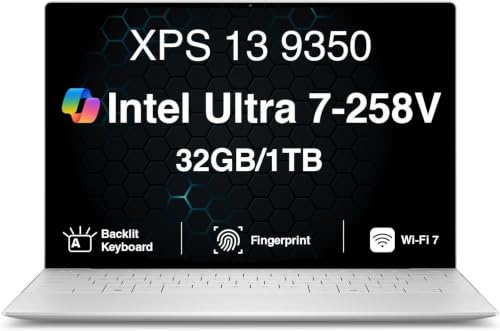
The Dell XPS 13 9350 is the premium Windows ultraportable here, built around Intel’s Core Ultra 7 258V with integrated Intel Arc 140V graphics. That integrated GPU is genuinely enough for this isometric world, and the 32GB of memory is the real headline: it leaves generous room for big mod lists, wiki pages, and voice chat alongside the game.
The 13.4-inch FHD+ display runs at 120Hz with 500 nits of brightness as listed. The listing states up to 26 hours of battery life, a figure tied to light playback workloads, but even in mixed use this is an efficient machine. The trade-off is ports: two Thunderbolt 4 connections and nothing else, so a small hub helps with a mouse, a drive, and a charger at once. Confirm the configuration on the product page before ordering, since XPS listings vary.
Specs
– Processor: Intel Core Ultra 7 258V, up to 4.8 GHz as listed
– Graphics: Intel Arc 140V integrated graphics
– Memory: 32GB DDR5
– Storage: 1TB PCIe SSD
– Display: 13.4-inch FHD+ 1920×1200, 120Hz, 500 nits as listed
– Ports: 2x Thunderbolt 4
– Wireless: Wi-Fi 7 and Bluetooth 5.4 as listed
– Operating System: Windows 11 Pro
– ASIN: B0H5TKFRVM
ASUS Zenbook 14 OLED

The ASUS Zenbook 14 OLED, model UM3406HA, brings the nicest screen in this group to a game that spends half its life at night. Its 14-inch OLED touchscreen renders the dark streets of West Point with true blacks, so a flashlight beam reads clearly against the dark. The Ryzen 7 8840HS and its Radeon 780M integrated graphics are well matched to the game’s light demands, with power to spare.
At about 2.65 pounds with a 75Wh battery, the Zenbook travels almost as easily as the MacBook Air while running Windows natively. The 16GB of LPDDR5X memory covers solo play and ordinary mod lists comfortably, and the 512GB SSD loads worlds quickly. Ports are a pleasant surprise for a thin machine: USB-C with USB4, USB-A, and HDMI 2.1, so a mouse and an external display connect without a hub.
Specs
– Processor: AMD Ryzen 7 8840HS, up to 5.1 GHz as listed
– Graphics: AMD Radeon 780M integrated graphics
– Memory: 16GB LPDDR5X
– Storage: 512GB PCIe 4.0 SSD
– Display: 14-inch WUXGA OLED touchscreen, 1920×1200
– Battery: 75Wh
– Weight: About 2.65 lb as listed
– Operating System: Windows 11 Home
– ASIN: B0DFWZ77LB
Lenovo Legion 5 Gen 10

The Lenovo Legion 5 Gen 10 is the pick for players who host. When your laptop runs the server for a co-op group, memory and CPU headroom matter most, and this machine pairs a Ryzen 7 260 with 16GB of DDR5-5600 that the listing says can grow to 32GB. Its RTX 5060 graphics are far beyond what Project Zomboid draws, so the same laptop also covers heavier games.
The 15.1-inch WQXGA OLED panel is sharp and bright at 500 nits as listed, with a 165Hz refresh rate the game does not need but desktop use appreciates. The 80Wh battery is respectable for a gaming laptop, though plugged-in play is the realistic plan for long hosted sessions. The listing also names a USB4 port, alongside HDMI and Ethernet for a stable wired link to your router.
Specs
– Processor: AMD Ryzen 7 260, up to 5.1 GHz as listed
– Graphics: NVIDIA GeForce RTX 5060, 8GB GDDR7
– Memory: 16GB DDR5-5600, up to 32GB as listed
– Storage: 1TB PCIe Gen4 SSD
– Display: 15.1-inch WQXGA OLED, 2560×1600, 165Hz, 500 nits as listed
– Battery: 80Wh
– Keyboard: 24-zone RGB backlit as listed
– Operating System: Windows 11 Home
– ASIN: B0FXMY8FYW
HP Victus 15

The HP Victus 15 rounds out the list as the roomy, big-screen Windows option. This configuration pairs a Ryzen AI 7 350 with an RTX 5060 and a generous 32GB of DDR5 memory, so hosting a co-op world while running your own client on the same machine is realistic. The 1TB SSD leaves space for a large mod collection besides.
The 15.6-inch FHD display runs at 144Hz, and the full-size keyboard suits a game built around hotkeys and inventory shortcuts. An RJ-45 Ethernet port is built in, which helps anyone hosting over a home network. The listing bundles a 7-in-1 USB-C hub; treat that as a bonus and confirm the page configuration before ordering. Framed honestly, the Victus is far more power than this game requires — it earns its place as the one-machine answer for players whose library goes well beyond one survival sim.
Specs
– Processor: AMD Ryzen AI 7 350, up to 5.0 GHz as listed
– Graphics: NVIDIA GeForce RTX 5060, 8GB GDDR7
– Memory: 32GB DDR5
– Storage: 1TB SSD
– Display: 15.6-inch FHD, 144Hz
– Ports: RJ-45 Ethernet as listed
– Extras: Bundled 7-in-1 USB-C hub as listed
– Operating System: Windows 11 Home
– ASIN: B0G1N8R9Z4
Comparison Table
| Product | Best for | Key spec |
|---|---|---|
| Apple MacBook Air 13 M4 | Silent solo play and travel | Fanless M4 with 16GB unified memory |
| Dell XPS 13 9350 | Premium Windows portability | 32GB memory and 1TB SSD |
| ASUS Zenbook 14 OLED | Night scenes on a vivid screen | 14-inch OLED touchscreen |
| Lenovo Legion 5 Gen 10 | Hosting co-op servers | Ryzen 7 260 with memory up to 32GB |
| HP Victus 15 | One machine for a big library | 32GB memory and 1TB SSD |
FAQ
Does Project Zomboid run on a Mac?
Yes. The game has a native macOS version with the same worlds and mod support as the Windows version, and an Apple silicon MacBook runs it directly, with no translation layer involved.
How much memory does Project Zomboid actually need?
Solo play with a modest mod list sits comfortably in 16GB. Pressure grows with large mod lists, huge explored worlds, and especially with hosting a multiplayer server on the same machine — where 32GB earns its keep.
Can I play Project Zomboid with friends on different laptops?
Yes. Multiplayer works across Windows and macOS, so a group can mix MacBooks and Windows laptops in the same world. One player hosts, or the group uses a dedicated server.
Conclusion
Project Zomboid asks for patience and planning, not expensive hardware. Pick the MacBook Air for silence and travel, the XPS 13 or Zenbook 14 for a premium everyday machine, and the Legion 5 or Victus 15 when hosting friends or carrying a wider library.
More from Amazon
Programs that pair well with the guide above. Offers and eligibility are set by Amazon and may change.
A free business account with business pricing and bulk-buying tools for work, shop or home office.
Create a business accountFree shipping on eligible items, Prime Video and more. Eligible new members can start with a free trial.
Start a Prime free trialAudiobooks and podcasts to listen to on the go. Eligible new members can start with a free trial.
Try Audible freeAd-free music streaming. Eligible new subscribers can start with a free trial.
Try Music Unlimited freeAs an Amazon Associate we earn from qualifying purchases.










Write Your Review
No reviews yet. Be the first to share your experience!