
Fusion 360 asks a laptop to wear several hats in a single day: parametric modeling with a deep feature tree in the morning, a multi-body assembly that must stay smooth while you orbit and section it in the afternoon, and CAM prep with toolpaths to generate in the evening. Each stage leans on the hardware differently.
The five laptops below cover that spread, from full mobile workstations with professional graphics to a lighter pick for smaller parts, with every spec stated exactly as its listing names it. As an Amazon Associate, we earn from qualifying purchases.
How to Choose a Laptop for Fusion 360
Start with the processor, and think single-core first. Much of Fusion 360 modeling work — rebuilding a feature tree, editing a sketch, regenerating a timeline — runs on one core at a time, so strong single-core speed keeps the interface responsive in heavy files. High core counts still help with rendering, simulation studies, and CAM toolpath generation in the background.
Graphics come next, and listings name the exact card you get: NVIDIA RTX 2000 Ada Generation in two workstations here, a GeForce RTX 4060 in the creator pick, a 20-core GPU inside Apple’s M4 Pro, and integrated Intel Graphics in the lightest machine. Large models with many bodies reward dedicated graphics memory, while part modeling and 2D drafting stay comfortable on far less.
Memory and storage set your ceiling. A 32GB configuration is the sensible floor for serious work, and the 48GB and 64GB options below leave room for documentation and a second design open at once. Fast SSD storage keeps big files opening quickly, and a chassis built for sustained loads holds its speed through long toolpath calculations.
Dell Precision 7680

The Precision 7680 is the heavyweight of this group, configured here with a 24-core Intel Core i9-13950HX and an NVIDIA RTX 2000 Ada Generation graphics card with 8GB of GDDR6 memory. That pairing suits users whose assemblies run to hundreds of components and who generate CAM toolpaths daily, and the 64GB of LPCAMM2 DDR5 memory gives complex timelines room to breathe.
Its 16-inch FHD+ anti-glare display favors long sessions under bright lighting, and the chassis is built to sustain loads rather than sprint and fade. Ports include Thunderbolt 4, HDMI, and Ethernet as listed. At 5.9 pounds as listed, it is a desk-first machine, but for a shop workhorse that rarely travels, that trade makes sense.
Specs
- Processor: Intel Core i9-13950HX vPro, 24 cores, up to 5.5 GHz
- Graphics: NVIDIA RTX 2000 Ada Generation, 8GB GDDR6
- Memory: 64GB LPCAMM2 DDR5
- Storage: 2TB SSD
- Display: 16-inch FHD+ anti-glare
- Ports: Thunderbolt 4, HDMI, RJ-45 Ethernet as listed
- Operating system: Windows 11 Pro
- ASIN: B0GMQ4D131
Lenovo ThinkPad P1 Gen 7

The ThinkPad P1 Gen 7 trims the workstation formula into a slimmer 16-inch frame. The listed configuration pairs an Intel Core Ultra 7 155H with an NVIDIA RTX 2000 Ada Generation Laptop GPU carrying 8GB of GDDR6 memory, plus 32GB of LPDDR5X memory in the replaceable CAMM2 format and a 1TB PCIe Gen4 SSD — the same professional graphics line as the big Dell, in a machine that travels far more easily.
The 16-inch WQUXGA touchscreen gives sketch work a crisp canvas, with a fingerprint reader and spill-resistant backlit keyboard. It is the pick for engineers who model seriously all day but still carry their machine to meetings, and the CAMM2 format means the memory can be swapped later rather than fixed for life.
Specs
- Processor: Intel Core Ultra 7 155H
- Graphics: NVIDIA RTX 2000 Ada Generation Laptop GPU, 8GB GDDR6
- Memory: 32GB LPDDR5X CAMM2
- Storage: 1TB PCIe Gen4 SSD
- Display: 16-inch WQUXGA touchscreen
- Security: Fingerprint reader as listed
- Operating system: Windows 11 Pro
- ASIN: B0D7TQ97S9
Apple MacBook Pro 14 (M4 Pro)

Fusion 360 runs natively on Apple silicon, and this MacBook Pro 14 configuration — M4 Pro with a 14-core CPU and 20-core GPU, 48GB of unified memory, and a 1TB SSD — is the strongest Mac option here. The M4 Pro’s single-core speed keeps feature rebuilds snappy, and the deep memory pool lets large assemblies share space with everything else you have open.
The 14.2-inch Liquid Retina XDR display is listed with up to 1600 nits of peak brightness and a 1,000,000:1 contrast figure, so shaded models look rich and legible. The Space Black chassis stays genuinely portable at this power level. One honest note: memory and storage are fixed at purchase, so get the 48GB and 1TB figures right the first time.
Specs
- Processor: Apple M4 Pro, 14-core CPU, 20-core GPU
- Memory: 48GB unified memory
- Storage: 1TB SSD
- Display: 14.2-inch Liquid Retina XDR, up to 1600 nits peak brightness as listed
- Color: Space Black
- Operating system: macOS
- ASIN: B0DTMBKJ3N
ASUS ProArt P16
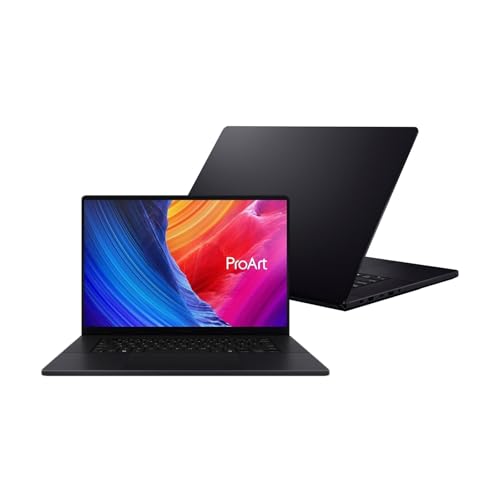
The ProArt P16 is the creator-leaning pick, built around an AMD Ryzen AI 9 HX 370 processor and an NVIDIA GeForce RTX 4060 Laptop GPU with 8GB of GDDR6 memory, as its listing names them. That is a strong viewport combination for Fusion 360, and the 32GB of LPDDR5X memory and 1TB PCIe 4.0 SSD match the working floor this guide recommends.
Its 16-inch 4K OLED touchscreen is the sharpest panel in this roundup, and the listing names an SD Express 7.0 card reader for pulling reference photos straight from a camera. The listing describes the graphics as NVIDIA Studio-validated, which is how ASUS positions this line for creator software. Ports include USB4 and HDMI 2.1.
Specs
- Processor: AMD Ryzen AI 9 HX 370, 12 cores, up to 5.1 GHz
- Graphics: NVIDIA GeForce RTX 4060 Laptop GPU, 8GB GDDR6
- Memory: 32GB LPDDR5X
- Storage: 1TB PCIe 4.0 NVMe SSD
- Display: 16-inch 4K OLED touchscreen
- Card reader: SD Express 7.0 as listed
- Operating system: Windows 11
- ASIN: B0DHZN19TD
HP ZBook Firefly 16 G11

The ZBook Firefly 16 G11 is the honest lightweight of the group, and its listing is clear about why: it runs an Intel Core Ultra 7 155U with Intel Graphics — integrated graphics, with no dedicated card. That makes it the pick for users whose work centers on single parts, sheet layouts, and 2D drafting rather than large assemblies, in a slim 16-inch machine of about 4.0 pounds.
The rest of the configuration is properly business-grade: 32GB of DDR5 memory in SO-DIMM slots, a 1TB PCIe NVMe SSD, a 16-inch IPS FHD+ display, a fingerprint reader, and two Thunderbolt 4 ports alongside USB-A and HDMI. Buy it knowing the graphics ceiling is the trade.
Specs
- Processor: Intel Core Ultra 7 155U, up to 4.8 GHz
- Graphics: Intel Graphics (integrated)
- Memory: 32GB DDR5 SO-DIMM
- Storage: 1TB PCIe NVMe SSD
- Display: 16-inch IPS FHD+
- Ports: 2 x Thunderbolt 4, USB-A, HDMI as listed
- Battery: 56Wh as listed
- Operating system: Windows 11 Pro
- ASIN: B0DVWR2JLD
Comparison Table
| Product | Best for | Key spec |
|---|---|---|
| Dell Precision 7680 | Largest assemblies and daily CAM work | RTX 2000 Ada 8GB, 64GB memory |
| Lenovo ThinkPad P1 Gen 7 | Workstation power that travels | RTX 2000 Ada 8GB, WQUXGA touch |
| Apple MacBook Pro 14 (M4 Pro) | Mac-based Fusion 360 design work | M4 Pro, 48GB unified memory |
| ASUS ProArt P16 | Modeling plus rendered presentation | RTX 4060 8GB, 4K OLED touch |
| HP ZBook Firefly 16 G11 | Light parts and drafting on the move | Core Ultra 7 155U, 32GB DDR5 |
FAQ
How much memory does Fusion 360 need on a laptop?
For occasional part modeling, 16GB can get by, but 32GB is the comfortable point once assemblies grow and other programs stay open beside the design. Every pick here lists at least 32GB, and the Dell and Apple configurations go further, with 64GB and 48GB, for simulation studies and several large files open at once.
Does Fusion 360 need a dedicated graphics card?
Not for every job. Part modeling and 2D drafting run fine on the integrated graphics in the ZBook Firefly, as its listing describes. Large assemblies and rendered views benefit from dedicated graphics memory, which is why the other four picks carry RTX-class cards or Apple’s 20-core GPU.
Can Fusion 360 run on a Mac?
Yes. Fusion 360 is published for macOS as well as Windows, and the MacBook Pro 14 above runs it on Apple silicon. The honest catch is that memory and storage on the Mac are fixed when you order, so choose with future projects in mind.
Conclusion
Match the machine to the heaviest file you open each week. Assembly and CAM-heavy users belong on the Precision 7680 or ThinkPad P1 Gen 7, Mac-based designers get a superb Fusion 360 home in the MacBook Pro 14, the ProArt P16 blends modeling with presentation polish, and the ZBook Firefly keeps lighter drafting work portable.
More from Amazon
Programs that pair well with the guide above. Offers and eligibility are set by Amazon and may change.
A free business account with business pricing and bulk-buying tools for work, shop or home office.
Create a business accountFree shipping on eligible items, Prime Video and more. Eligible new members can start with a free trial.
Start a Prime free trialAudiobooks and podcasts to listen to on the go. Eligible new members can start with a free trial.
Try Audible freeAd-free music streaming. Eligible new subscribers can start with a free trial.
Try Music Unlimited freeAs an Amazon Associate we earn from qualifying purchases.










Write Your Review
No reviews yet. Be the first to share your experience!