
The real decision with The Life and Suffering of Sir Brante is not graphics power. Sever and 101XP publish a minimum tier built around a Pentium® 4-era machine, 1 GB RAM and 3 GB of storage, so the bar sits far below anything sold today. What decides the purchase is platform and reading comfort: the game is Windows-only, its block still names Windows 7, and play is long stretches of journal text where screen quality and a good keyboard matter more than frame rates.
This roundup suits players who want one Windows laptop for this story-led game with room for a wider library. The five picks come from gaming and thin-and-light lines: an HP Victus 15 with an RTX 5060 and 32 GB of memory, a Lenovo Legion 5 Gen 10 with a WQXGA OLED panel, an Acer Nitro V 15 with a Core i9 and 180 Hz screen, an MSI Katana 15, and an ASUS Zenbook 14 OLED on integrated Radeon 780M graphics.
Quick Picks
As an Amazon Associate we earn from qualifying purchases
| Product | Best for | Key spec from title |
|---|---|---|
| HP Victus 15 | A bundled setup with memory and storage already fitted | RTX 5060, 32 GB DDR5, 1 TB SSD |
| Lenovo Legion 5 Gen 10 | Readers who want the sharpest text on an OLED panel | RTX 5060 8 GB GDDR7, 15.1-inch WQXGA OLED |
| Acer Nitro V 15 | A large screen with a fast refresh for mixed gaming | Core i9-13900H, RTX 4060, 180 Hz display |
| MSI Katana 15 | A straightforward mid-range gaming machine | Core i7-13620H, RTX 4050 6 GB GDDR6 |
| ASUS Zenbook 14 OLED | Carrying a light laptop between rooms and trips | Ryzen 7 8840HS, integrated Radeon 780M |
How to Choose
Windows only, and Windows 10 or newer in practice
Steam publishes exactly one platform block for this game, and it is Windows. The Mac and Linux requirement lists are empty, so there is no Mac or Linux edition to buy around. The block names “Microsoft® Windows® 7” as its OS line, yet the same page carries Steam’s own note that the client supports only Windows 10 and later from January 1st, 2024. Every pick here ships with Windows 11, which clears both the printed line and the practical one, so platform stops being a question once you stay on Windows.
One minimum tier, with no recommended tier behind it
Many games publish two tiers and invite you to shop against the higher one. This page publishes only a minimum: “Pentium® 4 1.5 GHz / Athlon® XP”, “1 GB RAM”, graphics and sound lines that each read “DirectX® 9.0c compatible”, and “3 GB available space”. There is no recommended tier to aim at, so treat the block as a floor rather than a target. All five laptops clear it by a wide margin; the honest way to choose between them is by screen, keyboard, weight and the other games you own.
Storage headroom for a library, not just this game
The published storage line is “3 GB available space”, one of the smallest footprints in this roundup series. Sir Brante alone will never trouble any drive here. The difference between the picks is everything else you keep installed: the Victus, Legion, Nitro and Katana each carry a 1 TB SSD, while the Zenbook carries 512 GB. If your Steam library holds several large modern titles alongside story games like this one, the 1 TB machines save you the uninstall shuffle; if this genre is most of your library, 512 GB is plenty.
Screen and keyboard comfort for a text-led game
Sir Brante plays out on the pages of a journal, so you will spend hours reading paragraphs and picking choices rather than watching fast action. Panel quality and keyboard feel carry the experience. The Legion’s 15.1-inch WQXGA OLED at 2560 x 1600 gives the crispest text of the five, the Zenbook’s 14-inch OLED keeps the same deep contrast in a lighter body, and the three 15.6-inch IPS machines trade some sharpness for size. Backlit keyboards on the gaming picks help during late sessions in a dim room.
The 5 Best Options
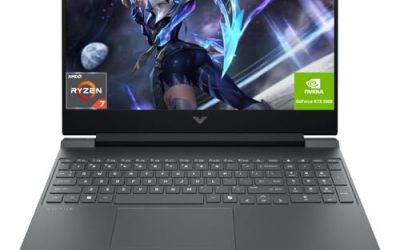
HP Victus 15

This Victus is sold as a seller bundle: a Ryzen AI 7 350 machine with an RTX 5060, 32 GB of DDR5 memory and a 1 TB SSD, with a Thunderobot 7-in-1 USB-C hub in the box per the listing title. Against a published minimum of 1 GB RAM and a DirectX® 9.0c compatibility line, that configuration is far beyond anything the game asks for, and the 144 Hz Full HD panel keeps the journal pages and menus fluid. It suits a buyer who wants the memory and storage already fitted rather than upgrading later, plus a hub for a desk setup.
Specs
- Processor: AMD Ryzen AI 7 350, up to 5.0 GHz as listed
- Graphics: NVIDIA GeForce RTX 5060 (no graphics-memory figure printed in the listing’s technical table)
- Memory: 32 GB DDR5
- Storage: 1 TB SSD
- Display: 15.6-inch FHD 144 Hz
- Keyboard: RGB backlit, with RJ-45 Ethernet
- Bundle: Thunderobot 7-in-1 USB-C hub included per the listing title
- Operating system: Windows 11 Home
- Colour: Black, model TPN-Q279
Best for: buyers who want 32 GB of memory and 1 TB of storage fitted from the start, with a hub bundled.
Watch out for: this is a seller bundle configuration, so confirm the 32 GB and 1 TB figures on the listing before ordering, and note the table prints no separate graphics-memory figure for the RTX 5060.
ASIN: B0G1N8R9Z4
Lenovo Legion 5 Gen 10

The Legion pairs a Ryzen 7 260 with an RTX 5060 Laptop GPU carrying 8 GB of GDDR7, and its 15.1-inch WQXGA OLED panel is the standout for a reading-heavy game: 2560 x 1600 resolution, 500 nits and a non-touch finish per the listing. Memory is 16 GB of DDR5-5600 in SODIMM slots with a 32 GB maximum, and storage is a 1 TB M.2 SSD, so both the journal text and a large library sit comfortably. USB4, HDMI 2.1 and Ethernet round out a machine that covers this title and far heavier ones without stretching.
Specs
- Processor: AMD Ryzen 7 260, 3.80 GHz up to 5.10 GHz
- Graphics: NVIDIA GeForce RTX 5060 Laptop GPU, 8 GB GDDR7
- Memory: 16 GB DDR5-5600 SODIMM, 32 GB maximum
- Storage: 1 TB SSD M.2 2242 PCIe Gen4 TLC
- Display: 15.1-inch WQXGA OLED 2560 x 1600, 500 nits, non-touch as listed
- Ports: USB4, HDMI 2.1, Ethernet (RJ-45)
- Keyboard: 24-zone RGB backlit
- Operating system: Windows 11 Home
Best for: readers who want the sharpest, brightest text panel of the five and strong hardware for the rest of their library.
Watch out for: the listing’s 7.09-pound item weight reads as a packaged figure rather than the machine itself, so check the weight on Lenovo’s own page if carrying it daily matters.
ASIN: B0FXMY8FYW
Acer Nitro V 15

The Nitro V 15 in this ANV15-51-99XD configuration runs a 13th Gen Intel Core i9-13900H with an RTX 4060 Laptop GPU, 16 GB of DDR5 in two slots with a 32 GB maximum, and a 1 TB PCIe Gen 4 SSD with two M.2 slots. Its 15.6-inch FHD IPS panel refreshes at 180 Hz, the fastest here, which does nothing for a text-led game but serves the action titles many Sir Brante players also own. Thunderbolt 4 and Wi-Fi 6 are on the listing, and the second M.2 slot gives an easy storage expansion path later.
Specs
- Processor: Intel Core i9-13900H
- Graphics: NVIDIA GeForce RTX 4060 Laptop GPU (no graphics-memory figure printed in the headline listing text)
- Memory: 16 GB DDR5, two slots, 32 GB maximum as listed
- Storage: 1 TB PCIe Gen 4 SSD, two M.2 slots as listed
- Display: 15.6-inch FHD IPS 180 Hz
- Connectivity: Thunderbolt 4, Wi-Fi 6, Ethernet (RJ-45)
- Keyboard: backlit
- Operating system: Windows 11 Home
Best for: players who split time between story games and fast action titles and want a 180 Hz panel plus a spare M.2 slot.
Watch out for: the listing’s body copy drifts into “Nitro V 16” wording in places, so match the model code ANV15-51-99XD when ordering, and note the headline text prints no graphics-memory figure for the RTX 4060.
ASIN: B0D8JTYXQM
MSI Katana 15

The Katana 15 B13VEK-277US is the plainest gaming machine here: a Core i7-13620H, an RTX 4050 with 6 GB of GDDR6 per the listing’s bullet text, 16 GB of DDR5-4800 and a 1 TB NVMe SSD behind a 15.6-inch Full HD IPS 144 Hz screen. Every figure sits far above the game’s single minimum tier, and the traditional gaming chassis brings a full-size keyboard feel that suits long reading and choice-making sessions. It is the pick for a buyer who wants a conventional gaming laptop that covers this title incidentally while handling mainstream games directly.
Specs
- Processor: Intel Core i7-13620H
- Graphics: NVIDIA GeForce RTX 4050, 6 GB GDDR6 per the listing bullet text
- Memory: 16 GB DDR5-4800
- Storage: 1 TB NVMe SSD
- Display: 15.6-inch Full HD IPS 144 Hz
- Ports: USB Type-C listed among the connections
- Operating system: Windows 11 Home
- Colour: Black, model B13VEK-277US
Best for: buyers who want a conventional mid-range gaming laptop whose keyboard and screen size suit long narrative sessions.
Watch out for: the listing’s technical table prints a 16 GB graphics card ram size against the 6 GB GDDR6 in its own bullet text; follow the bullet figure and confirm the configuration before ordering.
ASIN: B0BZBN3857
ASUS Zenbook 14 OLED

The Zenbook is the honest integrated-graphics pick. Its Ryzen 7 8840HS runs an integrated Radeon 780M that shares system memory with no dedicated pool, and the game’s published graphics line asks only for a “DirectX® 9.0c compatible” solution rather than naming any dedicated card, which is exactly the class of requirement this chip answers. In return you get a 14-inch WUXGA OLED touchscreen at 1920 x 1200, 16 GB of LPDDR5X, a 512 GB SSD and a 75 Wh battery in a Jade Black body built for carrying between rooms, cafés and trips.
Specs
- Processor: AMD Ryzen 7 8840HS, up to 5.1 GHz as listed
- Graphics: integrated AMD Radeon 780M, shared memory, no dedicated pool
- Memory: 16 GB LPDDR5X
- Storage: 512 GB M.2 NVMe PCIe 4.0 SSD
- Display: 14-inch WUXGA OLED touchscreen, 1920 x 1200 as listed
- Battery: 75 Wh as listed
- Connectivity: Wi-Fi 6E
- Operating system: Windows 11 Home
- Colour: Jade Black, model UM3406HA-WS74T
Best for: players who read and play away from a desk and want the lightest machine here for a text-led library.
Watch out for: the listing describes a touchscreen while the maker’s sheet for the UM3406HA line also lists non-touch panels, so confirm the panel on the exact listing before ordering.
ASIN: B0DFWZ77LB
Which One Fits Your Situation
You want one laptop for this and a shelf of modern games
Choose the Legion 5 Gen 10 or the Victus 15. Both carry an RTX 5060, and between the Legion’s 8 GB of GDDR7 and WQXGA OLED and the Victus’s 32 GB of memory with a bundled hub, they cover demanding current titles as comfortably as they cover a 3 GB narrative game. The Legion suits a fixed desk; the Victus suits a desk that needs the hub’s extra connections.
You read in bed, on trains and between rooms
Choose the Zenbook 14 OLED. It is the lightest pick, its OLED panel keeps journal text rich at low brightness, and its integrated graphics honestly match a published requirement that only asks for DirectX® 9.0c compatibility. The 512 GB SSD still holds a large library of story games, and the 75 Wh battery supports long unplugged reading sessions.
This is a second or shared family machine
Choose the Katana 15 or the Nitro V 15. Both are conventional 15.6-inch gaming laptops with 1 TB of storage, so several players’ libraries fit side by side, and both handle the mainstream games other household members will install. The Nitro adds a 180 Hz panel and a second M.2 slot; the Katana keeps the formula simpler.
You keep many large games installed at once
Choose any of the 1 TB picks over the Zenbook. Sir Brante itself needs only 3 GB, so the deciding figure is the rest of your catalogue. The Victus, Legion and Katana each hold 1 TB, and the Nitro matches that with a second M.2 slot free for a later drive, which makes it the easiest to expand.
Common Mistakes
- Shopping against a recommended tier that does not exist: the page publishes a minimum only, so there is no higher official target to match.
- Confusing the full game with the free Chapters 1&2 app: that is a separate Steam app with its own page, not the complete release covered here.
- Assuming a Mac or Linux version exists: both requirement lists are empty and no such edition is sold.
- Reading the Katana listing’s 16 GB table figure as graphics memory: its bullet text states 6 GB GDDR6 for the RTX 4050.
- Buying an old Windows 7 machine because the block names Windows 7: Steam’s client supports only Windows 10 and later, so a current Windows 11 laptop is the practical answer.
Frequently Asked Questions
Does The Life and Suffering of Sir Brante run on Mac or Linux?
No. Steam publishes a Windows block only, and the Mac and Linux requirement lists for the game are empty. There is no Mac or Linux edition sold, so all five picks in this roundup are Windows 11 laptops, and a Mac purchase would need a separate Windows route that this article does not cover.
Is there a recommended system tier to aim for?
No. The store page publishes a single minimum tier and nothing above it: a Pentium® 4 1.5 GHz processor, 1 GB RAM, DirectX® 9.0c compatible graphics and sound, and 3 GB of storage. Any current laptop clears that floor comfortably, so choose on screen, keyboard, weight and the rest of your library instead.
Will the game run on integrated graphics like the Zenbook’s?
The published graphics line asks only for a “DirectX® 9.0c compatible” solution and names no dedicated card. The Zenbook’s Radeon 780M is integrated and shares system memory, which is a real limitation for demanding 3D games, but it sits in the class this particular requirement describes. The four gaming picks carry dedicated cards for heavier titles.
The requirements name Windows 7, so can I use an old laptop?
The block does name “Microsoft® Windows® 7”, but the same page notes that the Steam Client supports only Windows 10 and later from January 1st, 2024. An old Windows 7 machine therefore cannot run the current client properly. Every pick here ships with Windows 11, which satisfies both the printed line and the practical one.
More from Amazon
Programs that pair well with the guide above. Offers and eligibility are set by Amazon and may change.
A free business account with business pricing and bulk-buying tools for work, shop or home office.
Create a business accountFree shipping on eligible items, Prime Video and more. Eligible new members can start with a free trial.
Start a Prime free trialAudiobooks and podcasts to listen to on the go. Eligible new members can start with a free trial.
Try Audible freeAd-free music streaming. Eligible new subscribers can start with a free trial.
Try Music Unlimited freeAs an Amazon Associate we earn from qualifying purchases.









Write Your Review
No reviews yet. Be the first to share your experience!