

Key takeaways
- Best Overall (power): Anker Nano 65W GaN II, a compact foldable 65W charger that also tops up a phone or tablet.
- Best Value (protection): Lacdo 13-inch laptop sleeve, a slim case for 13-inch MacBook and iPad Air/Pro 13 class devices.
- Best Budget (power for Dell): EAOYHGB 65W USB-C charger, a replacement-style charger listed for several Dell Latitude and XPS 13 models.
- Best for Commuters Who Carry Everything: BUG lightweight laptop tote, an open-top tote for work, travel, and school days.
- Best for Connections: Anker 7-in-1 USB-C hub with 4K HDMI, card readers, and USB ports.
- Best for Posture: Lamicall aluminum laptop stand, a foldable riser that fits up to 17.3-inch laptops.
- Best Quiet Mouse: Logitech M240 Silent Bluetooth mouse, receiver-free with an 18-month battery listed.
The best laptop accessories for work and travel are the ones that fix the three daily frictions: carrying the machine safely, keeping it charged, and connecting it to everything else on your desk. For that job, the Anker Nano 65W GaN II charger and the Anker 7-in-1 USB-C hub are the most useful pair for most people, with the Lacdo 13-inch sleeve as the cheapest protection and the Lamicall aluminum stand as the best upgrade for posture. This guide covers seven main picks and four alternatives, including a laptop sleeve for 13-inch machines, a laptop tote bag for women, a USB-C laptop charger, and a few desk extras that earn their space.
A quick note on how this guide is built. We did not personally use these products. Everything below comes from the specifications in the product listings, manufacturer pages, and the way each accessory type behaves in general, and anything we could not confirm is marked “not listed”. Prices are shown as tier words only, because they move constantly.
Our top picks


As an Amazon Associate we earn from qualifying purchases at no extra cost to you.
Top Picks at a Glance
- Best Overall (power): Anker Nano 65W GaN II, a compact foldable 65W charger that also tops up a phone or tablet.
- Best Value (protection): Lacdo 13-inch laptop sleeve, a slim case for 13-inch MacBook and iPad Air/Pro 13 class devices.
- Best Budget (power for Dell): EAOYHGB 65W USB-C charger, a replacement-style charger listed for several Dell Latitude and XPS 13 models.
- Best for Commuters Who Carry Everything: BUG lightweight laptop tote, an open-top tote for work, travel, and school days.
- Best for Connections: Anker 7-in-1 USB-C hub with 4K HDMI, card readers, and USB ports.
- Best for Posture: Lamicall aluminum laptop stand, a foldable riser that fits up to 17.3-inch laptops.
- Best Quiet Mouse: Logitech M240 Silent Bluetooth mouse, receiver-free with an 18-month battery listed.
Comparison Table
| Product | Best for | Key specs (as listed) | Watch for | Price tier |
|---|---|---|---|---|
| Lacdo 13-inch sleeve | Slim protection inside another bag | 13-inch laptop fit, also iPad Air/Pro 13, gray | Not a bag: no handles or shoulder strap listed | Budget |
| BUG laptop tote | Daily work or school carry | Lightweight tote, handbag style; laptop size not listed in title | Check the maker’s inner dimensions before buying | Budget to Mid-range |
| Anker Nano 65W GaN II | One charger for laptop and phone | 65W, GaN II, PPS support, foldable plug | Cable not stated in the title | Mid-range |
| EAOYHGB 65W USB-C | Spare charger for listed Dell models | 65W, USB-C, Dell Latitude and XPS 13 compatibility list | Only buy if your exact model is on the maker’s list | Budget |
| Anker 7-in-1 hub | Docking a thin laptop | 4K@60Hz HDMI, 85W max pass-through PD, 2 USB 3.0, 1 USB-C data, SD/TF | Charger is not included | Mid-range |
| Lamicall stand | Raising the screen on a desk | Aluminum, foldable, fits 10 to 17.3 inch | Weight and exact height range not listed | Mid-range |
| Logitech M240 | Quiet, receiver-free mouse | Bluetooth, silent clicks, 3 buttons, 18-month battery | Buttons are not customizable | Budget |
1. Anker Nano 65W GaN II: Best for One Charger That Does Everything
- Output: 65W maximum, with USB Power Delivery and PPS support per the listing.
- Chip: GaN II, which is why the block is small.
- Plug: foldable prongs for a bag or pocket.
- Listed devices: recent iPhones, iPad Pro, MacBook Pro and more.
- Cable: not listed in the title, so plan to use a USB-C cable you already own or buy a good one.
Best for: people who want one charger for a thin laptop, a phone, and a tablet. Skip if: your laptop needs more than 65W, which is common for gaming laptops and some 16-inch workstation models.
The reason this charger leads the list is flexibility. A 65W USB-C Power Delivery brick covers most thin-and-light laptops, which usually ship with a charger between 45W and 70W. It will also charge a phone at the speed the phone supports, because the charger negotiates power with each device. The PPS mention in the listing matters mostly for recent phones that use a programmable voltage mode to charge more efficiently; for a laptop it is simply a bonus.
The practical benefit of GaN is size. Older 65W bricks were bulky enough that many people left them at home and carried the original charger instead. A compact foldable block removes that excuse, and a second charger that lives in your travel bag means you never forget it. Remember that charging speed depends on the cable too. A cable that is not rated for the wattage can quietly limit the charge, so check that your cable is listed for 60W or higher before blaming the brick.
Pros: compact; foldable plug; 65W covers many thin laptops; charges phones and tablets too.
Cons: single-purpose cable not described in the listing; not enough for high-power laptops.
2. Lacdo 13-Inch Laptop Sleeve: Best Everyday Protection
- Fit: listed for 13-inch MacBook Neo, Air and Pro 13 models, and iPad Air/Pro 13.
- Color shown: gray.
- Type: slim sleeve rather than a full bag.
- Materials, padding thickness, and weight: not listed in the title, so check the maker’s page.
Best for: anyone searching for the best laptop sleeve for 13 inch laptops who already owns a backpack, tote, or briefcase. Skip if: you want a stand-alone bag with handles.
A sleeve solves the most common laptop damage scenario: a bag full of keys, chargers, and water bottles pressing on the lid. The compatibility list in this listing is long and specific, naming recent 13-inch MacBook generations. That is helpful, but it is also the thing to verify: look at the exact model number on the bottom of your laptop and compare it with the listing. Sleeve fit is tight by design, so a 13.3-inch laptop and a 13.6-inch laptop do not always fit the same sleeve the same way.
The advantage of a separate sleeve is that it moves between bags. You can slide the laptop into a backpack on Monday and a tote on Tuesday, and the laptop is protected either way. Sleeves also keep the laptop clean during commutes, which matters if you use it on a shared desk. The trade-off is that a sleeve offers modest impact protection, not drop protection. If you drop your bag from waist height regularly, look for a padded bag or a hard shell case.
Pros: slim; clear compatibility list; moves between bags; usable for a tablet as well.
Cons: limited impact protection; no handles; padding details not listed.
3. BUG Lightweight Laptop Tote: Best Laptop Tote Bag for Women Who Want a Casual Look
- Style: lightweight tote handbag.
- Use cases named in the listing: work, travel, beach, college, and teaching.
- Laptop size, material, and pocket layout: not listed in the title.
Best for: shoppers who want a laptop tote bag for women that looks like an everyday handbag. Skip if: you need a hard structure, a dedicated padded laptop compartment, or a bag that stays upright on its own.
Totes are popular among teachers and office workers because they are quick to open and easy to carry over the shoulder. The listing positions this one as lightweight and casual, which suggests a simpler build than a structured business bag. For laptops, the key question for any tote is whether the laptop has its own padded pocket. If the bag does not, put the laptop inside a sleeve such as the Lacdo above. That combination, a casual tote plus a protective sleeve, gives you flexible carry without relying on the bag alone for protection.
An open-top tote also has a security trade-off: it is easier for items to fall out or be reached into on a crowded train. If you commute daily, choose a version with a zip closure or add a small zip pouch inside. Check the maker’s dimensions to be sure a 15-inch laptop fits; the listing does not give an inner size in the title.
Pros: light; casual style; easy access; works with a sleeve.
Cons: padding and closure details not listed; less structured than a briefcase.
4. Anker 7-in-1 USB-C Hub: Best for Docking a Thin Laptop
- Video: HDMI with 4K at 60Hz per the listing.
- Power pass-through: up to 85W Power Delivery.
- Ports: 2 USB 3.0, 1 USB-C data port, SD and TF card readers.
- Charger: not included.
Best for: thin laptops with only one or two USB-C ports. Skip if: you need Ethernet or multiple monitor outputs.
A hub is the accessory that most changes how a thin laptop feels at a desk. One cable gives you a monitor, a keyboard dongle, a card reader, and charging. The “85W Max PD” line means the hub can pass up to 85W of charging power through to the laptop, so you can plug the hub into a charger and the laptop charges while it is connected. You still need to provide the charger and cable; the listing says plainly that a charger is not included.
One caution applies to every 4K@60Hz claim. The laptop’s USB-C port must support video output over USB-C for the HDMI port to work at all, and the cable and monitor must support the resolution. If you are unsure, check your laptop’s spec sheet for DisplayPort Alt Mode or Thunderbolt. Also note that card readers and USB 3.0 ports share the hub’s bandwidth, so using several fast devices at once can slow each one down.
Pros: good port mix; 4K@60Hz HDMI listed; power pass-through; compact.
Cons: charger not included; no Ethernet; shared bandwidth.
5. Lamicall Aluminum Laptop Stand: Best for Posture
- Material: aluminum.
- Fit: laptops from 10 to 17.3 inches.
- Design: adjustable and foldable riser.
- Weight, folded size, and maximum height: not listed in the title.
Best for: desk workers who look down at the screen all day. Skip if: you only use the laptop on your lap, or you will never add an external keyboard.
A stand raises the screen toward eye level. The catch is that raising the screen also lifts the keyboard, so a stand works best with a separate keyboard and mouse. Without them, you trade neck comfort for wrist strain. The foldable design is useful for carrying between home and an office, and the open design under the laptop leaves space for airflow, though a stand is not a cooling system by itself.
Aluminum also moves heat away from the base better than plastic does, which is a minor but real benefit for laptops that run warm. Check the anti-slip pads and the locking mechanism in the maker’s description; the title does not describe them. If your laptop is heavy, a stand with a stable base matters more than a low weight.
Pros: broad size range; foldable; aluminum build; improves screen height.
Cons: needs a separate keyboard and mouse; some specs not listed.
6. Logitech M240 Silent Bluetooth Mouse: Best Quiet Mouse
- Connection: Bluetooth with no USB receiver.
- Noise: quiet clicks.
- Buttons: 3, not customizable.
- Battery life: 18 months per the listing.
- Compatibility: PC and Mac.
Best for: shared offices, libraries, and travel. Skip if: you want programmable buttons or ergonomic sculpting.
The lack of a receiver is the key advantage on a laptop. A receiver occupies a precious USB port and is easy to lose, while Bluetooth needs no port. The trade-off is that you must pair the mouse once, and a laptop without Bluetooth, or a locked-down work PC, may not allow pairing. The quiet clicks make it a polite choice in meetings and cafes. The compact shape is better for small hands and travel than for long editing sessions.
Pros: receiver-free; quiet; long battery life listed; PC and Mac.
Cons: basic buttons; compact for large hands.
7. EAOYHGB 65W USB-C Laptop Charger: Best Budget Spare for Listed Dell Models
- Output: 65W USB-C.
- Listed compatibility: several Dell Latitude models, XPS 13, and a Chromebook 3100 2-in-1.
- Includes: a power cord, per the listing wording.
- Safety certifications: not listed in the title.
Best for: keeping a spare at the office or in a travel bag for a listed Dell model. Skip if: your laptop is not on the compatibility list, or you want a smaller GaN brick.
When people search for the best USB-C laptop charger, they often want one of two things: a universal brick or a replacement for a lost original. This one is the second. The listing names specific Dell models, so match your model number exactly. If your laptop uses a barrel-type Dell connector rather than USB-C, this will not fit it. Even when a model is on the list, check the voltage and wattage printed on your original charger.
The role it plays in a kit is a dependable spare. Having a second charger means you do not carry one back and forth, and it protects you if the original fails. Because brand-neutral chargers vary in quality, look for certification marks in the maker’s description and avoid using a damaged cable.
Pros: low cost; model list is explicit; USB-C connection.
Cons: limited to listed models; certifications not stated; larger than GaN options.
Also Consider
BAGSMART 13-Inch Laptop Sleeve
A 13-inch polyester sleeve listed for 13.3 to 14 inch laptops with front pockets, positioned as a laptop bag for women and compatible with MacBook, HP, and Dell. Consider it if you want pockets for a charger and mouse in the same sleeve.
Leeboom Aluminum Laptop Stand
An adjustable, foldable aluminum riser listed for 10 to 15.6 inch laptops and tablets. A simpler, lower-cost route to a raised screen when you do not need the 17.3-inch limit.
Kootek Laptop Cooling Pad
Five quiet fans, USB-powered, 12 to 17 inch fit, six height settings, and two extra USB ports, per the listing. Worth considering if your laptop throttles during long video calls or editing sessions.
AboveTEK Portable Lap Desk
A lap desk with a retractable left/right mouse tray and a non-slip heat shield, as listed. A good choice for couch and bed work if you do not want a stand at all.
How We Chose
This guide is research-based. We read the manufacturer and listing details for each product, compared them against general guidance on laptop power delivery, USB-C video output, and posture, and looked at what independent buying guides commonly say about each category, including laptop publications such as Wirecutter, PCMag, and Tom’s Guide. We did not personally use these products, so we do not claim durability or long-term results. We excluded anything that looked off-intent, such as a single-purpose gadget that did not help a laptop user in daily work.
The selection rules were simple. Each pick had to solve a real daily problem, appear current, and state enough specifications that you can verify compatibility yourself. Where a listing left out something important, such as weight or padding, we wrote “not listed” rather than guess. We also limited the number of picks from the same brand so the list is not just one catalog.
Buying Guide
Match the Sleeve or Bag to the Exact Laptop Size
Laptop sizes are rounded in marketing. A “13-inch” laptop can measure 13.0, 13.3, or 13.6 inches on the diagonal, and the body size depends on bezels. Check the width and depth in the specs and compare with the sleeve’s inner dimensions. A good sleeve fit leaves less than about half an inch of slack; too much slack lets the laptop slide, and too little makes it hard to remove. For totes and larger bags, check that a padded laptop compartment exists, because the bag itself may not protect the machine.
Buy a Charger by Wattage and Connector, Not Brand
Read the wattage on your original charger. A laptop that ships with a 65W charger will work with a 65W or higher USB-C charger, but a laptop that ships with a 100W charger will charge slowly or not at all on a 65W unit under load. For travel, one 65W GaN charger often replaces several chargers. Use a cable rated for the wattage; 60W cables are common, but 100W loads need a cable rated for that.
Choose a Hub for the Ports You Use Every Day
List your daily connections: monitor, keyboard, card reader, wired internet. If you use a monitor, confirm that your laptop port supports video output. If you need Ethernet, look for a hub that includes it; this one does not. Check pass-through wattage so the hub does not limit your charging.
Raise the Screen Only if You Add a Keyboard
A stand improves screen height but also raises the keyboard. If you plan to use it for more than short bursts, pair it with a separate keyboard and mouse. Keep the top of the screen near eye level and the keyboard at elbow height.
Think About Noise and Wireless Limits
Quiet mice and receiver-free Bluetooth are friendly in shared spaces, but locked-down work laptops may block Bluetooth pairing. If that is your situation, choose a 2.4 GHz receiver mouse instead.
Common Mistakes to Avoid
- Buying a charger that is on a generic compatibility list without matching the exact model number.
- Trusting a bag as protection without a padded laptop pocket.
- Expecting a hub to power a high-wattage laptop without a separate charger.
- Using a stand without an external keyboard.
- Ignoring cable ratings, which can silently cap charging speed.
More Picks Worth Considering
These additional options fit the same use case and are worth a look if the main picks above do not match your needs.
Lacdo 13 inch Laptop Sleeve Case for 13 inch MacBook Neo / Air / Pro 13, Gray
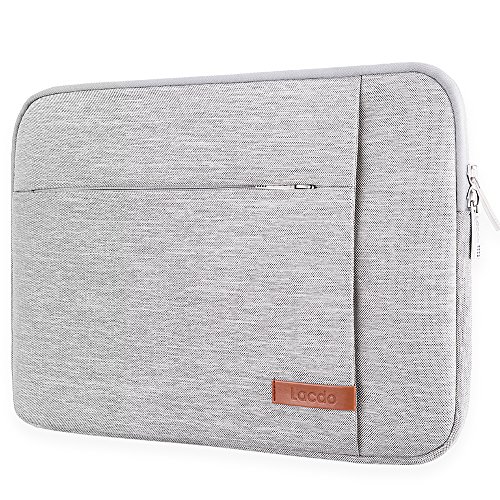
Listed as Lacdo 13 inch Laptop Sleeve Case for 13 inch MacBook Neo / Air / Pro 13, Gray. Compare size, material and compatibility with your own setup before choosing, and check the maker’s size or fit chart where relevant.
65W USB Type C Laptop Charger Compatible with Dell Latitude 5440 5540 5450

Listed as 65W USB Type C Laptop Charger Compatible with Dell Latitude 5440 5540 5450. The maker’s listing highlights: 5420 7420 5520 E5440 E5430 5320 7440 5430 5530 7430 7450 XPS 13 Power Cord, Chromebook 3100 2in1 Computer AC Adapter. Compare size, material and compatibility with your own setup before choosing, and check the maker’s size or fit chart where relevant.
Frequently Asked Questions
What are the best laptop accessories to buy first?
Start with protection and power: a well-fitting sleeve or padded bag and a good spare charger. After that, a hub or a stand depends on how you work. A hub is best for desk use with a monitor, and a stand is best for long sessions.
What is the best laptop sleeve for a 13 inch laptop?
The best sleeve is the one with an explicit compatibility list that includes your model. The Lacdo 13-inch sleeve lists several recent 13-inch MacBook and iPad models, and the BAGSMART sleeve adds front pockets for small accessories.
Is a laptop tote bag for women safe for a laptop?
It can be, if the bag has a padded compartment or you use a sleeve inside it. Totes are usually open-topped and less structured, so a sleeve adds the protection the bag may lack.
Can a USB-C charger power any laptop?
No. The laptop must support USB-C charging, and the charger must provide enough wattage. Check the wattage on your original charger and match or exceed it, and use a cable rated for the load.
Do I need a USB-C hub?
You need one if your laptop has only one or two USB-C ports and you use a monitor, a mouse dongle, or a memory card. If you only use wireless devices and charge through the same port, you may not.
Does a cooling pad help?
It can help some laptops run cooler under sustained load, but the effect varies by model. A stand with airflow is often enough for light work, and a cooling pad is mostly useful for gaming or heavy rendering.
How much should I spend on laptop accessories?
Spend more on the items that touch power and safety, such as chargers, and less on simple items such as sleeves and mice. Use the tier labels in the table as a rough guide.
Which One Should You Buy?
If you buy only one thing, choose the Anker Nano 65W GaN II charger for a travel kit, or the Lacdo sleeve for protection. If you work at a desk, add the Anker 7-in-1 hub and the Lamicall stand. If you carry a bag to work, the BUG tote plus a sleeve gives you casual carry with a protective layer. If you own a listed Dell model, the EAOYHGB charger makes a practical spare, and the Logitech M240 makes meetings quieter.
Sources
- Anker product specification pages for the Nano 65W GaN II charger and the 7-in-1 USB-C hub
- Logitech M240 Silent Bluetooth Mouse product page
- Lacdo and Lamicall product descriptions
- USB Implementers Forum guidance on USB Power Delivery
- Independent buying guides for laptop accessories from Wirecutter and PCMag
Last updated: October 2026




Write Your Review
No reviews yet. Be the first to share your experience!