

Key takeaways
- Best Overall Budget: Redragon K668, full size with hot-swap sockets, RGB and dedicated hotkeys.
- Best Value Mechanical: Redragon wired hot-swap board with red switches and PBT double-shot keycaps.
- Best for Competitive Shooters: AULA WIN68 HE, a 60% Hall-effect keyboard with adjustable actuation and rapid trigger.
- Best Wireless on a Budget: AULA F75 Pro, a 75% tri-mode board with a knob and pre-lubed switches.
- Best Quiet Pick: SteelSeries Apex 3, with whisper-quiet switches, IP32 water resistance and a magnetic wrist rest.
- Best Hybrid Feel: Razer Ornata V3, low-profile mecha-membrane keys with a wrist rest.
- Best Plain Membrane: Logitech G213 Prodigy, a Mech-Dome board with a palm rest and media controls.
The best budget gaming keyboard for most laptop and desktop players is the Redragon K668, a wired 108-key hot-swap board with extra shortcut keys, and the runner-up is the Logitech G213 if you prefer a quiet, spill-resistant membrane board with a palm rest. If you play competitive shooters and want adjustable key travel, the AULA WIN68 HE is the budget Hall-effect option. This guide compares seven affordable gaming keyboards by switch type, layout, connection, noise and what each one asks you to give up.
We did not personally use these products. This guide is research-based, built from manufacturer spec pages, listing details and independent reviews named at the end. Where a detail could not be confirmed, we write “not listed” rather than guess. The article is written for people who connect an external keyboard to a gaming laptop or a budget desktop, so port use, size and noise are covered along with switches.
Our top picks



As an Amazon Associate we earn from qualifying purchases at no extra cost to you.
Top Picks at a Glance
- Best Overall Budget: Redragon K668, full size with hot-swap sockets, RGB and dedicated hotkeys.
- Best Value Mechanical: Redragon wired hot-swap board with red switches and PBT double-shot keycaps.
- Best for Competitive Shooters: AULA WIN68 HE, a 60% Hall-effect keyboard with adjustable actuation and rapid trigger.
- Best Wireless on a Budget: AULA F75 Pro, a 75% tri-mode board with a knob and pre-lubed switches.
- Best Quiet Pick: SteelSeries Apex 3, with whisper-quiet switches, IP32 water resistance and a magnetic wrist rest.
- Best Hybrid Feel: Razer Ornata V3, low-profile mecha-membrane keys with a wrist rest.
- Best Plain Membrane: Logitech G213 Prodigy, a Mech-Dome board with a palm rest and media controls.
Quick Comparison Table
| Product | Best for | Key specs | Watch for | Price tier |
|---|---|---|---|---|
| Redragon K668 | All-round budget gaming | 108 keys, hot-swap, wired, RGB, extra hotkeys | Switch type not listed in title | Budget |
| Redragon hot-swap red-switch board | First mechanical keyboard | Wired, hot-swappable red switch, PBT double-shot keycaps, 11 lighting modes | Exact layout not listed in title | Budget |
| AULA WIN68 HE | FPS and esports | 68 keys, Hall-effect, 8000 Hz, adjustable actuation | Small layout, no number pad | Mid-range |
| AULA F75 Pro | Cable-free desk | 75%, 2.4 GHz, Bluetooth 5.0, USB-C, knob | Wireless battery needs charging | Mid-range |
| SteelSeries Apex 3 | Quiet play | IP32, 10-zone RGB, magnetic wrist rest, about 1.27 kg | Not hot-swappable | Mid-range |
| Razer Ornata V3 | Low-profile fans | Mecha-membrane, 10-zone RGB, magnetic wrist rest | Hybrid feel is not true mechanical | Mid-range |
| Logitech G213 Prodigy | Quiet, spill-resistant | Mech-Dome, 4 mm travel, 50 g actuation, 1.8 m cable | Older design, no hot-swap | Budget |
What “Budget” Means for a Gaming Keyboard
A budget gaming keyboard gives up three things compared with premium boards: fancy build materials, wireless polish and software depth. It does not have to give up the things that matter for playing. Those are a stable matrix (anti-ghosting or full key rollover), a layout you can reach comfortably, a switch you enjoy and a cable or wireless link that does not drop inputs.
For laptop gamers, the question is usually whether to buy a full-size board (about 440 to 450 mm wide) or a compact 60% or 75% board (about 290 to 330 mm wide). Compact boards leave more room for your mouse, which matters on a small desk or a lap tray. Full-size boards keep the number pad for spreadsheets and the arrow cluster for movement in some games.
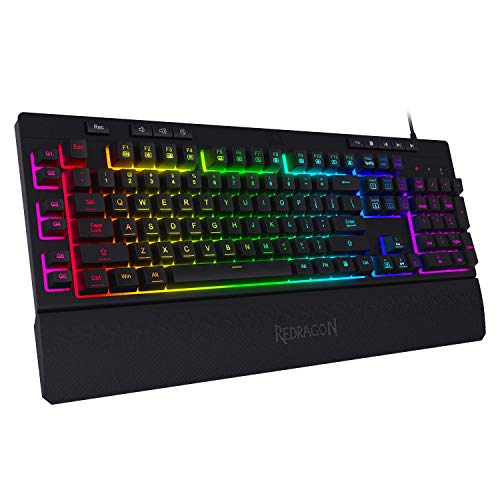
1. Redragon K668: Best Overall Budget
- 108-key layout with four extra hotkeys for mute, calculator and desktop
- Hot-swap sockets, so switches can be changed without soldering
- Wired USB connection, RGB lighting and Redragon PRO software
- Cushioned noise dampening described as a creamy, thocky sound
- Switch type: not listed in the title
Best for: players who want a full-size board with room to grow. Skip if: you need a compact layout or wireless.
The K668’s appeal is flexibility. Hot-swap sockets mean that if you dislike the stock switches, you can replace them with 3-pin or 5-pin switches (check which the board supports on the maker’s page) without a soldering iron. The four dedicated shortcut keys for mute, calculator and desktop are quietly useful when you tab out of a game or work in between sessions. The dampening materials aim for a deeper, softer sound than the rattly tone of cheaper boards.
Because it is wired, there is no battery to charge and no latency from a wireless link. On a laptop, it uses one USB port, so a small hub helps if you also connect a mouse and a headset dongle. Check that the cable length reaches your setup, because this is a full-size board and sits further from the laptop.
Pros: hot-swap sockets; full-size layout; hotkeys; software for remapping; wired reliability. Cons: switch type not stated in the title; no wireless; larger footprint.
2. Redragon Hot-Swap Red-Switch Board: Best First Mechanical
- Wired mechanical gaming keyboard with hot-swappable red switches
- 11 programmable backlit modes
- Double-shot PBT keycaps
- Anti-ghosting; compatible with PC and Mac per the listing
- Layout: not listed in the title
Best for: a first mechanical keyboard on a tight budget. Skip if: you want a specific layout confirmed in the title.
Red switches are linear: smooth and quiet-ish with no tactile bump, which many gamers prefer for repeated key presses. Double-shot PBT keycaps matter because PBT plastic resists the shiny wear that cheap ABS keycaps develop after months of use, and double-shot construction means the legends cannot rub off. Together with hot-swap sockets, this is a combination that was once only available at a higher tier.
Because the title does not state the layout, check the product page images before ordering, especially if you need a number pad or a tenkeyless footprint to fit a laptop desk.
Pros: hot-swappable; PBT keycaps; linear red switches; Mac compatibility noted. Cons: layout not in the title; lighting modes are basic compared with software-driven boards.
3. AULA WIN68 HE: Best for Competitive Shooters
- 60% layout with 68 keys, wired USB
- Hall-effect magnetic switches
- Adjustable actuation (0.02 mm to 3.44 mm on the base model per the maker)
- Rapid trigger and 8000 Hz polling rate
- RGB backlighting
Best for: first-person shooter players who want rapid trigger without a premium price. Skip if: you need arrows, function keys or a number pad.
Hall-effect keyboards use magnets to detect how far a key is pressed, which lets you set the actuation point and enable rapid trigger, where the key resets the moment you start to release it. In shooters, this can shave precious milliseconds off counter-strafing and movement. The 8000 Hz polling rate is a headline number; to benefit from it you need a compatible game, a stable USB port and a CPU that can keep up, so treat it as a bonus rather than a reason to buy.
The compact 60% layout moves the arrow keys and function row behind a function layer, which takes getting used to. Latency numbers vary between listings (0.3 ms on the maker’s page versus other values on retailer pages), so do not compare them as precise facts. Variants named PRO and MAX exist with slightly different ranges, so confirm you are viewing the base WIN68 HE.
Pros: adjustable actuation; rapid trigger; compact; high polling rate. Cons: small layout; software learning curve; not suited to office typing with numbers.
4. AULA F75 Pro: Best Budget Wireless Board
- 75% layout with a volume knob
- Tri-mode: 2.4 GHz, USB-C wired and Bluetooth 5.0
- Hot-swappable with pre-lubed Reaper switches
- Side-printed PBT keycaps and RGB backlighting
Best for: players who want a tidy cable-free desk and a compact board. Skip if: you only want the cheapest possible board.
The 75% layout keeps the arrow keys and function row in a small footprint, which makes it a strong fit for laptop setups. Tri-mode connectivity lets you use the 2.4 GHz dongle for gaming, Bluetooth for a tablet or phone, and USB-C when the battery is low. The knob is genuinely useful for volume. Pre-lubed switches reduce scratchiness, which is a common complaint with cheap mechanical boards.
Keep in mind that wireless boards need charging and that battery life numbers depend on lighting; battery capacity is not listed in the title, so check the maker’s page. Using the 2.4 GHz dongle also takes a USB port on your laptop.
Pros: wireless and wired options; knob; hot-swap; compact. Cons: needs charging; dongle uses a USB port; battery details not in the title.
5. SteelSeries Apex 3: Best Quiet Pick
- Full-size layout with a magnetic wrist rest
- Whisper-quiet switches rated for 20 million key presses
- IP32 water resistance
- 10-zone RGB lighting; 24-key anti-ghosting listed by one retailer
- About 1.27 kg; 17.52 by 5.94 by 1.57 inches
Best for: shared rooms and late-night play. Skip if: you want hot-swappable switches or a true mechanical click.
The Apex 3 uses a quiet, low-friction switch that behaves between a membrane and a mechanical switch. IP32 water resistance protects against light spills, which matters for gamers who keep a drink next to the keyboard. The magnetic wrist rest attaches securely and gives full palm support. The 10-zone lighting is not per-key, but it is bright and well integrated with SteelSeries software.
Weight is around 1.27 kg, so it stays put on the desk. The trade-off is that you cannot swap switches or keycaps easily, so the Apex 3 is a keyboard you keep as it is.
Pros: quiet; water resistant; wrist rest; sturdy. Cons: not hot-swappable; zone lighting only; limited customisation.
6. Razer Ornata V3: Best Hybrid Feel
- Low-profile keys with mecha-membrane switches
- 10-zone RGB lighting and UV-coated keycaps
- Magnetic wrist rest and backlit media keys
- Snap Tap feature named in the listing
- 6-key conflict-free operation and 1,000 Hz polling per the maker
Best for: players who like a shallow, clicky feel without a full mechanical keyboard. Skip if: you want silent keys or high polling.
Mecha-membrane switches combine a membrane layer with a mechanical-feeling click. The keys are low-profile, which can feel more comfortable on a laptop because the height is closer to a laptop keyboard. The wrist rest is a welcome inclusion. Because it is a hybrid design, a switch swap is not possible, and the clicky sound can be noisy in a shared room.
Razer’s Synapse software is where you configure lighting and macros; check its system requirements and whether it fits your preferences about background apps.
Pros: low profile; wrist rest; Razer ecosystem; sturdy build. Cons: not a true mechanical switch; clicky noise; software dependent.
7. Logitech G213 Prodigy: Best Plain Membrane
- Mech-Dome keys: membrane with 4 mm travel and about 50 g actuation force
- Full-size, 104 keys with a built-in palm rest
- 5-zone RGB lighting and dedicated media controls
- 1.8 m cable; about 1,000 g; spill resistance up to 60 ml per the maker
- Wired USB
Best for: quiet, no-fuss play and general use. Skip if: you want a mechanical feel or hot-swap.
The G213 is not a mechanical keyboard, but the Mech-Dome design gives a softer press than flat membrane boards. The integrated palm rest and adjustable feet make long sessions more comfortable, and the media keys are quick to use. Spill resistance is a real advantage in a shared household.
It is an older design, so there is no wireless, no hot-swap, and the lighting is limited. For what it costs, it is a safe, durable and quiet option.
Pros: quiet; palm rest; spill resistant; long cable. Cons: not mechanical; zone lighting; older design.
Also Consider
- GEODMAER 65% gaming keyboard: a wired 68-key membrane board that is very light on cost; good if you want a compact layout and nothing else.
- Womier SK80: a wired 75% gasket-mount keyboard with a small display, hot-swap sockets and pre-lubed stabilizers; a good upgrade path.
- Logitech G413 SE: a full-size mechanical keyboard with an aluminum top; a more premium step for players who want a classic layout.
Which Keyboard for Which Game Type
| Game type | What matters | Best fit from this list |
|---|---|---|
| Competitive shooters | Fast reset, compact layout, wired link | AULA WIN68 HE |
| MOBAs and strategy | Many keys and hotkeys within reach | Redragon K668 |
| Single-player and story games | Comfort and quiet | SteelSeries Apex 3 or Logitech G213 |
| Mixed work and play on one laptop | Wireless, compact, multi-device | AULA F75 Pro |
| Rhythm and typing games | Clean linear travel and good keycaps | Redragon hot-swap red-switch board |
| Shared room or late-night play | Low noise | SteelSeries Apex 3 |
Use the table as a starting point, not a rule. Genre matters less than your own habits: if you press movement keys with a lot of force, a firmer switch may feel better, and if you hover on keys, a lighter one will reduce fatigue.
A Quick Cost-Per-Year Check
A keyboard is a daily-use tool, so price per year of use is a fairer way to compare than the sticker tier alone. Suppose a budget board lasts four years of daily play and a mid-range board lasts six. Divide the purchase price by the years you expect to use it, and add the cost of anything you must buy separately, such as a wrist rest. A board with a wrist rest included, like the Apex 3 or the Ornata V3, may cost less over time than a cheaper board plus a separate rest. A hot-swap board, like the Redragon K668 or the AULA F75 Pro, can also extend life, because a worn or disliked switch can be replaced rather than the whole keyboard.
For rated lifespans, use the maker’s numbers only as a guide. SteelSeries lists 20 million key presses for the Apex 3 switches. Even at 10,000 presses a day, which is a lot, that is more than five years of play. In practice, keycap shine, spilled drinks and cable damage end most keyboards before the switches wear out.
Care and Cleaning Basics
- Unplug the keyboard and turn it upside down over a towel once a month to shake out crumbs.
- Use a soft brush or compressed air between the keys; avoid soaking the board.
- Wipe keycaps with a slightly damp microfibre cloth; do not use harsh solvents on printed legends.
- With hot-swap boards, only remove switches with the proper puller, and straighten any bent pins before reinserting.
- Keep drinks away; IP32 and 60 ml spill ratings help with small spills but are not a licence to pour.
Cheap Upgrades Worth Making
Once you own a budget board, a few small purchases change how it feels more than a new keyboard would. A set of PBT keycaps replaces thin stock caps and cuts shine. A low-profile wrist rest helps if you chose a flat board such as the AULA WIN68 HE or the Redragon K668. A small stick-on foam layer or a desk mat under the keyboard reduces the hollow sound that cheap cases can have, and a coiled or braided cable can tidy the desk. If your board is hot-swappable, a switch puller and a pack of lubed linear switches are the usual next step; check that the switches match the 3-pin or 5-pin sockets listed by the maker. None of this is required, and a stock board is perfectly playable, but these upgrades are a sensible way to stretch a budget board for another year or two before you consider replacing it.
How We Chose
We shortlisted budget gaming keyboards that are currently sold and that appear repeatedly in independent buying guides. We compared layout, switch type, connection and listed features, using manufacturer spec pages and retailer listings, and read reviews from keyboard-focused publications. We did not personally use these products. Where listings disagree, we followed the manufacturer’s page and say so. We limited each brand to two picks and excluded boards with unclear specs or odd naming.
Buying Guide
Switch type: linear, tactile, clicky, membrane and Hall effect
Linear switches (reds) press smoothly and suit rapid taps in games. Tactile switches give a bump when they actuate, which helps typing accuracy. Clicky switches add an audible click and are loud. Membrane and Mech-Dome keys are quiet and cheap but lack the crisp feel. Hall-effect switches use magnets and allow adjustable actuation, which is the main feature that has moved from premium to budget boards recently.
Layout and desk space
A full-size board is around 440 to 450 mm wide and leaves little space for a mouse on a small desk. A tenkeyless board is about 360 mm. A 75% board is about 320 to 330 mm, and a 60% board about 290 mm. If your mouse arm hits the keyboard when you swipe, choose a more compact layout.
Wired or wireless
Wired boards avoid battery management and cannot lose connection. Wireless boards remove cable clutter and work better with a laptop that moves around. For competitive play, wired is the safe choice; for a tidy desk, a good 2.4 GHz wireless board is usually fine.
Hot-swap and keycaps
Hot-swap sockets let you replace switches without soldering. PBT keycaps resist shine and wear better than ABS. These two features mean a budget board can last longer and be personalised cheaply.
Software and lighting
Check whether remapping and lighting need vendor software running in the background. Some people prefer onboard memory so settings persist without software. Zone lighting is fine; per-key RGB is a nice extra.
Setup Tips for Laptop Gamers
- Use a USB hub with its own power if your laptop has only two ports.
- Place the keyboard so that your wrists are neutral; a wrist rest can help if you use a flat board.
- Disable laptop touchpad while gaming to avoid accidental inputs.
- If you use 2.4 GHz wireless, keep the dongle on a short extension cable near the keyboard for a cleaner signal.
Common Mistakes to Avoid
- Buying a keyboard by RGB features instead of switch feel.
- Choosing a 60% layout without realising you will miss arrow keys.
- Ignoring noise if you share a room.
- Believing that a bigger polling rate always means a better experience.
Frequently Asked Questions
What is the best budget gaming keyboard?
The Redragon K668 is a strong all-round choice, and the AULA WIN68 HE is a strong choice for competitive shooters who want adjustable actuation.
Is a mechanical keyboard worth it for gaming?
Yes for many players, because mechanical switches feel crisp and last longer, but a good membrane board like the Logitech G213 is perfectly playable and quieter.
What size gaming keyboard should I buy for a laptop?
A tenkeyless or 75% layout is usually best because it leaves room for the mouse, while a full-size board makes sense if you need the number pad.
Do I need a wireless gaming keyboard?
Not necessarily. Wired boards are simple and reliable. Wireless is useful for tidy desks and for moving between a laptop and a tablet.
What does hot-swappable mean?
It means the switches plug into sockets, so you can replace them without soldering. Check which switch pin types the board supports.
What is a Hall-effect keyboard?
It uses magnets and sensors to detect key position, which allows adjustable actuation points and rapid trigger.
Are cheap gaming keyboards durable?
Durability varies. Look for PBT keycaps, a sturdy frame and a rated switch lifespan, such as the 20 million presses SteelSeries lists for the Apex 3.
Which One Should You Buy?
Choose the Redragon K668 for an all-round budget board. Choose the Redragon hot-swap red-switch board if you want a first mechanical keyboard. Choose the AULA WIN68 HE for competitive shooters, the AULA F75 Pro for a wireless compact board, the SteelSeries Apex 3 for quiet play, the Razer Ornata V3 for a hybrid low-profile feel and the Logitech G213 for a simple, spill-resistant board.
Sources
- Redragon product pages
- AULA product pages (WIN68 HE, F75 Pro)
- SteelSeries Apex 3 product page
- Razer Ornata V3 product page
- Logitech G213 Prodigy product page
- Independent keyboard reviews from RTINGS and keyboard-focused publications
Last updated: October 2026




Write Your Review
No reviews yet. Be the first to share your experience!