

Key takeaways
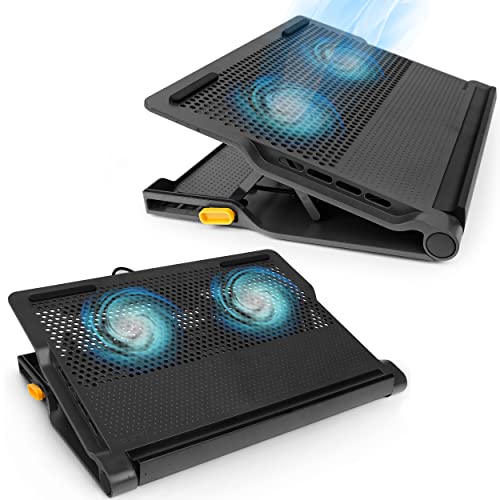
- Best Compact Overall: KYOLLY Ultra Slim Laptop Cooling Pad
- Best Foldable Riser With Fan: Craftreasure Laptop Cooling Stand with Fan
- Best Riser for MacBooks: ZMYPPYA Laptop Stand with Active Cooling Fan
- Best Height Adjustability: AISUNKUTECH Cooling Pad with 5-Level Stand
- Best Fan Coverage: Kootek Laptop Cooling Pad with 5 Quiet Fans
- Best Soft Lap-and-Desk Mat: Targus Chill Mat for up to 16-Inch Laptops
- Best No-Fan Option: Lamicall Aluminum Laptop Stand
The best laptop cooling stand for a small desk setup is a slim, foldable stand with a couple of quiet fans, and the KYOLLY ultra slim cooling pad is the compact pick to start with, with the Craftreasure foldable stand as the runner-up if you want a riser that tucks away after work. Small desks punish bulky cooling pads: a 17-inch gaming cooler with nine fans can swallow half your workspace and block the space you need for a mouse and notebook. The seven picks below favor footprint, adjustable height and portability, and the guide explains how to measure your desk so the stand you choose actually fits.
This guide is research-based. We did not personally use these stands; we compared maker listings, stated sizes and independent coverage of how laptop cooling pads behave, and we write “not listed” where a detail could not be confirmed. A cooling stand cannot make a laptop run cooler than its design allows, but good airflow under the chassis and a raised angle can help a hot laptop breathe, and an ergonomic angle helps your wrists and neck, which small-desk workers often forget.
Our top picks



As an Amazon Associate we earn from qualifying purchases at no extra cost to you.
Top Picks at a Glance
- Best Compact Overall: KYOLLY Ultra Slim Laptop Cooling Pad
- Best Foldable Riser With Fan: Craftreasure Laptop Cooling Stand with Fan
- Best Riser for MacBooks: ZMYPPYA Laptop Stand with Active Cooling Fan
- Best Height Adjustability: AISUNKUTECH Cooling Pad with 5-Level Stand
- Best Fan Coverage: Kootek Laptop Cooling Pad with 5 Quiet Fans
- Best Soft Lap-and-Desk Mat: Targus Chill Mat for up to 16-Inch Laptops
- Best No-Fan Option: Lamicall Aluminum Laptop Stand
Comparison Table
| Product | Best for | Key specs (per listing) | Watch for | Price tier |
|---|---|---|---|---|
| KYOLLY Ultra Slim | Tight desks, thin laptops | 2 big fans, 5 height positions, ultra slim, portable | Two fans move less air than larger pads | Budget |
| Craftreasure Fan Stand | Desk riser that folds away | Fan with one-key switch, adjustable riser, foldable | Fan size and noise not listed | Mid-range |
| ZMYPPYA Riser with Fan | MacBook and thin laptops | Riser with active cooling fan, wide compatibility | Compatibility range worth checking | Mid-range |
| AISUNKUTECH 3-Fan | Adjustable angle, extra USB | 3 quiet fans, 5-level height, 2 USB ports, phone holder, fits 12-17 inch | Larger footprint than slim stands | Budget |
| Kootek 5-Fan | Hot laptops that need airflow | 5 quiet fans, fits 12-17 inch laptops | Takes more desk space | Budget |
| Targus Chill Mat | Soft padded surface | Dual-fan heat dispersion, up to 16 inch laptops | Basic angle control | Budget |
| Lamicall Aluminum Stand | Silent raised airflow | Aluminum, adjustable, foldable, 10-17.3 inch | No fan, passive only | Mid-range |
How to Fit a Cooling Stand on a Small Desk
Before comparing models, measure your desk. A laptop plus a stand takes more depth than a laptop alone, because the stand raises the back and the base extends past the laptop edges. As a rule of thumb, a 15.6-inch laptop is roughly 14 inches wide and 10 inches deep; a pad rated for 17-inch laptops is often a couple of inches wider and deeper than the laptop it carries. On a 24-inch-deep desk with a monitor at the back, that extra footprint decides whether you still have room for a notebook and mouse.
A quick footprint worksheet
| Step | What to measure | Example |
|---|---|---|
| 1 | Desk depth minus monitor stand depth | 24 in minus 8 in leaves 16 in |
| 2 | Laptop depth plus stand overhang | 10 in plus about 1 to 2 in |
| 3 | Space left for hands and mouse | 16 in minus 12 in leaves about 4 in |
| 4 | Verdict | Under 5 in left: choose a slim or foldable stand |
The numbers are illustrative, so use your own. If the remaining space is only a few inches, a slim pad or a foldable riser is the practical choice. If you have an external keyboard and place the laptop on the stand as a second screen, size matters less, and the best airflow pad may suit you better.
Fans versus passive risers
A fan pad pushes air toward the underside vents, and it helps most when the laptop has bottom intake vents and runs hot under sustained load. A passive aluminum riser lifts the laptop and lets natural airflow and the metal’s heat spreading do the work. Many thin ultrabooks and MacBooks have little to gain from a fan pad because they are designed around low-power chips, so a passive stand is often enough for browsing and office work. Gaming laptops and workstations are the ones most likely to benefit from a fan pad.
1. KYOLLY Ultra Slim Laptop Cooling Pad: Best Compact Overall
- Fans: 2 large quiet fans
- Height: 5 adjustable positions
- Design: ultra slim, portable
- Size range: designed for small to mid-size laptops (exact range in the listing)
- Noise level: described as quiet, decibel figure not listed
Best for: small desks and thin laptops. Skip if: you run a 17-inch gaming laptop under heavy load.
The KYOLLY pad does the job you want from a small-desk stand: it is slim, it has two large fans rather than a crowd of small ones, and it offers five angles to match your typing position. Fewer, bigger fans tend to run quieter at the same airflow than many small ones, which matters in a quiet home office.
The five-position stand lets you raise the back of the laptop by different amounts, which improves wrist posture on a small desk. Choose the lowest comfortable angle for typing and the highest angle only when you need more airflow or a better screen position.
It sits in the budget tier, which makes it a low-risk first cooling stand. The trade-off is airflow: two fans will not match a nine-fan gaming pad on a hot machine, but for office laptops and student machines it is usually sufficient.
Pros:
- Slim profile suits tight desks
- Five height positions
- Budget tier
- Two large fans rather than many small ones
Cons:
- Lower airflow than bigger pads
- Best for smaller laptops
2. Craftreasure Laptop Cooling Stand with Fan: Best Foldable Riser With Fan
- Cooling: fan with a one-key on/off switch
- Stand: adjustable, foldable laptop riser
- Design: ergonomic desk stand for computer and notebook
- Fan count and size: not listed in the headline
- Maximum laptop size: check the listing
Best for: people who want to fold the stand away after work. Skip if: you need many fans or RGB lighting.
This stand is a riser first and a cooler second. The foldable design means the desk is clear when you close the laptop, which is the main advantage on a shared or small desk. A one-key switch makes it easy to turn the fan off when you only need the raised angle, which saves noise and power.
Because the fan details are not listed in the headline, treat it as light cooling assistance rather than a gaming cooler. It suits office use, video calls and study sessions, where the laptop sits at an ergonomic height and benefits from a bit of airflow.
It lands in the mid-range tier, a little above basic risers because of the fan and fold mechanism. Check the listing for the maximum laptop size and weight before ordering.
Pros:
- Folds flat for storage
- One-key fan switch
- Adjustable height and angle
Cons:
- Fan specs not listed in headline
- Not meant for heavy gaming loads
3. ZMYPPYA Laptop Stand with Active Cooling Fan: Best Riser for MacBooks
- Type: laptop riser with active cooling fan
- Compatibility: described as widely compatible, including MacBooks
- Use: desk stand
- Fan details and noise: not listed in the headline
- Material: not listed in the headline
Best for: thin laptops and MacBooks on a tight desk. Skip if: you want a large fan array.
The listing positions this model as a riser with a fan rather than a classic pad, which is a good match for thin laptops that need a modest lift and a bit of airflow. Risers hold the laptop above the desk surface, free up space under the front edge for a keyboard, and keep the screen at a better height.
Compared with a fan pad, the benefit is footprint: risers are usually narrower in depth. The caution is compatibility. Check that the stand’s grip or lip fits your laptop’s thickness and that the fan sits under the vents rather than a solid part of the chassis. On MacBooks the intake is mostly along the hinge and the vents are on the sides or bottom edges depending on the model, so a fan under the middle may do little. A raised stand still helps with airflow around the base.
Pros:
- Riser form with a fan, saving depth
- Described as widely compatible
- Mid-range tier
Cons:
- Fan placement may not line up with every vent layout
- Few specs in the headline
4. AISUNKUTECH Cooling Pad with 3 Fans and 5-Level Stand: Best Height Adjustability
- Fans: 3 quiet fans
- Height: 5-level adjustable ergonomic stand
- Extras: 2 USB ports and a phone holder
- Size range: fits 12 to 17 inch laptops
- Power: USB powered
Best for: a flexible pad that also holds your phone and adds USB ports. Skip if: your desk is under 20 inches deep.
This pad covers more bases than the slim picks: three fans, five angles, two extra USB ports to replace the one it uses, and a phone holder. For a student who works at a small desk and wants a single accessory to handle cooling, height and a phone, that is a neat package.
The extra features add footprint. The phone holder takes up space on one side, and the pad is built for a wide range of laptop sizes, so the base is larger than the slim picks. Measure before ordering if your desk is very shallow.
The price is in the budget tier, which is good value for the number of features.
Pros:
- Five height levels
- Two USB ports and a phone holder
- Budget tier
Cons:
- Larger footprint
- Fits a wide range of sizes, which means the base is generic
5. Kootek Laptop Cooling Pad with 5 Quiet Fans: Best Fan Coverage
- Fans: 5 quiet fans
- Size range: 12 to 17 inch laptops
- Design: cooler stand, USB-powered fans
- Height positions: listed in the full page, not in the headline
- Noise: described as quiet, figure not listed
Best for: hot laptops with bottom vents. Skip if: you only have a narrow shelf-style desk.
When a laptop is running warm and fans are needed, more coverage helps. Five fans spread airflow across the underside, so a vent anywhere in the middle or at the edges is likely to see moving air. Kootek is a well-known name in this category, and this model is a common reference point for budget cooling pads.
The cost of coverage is footprint. A pad sized for 17-inch laptops is large, so on a small desk it may overlap your keyboard area. If you pick this model, choose the pad that matches your laptop size, not the biggest one, and check dimensions.
Use the lowest fan speed that keeps the laptop comfortable, which also reduces noise and USB power draw.
Pros:
- Five fans for broad airflow
- Fits 12 to 17 inch laptops
- Budget tier
Cons:
- Large footprint on small desks
- Adds fan noise
6. Targus Chill Mat for up to 16-Inch Laptops: Best Soft Lap-and-Desk Mat
- Fans: dual-fan heat dispersion
- Size range: up to 16 inch laptops
- Surface: padded mat, designed for heat protection
- Angle control: basic, not adjustable per the headline
- Power: USB powered
Best for: people who use the laptop on both a desk and their lap. Skip if: you want multiple stand angles.
Targus is a mainstream laptop accessory brand, and the Chill Mat is built for comfort: a soft surface under the laptop, two fans for airflow, and a size limit of 16 inches. It is less of a stand and more of a pad. For small-desk users who move between a desk and a sofa, the soft, flat design is simple and compact.
It will not raise the laptop to an ergonomic angle, so pair it with a separate stand if posture matters. Because it lies flat, the footprint is just slightly larger than the laptop.
Pros:
- Soft surface for lap and desk use
- Two fans, flat footprint
- Established accessory brand
Cons:
- No height adjustment listed
- Limited to laptops up to 16 inches
7. Lamicall Aluminum Laptop Stand: Best No-Fan Option
- Material: aluminum
- Design: adjustable, foldable stand
- Size range: 10 to 17.3 inch laptops per the listing
- Cooling: passive, no fan
- Weight and exact footprint: not listed in the headline
Best for: quiet rooms, MacBooks and thin laptops that run cool. Skip if: your laptop throttles under load and needs forced airflow.
Not every laptop needs a fan. If your machine mostly runs office and browser workloads, a passive aluminum stand lifts it, spreads some heat through the metal and improves your posture without any noise or USB power draw. The Lamicall stand folds for storage and supports a wide size range.
It is also the only pick in this list that costs nothing in noise. In a bedroom, library or shared office, silence is a feature in itself. If you later find your laptop still runs hot, you can add a clip-on or external cooling fan without replacing the stand.
Pros:
- Silent
- Folds for storage
- Wide size range
Cons:
- No active cooling
- Mid-range tier for a passive stand
Also Consider
TECKNET Slim Portable Laptop Cooling Pad
A slim, portable pad for 12 to 17 inch laptops with high-efficiency cooling claims. A solid alternate to KYOLLY if you prefer a better-known brand.
Nulaxy Ergonomic Adjustable Laptop Stand
A foldable passive stand with a heat vent design and heavy-duty portability. Good if you want a no-fan riser at a low price.
YICOSUN Adjustable Laptop Cooling Stand
An aluminum, foldable stand with two quiet fans and RGB lighting. Attractive if you want a bit of style, but the lighting and extra parts add cost.
Leeboom Adjustable Aluminum Laptop Stand
A very low-cost foldable aluminum riser for laptops up to 15.6 inches. Suitable as a spare stand for travel.
How We Chose
This guide is research-based. We did not personally use these stands. We searched the store catalog for laptop cooling stands and risers, kept items that are currently sold and fit small-desk use, and compared them against their maker or listing details. We weighed stated fan count and size, height adjustability, supported laptop sizes, foldability and extras like USB ports. We also read independent coverage on how cooling pads affect laptop temperatures to avoid overstating benefits.
We limited each brand to one or two entries, included both fan and passive options, and wrote “not listed” for anything we could not confirm. Prices are shown as tiers because they change often.
Buying Guide
Match the stand to your laptop type
Thin ultrabooks and MacBooks usually need a riser, not a heavy fan pad. Gaming laptops and workstations with powerful GPUs benefit from fan coverage. If you are unsure, start with a quiet two-fan or passive stand and see whether the fan noise is worth it.
Check the size range
Pick a pad rated for your laptop size, not the biggest one. A 14-inch laptop on a pad built for 17 inches wastes desk space and may slide. For laptops 15.6 inches and below, a pad sized for 12 to 16 inches is a good fit.
Look for adjustable angle
Height adjustment helps wrists and neck. A typical range of 2 to 6 inches is enough; steeper angles can strain wrists. Use a lower angle for typing and a higher one for viewing.
Fan noise and USB power
Fans draw power from a USB port, which can use a port you need. Choose pads with a pass-through USB port or accept losing one. Low-speed settings and larger fans are generally quieter than many tiny fans.
Stability and grip
A stand that wobbles is worse than none. Look for non-slip lips or rubber pads, and avoid stands with thin hinges for heavy laptops. For laptops over 5 pounds, favor sturdy aluminum or wide pads.
Common Mistakes to Avoid
- Buying a 17-inch gaming pad for a 13-inch ultrabook on a narrow desk.
- Expecting a cooling stand to fix a laptop that is throttling because of dust or failing thermal paste.
- Blocking the stand’s airflow with a soft surface like a blanket.
- Using a high fan speed all day when low speed is enough.
- Ignoring ergonomics: a cool laptop at a bad angle still strains your wrists.
Frequently Asked Questions
Do laptop cooling stands really work?
They can help, especially for laptops that run hot under sustained load, but results vary. Improved airflow and a raised angle can reduce heat build-up modestly. They do not replace good internal cooling, and a dusty laptop needs cleaning more than a pad.
What size cooling stand fits a small desk?
A slim pad or foldable riser sized for your laptop works best. Measure your desk depth, subtract the monitor stand, and leave at least 4 to 5 inches for your hands. If you have less, choose a foldable stand.
Are fan pads or passive stands better?
Fan pads suit hot laptops with bottom vents, such as gaming models. Passive stands suit thin laptops and quiet rooms. If your laptop rarely gets hot, a passive stand is simpler and silent.
Will a cooling stand work with a MacBook?
Yes, a stand can be used with a MacBook, but MacBooks often benefit more from elevation and airflow than from fans. Apple silicon models run cooler in general, so a quiet riser is usually enough.
Do cooling pads use a USB port?
Most do, because the fans are USB powered. Some models include extra USB ports so you do not lose one. Check the listing if ports are scarce on your laptop.
Is it safe to use a cooling pad on my lap?
Soft mats like the Targus Chill Mat are designed with lap use in mind, but rigid stands are for desks. Follow your laptop maker’s guidance about ventilation and avoid blocking vents with fabrics.
How loud are laptop cooling stands?
Noise varies by fan size and speed. Larger fans at low speed are generally quieter than many small fans at high speed. Many listings call their fans quiet but rarely list decibel figures, so treat those claims cautiously.
Which One Should You Buy?
For a small desk, start with the KYOLLY ultra slim pad if you want gentle airflow in a compact body, or the Craftreasure foldable stand if you want to clear the desk at the end of the day. Pick the ZMYPPYA riser for a thin laptop or MacBook, the AISUNKUTECH pad if you want angles, USB ports and a phone holder, and the Kootek pad if your laptop runs hot and you have room for it. The Targus Chill Mat suits desk-and-lap use, and the Lamicall aluminum stand is the right answer if you want silence. Measure your desk first, then choose the smallest stand that meets your laptop’s cooling and ergonomic needs.
Sources
- Kootek, KYOLLY and AISUNKUTECH cooling pad product pages
- Targus Chill Mat product documentation
- Lamicall and Nulaxy laptop stand product pages
- Laptop maker guidance on ventilation and cooling accessories
- Independent laptop cooling pad coverage from tech publications
Last updated: October 2026





Write Your Review
No reviews yet. Be the first to share your experience!