
A DevOps engineer rarely works in one place. The morning might start with a pipeline failure handled from the kitchen table, the afternoon with a local cluster rebuilt at a desk, and the evening with an incident call taken from an airport lounge. The laptop must keep containers, virtual machines, terminals, and chat tools open at once, then last all day away from a charger.
As an Amazon Associate, we earn from qualifying purchases.
The five machines below were picked for that pattern of work. Each ships with at least 32GB of memory in the configuration listed, fast solid-state storage for container images and virtual disks, and ports that still work in older server rooms. They range from a featherweight travel machine to a 16-inch workstation, covering every style of on-call life.
How to Choose a Laptop for DevOps Work
Memory comes first. A handful of containers, one or two virtual machines, a browser full of dashboards, and an IDE can eat through 16GB before lunch. Look for 32GB as listed, and confirm the exact configuration in the listing, because many model names cover several memory sizes.
Storage speed matters almost as much. Container images, base boxes, and log archives grow quickly, so a fast NVMe drive with at least 1TB of room keeps local work smooth. Battery life decides how an on-call day feels: a healthy runtime as listed, paired with USB-C charging, helps on trains and client sites.
Linux support needs care: some makers list Linux editions or certify specific models, while others ship Windows only. Check the listing for the exact machine and confirm your distribution is named there before you commit, since nothing beyond what the maker states can be assumed.
Finally, check the ports. Two Thunderbolt or USB4 ports, HDMI for the meeting room screen, and a wired Ethernet port on some models save the dongle hunt on unfamiliar networks.
Lenovo ThinkPad T14 Gen 5

The ThinkPad T14 Gen 5 is the sensible default for engineers who split time between a desk and everywhere else. The listed configuration pairs an AMD Ryzen 7 PRO 8840U with 32GB of DDR5 memory and a 1TB NVMe drive, enough headroom for a local Kubernetes cluster, a database container, and a full IDE side by side.
It also keeps the practical touches DevOps work rewards. There is a wired Ethernet port for server room visits, two Thunderbolt 4 ports for docks and fast external drives, and a touchscreen in this listing for quick dashboard taps. The 52.5Wh battery and 65W USB-C charging mean a power bank can top it up between calls.
Specs
- Processor: AMD Ryzen 7 PRO 8840U (8 cores, up to 5.1 GHz as listed)
- Memory: 32GB DDR5
- Storage: 1TB PCIe NVMe SSD
- Display: 14-inch WUXGA IPS touchscreen
- Graphics: AMD Radeon 780M integrated
- Ports: 2x Thunderbolt 4, USB-A, HDMI 2.1, RJ-45 Ethernet
- Battery: 52.5Wh
- Operating system: Windows 11 Pro
- ASIN: B0DGKBYSL2
Dell XPS 13 9350

The Dell XPS 13 9350 is the pick for engineers who live out of a carry-on bag. At 2.7 pounds as listed, it disappears into a backpack, yet the listed configuration still carries 32GB of LPDDR5X memory and a 1TB SSD, so a couple of containers and a virtual machine remain realistic on the road.
The 13.4-inch 3K OLED touch display keeps dense terminal text sharp, and Wi-Fi 7 keeps transfers quick on newer networks. The trade-off is ports: two Thunderbolt 4 ports handle everything, so a small dock becomes part of the kit. This listing ships with Windows 11 Pro, so Linux users should confirm support on the listing, since no Linux edition is stated there.
Specs
- Processor: Intel Core Ultra 7 258V
- Memory: 32GB LPDDR5X
- Storage: 1TB SSD
- Display: 13.4-inch 3K OLED touch (2880 x 1800)
- Ports: 2x Thunderbolt 4
- Wireless: Wi-Fi 7
- Weight: 2.7 lb as listed
- Operating system: Windows 11 Pro
- ASIN: B0F1FDRLZ1
Apple MacBook Pro 14 (M4 Pro)

The MacBook Pro 14 with the M4 Pro chip is the heavy lifter of this group. The listed configuration steps up to 48GB of unified memory and a 1TB SSD, which suits engineers who keep large local clusters, several virtual machines, and big log archives open. The chip chews through container builds quickly while staying quiet under load.
macOS gives you a native Unix terminal, and the usual container and infrastructure tools run on the platform. The port mix is generous for a thin machine: three Thunderbolt 4 ports, HDMI, an SDXC card slot, and MagSafe charging. Battery life is a strength as Apple states it, which matters on long incident days away from a desk.
Specs
- Chip: Apple M4 Pro (14-core CPU, 20-core GPU)
- Memory: 48GB unified memory
- Storage: 1TB SSD
- Display: 14.2-inch Liquid Retina XDR (up to 1600 nits peak as Apple states)
- Ports: 3x Thunderbolt 4, HDMI, SDXC card slot, MagSafe 3
- Color: Space Black
- Operating system: macOS
- ASIN: B0DTMBKJ3N
HP ZBook Firefly 16 G11

The ZBook Firefly 16 G11 suits engineers who want a big screen for side-by-side terminals and dashboards. The listed configuration combines a Core Ultra 7 155U with 32GB of DDR5 memory and a 1TB NVMe SSD. The listing describes that memory as SO-DIMM modules, an upgrade path the soldered-memory models here do not offer.
At 4.0 pounds as listed it is the heaviest machine here, but the 16-inch FHD+ panel, two Thunderbolt 4 ports, USB-A for older console cables, and a fingerprint reader make it a comfortable desk anchor. The 56Wh battery and 65W USB-C charging keep it usable through a full day of meetings and deployments.
Specs
- Processor: Intel Core Ultra 7 155U
- Memory: 32GB DDR5 SO-DIMM
- Storage: 1TB PCIe NVMe SSD
- Display: 16-inch IPS FHD+ (1920 x 1200)
- Ports: 2x Thunderbolt 4, 2x USB-A, HDMI
- Security: Fingerprint reader as listed
- Battery: 56Wh with 65W USB-C charging as listed
- Weight: 4.0 lb as listed
- Operating system: Windows 11 Pro
- ASIN: B0DVWR2JLD
Lenovo ThinkPad X1 Carbon Gen 13 Aura Edition
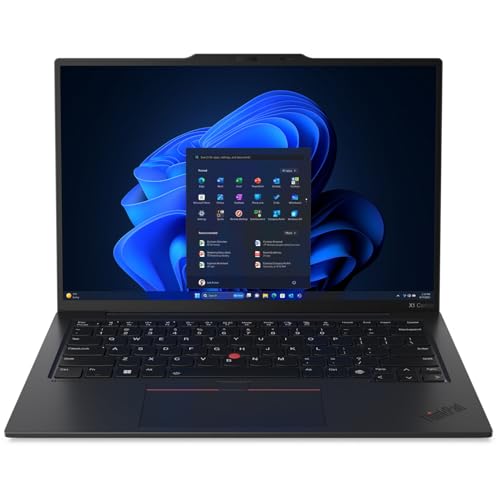
The ThinkPad X1 Carbon Gen 13 Aura Edition is the travel flagship. At 2.4 pounds as listed, it is the lightest machine in this group, yet the listed configuration still packs 32GB of LPDDR5X memory and a fast 2TB Gen 5 SSD, so your image library and virtual disks travel with you.
The 14-inch 2.8K OLED display keeps tiny terminal fonts crisp, the 1080p IR camera with a privacy shutter handles standup calls well, and Wi-Fi 7 covers newer office networks. Two Thunderbolt 4 ports and HDMI handle docks and meeting rooms. For engineers whose office is wherever the incident is, this is the easiest machine to carry all day.
Specs
- Processor: Intel Core Ultra 7 258V
- Memory: 32GB LPDDR5X
- Storage: 2TB PCIe Gen 5 SSD
- Display: 14-inch 2.8K OLED (2880 x 1800)
- Camera: 1080p IR with privacy shutter as listed
- Wireless: Wi-Fi 7
- Weight: 2.4 lb as listed
- Operating system: Windows 11 Pro
- ASIN: B0DQ4CRXDQ
| Product | Best for | Key spec |
|---|---|---|
| Lenovo ThinkPad T14 Gen 5 | Balanced everyday DevOps work | 32GB DDR5, Ryzen 7 PRO 8840U |
| Dell XPS 13 9350 | Frequent travel and on-call mobility | 32GB LPDDR5X at 2.7 lb |
| Apple MacBook Pro 14 (M4 Pro) | Large local clusters and heavy builds | 48GB unified memory |
| HP ZBook Firefly 16 G11 | Desk-based work on a big screen | 16-inch display, 32GB DDR5 |
| Lenovo ThinkPad X1 Carbon Gen 13 Aura Edition | Lightest carry with big storage | 2TB SSD at 2.4 lb |
FAQ
How much RAM does a DevOps engineer actually need?
For light terminal and cloud console work, 16GB can cope, but local containers and virtual machines push past it quickly. The machines here are listed at 32GB or more, which leaves room for a local cluster, an IDE, and dashboards at once.
Can these laptops run Linux?
Support depends on the exact model and configuration. Some makers list Linux editions or certifications for specific machines, while the listings above mostly ship with Windows 11 Pro or macOS. Check the listing and confirm your distribution is named there before ordering.
Is a Mac a good choice for DevOps work?
Yes, for many engineers. macOS provides a Unix terminal, and the common container, orchestration, and infrastructure-as-code tools all run on it. Just note that local containers on macOS run inside a lightweight Linux virtual machine, which is one more reason the 48GB configuration above helps.
Conclusion
Every machine here can carry a modern DevOps workload, so the choice comes down to how you work. Pick the T14 Gen 5 for balance, the XPS 13 or X1 Carbon for travel, the MacBook Pro for the most memory headroom, and the ZBook Firefly when a big screen anchors your desk. Match the listed configuration to your cluster size, confirm the operating system details, and your next on-call week will feel much lighter.
More from Amazon
Programs that pair well with the guide above. Offers and eligibility are set by Amazon and may change.
A free business account with business pricing and bulk-buying tools for work, shop or home office.
Create a business accountFree shipping on eligible items, Prime Video and more. Eligible new members can start with a free trial.
Start a Prime free trialAudiobooks and podcasts to listen to on the go. Eligible new members can start with a free trial.
Try Audible freeAd-free music streaming. Eligible new subscribers can start with a free trial.
Try Music Unlimited freeAs an Amazon Associate we earn from qualifying purchases.










Write Your Review
No reviews yet. Be the first to share your experience!