
A presentation clicker frees you from standing next to your laptop. Instead of walking back to the keyboard every time a slide changes, you advance slides from anywhere in the room, keep eye contact with your audience, and use a pointer to direct attention where it matters. For laptop users the choice comes down to a few practical details: whether your machine has USB-A ports or only USB-C, whether you present on a projector screen or a large TV, and how far from the laptop you need to roam.
This guide compares five wireless presentation clickers that cover those situations. It includes a premium digital-pointer remote, two established plug-and-play models with physical lasers, and two budget-friendly options with long stated ranges. Each pick lists only the facts its maker publishes, so you can match a remote to your laptop, your screen, and your presenting style.
As an Amazon Associate, we earn from qualifying purchases.
Quick answer
The Logitech Spotlight is the strongest all-round pick for laptop users who present on TV or LCD screens, thanks to its digital highlighting and magnification. The Logitech R400 remains the simplest plug-and-play choice for projector rooms. The Kensington Presenter Expert adds cursor control, while the Norwii N29 and N95 deliver long stated ranges and low running costs.
Logitech Spotlight Presentation Remote (Black)

The Spotlight is built for modern presentation setups where slides appear on TVs and LCD panels. A physical laser dot does not show up on those screens, so the Spotlight replaces it with digital highlighting and magnification that appear on screen and work on TV and LCD displays. It connects to your laptop either by Bluetooth or through the included USB receiver, which gives it an easy path onto both older machines with USB-A ports and newer laptops that rely on Bluetooth.
Logitech states a range of 30 m, or 100 ft, which is enough for most meeting rooms and classrooms. The remote uses quick charging rather than replaceable cells. Its advanced features, including the highlighting and magnification modes, require Logitech’s presentation software to be installed on the laptop. This pick is the exact black variant, model 910-005749; the gold and silver versions are separate listings and are not covered here.
Specs
- Model: 910-005749
- Connection: Bluetooth or included USB receiver
- Range: 30 m / 100 ft, as stated by the maker
- Pointer type: digital highlighting and magnification on screen
- Works on: TV and LCD screens, where a laser dot does not show
- Charging: quick charging; battery details beyond that are not stated
- Software: Logitech presentation software needed for advanced features
Logitech Wireless Presenter R400
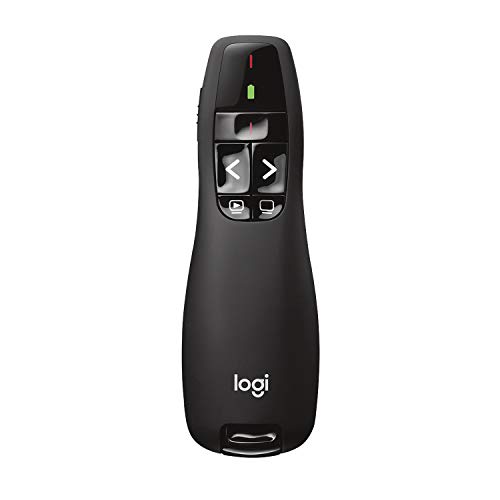
The R400 is the classic plug-and-play presenter. Its USB-A receiver works without any software setup, so you can walk into a room, plug it in, and start presenting. It has a red laser pointer for drawing attention on projector screens and whiteboards, and it runs on AAA batteries, which are easy to replace between meetings and easy to carry as spares.
Logitech states a range of up to 15 m, or 50 ft, which suits small and medium meeting rooms. Two limits are worth knowing before you buy. The receiver is USB-A only, so a laptop with only USB-C ports needs an adapter. And like every physical laser, its dot does not show on LCD or TV screens, so it is a poor match for presentations given on a large display panel. For a projector-based room, though, model 910-001354 remains a dependable, simple choice.
Specs
- Model: 910-001354
- Connection: USB-A receiver, plug-and-play
- Range: up to 15 m / 50 ft, as stated by the maker
- Pointer type: red laser
- Battery: AAA batteries
- Screen note: laser dot does not show on LCD or TV screens
Kensington Presenter Expert with Red Laser Pointer and Cursor Control (K72425AM)

The Presenter Expert adds something the other remotes here do not: a cursor-control joystick that works like a mouse. That makes it useful when a presentation includes live software, a web page, or anything else where you need to move an on-screen cursor without returning to the laptop. It also carries a red laser pointer for conventional slide work.
The remote connects through a 2.4GHz USB receiver, and the receiver stores inside the remote itself, which reduces the chance of leaving it behind in a meeting room. The buttons are backlit, which helps in darkened rooms. Kensington’s stated range for this model was not captured in the listing evidence, so the range is recorded here as not stated rather than borrowed from any other variant. This pick is model K72425AM exactly; the green laser variant with memory is a different product and is not covered here.
Specs
- Model: K72425AM
- Connection: 2.4GHz USB receiver, stored inside the remote
- Range: not stated
- Pointer type: red laser, plus cursor-control joystick that works like a mouse
- Buttons: backlit
- Battery: not stated
Norwii N29 Presentation Clicker (Black)

The N29 is a straightforward 2.4GHz clicker with a few controls that presenters use constantly. Alongside slide advance, it offers hyperlink controls for opening links inside a deck and volume controls for embedded media. Its USB receiver stores in the remote, so the two pieces travel together.
Norwii states a range of over 330 ft, which is the maker’s claim and far beyond what most rooms require; treat it as a headline figure rather than a guarantee for every venue. The listing states support for Windows, macOS, Android and Linux. On power, the listing’s specification field says the N29 takes one AAA battery, and that is the figure to plan around, even though one summary line in the listing copy uses the word rechargeable. Model N29 is a different product from the N95 below, and their features should not be mixed.
Specs
- Model: N29
- Connection: 2.4GHz wireless, USB receiver stored in the remote
- Range: over 330 ft, as claimed by the maker
- Pointer type: not stated
- Controls: slide advance, hyperlink and volume controls
- Compatibility: Windows, macOS, Android and Linux, per the listing
- Battery: 1 AAA battery, per the listing specification field
Norwii N95 Presentation Clicker (Green Pointer, USB-A)

The N95 takes a different approach to power and pointing. Instead of a replaceable cell, it has a rechargeable 300mAh lithium-polymer battery that charges over USB-C. Norwii states up to four weeks of use from a two-hour charge; that is the maker’s claim, and real results will depend on how often you present. Its pointer is green rather than red, and it connects to the laptop through a USB-A receiver.
This pick is specifically the USB-A, green-pointer version of model N95. Other N95 variants with Bluetooth or combined USB-A and USB-C receivers are separate listings and are not interchangeable with this one, so check the variant name carefully if you order. For presenters who dislike swapping batteries and prefer a green pointer, it is a practical pick, provided your laptop has a USB-A port or you already carry an adapter.
Specs
- Model: N95
- Connection: USB-A receiver
- Range: not stated
- Pointer type: green pointer
- Battery: rechargeable 300mAh lithium-polymer; up to 4 weeks of use per 2-hour charge, as claimed by the maker
- Charging: USB-C
How to choose
Start with your laptop’s ports. The R400, Kensington Presenter Expert, Norwii N29 and Norwii N95 all rely on USB-A receivers, so a USB-C-only laptop needs an adapter for any of them. The Spotlight avoids that issue entirely by offering Bluetooth as well as its receiver.
Next, match the pointer to your screen. Physical lasers, red on the R400 and Kensington and green on the N95, work on projector screens but do not show on LCD or TV panels. If you present on a large display, the Spotlight’s digital highlighting and magnification are designed for exactly that situation. If you need to move a cursor during the talk, only the Kensington offers joystick cursor control.
Then consider range and power. Stated ranges run from the R400’s 15 m up to Norwii’s claim of over 330 ft for the N29, but these are makers’ figures, and a modest figure that covers your room is enough. For power, AAA models like the R400 and N29 are easy to feed with spares, while the N95’s rechargeable battery and the Spotlight’s quick charging remove battery swaps at the cost of remembering to charge.
Who should skip
Skip physical laser models if your presentations run on TVs or LCD screens, because the dot will not appear; the Spotlight is the better fit there. Skip the Spotlight if you present on borrowed or locked-down laptops where you cannot install Logitech’s presentation software, since its advanced features depend on it. Skip USB-A receiver models if your laptop has only USB-C ports and you do not want to carry an adapter. And skip the longest-range claims as a buying reason if you present in ordinary meeting rooms, where every model here already covers the distance.
FAQ
Do these clickers work with both Windows and Mac laptops?
Most connect through a standard USB receiver or Bluetooth and are treated by the laptop as basic input devices. The Norwii N29 listing explicitly states support for Windows, macOS, Android and Linux. The Spotlight’s advanced features need Logitech’s presentation software installed. For the other models, detailed operating-system lists were not stated in the listing evidence, so check the product page for your exact system before ordering.
Why does a laser pointer not show on my TV or monitor?
A laser dot is a spot of light on a surface, and emissive screens such as LCD and TV panels do not display it the way a projector screen does. That is why this guide separates the two pointer types: physical lasers for projector rooms, and the Spotlight’s on-screen digital highlighting and magnification for panel displays.
Is a green pointer better than a red one?
Neither colour is universally better. The practical point in this line-up is availability and preference: the Norwii N95 is the green-pointer option here, while the R400 and Kensington use red. Choose based on the rest of the package, such as battery type and connection, rather than colour alone.
How far from my laptop can I stand?
Only as far as the stated range for your model, and those figures are makers’ claims measured in favourable conditions. The R400 states up to 15 m, the Spotlight 30 m, and the N29 over 330 ft as claimed by Norwii. The Kensington and N95 ranges are not stated. Walls, interference and room layout can all shorten real-world range.
Final verdict
For most laptop users presenting on modern screens, the Logitech Spotlight is the pick to beat: Bluetooth or receiver connection, a 30 m stated range, and digital highlighting that stays visible on TVs and LCD panels. The Logitech R400 is the simplest choice for projector rooms and anyone who values replaceable AAA batteries. The Kensington Presenter Expert earns its place when cursor control matters. The Norwii N29 suits presenters who want hyperlink and volume controls with a very long claimed range, and the Norwii N95 suits those who prefer a rechargeable battery and a green pointer. Match the receiver to your ports and the pointer to your screen, and any of the five will do the job.
Product and ASIN Reference
| Product | ASIN |
|---|---|
| Logitech Spotlight Presentation Remote (Black) | B07S5HMQBH |
| Logitech Wireless Presenter R400 | B002GHBUTK |
| Kensington Presenter Expert with Red Laser Pointer and Cursor Control (K72425AM) | B009K1PYGU |
| Norwii N29 Presentation Clicker (Black) | B07S52PS5Z |
| Norwii N95 Presentation Clicker (Green Pointer, USB-A) | B08Z79BD1D |
More from Amazon
Programs that pair well with the guide above. Offers and eligibility are set by Amazon and may change.
A free business account with business pricing and bulk-buying tools for work, shop or home office.
Create a business accountFree shipping on eligible items, Prime Video and more. Eligible new members can start with a free trial.
Start a Prime free trialAudiobooks and podcasts to listen to on the go. Eligible new members can start with a free trial.
Try Audible freeAd-free music streaming. Eligible new subscribers can start with a free trial.
Try Music Unlimited freeAs an Amazon Associate we earn from qualifying purchases.
Write Your Review
No reviews yet. Be the first to share your experience!