

Key takeaways
- Pros: bright 120Hz AMOLED touchscreen, light for a 16-inch laptop, strong battery, vapor chamber cooling, Wi-Fi 7.
- Cons: PWM dimming on the panel, no S Pen support, premium tier, and a large trackpad area that some find easy to touch by accident.
The best Samsung laptop in 2026 is the Galaxy Book6 Pro, a thin 14-inch or 16-inch Windows laptop with a Dynamic AMOLED 2X touchscreen at up to 120Hz, an Intel Core Ultra Series 3 processor and a battery Samsung rates for up to 30 hours of video playback. Creators who need a discrete GPU should look at the Galaxy Book6 Ultra with RTX 5060 or RTX 5070 graphics, travelers who prize battery life and Copilot+ features should look at the Snapdragon-based Galaxy Book6 Edge, and budget buyers can choose the plain Galaxy Book6 with an anti-glare IPS screen. This guide compares the lineup by chip, display, weight and battery so you can match a model to your work.
Specifications come from Samsung’s product pages and its March 2026 announcement of the Galaxy Book6 series, with review context from Tom’s Guide, Tom’s Hardware and Notebookcheck. Prices are described as tiers only. Samsung announced the Book6, Book6 Pro and Book6 Ultra at CES on January 6, 2026, and they went on sale on March 11, 2026.
Our top picks



As an Amazon Associate we earn from qualifying purchases at no extra cost to you.
Quick Comparison of the Best Samsung Laptops
| Pick | Best for | Processor | Display | Weight | Battery claim |
|---|---|---|---|---|---|
| Galaxy Book6 Pro 16-inch | Best overall | Core Ultra 7 356H or Ultra X7 358H | 16-inch 2880 x 1800 AMOLED touch, 120Hz | About 1.6kg (3.5 lb) | Up to 30 hours video |
| Galaxy Book6 Pro 14-inch | Best for travel | Core Ultra 7 356H or Ultra X7 358H | 14-inch AMOLED touch, 120Hz | Lighter than the 16-inch | Up to 30 hours video |
| Galaxy Book6 Ultra | Best for creators | Core Ultra 7 356H, X7 358H or Ultra 9 386H | 16-inch 2880 x 1800 OLED touch, 120Hz | About 1.86 to 1.89kg | Roughly 15 hours in one review |
| Galaxy Book6 Edge 16-inch | Best for battery and AI | Snapdragon X2 Elite (80 TOPS) | 16-inch 3K AMOLED touch, up to 120Hz | 3.42 lb | Up to 22 hours video |
| Galaxy Book6 14-inch | Best budget | Core Ultra 5 325 or Ultra 7 355 | 14-inch IPS anti-glare | 3.15 lb | Up to 24 hours video |
| Galaxy Book6 Touch 16-inch | Big screen at a lower tier | Core Ultra 5 325 or Ultra 7 355 | 16-inch IPS anti-glare touch | About 3.84 lb | Up to 24 hours video |
| Galaxy Book5 Pro 360 | 2-in-1 with S Pen | Core Ultra 7 (prior generation) | 16-inch 3K AMOLED touch, 120Hz | About 1.69kg | Prior-generation rating |
How the Galaxy Book6 Family Is Organized
Samsung splits its 2026 laptops into four tiers. The Galaxy Book6 is the entry model with Intel Core Ultra 5 or Core Ultra 7 processors, 16GB of memory, 512GB or 1TB of storage and a 14-inch or 16-inch anti-glare IPS display, plus a touch version of the 16-inch. The Galaxy Book6 Pro moves to the Dynamic AMOLED 2X touchscreen and Intel’s Core Ultra Series 3 H-class processors built on the 18A process, with up to 64GB of memory and 2TB of storage across the comparison table. The Galaxy Book6 Ultra adds RTX graphics and a MacBook Pro-like body, and the Galaxy Book6 Edge is the Arm option built around Qualcomm’s Snapdragon X2 Elite.
The practical rule is that processor and screen decide almost everything else. Pick Intel if you depend on legacy Windows software, pick Snapdragon if you value battery life and quiet operation and your apps run natively or well under emulation, and pick the Ultra only when you need a discrete GPU. Samsung also pairs its laptops with Galaxy phones through features such as Quick Share, Multi Control and Link to Windows, which makes the brand more appealing if you already own a Galaxy phone or tablet.
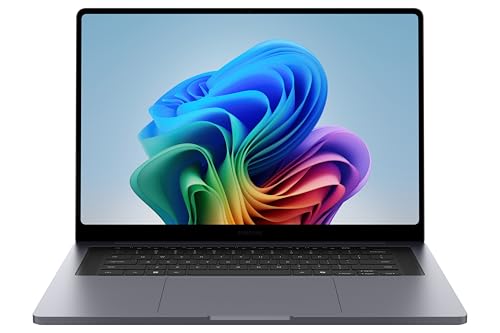
Best Overall: Samsung Galaxy Book6 Pro 16-Inch
The Galaxy Book6 Pro is the Samsung to buy for most people because it delivers an excellent screen, a light body and long battery life without the cost of a gaming-class GPU. Samsung lists Intel Core Ultra 7 356H and Core Ultra X7 358H processors, 16GB or 32GB of memory in its US configurations, 1TB of storage and a 16-inch Dynamic AMOLED 2X touchscreen at 2880 x 1800 with an adaptive refresh rate up to 120Hz. Samsung quotes up to 1,000 nits of HDR brightness, while Notebookcheck measured a panel peak near 1,200 nits.
The 16-inch model gets a vapor chamber for the first time, which helps sustained performance, and the chassis is about 0.47 inches thick and weighs roughly 1.6kg (3.5 pounds). Notebookcheck lists a 78Wh battery, and Samsung claims up to 30 hours of video playback, a figure you should treat as a best case. Connectivity includes Thunderbolt 4, an HDMI port, a headphone jack, Wi-Fi 7 and Bluetooth 5.4. Tom’s Guide called it an early contender for its favorite Windows laptop of 2026.
Who it is for: students, office workers and travelers who want a premium display and quiet performance. Two caveats from reviews: Notebookcheck noted constant PWM flicker on the OLED, which a small number of people find tiring, and a Samsung answer on a retailer page says the S Pen is not supported on the Book6 Pro.
- Pros: bright 120Hz AMOLED touchscreen, light for a 16-inch laptop, strong battery, vapor chamber cooling, Wi-Fi 7.
- Cons: PWM dimming on the panel, no S Pen support, premium tier, and a large trackpad area that some find easy to touch by accident.
Best for Travel: Samsung Galaxy Book6 Pro 14-Inch
The 14-inch Book6 Pro shares the platform and the AMOLED screen quality of the 16-inch model in a smaller body that fits a small shoulder bag. It uses the same family of Core Ultra Series 3 processors, supports 16GB or 32GB of memory in the configurations Samsung lists, and keeps the 120Hz refresh option. The lower pixel count of a 14-inch panel and the smaller chassis mean the machine is lighter and a little more battery-efficient per inch, although the cooling system is simpler than the 16-inch version’s vapor chamber.
Who it is for: commuters, consultants and students who move between rooms constantly. If you mostly use office applications, browsers and video calls, this is the best-balanced Samsung, because you get the premium display without carrying a large laptop. If you edit photos or run virtual machines, step up to the 16-inch model for the extra cooling and screen area.
- Pros: compact, AMOLED touchscreen, strong battery claim, same modern ports and wireless.
- Cons: less cooling headroom than the 16-inch Pro, small keyboard deck and no numeric keypad.
Best for Creators: Samsung Galaxy Book6 Ultra
The Galaxy Book6 Ultra is Samsung’s performance model, combining an Intel Core Ultra H-series processor with NVIDIA RTX 5060 or RTX 5070 graphics in a thin aluminum body. Samsung’s US page lists Core Ultra 7 356H, Core Ultra X7 358H and Core Ultra 9 386H processors, and Tom’s Hardware reviewed a unit with an RTX 5070 (8GB GDDR7 at 90W), 32GB of LPDDR5X-8533 memory, a 2TB SSD and a 16-inch 2880 x 1800 OLED touchscreen at 120Hz. Ports include two Thunderbolt 4, HDMI 2.1, USB-A, a 3.5mm jack and an SD card reader, which is more than most thin Windows laptops offer.
Reviewers praised the display and speakers. Truthful Reviews gave it 4.5 out of 5, measured a peak brightness near 1,123 nits and reported nearly 15 hours of battery life, while Notebookcheck called it a very good multimedia laptop with a gorgeous OLED and an excellent speaker system. Trusted Reviews, on the other hand, found the RTX 5070 performance underwhelming for the cost, and several reviewers commented that the design closely resembles Apple’s MacBook Pro. Battery capacity is reported as 78Wh, 80.2Wh and 83Wh in different reviews, so confirm the exact figure on the unit you buy.
Who it is for: photographers, video editors, 3D hobbyists and engineering students who want a discrete GPU in a laptop under 1.9kg. It is not meant to compete with thicker gaming laptops on frame rate, since the GPU’s 90W limit is modest.
- Pros: bright OLED touchscreen, RTX graphics in a thin body, full set of ports, strong speakers, long battery life for its class.
- Cons: premium cost, GPU limited to 90W, fans audible under load.
Best for Battery Life and AI: Samsung Galaxy Book6 Edge
The Galaxy Book6 Edge is the Arm-based alternative. Samsung lists a Snapdragon X2 Elite with a base clock of 3.4GHz, boost up to 4.7GHz and an NPU rated at 80 TOPS, 16GB of memory and a 1TB SSD in the 16-inch US configuration. The 3K Dynamic AMOLED 2X touchscreen uses Corning Gorilla Glass DX with an anti-reflective coating and an adaptive refresh rate up to 120Hz, with peak HDR brightness of up to 500 nits, which is lower than the Intel Pro models. The battery is 61.8Wh and Samsung rates it at up to 22 hours of video playback.
The laptop weighs 3.42 pounds and measures 0.48 inches thick. Ports include two USB4 ports, an HDMI 2.1 port, a USB 3.2 port, a microSD slot and a headphone jack, with Wi-Fi 7 and Bluetooth 5.4. The included 65W charger reaches about 40 percent in 30 minutes. Because it is an Arm machine, check that your must-have applications run natively on Windows on Arm or at least well under emulation, and confirm that drivers exist for any specialty hardware such as drawing tablets or certain VPN clients.
- Pros: long battery life, efficient and cool operation, 80 TOPS NPU for on-device AI, fast charging, many ports.
- Cons: dimmer HDR peak than the Pro, Arm compatibility limits, no discrete GPU.
Best Budget: Samsung Galaxy Book6 14-Inch
The standard Galaxy Book6 is the economical choice. Samsung lists Intel Core Ultra 5 325 and Core Ultra 7 355 processors, 16GB of memory, 512GB or 1TB of storage and a 14-inch anti-glare IPS display. The 14-inch model weighs 3.15 pounds, measures 14.9mm thick and carries a battery rated for up to 24 hours of video playback. It lacks the AMOLED panel, the vapor chamber and the faster H-series processors of the Pro, but it still delivers a modern thin-and-light laptop that handles documents, browsing, video calls and streaming.
Who it is for: students, parents and small business owners who want a Samsung laptop without paying for the premium display. The anti-glare IPS screen is easier to read in bright rooms, which is a hidden advantage for classrooms and cafes.
- Pros: light, lower tier, good battery claim, anti-glare screen.
- Cons: no OLED, less powerful processor, modest cooling for heavy tasks.
Best Big Screen for Less: Samsung Galaxy Book6 Touch 16-Inch
The Galaxy Book6 Touch pairs the base Book6’s processors with a 16-inch anti-glare IPS touchscreen. At around 3.84 pounds it is heavier than the Pro models but still thin, and the 16GB memory and 512GB or 1TB storage options match the base series. A larger panel makes spreadsheets, split-screen work and photo review more comfortable than a 14-inch display, and the touch layer adds stylus-free tablet-style navigation on Windows.
Who it is for: office workers, teachers and students who prefer a big screen, do not need AMOLED, and want a touchscreen for presentations or note-taking. If you want to write with the S Pen, note that the Book6 Pro does not support it, and Samsung’s current Book6 comparison does not list a 360-degree convertible, so check the specification sheet before assuming pen support on any model.
- Pros: large touchscreen, anti-glare finish, base-tier cost, strong battery claim.
- Cons: heavier than the Pro, IPS rather than AMOLED, base-tier processor.
Best 2-in-1 With S Pen: Samsung Galaxy Book5 Pro 360
If you want a convertible laptop with a pen, the previous-generation Galaxy Book5 Pro 360 remains the Samsung to look at. It is a 16-inch model with a 3K AMOLED touchscreen at 120Hz, an Intel Core Ultra 7 processor, configurations up to 32GB of memory and an included S Pen, at roughly 1.69kg. Samsung’s current Book6 pages do not show a 360-degree variant with confirmed specifications, so the Book5 Pro 360 is the safer pick until Samsung publishes one.
Who it is for: note-takers, designers who sketch, and presenters who fold a screen flat. Because it is the older platform, expect lower efficiency than the Book6 Pro, so look for a retailer with a full warranty.
- Pros: S Pen included, 360-degree hinge, AMOLED display, light for a 16-inch convertible.
- Cons: previous-generation processor, limited stock, shorter battery life than the Book6 family.
Spec Math: Reading Battery Claims
Battery claims are easier to judge when you divide capacity by hours. The Book6 Edge’s 61.8Wh pack at its 22-hour video rating implies an average draw of about 2.8W, and the Book6 Pro’s 78Wh pack at 30 hours implies about 2.6W, both of which are only achievable when the laptop plays local video at modest brightness. A typical office workload with browser tabs, chat and video calls draws two to three times that, which is why real-world runtimes are often closer to 10 to 15 hours. For planning, take half of Samsung’s rating as a safe estimate for mixed use, and a third for heavy multitasking at full brightness.
Weight is similar to calculate. A 3.5-pound 16-inch Pro adds up to about 4 pounds with its charger, while a 3.15-pound 14-inch Book6 lands near 3.6 pounds. Carry the Pro if you value the screen and the Book6 if every ounce counts.
Decision Matrix: Which Samsung Laptop Fits You
| Your situation | Best choice | Why |
|---|---|---|
| Student on a budget | Galaxy Book6 14-inch | Light, anti-glare, 24-hour video rating |
| Office worker who wants a premium screen | Galaxy Book6 Pro 14-inch | AMOLED touch, light, long battery |
| Frequent traveler needing maximum battery | Galaxy Book6 Edge | Snapdragon X2 Elite, 22-hour rating |
| Photo and video editor | Galaxy Book6 Ultra | RTX 5060 or 5070, OLED, SD reader |
| Wants a big display for multitasking | Galaxy Book6 Pro 16-inch | 16-inch AMOLED, vapor chamber |
| Needs an S Pen | Galaxy Book5 Pro 360 | Included S Pen and 360-degree hinge |
| Uses a Galaxy phone daily | Any Galaxy Book6 | Quick Share and Multi Control integration |
Ownership Realities: What to Know Before Buying
AMOLED panels offer deep blacks and punchy color but can show image retention if a static element stays on screen for hours, so use a short screen timeout and a dark theme where practical. PWM dimming, which Notebookcheck reported on the Book6 Pro, affects only a minority of users, but if you are sensitive to flicker, try the laptop in person or choose an IPS Book6 model. Thin aluminum bodies also scratch and dent more easily than thicker designs, so a sleeve is worth the small cost.
Memory on most thin laptops is soldered, so choose 32GB if you plan to keep the laptop for five years or run heavy workloads. Storage is usually a replaceable M.2 drive on Samsung models, but confirm in the service manual before relying on that. Arm laptops like the Book6 Edge also deserve a compatibility check: list your essential programs and confirm native or well-supported emulated versions before buying. Finally, update the BIOS and Samsung’s software shortly after setup, because early firmware often improves battery behavior and fan control.
Frequently Asked Questions
Which Samsung laptop is best for most people?
The Galaxy Book6 Pro is the best all-rounder because it combines an AMOLED touchscreen, Intel Core Ultra Series 3 processors, a light body and a strong battery rating. Choose the 14-inch for portability and the 16-inch for a bigger screen and better cooling.
Is the Galaxy Book6 Edge better than the Intel models?
It is better for battery life, quiet operation and on-device AI, thanks to the Snapdragon X2 Elite and its 80 TOPS NPU. The Intel Pro and Ultra models are safer for older Windows software and offer brighter screens or discrete graphics.
Does the Galaxy Book6 Pro work with the S Pen?
Samsung has said the S Pen is not supported on the Galaxy Book6 Pro. If you want pen input, look at the previous-generation Galaxy Book5 Pro 360 or check the specifications of any new convertible Samsung announces.
Can the Galaxy Book6 Ultra run games?
Yes, its RTX 5060 or RTX 5070 graphics can play current games at moderate to high settings. However, the GPU is limited to about 90W in the reviewed RTX 5070 configuration, so a thicker gaming laptop will be faster.
How long does a Samsung Galaxy Book battery last?
Samsung rates the Book6 Pro at up to 30 hours of video playback, the Book6 at up to 24 hours and the Book6 Edge at up to 22 hours. Real use is shorter, so expect roughly half those numbers for mixed work.
Do Samsung laptops work with Galaxy phones?
Yes. Samsung offers features such as Quick Share for file transfers, Multi Control for using a Galaxy tablet or phone with the laptop’s keyboard and mouse, and Link to Windows for notifications. They work best with Galaxy devices, though basic Windows features function with any phone.


Write Your Review
No reviews yet. Be the first to share your experience!