

Key takeaways
- Brightness levels. A single-level backlight is either on or off. Two-level or three-level lighting lets you match a dark room or a bright train carriage.
- Evenness. Cheap keyboards leak light around the key edges or show uneven brightness between the center and sides. Legends that glow brightly but leave key gaps dark are easier to read.
- Auto timeout and ambient sensing. A good keyboard turns the light off when you stop typing and back on when you touch a key. Ambient sensors save battery by staying off in bright rooms.
- Key travel and feel. A light you can read does not help if the keys are shallow. Most thin laptops offer 1.0 to 1.5 mm of travel, and 1.5 mm is a comfortable target for long typing.
The best laptop with a backlit keyboard in 2026 is the Lenovo ThinkPad X1 Carbon Gen 13, because it pairs a two-stage white backlight with 1.5 mm key travel, a TrackPoint and a body under 1 kg. For a value pick, the Acer Aspire 14 AI and HP OmniBook 5 14 both include backlit keyboards at the mid-range tier, the MacBook Air 13-inch with M5 is the simplest premium choice, and gaming laptops such as the Lenovo Legion 5i add per-zone RGB. This guide compares seven real laptops by how the keyboard actually behaves, not only by whether a backlight exists.
Our top picks



As an Amazon Associate we earn from qualifying purchases at no extra cost to you.
Quick comparison of the seven picks
| Pick | Best for | Backlight | Screen | Weight | Battery |
|---|---|---|---|---|---|
| Lenovo ThinkPad X1 Carbon Gen 13 | Best typing feel | White LED, two-stage; 1.5 mm travel | 14-inch 2.8K OLED option, 120 Hz | About 0.99 kg | 57 Wh |
| MacBook Air 13 (M5) | Best premium all-rounder | Backlit Magic Keyboard with Touch ID | 13.6-inch 2560×1664, 500 nits | 1.23 kg | 53.8 Wh |
| ASUS Zenbook S 14 (2026) | Best thin Windows laptop | Backlit chiclet keyboard | 14-inch 2880×1800 OLED, 120 Hz | 1.2 kg | Large pack for the class |
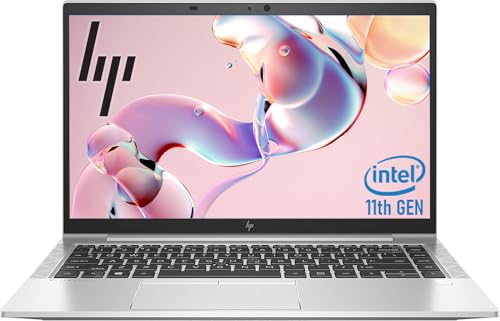
| HP OmniBook 5 14 | Best mid-range OLED | Full-size backlit keyboard | 14-inch 2K OLED | Under 1.5 kg class | 59 Wh |
| Acer Aspire 14 AI | Best budget | Backlit keyboard | 14-inch 1920×1200 IPS, 300 nits | 3.09 lb (about 1.4 kg) | 65 Wh |
| Lenovo Legion 5i Gen 10 (15) | Best RGB for gaming | White, 4-zone or 24-zone RGB by model | 15.1-inch WQXGA OLED option, 165 Hz | About 1.9 kg (4.1 to 4.25 lb) | 60 or 80 Wh |
| Acer Nitro V 17 AI | Best large-screen backlit gaming | Backlit keyboard with number pad | 17.3-inch FHD or QHD up to 180 Hz | About 2.7 kg | 76 Wh |
Specifications come from manufacturer pages and published reviews. Some brands change keyboard options between regions, so verify the backlight on the exact model number before you buy. Prices are described by tier only.
Why the backlight is only half the story
Nearly every mid-range and premium laptop in 2026 has a backlit keyboard, so the useful question is how well it works. Four things decide that.
- Brightness levels. A single-level backlight is either on or off. Two-level or three-level lighting lets you match a dark room or a bright train carriage.
- Evenness. Cheap keyboards leak light around the key edges or show uneven brightness between the center and sides. Legends that glow brightly but leave key gaps dark are easier to read.
- Auto timeout and ambient sensing. A good keyboard turns the light off when you stop typing and back on when you touch a key. Ambient sensors save battery by staying off in bright rooms.
- Key travel and feel. A light you can read does not help if the keys are shallow. Most thin laptops offer 1.0 to 1.5 mm of travel, and 1.5 mm is a comfortable target for long typing.
Battery impact is small. An LED backlight usually draws well under half a watt at low brightness, so a 50 Wh battery loses only a few percent of runtime. A worked example: at 0.3 W, a 10-hour workday adds 3 Wh of consumption, which is about 6 percent of a 50 Wh pack. Gaming RGB with many zones draws more, but still far less than the display or processor.
Best typing feel: Lenovo ThinkPad X1 Carbon Gen 13
The ThinkPad X1 Carbon Gen 13 Aura Edition has a backlit keyboard with white LED lighting, a two-stage backlight, a function lock and 1.5 mm key travel, as described by Lenovo’s PSREF listing and published reviews. It also keeps the red TrackPoint and a haptic touchpad. The 14-inch screen is available as a 2.8K (2880×1800) OLED at 120 Hz with 500 nits, with IPS and touch options. Lenovo lists the starting weight at 986 g, with a carbon fiber top and aluminum bottom. The battery is 57 Wh with a 65 W compact USB-C charger, and Laptop Mag’s rundown lasted about 11 hours 28 minutes on the OLED model. Intel Core Ultra 7 258V or 268V chips and 32 GB of memory are the typical configuration.
Who it suits: writers, programmers and managers who type for hours. The deep key travel, shaped keycaps and clean white light make it the reference for business typists. Reviews criticize the cost and note that performance is modest for the money, so choose it for the keyboard and weight, not for raw speed.
Pros
- Best-in-class typing feel and a TrackPoint for precise cursor control.
- Very light carbon-fiber build with a user-replaceable battery per Notebookcheck.
- Wi-Fi 7 and plenty of ports for the class.
Cons
- Premium tier cost for a modest chip.
- Only two backlight levels.
- OLED model drains the battery faster than the IPS version.
Best premium all-rounder: MacBook Air 13-inch (M5)
The M5 MacBook Air has a backlit Magic Keyboard with Touch ID. Apple’s tech specs list a 13.6-inch Liquid Retina display at 2560×1664 with 500 nits, a weight of 2.7 pounds (1.23 kg), 16 GB of unified memory as the starting point and a 53.8 Wh battery rated for up to 15 hours of wireless web. The keyboard is quiet, has a full-height function row and a stable feel, and the backlight stays even across the keys.
Who it suits: students and professionals who want a laptop that works well out of the box, lasts a full day and keeps its value. It is quiet and fanless, which suits libraries and meetings where keyboard noise matters.
Pros
- Quiet, comfortable keys and an excellent trackpad.
- Strong battery life and no fan noise.
- Touch ID for fast login.
Cons
- Key travel is shallower than the ThinkPad’s.
- Limited ports and no upgradeable memory.
- Premium tier cost.
Best thin Windows laptop: ASUS Zenbook S 14 (2026)
The 2026 Zenbook S 14 (UX5406) uses an Intel Core Ultra Series 3 chip with up to a 50 TOPS NPU in a 1.1 cm chassis weighing 1.2 kg. Notebookcheck measured 1.205 kg and recorded a keyboard light, and ASUS’s spec page for the earlier UX5406 describes a backlit chiclet keyboard with 1.1 mm key travel. The 14-inch OLED panel is 2880×1800 at 120 Hz and the review noted a brighter OLED panel than the previous generation. That review also noted a slow integrated GPU, which does not matter for typing and office work.
Who it suits: commuters and students who want a thin, attractive laptop with a vivid OLED screen and a comfortable shallow keyboard. Typists who prefer deep keys should look at the ThinkPad.
Pros
- Light, thin and sturdy with a bright OLED panel.
- Good speakers and a comfortable touchpad.
Cons
- Shallow 1.1 mm key travel on the model whose spec page is public.
- Weaker integrated graphics than some rivals.
Best mid-range OLED: HP OmniBook 5 14
The HP OmniBook 5 14 is listed with a full-size backlit keyboard in a soft gray finish, no number pad on the 14-inch model and a numeric keypad on the 16-inch version. The 14-inch version has a 2K OLED display, options for a Snapdragon X Plus X1P-42-100 or Intel Core 5 and Core 7 processors, a 59 Wh battery and a 1080p IR camera. NanoReview lists the 2026 14-inch version as launched in January 2026.
Who it suits: buyers who want an OLED screen and a backlit keyboard at a mid-range tier. Check the processor type, because the Snapdragon version prioritizes battery life and the Intel version suits software compatibility. The 16-inch version is better if you need a number pad.
Pros
- OLED display at a mid-range tier with a comfortable full-size keyboard.
- Choice of Arm and Intel platforms.
Cons
- Backlight levels and key travel are not published in detail by HP.
- Build quality is plainer than premium rivals.
Best budget: Acer Aspire 14 AI
The Acer Aspire 14 AI is the common budget choice for a backlit keyboard. The Lunar Lake models, such as those with Core Ultra 5 226V or Core Ultra 7 256V, offer 16 GB of LPDDR5X, a 14-inch 1920×1200 IPS panel at 300 nits, Intel Arc 140V graphics, a 65 Wh battery, Wi-Fi 6E and a weight of 3.09 pounds. Ports include two USB4/Thunderbolt 4 connectors, two USB 3.2 Gen 1, HDMI 2.1 and a headphone jack. A larger Aspire 16 AI based on the Core Ultra 7 355 adds a white backlit keyboard with a number pad, an AcerSense key and a programmable key.
Who it suits: students, home users and small offices that want a reliable everyday laptop with a lit keyboard and long battery. The screen is not made for color work, but it is fine for documents and video calls.
Pros
- Large battery and a full set of modern ports at a budget tier.
- Choice between 14-inch and 16-inch versions.
Cons
- Basic 300-nit IPS screen.
- Plastic-leaning feel and a keyboard that flexes more than premium models.
Best RGB for gaming: Lenovo Legion 5i Gen 10
The Legion 5i Gen 10 15-inch has a white backlit keyboard as standard according to TechPowerUp, with a 24-zone RGB keyboard on many configurations and a four-zone RGB version on lower trims. A 2026 Core Ultra 7 255HX and RTX 5060 configuration pairs a 15.1-inch WQXGA (2560×1600) OLED at 165 Hz and 500 nits with an RTX 5060 8 GB. Reviewers list the weight at 4.1 to 4.25 pounds, and the battery as 60 Wh or an optional 80 Wh. Gizmodo’s review described the lighting of its unit as single-zone, which shows how much configuration matters.
Who it suits: gamers who want zone lighting without the premium cost of per-key RGB. For the best keyboard feel in games, choose a version with the 24-zone option and the larger battery.
Pros
- Comfortable keyboard and strong cooling for the weight.
- OLED 165 Hz screen option.
Cons
- Lighting options vary by model, so check the listing.
- Small battery on the base version.
Best large-screen backlit gaming: Acer Nitro V 17 AI
The Acer Nitro V 17 AI has a backlit keyboard with a number pad, a fingerprint reader and a 76 Wh battery, according to the published specifications. The main model uses a Ryzen 7 260 with an RTX 5070 limited to about 85 W, up to 64 GB of memory, a 17.3-inch IPS screen in FHD 144 Hz, FHD 180 Hz or QHD 165 Hz, and weighs about 2.7 kg. The roomy deck leaves space for full-size arrow keys and a number pad.
Who it suits: players and spreadsheet users who want a full layout and a large screen, with backlighting for late-night sessions. It is too heavy for daily commuting.
Pros
- Full-size layout with a number pad and a large battery for the class.
- QHD option for sharper work and play.
Cons
- Heavy and bulky.
- Many near-identical model names.
How to choose a laptop with a backlit keyboard
Match the lighting to your use
For office and travel, a clean white backlight with two or three brightness levels is best. For gaming, zone RGB lets you color-code key clusters, but it adds little to typing comfort. For night-time writing, choose a keyboard with even lighting and clear legends.
Key travel and layout
If you type for more than two hours a day, prefer 1.3 to 1.5 mm of key travel and a full-height function row. Thin ultrabooks with 1.0 to 1.1 mm of travel feel flatter, which some people like. Number pads matter for accounting and data entry, and they appear on 16-inch and 17-inch laptops, not on most 13-inch and 14-inch models.
Check for spill resistance and wear
Backlit keycaps with painted legends can wear shiny on frequently used keys. Laser-etched or double-shot legends last longer. ThinkPads and many Apple keyboards are known for long-lasting legends, but no keyboard is immune from oils.
Think about your environment
If you work in bright rooms, a backlight rarely matters. If you often work on trains, planes or in lecture halls, a dependable two-stage light matters daily, and an auto timeout saves a little battery.
Decision matrix by situation
| Your situation | Best choice | Why |
|---|---|---|
| Types for hours every day | ThinkPad X1 Carbon Gen 13 | 1.5 mm travel and a two-stage light |
| Wants the simplest premium laptop | MacBook Air 13 (M5) | Quiet keys and strong battery |
| Wants a thin Windows laptop with OLED | Zenbook S 14 | 1.2 kg and a bright 120 Hz screen |
| Mid-range with OLED | HP OmniBook 5 14 | OLED and a full-size backlit keyboard |
| Strict budget | Acer Aspire 14 AI | 65 Wh battery and a lit keyboard |
| Gamer who wants RGB | Legion 5i Gen 10 | 24-zone RGB on many models |
| Needs a number pad and a big screen | Nitro V 17 AI or Aspire 16 AI | Full layout |
Ownership and maintenance
Clean the keyboard every month with a soft brush or a few bursts of compressed air held at an angle. Wipe keycaps with a cloth slightly dampened with isopropyl alcohol, never sprayed directly onto the keys. Avoid eating over the keyboard, as crumbs and liquid can cause stuck keys and uneven backlight leakage.
If one key fails, check whether the manufacturer offers keyboard replacement through service. Business laptops like the ThinkPad commonly have accessible keyboards, while thin ultrabooks may require removing the whole top case. Also test the backlight at the lowest and highest levels when you receive the laptop, because uneven lighting is easiest to notice in the first return window.
Common mistakes include assuming every configuration has the same keyboard, ignoring the function-key behavior that controls the light, and buying a thin laptop for heavy typing without trying the keys. If you can, try the keyboard in a store before ordering.
Frequently Asked Questions
Do all laptops have backlit keyboards?
No. Many low-cost laptops omit the backlight to save money, and some models offer it only in higher configurations. Always check the exact model number, since the same product name can ship with and without it.
How do I turn on the keyboard backlight?
Most Windows laptops use a function key combination, often Fn plus the spacebar or a key marked with a sun-like keyboard icon. On a MacBook, the backlight adjusts through the keyboard brightness controls in Control Center or the function row.
Does a backlit keyboard drain the battery?
Slightly. At low brightness the effect is usually a few percent of total runtime, and an auto-off timeout reduces it further. RGB gaming keyboards with many zones use more power, though still far less than the screen.
What is the difference between white backlight and RGB?
A white backlight offers one color at one or more brightness levels. RGB keyboards can show many colors, split into zones or per key. RGB is mostly cosmetic and helpful for highlighting game keys.
Which laptop has the best keyboard overall?
The ThinkPad X1 Carbon Gen 13 is widely named for typing feel, with the MacBook Air close behind for quiet, stable keys. The best keyboard for you depends on travel depth and layout preference, so try it if possible.
Can I add a backlight to a laptop that does not have one?
In most cases no. The backlight is part of the keyboard assembly and the circuit board, so adding one is not practical. A small USB clip light or a replacement keyboard from the manufacturer are the realistic options.


Write Your Review
No reviews yet. Be the first to share your experience!