

Key takeaways
- Who it suits: first-time gaming laptop buyers and students who want one machine for classes and games.
- Pros: upgradeable memory and storage, good screen for the tier, 6GB VRAM, solid cooling for a thin gaming laptop.
- Cons: the plastic body flexes a little, some versions ship with single-channel memory (add a second stick to unlock more performance), and regional availability varies.
In 2026, the best RTX 30-series laptop is usually an RTX 3060 or RTX 3070 model bought at a clearance or used price, because they offer the most performance per cost, while the RTX 3050 6GB is the pick for new budget gaming laptops such as the Lenovo LOQ and Acer Nitro V 15. The RTX 3050 handles 1080p at medium settings, the RTX 3060 steps up to high settings, and the RTX 3070 gives the most headroom, but all three are now previous-generation parts, so the real skill is knowing which configuration to buy.
The catch is that the same GPU name covers very different laptops. Nvidia sells each laptop GPU in a wide range of power limits, called total graphics power or TGP, and a low-power RTX 3070 can lose to a high-power RTX 3060. Memory size also differs across versions. This guide explains the real specs, lists the models that are still sold or common on the used market, and shows how to choose one without overpaying.
Our top picks


As an Amazon Associate we earn from qualifying purchases at no extra cost to you.
RTX 3050 vs 3060 vs 3070 laptop GPUs: the numbers
| Spec | RTX 3050 Laptop | RTX 3060 Laptop | RTX 3070 Laptop |
|---|---|---|---|
| CUDA cores | 2048 to 2560 | 3840 | 5120 |
| VRAM | 4GB or 6GB GDDR6 | 6GB GDDR6 | 8GB GDDR6 |
| TGP range | 35 to 80 W | 60 to 115 W | 80 to 125 W |
| Memory bus | 128 bit class | 192 bit | 256 bit |
| Typical target | 1080p, medium to high | 1080p high, light 1440p | 1080p ultra, 1440p high |
| Ray tracing and DLSS | Yes (2nd generation RT, DLSS 2) | Yes | Yes |
These figures come from Nvidia’s published laptop comparison and spec sheets. Note that the RTX 3050 exists in a 4GB original version and a refreshed 6GB version with more CUDA cores, and Notebookcheck warns that low-TGP variants give significantly lower performance. Always check the exact version, not just the name.
Why TGP and VRAM matter more than the badge
A laptop GPU is a power-limited chip. At 80 W an RTX 3050 can hold higher clocks than the same chip at 35 W, which can be a performance gap of 30 percent or more. The same applies upward: an RTX 3070 at 80 W may perform close to an RTX 3060 at 115 W. Always look for the maximum TGP in the spec sheet, which may be listed as “up to 80W with Dynamic Boost”.
VRAM is the second factor. 4GB is tight for modern games at 1080p high settings; 6GB is the minimum for a comfortable experience in 2026, and 8GB gives breathing room for higher texture settings. A 4GB RTX 3050 will hit stutter in newer titles even if the GPU core is fast enough.
Quick comparison of picks
| Pick | GPU | Best for | Key specs | Price tier |
|---|---|---|---|---|
| Lenovo LOQ 15 (RTX 3050 6GB) | RTX 3050 6GB | Best new budget | Core i5 or Ryzen 5, 144Hz screen, upgradeable DDR5, two M.2 slots | Budget |
| Acer Nitro V 15 (RTX 3050 6GB) | RTX 3050 6GB, up to 80 W | Best upgrade path | Core i5-13420H or Ryzen 5 6600H, 144 to 165Hz, Thunderbolt 4 on some | Budget |
| ASUS TUF Gaming A15 (RTX 3050) | RTX 3050 4GB, up to 75 W | Best build durability | Ryzen 5 7535HS or Ryzen 7 7435HS, 15.6 in 144Hz FHD | Budget to mid-range |
| RTX 3060 laptop (used or clearance) | RTX 3060 6GB, 60 to 115 W | Best value overall | Ryzen 7 or Core i7 class, 144Hz screen | Mid-range |
| RTX 3070 laptop (used or clearance) | RTX 3070 8GB, 80 to 125 W | Best high-detail 1080p/1440p | Ryzen 9 or Core i7 class, 165 to 240Hz screen | Mid-range to premium |
Best new budget: Lenovo LOQ with RTX 3050 6GB
The Lenovo LOQ line includes models such as the LOQ 15IRX9 with a 13th-generation Core i5 and an RTX 3050 6GB, and AMD versions with Ryzen 5 7235HS, according to retailer listings. Typical features include a 144Hz screen with full sRGB coverage, expandable DDR5 memory, two M.2 storage slots and USB-C with Power Delivery.
- Who it suits: first-time gaming laptop buyers and students who want one machine for classes and games.
- Pros: upgradeable memory and storage, good screen for the tier, 6GB VRAM, solid cooling for a thin gaming laptop.
- Cons: the plastic body flexes a little, some versions ship with single-channel memory (add a second stick to unlock more performance), and regional availability varies.
Best upgrade path: Acer Nitro V 15 with RTX 3050 6GB
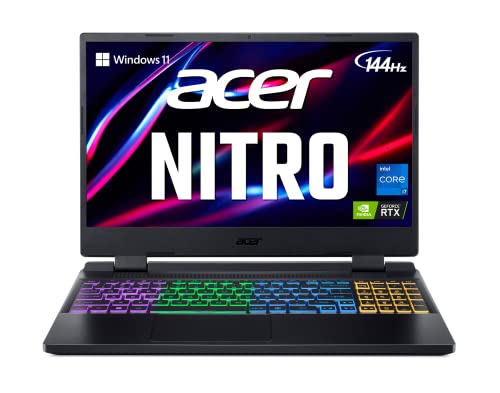
The Acer Nitro V 15 pairs an RTX 3050 6GB, which Acer lists at up to 80 W, with a Core i5-13420H or a Ryzen 5 6600H depending on the market. The 144Hz or 165Hz IPS display and Thunderbolt 4 on some versions make it a versatile pick. Base versions can ship with 8GB of DDR5 in a single module, and Acer supports up to 32GB, so adding a matching second module is the first upgrade to make.
- Who it suits: buyers who want to upgrade memory and storage later.
- Pros: up to 80 W GPU, spare SSD slot, fast screens, good port selection.
- Cons: fans get loud under load, the webcam is basic, and newer Nitro V variants with an RTX 4050 offer better efficiency if your budget stretches.
Best build: ASUS TUF Gaming A15 with RTX 3050
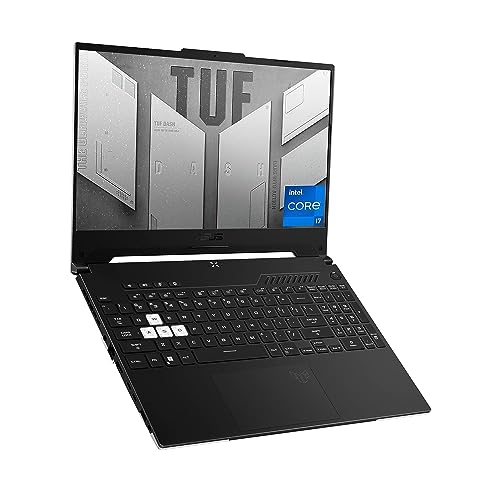
ASUS lists the TUF Gaming A15 with an RTX 3050 Laptop GPU with 4GB GDDR6 and up to 75 W with Dynamic Boost, alongside Ryzen 5 7535HS or Ryzen 7 7435HS processors and a 15.6-inch Full HD 144Hz display. It has a durability-focused chassis, which is why it has stayed popular. The 4GB VRAM is its main limit, since newer games may require lowered textures.
- Who it suits: students and creators who value durability and battery longevity over maximum frame rates.
- Pros: strong build, good Ryzen efficiency, comfortable keyboard.
- Cons: 4GB VRAM, a middling display on some versions, and an RTX 3060 option is not on ASUS’s current spec page, so any RTX 3060 TUF A15 is an older or used configuration.
Best value: RTX 3060 laptops (used or clearance)
The RTX 3060 laptop GPU has 3840 CUDA cores, 6GB of GDDR6 and a TGP of up to 115 W. In a good chassis it plays most 2026 games at 1080p high settings and handles light video editing and 3D work. Because new RTX 3060 laptops are mostly sold out, the practical route is clearance stock, certified refurbished units or carefully inspected used machines from brands such as ASUS, Lenovo Legion, HP Omen and Dell.
- Who it suits: gamers who want high settings at 1080p without paying for a current-generation GPU.
- Pros: large performance jump over the RTX 3050, wide choice of used models, 6GB VRAM.
- Cons: older batteries, possible dust-clogged fans, a warranty that may be short or missing.
Best performance: RTX 3070 laptops (used or clearance)
The RTX 3070 laptop GPU offers 5120 CUDA cores, 8GB of GDDR6 and a TGP of up to 125 W. At full power it is a strong 1080p ultra and 1440p high-settings GPU, and 8GB of VRAM keeps texture-heavy games happier than the 3060. It is the one to look for when you want a laptop that will last a few more years without feeling limited.
- Who it suits: enthusiasts, streamers and creators who want 1440p or heavy Blender and video work on a used budget.
- Pros: 8GB VRAM, high clocks at high TGP, often paired with high-refresh screens.
- Cons: hot and loud under load, shorter battery life, and the TGP varies widely, so confirm that it is a 100 W or higher version.
Performance expectations at 1080p
| Game type | RTX 3050 6GB | RTX 3060 | RTX 3070 |
|---|---|---|---|
| Esports titles (Valorant, CS2) | 120+ fps at high | 200+ fps at high | 240+ fps at high |
| Modern AAA at 1080p | Medium settings, DLSS helps | High settings | High to ultra |
| 1440p | Not recommended | Medium to high with DLSS | High with DLSS |
| Video editing and 3D | Entry-level, 6GB limit | Good | Very good |
These ranges are general expectations from the specs and from published benchmarks; real frame rates depend on the game, the CPU, the memory configuration and the TGP of the specific laptop.
A worked example: cost per frame
Suppose a used RTX 3060 laptop averages 85 fps in a game at 1080p high and costs about the same as a new RTX 3050 6GB model averaging 60 fps. The RTX 3060 delivers around 40 percent more frames for the same spend, which is why used 3060 and 3070 laptops dominate the value discussion. The trade is the missing warranty and the wear on the cooling system. If the new laptop includes a full warranty and the used one does not, add the cost of a thermal repaste and a possible battery replacement to your budget before comparing.
How to choose: a decision matrix
| Your situation | Choose | Reason |
|---|---|---|
| New laptop with a warranty, tight budget | LOQ or Nitro V with RTX 3050 6GB | 6GB VRAM and upgradeable memory |
| Competitive esports at 144Hz | RTX 3050 6GB or 3060 | Esports games are light on the GPU |
| AAA games at high settings | RTX 3060 at 100 W or higher | Better performance per cost |
| 1440p gaming or creative work | RTX 3070 at 100 W or higher | 8GB VRAM and a wider bus |
| Prefer durability for school use | TUF A15 | Sturdy build |
| Must have a long battery life | Consider a thin non-gaming laptop | RTX 30-series gaming laptops drain quickly |
Buying used: an inspection checklist
- Ask for the exact model number and confirm the GPU and its TGP on the manufacturer’s page.
- Run a stress test such as a game benchmark for 20 minutes and watch for crashes, artifacts or thermal throttling.
- Check the battery health report; a battery below 60 percent of design capacity needs replacement.
- Inspect the hinges, the keyboard and the ports for wear.
- Look inside the vents for heavy dust and ask if the thermal paste was ever renewed.
- Make sure the BIOS is not locked and that the seller wipes the drive.
- Prefer sellers who offer a return window of at least 14 days.
Upgrades and maintenance that extend life
- Install matched dual-channel memory; it can lift frame rates by double-digit percentages on integrated and laptop GPUs.
- Add a second SSD if the laptop has a free M.2 slot.
- Clean the fans every 6 to 12 months with compressed air.
- Renew thermal paste on laptops that are over three years old.
- Use a cooling pad for long sessions and limit the charger-connected battery level in the manufacturer’s app.
- Keep the GPU driver updated, but wait a few days after a major release.
The CPU and memory pairing that keeps the GPU fed
A GPU only performs as well as the rest of the laptop allows. Pair an RTX 3060 or 3070 with a processor that has at least 6 fast cores, such as a Ryzen 5 6600H or 7535HS, a Ryzen 7 class chip, or a Core i5-12450H or newer. Weak or much older CPUs create bottlenecks in esports titles, where the processor often limits frame rate before the graphics chip does.
Memory is the other half. Single-channel configurations, common on budget models that ship with one 8GB stick, cut memory bandwidth in half and can reduce frame rates noticeably. A matched pair of modules for 16GB total is the best first upgrade, and 32GB is useful for creative work and heavy multitasking. Fast storage matters less for frame rate but affects load times; a PCIe NVMe SSD of 512GB is a minimum, as modern games often exceed 100GB each.
Screen, cooling and ports: what to check
- Refresh rate: 144Hz is a worthwhile standard for gaming at this level; 165Hz and above only help if the GPU can reach those frame rates.
- Color coverage: a panel with full sRGB coverage suits creative work; many budget screens cover less, which looks washed out.
- Cooling: look for two fans and several heat pipes. Reviews that report fan noise and temperatures under load are worth reading.
- Ports: HDMI 2.1 or DisplayPort over USB-C helps if you plan to connect an external monitor; Thunderbolt 4 is a bonus on some Nitro V models.
- Charger: gaming laptops with 150 W to 230 W chargers are heavy; check whether the model supports USB-C top-up charging for light use.
- Battery: expect two to five hours of light use. If you need all-day battery life, a gaming laptop is a compromise.
How the 30-series compares with newer cards
RTX 40-series and 50-series laptop GPUs add efficiency and features such as DLSS 3 frame generation on the 40-series, so a new laptop with an RTX 4050 can match a used 3060 while using less power and carrying a warranty. The 30-series wins on price when you buy used or clearance stock and on raw performance when the TGP is high. If you plan to keep the laptop for five years or more, weigh the long-term driver and feature support of newer architectures against the immediate saving.
Settings that make these GPUs go further
Turn on DLSS where a game offers it; it renders at a lower resolution and upscales, which can lift frame rates by 30 to 60 percent on an RTX 3050 or 3060 with little visible loss. Lower shadows and volumetric effects before touching textures, since they cost the most performance for the least visual change. Cap the frame rate slightly below the screen refresh rate to cut heat and fan noise. Set the laptop to its performance mode while plugged in, and use the integrated graphics through the hybrid mode on battery to extend runtime.
Frequently Asked Questions
Is an RTX 3050 laptop still worth buying in 2026?
Yes for a budget gaming laptop, if it has 6GB of VRAM and a TGP near 75 to 80 W. It plays most games at 1080p medium settings and handles esports titles very well, but avoid the 4GB version for new releases.
What is the difference between RTX 3060 and RTX 3070 laptops?
The RTX 3070 has 5120 CUDA cores and 8GB of VRAM, against 3840 cores and 6GB for the RTX 3060. That usually means noticeably higher frame rates at 1440p and in texture-heavy games, but only if the laptop gives the 3070 a high power limit.
Does TGP really matter that much?
Yes. TGP sets how much power the GPU can use. The same RTX 3070 can differ by well over 20 percent in performance between an 80 W and a 125 W laptop, so always check the maximum TGP.
Is 6GB of VRAM enough for 2026 games?
It is enough for 1080p at medium to high settings in most games, though some new titles want more at high textures. Lowering the texture setting or enabling DLSS usually keeps games smooth.
Should I buy an RTX 3060 laptop or a new RTX 4050 laptop?
A used RTX 3060 at a high TGP often matches or beats an RTX 4050 in raw speed, while the RTX 4050 offers better efficiency, DLSS 3 frame generation and a full warranty. Choose based on whether price or warranty and battery life matter more.
Can these laptops handle video editing and 3D work?
Yes, with limits. The RTX 3060 and 3070 handle 1080p and 4K editing with acceleration, while the RTX 3050’s 4GB or 6GB of VRAM can struggle with large projects. Add enough system memory, ideally 16GB or more, for smooth work.


Write Your Review
No reviews yet. Be the first to share your experience!