
Our Short List of 3
All 5 Picks at a Glance
| Product | Specs | Action |
|---|---|---|
 Dell S2721HS | Check price on Amazon | |
 BenQ GW2790 | Check price on Amazon | |
 ASUS VA27EQSB | Check price on Amazon | |
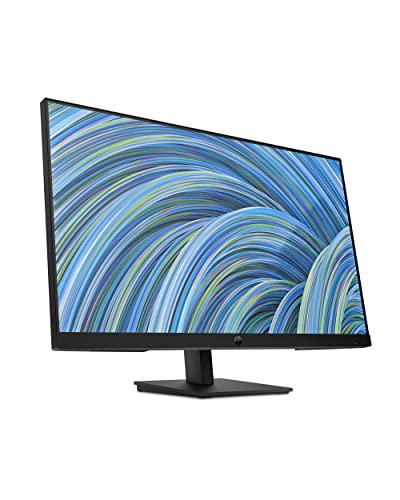 HP M27ha | Check price on Amazon | |
 LG 27MP400-B | Check price on Amazon |
A larger monitor makes everyday computing easier on aging eyes. Text grows bigger without squinting, menus stay readable at arm’s length, and a bright, steady picture reduces the strain of long reading sessions. The right screen pairs a large panel with a matte finish, a low blue light mode, and a stand that brings the display to eye level.
The five monitors below are all 27-inch Full HD displays with IPS panels, which keep colors and contrast steady from different viewing angles. Each one is chosen for a senior-friendly trait: a height-adjustable stand, an eye-care mode, simple controls, or built-in speakers. Pick the one that matches the desk setup, then set the operating system text scaling one step larger.
As an Amazon Associate, we earn from qualifying purchases.
Table of Contents
- How to Choose a Monitor for Seniors
- Dell S2721HS
- BenQ GW2790
- ASUS VA27EQSB
- HP M27ha
- LG 27MP400-B
- FAQ
- Conclusion
How to Choose a Monitor for Seniors
Start with size. A 27-inch screen shows text and icons large enough to read comfortably at a normal desk distance, and Full HD resolution keeps interface elements big rather than tiny. A 32-inch screen is larger still, but it needs a deeper desk and a longer viewing distance, so 27 inches is the sweet spot for most home desks.
Look for a matte, anti-glare screen. Glossy panels reflect windows and lamps, which forces the eyes to work harder. A matte IPS panel stays readable in a bright room and keeps contrast steady when viewed slightly off center.
Eye-care features matter more than refresh rate. Low blue light modes and flicker-free backlights reduce fatigue during long reading sessions, and a brightness sensor that adapts to room light keeps the screen from glaring at night. A 75 Hz refresh rate is plenty for email, video calls, photos, and streaming; higher rates suit fast gaming, not reading.
Check the stand. Height adjustment lets the top of the screen sit at eye level, which keeps the neck straight. Tilt, swivel, and pivot add flexibility, and a VESA mount pattern allows a monitor arm if desk space is tight. Simple controls help too: a small joystick or clearly labeled buttons beat a hidden touch strip.
Finally, match the ports. Most laptops connect over HDMI, and many newer ones use USB-C or DisplayPort, so a monitor with two HDMI ports plus DisplayPort covers nearly every laptop. Built-in speakers are a bonus for video calls and streaming, since they remove the need for separate speakers. Confirm the exact model number before ordering, since look-alike models can differ in stand and ports.
Dell S2721HS
The Dell S2721HS is the best overall monitor for seniors because it combines a large, calm picture with a fully adjustable stand. Its 27-inch IPS panel runs at Full HD resolution with a 75 Hz refresh rate, and the matte anti-glare coating keeps the screen readable in bright rooms. Dell ComfortView reduces blue light emissions, and the flicker-free backlight stays steady during long sessions.
The stand is the strongest reason to choose this model. It adjusts for height, tilt, swivel, and pivot, so the screen can sit at eye level and rotate into portrait orientation for long documents. Thin bezels keep the focus on the picture, and wide viewing angles hold the image steady from the side of the desk.
Two HDMI ports and one DisplayPort suit nearly any laptop, and an audio line-out feeds external speakers or headphones. There are no built-in speakers, so video calls rely on the laptop speakers or a separate set. Match the S2721HS model exactly; the similar S2721H has a tilt-only stand.
BenQ GW2790
The BenQ GW2790 is the eye-care pick, built around features that reduce strain during long reading sessions. Its 27-inch IPS panel runs at Full HD resolution with a 100 Hz refresh rate, and the matte anti-glare surface keeps reflections low. BenQ Eye-CareU software and Low Blue Light Plus mode cut blue light, while Brightness Intelligence Gen2 adjusts the backlight to match room lighting automatically.
The panel covers 99 percent of the sRGB color space, so photos and documents look natural. Two HDMI ports and one DisplayPort cover most laptops, and built-in speakers handle video calls and streaming.
The trade-off is the stand, which adjusts for tilt only. Seniors who need the screen raised should pair it with a monitor riser or a VESA arm, which the panel supports. A dedicated input hotkey switches between two connected devices. Match the GW2790 model exactly; the GW2790Q is QHD and the GW2790TC adds USB-C.
ASUS VA27EQSB
The ASUS VA27EQSB is the most adjustable eye-care monitor in this roundup, with a stand that moves in every direction. Its 27-inch IPS panel runs at Full HD resolution with a 75 Hz refresh rate, and the frameless design keeps the picture large and uncluttered. ASUS Eye Care technology pairs a low blue light filter with a flicker-free backlight, and the matte coating cuts reflections from windows and lamps.
The stand adjusts for height, tilt, swivel, and pivot, and the panel rotates into portrait mode for reading long articles and documents. Built-in speakers cover video calls, and a USB hub connects a keyboard and mouse with fewer cables to the laptop. DisplayPort, HDMI, and D-Sub inputs cover old and new laptops alike.
Match the VA27EQSB model exactly; the similar VA27EHE has a tilt-only stand and no USB hub.
HP M27ha
The HP M27ha is the straightforward choice for seniors who want a large screen, simple controls, and a stand that adjusts to eye level. Its 27-inch IPS panel runs at Full HD resolution with a 75 Hz refresh rate, and the anti-glare coating keeps the picture readable in bright rooms. HP Eye Ease lowers blue light without shifting colors toward yellow, which keeps documents and photos looking natural.
The stand adjusts for height, tilt, and pivot, so the screen can sit at eye level and rotate for long documents. Built-in speakers handle video calls and streaming, and the slim profile with narrow bezels fits smaller desks. HDMI, DisplayPort, and VGA inputs cover nearly any laptop, old or new.
Match the M27ha model exactly; the similar M27f has a tilt-only stand.
LG 27MP400-B
The LG 27MP400-B is the budget pick, offering a large, easy-to-read screen without extras that complicate setup. Its 27-inch IPS panel runs at Full HD resolution with a 75 Hz refresh rate, and the three-side virtually borderless design makes the picture feel larger than the frame. Reader Mode lowers blue light for long reading sessions, and the flicker-safe backlight stays steady.
OnScreen Control software lets brightness, volume, and picture modes be adjusted with the mouse instead of fumbling with buttons on the bezel, which is a real help for stiff hands. Two HDMI ports, one DisplayPort, and one D-Sub input cover most laptops.
The stand adjusts for tilt only, so seniors who need the screen raised should use a monitor riser or a VESA arm. There are no built-in speakers, so video calls rely on the laptop speakers or a separate set. Match the 27MP400-B model exactly; the 27MP450-B adds a height-adjustable stand.
FAQ
What size monitor is best for seniors?
A 27-inch monitor is the best match for most seniors. It shows text and icons large enough to read at a normal desk distance without dominating the desk. A 24-inch screen works on a small desk, while a 32-inch screen needs a deeper desk and a longer viewing distance to feel comfortable.
Does a low blue light mode really help tired eyes?
A low blue light mode reduces one source of eye fatigue, and a flicker-free backlight removes another. They help most with good habits: raise the text size, keep the screen at eye level, and look away briefly every twenty minutes or so.
Is a 4K monitor better than Full HD for seniors?
Not necessarily. On a 27-inch screen, Full HD keeps menus, icons, and text large and easy to read. A 4K panel at the same size shows sharper text, but interface elements shrink unless the operating system scaling is raised. Seniors who want the simplest experience usually prefer Full HD at 27 inches.
Can I connect a monitor to any laptop?
Nearly any laptop connects to these monitors over HDMI, and most also support DisplayPort through an adapter or a USB-C port. Check which ports the laptop has before ordering, and confirm the monitor listing matches the exact model number, since look-alike models can have different ports and stands.
Conclusion
The best monitor for seniors is a large, matte screen with an eye-care mode and a stand that brings the display to eye level. The Dell S2721HS is the strongest all-around choice, combining a fully adjustable stand with a calm, glare-free picture. The BenQ GW2790 leads on eye-care features, the ASUS VA27EQSB adds a USB hub and full stand movement, the HP M27ha keeps setup simple with built-in speakers, and the LG 27MP400-B delivers the essentials at a budget-friendly tier. Whichever model fits the desk, raise the text size one step and switch the low blue light mode on.
Product and ASIN Reference
| Product | ASIN |
|---|---|
| Dell S2721HS | B09S4ZZMS9 |
| BenQ GW2790 | ⚠ B0CP9WK81R |
| ASUS VA27EQSB | B09XJN7ZJR |
| HP M27ha | B08DJB7VVY |
| LG 27MP400-B | B097NXN7RF |
More from Amazon
Programs that pair well with the guide above. Offers and eligibility are set by Amazon and may change.
A free business account with business pricing and bulk-buying tools for work, shop or home office.
Create a business accountFree shipping on eligible items, Prime Video and more. Eligible new members can start with a free trial.
Start a Prime free trialAudiobooks and podcasts to listen to on the go. Eligible new members can start with a free trial.
Try Audible freeAd-free music streaming. Eligible new subscribers can start with a free trial.
Try Music Unlimited freeAs an Amazon Associate we earn from qualifying purchases.

Write Your Review
No reviews yet. Be the first to share your experience!