

Key takeaways
- On a small desk, every inch of footprint competes with a laptop, a monitor riser, a notebook, and a coffee mug.
On a small desk, every inch of footprint competes with a laptop, a monitor riser, a notebook, and a coffee mug. A printer that sprawls across that surface forces a trade-off nobody enjoys, which is why people shopping in this category tend to ask about size before anything else. But footprint is only the first filter. Ink or toner, color or black and white, scanning or print-only, and wireless setup all change how a printer feels to live with once it is plugged in next to a laptop.
This guide is for people working from a studio apartment, a dorm, a shared corner of a living room, or a narrow home office shelf. The 2026 shortlist below includes a portable color inkjet, an all-in-one HP DeskJet, and three compact wireless laser printers, judged only from what the product titles state. Exact dimensions are not in the titles, so measure the available space and compare it with the size on each listing before buying. Supply costs and subscription terms should also be checked on the listing.
Quick Picks
Our top picks



As an Amazon Associate we earn from qualifying purchases at no extra cost to you.
| Product | Best for | Key spec from the title |
|---|---|---|
| Canon PIXMA TR160 | Portable color printing | Wireless color, 50-sheet tray, 1.44″ display |
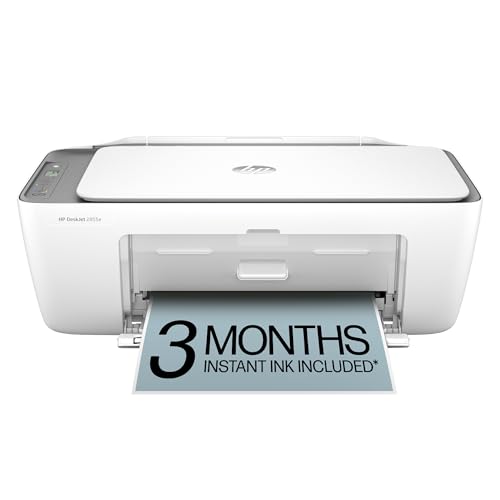
| HP DeskJet 2955 / 2855e | Color all-in-one with scanning | Wireless color inkjet, print, scan, copy |
| Brother HL-L2405W | Black and white documents | Wireless compact monochrome laser, mobile printing |
| Canon imageCLASS LBP6030w | Print-only simplicity | Monochrome laser, 19 PPM, 1 year limited warranty |
| Brother HL-L2460DW | Double-sided printing | Wireless compact monochrome laser with duplex |
How to Choose
Decide between inkjet and laser
Inkjets print color, including photos and graphics, and the all-in-one models add a scanner and copier. Laser printers in this list are monochrome, which suits text documents, forms, and shipping labels that do not need color. A laser can sit unused for a while without the nozzle issues that sometimes affect inkjets, while an inkjet gives more flexibility for color needs. Think about what actually comes out of the printer in a typical week. A person who prints a dozen pages of text and one photo a month may be happier with a laser plus a local print shop for the photo, while a household with school projects and craft printouts will want color on hand at all times.
Check print-only versus all-in-one
All-in-one printers include a scanner and copier, which is handy for signing and scanning paperwork, but they take more desk space because of the scanner lid. Print-only lasers, like the Canon imageCLASS LBP6030w, are slimmer in function and simpler to use. If scanning happens only a few times a year, a phone scanning app plus a print-only machine may be enough, saving room on the desk.
Look at wireless, mobile printing, and duplex
Wireless setup means no cable across the desk, which is a real help in small spaces. Mobile printing support lets a phone or tablet send documents directly. Duplex, listed on the Brother HL-L2460DW, prints on both sides automatically and can cut paper use. The Canon PIXMA TR160 lists a 50-sheet paper tray, which signals a compact tray rather than a large cassette, so it suits light use. Wireless printers also depend on a stable home network, so a router placed far from a back corner of the apartment can slow setup. Putting the printer within reach of the router or using the manufacturer’s app to check the connection helps keep jobs from stalling.
What to ignore and where budget printers cut corners
Do not focus on subscription trial wording in titles without reading the terms on the listing. Starter ink or toner often runs out sooner than full-size supplies, and replacement costs per page vary a lot between models. Budget printers tend to cut corners on tray size, speed, and display, so check the listed pages per minute where it appears, such as the 19 PPM on the Canon laser. Place printers on a stable, ventilated surface and follow the manual for paper types. It also helps to leave room behind and above the machine, since paper trays and cover lids need space to open fully, and a printer pushed against a wall can end up with crumpled sheets or a cover that never closes properly.
The 5 Best Options
Canon PIXMA TR160 Wireless Portable Printer
The TR160 is a color wireless printer described as lightweight and compact, with a 50-sheet paper tray and a 1.44 inch display. It fits people who want to print in color and tuck the machine away when it is not needed.
- Strength: lightweight, compact design suits small desks and travel
- Strength: color printing from a printer built for portability
- Trade-off: the 50-sheet tray means frequent refills for heavier use
Skip it if high-volume printing or built-in scanning is needed. It makes sense for students, remote workers who print occasionally, and anyone who wants to store the printer in a drawer between jobs. Check the listing for supply and power details. A printer this size pairs well with a laptop setup on a folding table, where a permanent printer shelf would be impossible. Because the title highlights on-the-go printing, buyers who plan to carry it should also look at how it is powered and what the carrying options are before relying on it away from a wall outlet.
HP DeskJet 2955 and 2855e
These color inkjet all-in-ones are listed with wireless connectivity, print, scan, and copy functions, and mobile compatibility. They suit small households and home offices that want color and a scanner in one machine.
- Strength: print, scan, and copy functions in a single unit
- Strength: wireless and mobile compatibility are named in the title
- Trade-off: the scanner lid adds to the space required on a small desk
Skip it if only black-and-white text is printed, because a laser may be a better fit. The two model names appear in separate listings, so buyers should read each for supply and subscription details before choosing between them. Mobile compatibility is a real convenience for people who rarely open a computer: a boarding pass, a recipe, or a permission slip can go straight from a phone to paper. Setting up wireless printing usually takes a few minutes with the manufacturer’s app, and an all-in-one also doubles as a basic copier for quick jobs.
Brother HL-L2405W Compact Monochrome Laser Printer
The HL-L2405W is a wireless compact monochrome laser with mobile printing and black and white output. The title mentions a refresh subscription trial, so buyers should read the listing for how it works.
- Strength: compact laser designed for text documents
- Strength: wireless and mobile printing keep cables off the desk
- Trade-off: monochrome only, with no color output and no scanner
Skip it if color printing or scanning is needed. It suits students, writers, and small offices that print mostly text and want a printer that does not take up much room. Laser output is often favored for crisp text on everyday documents such as essays, invoices, and forms, and a monochrome machine avoids the temptation to buy several colored supplies. Anyone curious about the trial offer in the title should read its terms before signing up, because ongoing plans can change supply costs.
Canon imageCLASS LBP6030w
This white, wireless, single-function monochrome laser prints at 19 PPM and carries a 1 year limited warranty, according to the title. It is a print-only machine for people who just want documents on paper.
- Strength: 19 PPM is a stated speed for text jobs
- Strength: print-only design keeps things simple
- Trade-off: no scanner or copier, and no color
Skip it if a scanner is needed or if automatic duplex is a must. The white finish also suits a bright room or a desk with light furniture. A one-year limited warranty is spelled out in the title, which gives buyers a clear starting point for what the maker covers, though the warranty terms themselves live on the listing and in the box. For a household that wants a quiet, set-and-forget text printer, a single-function model removes the menus and the scanner glass that other machines carry.
Brother HL-L2460DW Compact Monochrome Laser with Duplex
This wireless monochrome laser lists duplex printing and mobile printing, plus a refresh subscription trial mentioned in the title. It suits people who print longer documents and want to save paper. Thesis drafts, meeting packets, and reading material are the kind of jobs where double-sided output pays off, since it halves the number of sheets on the desk and in the tray. As with the sibling model, the subscription trial wording should be checked against the full listing before assuming how supplies will be billed.
- Strength: automatic duplex prints on both sides
- Strength: compact, wireless design for small spaces
- Trade-off: monochrome only and no scanning
Skip it if color or scanning matters more than double-sided printing.
Which One Fits Your Situation
A student in a dorm room
The Canon PIXMA TR160 is lightweight and portable, so it can be stored away between assignments.
A freelancer who scans contracts and prints color
The HP DeskJet 2955 or 2855e covers printing, scanning, and copying in one unit.
A writer or consultant who prints long text documents
The Brother HL-L2460DW offers duplex printing in a compact laser, which saves paper.
A minimalist who only prints a few pages a week
The Canon imageCLASS LBP6030w or Brother HL-L2405W keep things simple with monochrome laser output.
A tiny apartment where the printer lives on a shelf
The Brother HL-L2405W or Canon imageCLASS LBP6030w suit a shelf setup, because a print-only laser has no scanner lid that needs headroom. A small stand or riser, sold separately, can lift the machine off the desk entirely.
Common Mistakes
- Buying on footprint alone without measuring the available desk or shelf.
- Ignoring ongoing ink or toner costs and starter supply limits.
- Choosing an all-in-one when a scanner will rarely be used.
- Forgetting that a lid, tray, or output slot needs clearance around the printer.
- Skipping the terms of any subscription trial mentioned in the title.
Related guides
- Affordable Gaming Mouse For Alienware Laptop
- Laptop Docking Stations For Dual Monitors
- Travel Backpack With Laptop Compartment
Frequently Asked Questions
Is a laser or inkjet better for a small desk?
Neither is automatically smaller. Pick based on whether color and scanning are needed, then compare dimensions on the listing.
Can these printers print from a phone?
Several titles mention mobile printing or mobile compatibility. Check the listing for supported apps and phone systems.
Where should a compact printer sit?
On a stable, level surface with space around vents and paper paths. A small shelf or stand can also free up desk space.
What does duplex mean?
Duplex printing means the printer automatically prints on both sides of a sheet, which can reduce paper use. It is most helpful for long documents, where flipping each page by hand would be slow and error-prone. Models without duplex can still print on both sides manually, by feeding the stack back through, though the steps are fiddlier.
More from Amazon
Programs that pair well with the guide above. Offers and eligibility are set by Amazon and may change.
A free business account with business pricing and bulk-buying tools for work, shop or home office.
Create a business accountFree shipping on eligible items, Prime Video and more. Eligible new members can start with a free trial.
Start a Prime free trialAudiobooks and podcasts to listen to on the go. Eligible new members can start with a free trial.
Try Audible freeAd-free music streaming. Eligible new subscribers can start with a free trial.
Try Music Unlimited freeAs an Amazon Associate we earn from qualifying purchases.
Write Your Review
No reviews yet. Be the first to share your experience!