
Our Short List of 3
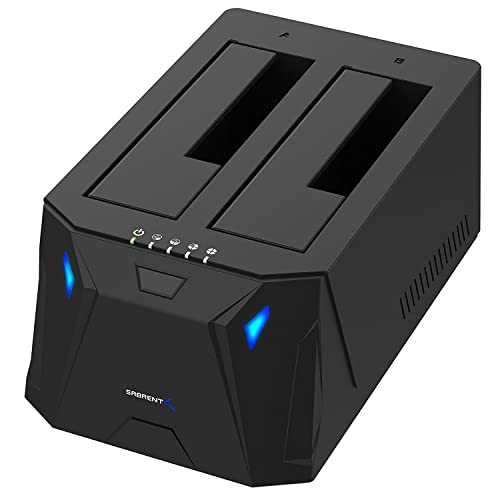
- Bays: 2, for 2.5-inch and 3.5-inch SATA drives
- Function: offline cloning; both bays visible to the host simultaneously
- Clone speed: rated up to 60 MB/s (maker rating)
- Host connection: USB 3.0, 5 Gbps, via USB-B

- Bays: 2, for 2.5-inch and 3.5-inch SATA drives
- Function: offline cloning
- Clone speed: rated up to 60 MB/s (maker rating)
- Host connection: USB 3.0, 5 Gbps, via USB-C

- Bays: 2, for 2.5-inch and 3.5-inch SATA drives
- Function: drive access only; no clone function stated
- Host connection: USB 3.0, 5 Gbps
- Hot-swap: supported
All 3 Picks at a Glance
| Product | Specs | Action |
|---|---|---|
| Sabrent EC-HD2B |
| Check price on Amazon |
| Sabrent EC-CH2B |
| Check price on Amazon |
| Thermaltake BlacX Duet (ST0014U-D) |
| Check price on Amazon |
A hard drive docking station turns a bare SATA drive into something your laptop can read in seconds. Drop a 2.5-inch or 3.5-inch drive into an open bay, connect one cable, and the drive appears like any other external disk. Dual-bay models go further: they can copy one drive to another entirely on their own, with the computer switched off or busy elsewhere. That makes them useful for drive upgrades, quick backups, and keeping a bootable spare of a working system drive.
One scope note before the picks. This guide covers bare-drive SATA docks for access and offline cloning. It does not cover USB-C or Thunderbolt laptop docking stations, which are port-expansion hubs for displays, peripherals, and charging; this site treats those as a separate product class with separate guides. If your goal is more ports on a laptop, you want that other class. If your goal is reading, copying, or cloning loose drives, the five docks below are the right tools.
As an Amazon Associate, we earn from qualifying purchases.
Quick answer
The StarTech SDOCK2U313R is the strongest all-round pick for fast standalone cloning over a 10 Gbps link. The Sabrent EC-HD2B and EC-CH2B cover slower offline cloning over USB-B or USB-C, the Thermaltake BlacX Duet suits simple dual-drive access without cloning, and the FIDECO dual bay adds an LED activity indicator for steady backup work. Choose by clone speed and host port first.
How to choose
Start with the job. If you only need to read files from loose drives, a simple access dock is enough. If you duplicate drives regularly, an offline cloner earns its place: insert a source and a target, press a button, and the dock copies sector by sector without tying up your laptop. Every dual-bay dock here except the Thermaltake offers that function, so check the notes before assuming a second bay means cloning.
Host speed is the second decision. A USB 3.2 Gen 2 link runs at 10 Gbps, while USB 3.0 docks run at 5 Gbps. For quick file access the difference is modest, but for cloning it sets the pace of the whole job. Port shape matters separately: USB-C and USB-B host connectors can carry the same 5 Gbps link, so do not pay extra for a port shape expecting throughput it does not add.
Third, respect the target-drive rule. On standalone cloners the target drive must be at least as large as the source, because the dock copies the entire disk surface, used and unused space alike. Sector cloners also copy empty blocks and stall on bad sectors, so a failing source drive belongs on imaging software, not a dock button. A dock clone is a healthy-drive tool; recovery software is the right first step for a drive that clicks, drops offline, or reports growing errors.
Finally, treat capacity limits and clone speeds as maker and roundup claims rather than settled facts. Where sources disagree on a model’s capacity ceiling, this guide prints no figure instead of picking a side.
StarTech SDOCK2U313R
The SDOCK2U313R is the performance pick of this set and the one to choose when cloning is the main job. It is a dual-bay standalone duplicator: insert a source and target drive, start the copy, and the dock works on its own while your laptop stays free. StarTech rates the standalone sector-by-sector clone at up to 28 GB/min, a maker rating that sits well above the 5 Gbps docks below, because the copy runs internally rather than across the host cable.
Its host link is USB 3.2 Gen 2 at 10 Gbps, and the box includes both USB-C and USB-A cables, so it connects to modern and older laptops without an adapter hunt. Each bay runs SATA III and supports TRIM and 4Kn drives. StarTech states no capacity limit for the unit. The standing rule still applies: the target drive must be at least as large as the source. Per roundup copy, the dock carries a 2-year warranty plus lifetime technical support, the strongest support terms in this group.
Specs
- Bays: 2, for 2.5-inch and 3.5-inch SATA drives
- Function: standalone duplicator with sector-by-sector offline cloning
- Clone speed: rated up to 28 GB/min (maker rating)
- Host connection: USB 3.2 Gen 2, 10 Gbps; USB-C and USB-A cables included
- Drive support: SATA III per bay, TRIM, 4Kn
- Capacity limit: none stated by the maker
- Target drive rule: target must be at least as large as the source
- Warranty: 2 years, plus lifetime technical support per roundup copy
Sabrent EC-HD2B
- Bays: 2, for 2.5-inch and 3.5-inch SATA drives
- Function: offline cloning; both bays visible to the host simultaneously
- Clone speed: rated up to 60 MB/s (maker rating)
- Host connection: USB 3.0, 5 Gbps, via USB-B
The EC-HD2B is Sabrent’s dual-bay cloner on a USB-B host connection, aimed at buyers who clone occasionally rather than daily. It takes 2.5-inch and 3.5-inch SATA drives, and its offline clone function is rated by the maker at up to 60 MB/s. That pace is far below the StarTech’s internal rating, so this dock suits overnight or background copies rather than quick turnarounds.
When connected to a computer, both bays are visible to the host at the same time, which makes the EC-HD2B handy for manual file moves between two loose drives as well as button-press cloning. One caution: sources disagree about this model’s per-drive capacity limit, so no capacity figure is stated here. If your drives are very large, confirm the current limit on the product page before ordering.
Sabrent EC-CH2B
- Bays: 2, for 2.5-inch and 3.5-inch SATA drives
- Function: offline cloning
- Clone speed: rated up to 60 MB/s (maker rating)
- Host connection: USB 3.0, 5 Gbps, via USB-C
The EC-CH2B is the EC-HD2B’s sibling, and the difference is exactly one thing: the host connector. Where the EC-HD2B uses USB-B, the EC-CH2B uses USB-C, which suits current laptops that no longer ship with older ports nearby. Everything else carries over, including the same 5 Gbps USB 3.0 link speed and the same maker-rated offline clone pace of up to 60 MB/s.
That point is worth stating plainly, because it is the most common buying mistake in this class: the port shape changes the cable, not the throughput. A USB-C connector on a USB 3.0 dock does not make it a 10 Gbps dock. Choose the EC-CH2B because your laptop has USB-C and you want a direct cable, not because you expect it to clone faster than its sibling.
Thermaltake BlacX Duet (ST0014U-D)
- Bays: 2, for 2.5-inch and 3.5-inch SATA drives
- Function: drive access only; no clone function stated
- Host connection: USB 3.0, 5 Gbps
- Hot-swap: supported
The BlacX Duet is the access-only pick in this guide, and its section exists partly to prevent a common mistake. It is a dual-bay dock for 2.5-inch and 3.5-inch SATA drives on a USB 3.0 link at 5 Gbps, and its bays are hot-swappable, so you can exchange drives without powering the unit down. That makes it a convenient reader for rotating through a drawer of loose drives.
What it does not offer, based on the copy available for this model, is any clone function. No cloning is stated for the BlacX Duet, so it should never be bought as a duplicator. If your workflow is plugging in drives, copying files through your laptop, and moving on, it fits well; for exact drive copies, choose a cloning dock above. Capacity figures for this model also conflict across sources, so none are printed here.
FIDECO Dual Bay Hard Drive Docking Station
The FIDECO dual bay rounds out the set as a straightforward cloning dock with one practical extra: an LED activity indicator. That small feature matters more than it sounds during long offline copies, because it gives you a visible sign of progress and drive activity without connecting a computer to check. The dock connects over USB 3.0 at 5 Gbps and supports offline cloning, putting it in the same working category as the two Sabrent models.
As with the Sabrents, keep expectations aligned with the link speed: this is a set-it-running backup tool, not a fast duplicator. Capacity figures for this model conflict across sources, so this guide prints none; check the listing if you plan to use very large drives.
Specs
- Bays: 2 (dual bay)
- Function: offline cloning
- Host connection: USB 3.0, 5 Gbps
- Indicator: LED activity indicator
- Capacity limit: not stated here, because sources conflict
Who should skip
Skip this whole class if you actually need a laptop docking station with display outputs, charging, and peripheral ports; those are a different product, covered in this site’s separate guides. Skip cloning docks if your source drive is failing, clicking, or throwing errors, because sector copying stalls on bad sectors and imaging software is the safer first tool. Skip the BlacX Duet if offline cloning is on your list at all, since no clone function is stated for it. Skip the 5 Gbps cloners if you duplicate large drives on a schedule, because their maker-rated pace turns big jobs into long waits. And skip every dock here if your drives are NVMe rather than SATA.
FAQ
Can a docking station clone a drive without a computer?
Yes, if the model has an offline clone function. The StarTech, both Sabrent models, and the FIDECO in this guide clone standalone: insert source and target, start the copy, and the dock works alone. The Thermaltake BlacX Duet has no clone function stated, so it always works through a connected computer.
Does a USB-C connector make a dock faster?
Not by itself. The Sabrent EC-CH2B uses USB-C but runs the same 5 Gbps USB 3.0 link as its USB-B sibling, the EC-HD2B. Speed comes from the link standard, not the plug shape. The StarTech’s 10 Gbps USB 3.2 Gen 2 connection is the faster link in this guide.
How big does the target drive need to be when cloning?
At least as large as the source drive. Standalone cloners copy the full disk surface sector by sector, including empty space, so a smaller target cannot hold a complete copy. Using an equal or larger target is the safe rule for every cloning dock in this guide.
Can I clone a failing drive with one of these docks?
It is a poor idea. Sector cloners copy empty blocks and stall on bad sectors, so a failing source drive belongs on imaging software first, where errors can be skipped, retried, and logged. Use a dock clone for healthy drives, such as upgrades and backups.
Final verdict
For regular cloning, the StarTech SDOCK2U313R is the clear first choice: the fastest host link in this set, a maker-rated standalone clone speed far above the rest, both cable types in the box, and the strongest support terms. The Sabrent EC-HD2B and EC-CH2B are the same honest 5 Gbps cloner in two port shapes, so pick between them by your laptop’s connector and nothing else. The Thermaltake BlacX Duet earns its place strictly as a hot-swappable access dock, never as a cloner. The FIDECO dual bay is the simple cloning option whose activity LED makes long copies easier to live with.
Product and ASIN Reference
| Product | ASIN |
|---|---|
| StarTech SDOCK2U313R | B019Y4JE22 |
| Sabrent EC-HD2B | B0759567JT |
| Sabrent EC-CH2B | B09646W9PX |
| Thermaltake BlacX Duet (ST0014U-D) | B01J4XNLN6 |
| FIDECO Dual Bay Hard Drive Docking Station | B07D6L5CJF |
More from Amazon
Programs that pair well with the guide above. Offers and eligibility are set by Amazon and may change.
A free business account with business pricing and bulk-buying tools for work, shop or home office.
Create a business accountFree shipping on eligible items, Prime Video and more. Eligible new members can start with a free trial.
Start a Prime free trialAudiobooks and podcasts to listen to on the go. Eligible new members can start with a free trial.
Try Audible freeAd-free music streaming. Eligible new subscribers can start with a free trial.
Try Music Unlimited freeAs an Amazon Associate we earn from qualifying purchases.
Write Your Review
No reviews yet. Be the first to share your experience!