
A smart card reader is a small purchase that can quietly block your workday when it goes wrong. Pick the wrong connector, an outdated firmware revision, or a reader your agency does not recognize, and a CAC or PIV login that should take seconds turns into a help-desk ticket. The category is mature, though: a handful of established makers supply most readers used for military CAC logins, federal PIV credentials, and corporate ID badges, and the differences are easy to sort.
The five readers below cover the main shapes of the category: cabled desk readers for a permanent workstation, a USB-C model for current laptops, a folding pocket reader for travel, an upright stand reader, and a budget pick for home logins. Each section notes its model’s federal listings, OS support, and small print such as firmware limits and driver requirements.
As an Amazon Associate, we earn from qualifying purchases.
Quick answer
For most laptop users, the Identiv SCR3310v2 is the safest default: a cabled USB-A desk reader with CAC and PIV approval, GSA listing, and no driver install on Windows or current macOS. USB-C laptops should look at the IOGEAR GSR205 instead. Travelers get the folding Identiv SCR3500C SmartFold, the HID OMNIKEY 3121 suits fixed desks, and the Saicoo is the budget home-login pick.
How to choose
Start with the connector. Older laptops and most docking setups still offer USB-A, while many current thin laptops ship with USB-C only. A USB-C reader plugs straight into those machines; a USB-A reader needs an adapter, one more part to lose and one more point of failure. Check your ports first, because this decides which half of the list is even an option.
Next, decide between a cabled desk reader and a folding pocket reader. Cabled models sit flat or in a stand, stay plugged in, and have no moving parts beyond the card slot. Folding readers collapse to thumb-drive size and travel well, but the hinge is the known weak point of the design, so they suit travel and occasional use better than all-day desk duty.
Federal listing status matters for work credentials. Readers described as CAC and PIV approved, TAA-compliant, or listed on the GSA Approved Products List are the ones government and contractor buyers are usually required to use. FIPS 201 is the federal standard behind PIV credentials, and listings referencing it signal the reader has passed the relevant approval process. For a home login these listings matter less; for agency work, they are often the whole point.
One caveat applies to nearly every reader here: the CAC login middleware your agency uses is generally not included. Your organization supplies the middleware, certificates, and login configuration, so a working reader still will not log you in until that software side is in place. Check your agency’s approved-hardware list before ordering, since some employers support only named models.
Finally, note the firmware and driver details: some readers cannot be firmware-upgraded in the field, so old stock may struggle with newer cards, and a few ask for a driver install before the first plug-in.
Identiv SCR3310v2

The SCR3310v2 is the reference point for this category: a flat USB-A desk reader on a 1.5 m cable, from the Identiv line that has supplied CAC readers for years. The maker lists it as CAC and PIV approved, on the GSA Approved Products List, and TAA-listed, the combination most federal and contractor buyers shop for. Per the manual, no driver install is needed on Windows or current macOS, so setup is plug-in, with agency middleware doing the login work on top.
The maker-stated operating-system range is broad: macOS 10.9 through 15, Windows, Linux, Chrome OS, and Android 8 and later. The slot is rated for 100,000 insertions, pointing at daily, years-long desk use.
One caution deserves emphasis: units with firmware older than 6.02 can miss some newer CACs on Macs, and that firmware cannot be field-upgraded. Buy new stock rather than old inventory, especially for a Mac.
Specs
- Connector: USB-A, flat desk reader, 1.5 m cable
- Card support: CAC and PIV, per maker listing
- Federal status: GSA Approved Products List, TAA-listed, per maker
- Driver: none needed on Windows or current macOS, per the manual
- Maker OS range: macOS 10.9-15, Windows, Linux, Chrome OS, Android 8+
- Slot rating: 100,000 insertions
- Firmware: pre-6.02 units can miss newer CACs on Macs; not field-upgradable
IOGEAR GSR205

The GSR205 is the pick built for current laptops: a USB-C desk reader on a cable of about 25 in, connecting directly to modern thin machines and Thunderbolt 3 ports without an adapter. IOGEAR lists it as TAA-compliant, with CAC and PIV support. Per its manual, it also supports USAccess PIV v7 and v8 credentials.
Three cautions come with it. First, the manual states that CAC middleware is not included: the reader alone does not complete a CAC login. Second, the maker warranty is 1 year. Third, Mac support needs a careful read: the maker presents broad Mac compatibility, but independent Mac checks cover only macOS 10.14 and 10.15, so support beyond those versions is not independently confirmed.
Within those limits, the GSR205 is the cleanest answer for a USB-C-only laptop needing daily CAC or PIV logins, and its TAA status keeps it eligible where that compliance is required.
Specs
- Connector: USB-C desk reader, cable about 25 in; works in Thunderbolt 3 ports, per the manual
- Card support: CAC and PIV; USAccess PIV v7/8 per the manual
- Federal status: TAA-compliant, per maker
- Middleware: CAC middleware not included, per the manual
- Warranty: 1 year, per maker
- Mac note: independent checks cover macOS 10.14/10.15 only
Identiv SCR3500C SmartFold

The SCR3500C SmartFold is the travel option: a folding USB-C pocket reader that collapses to roughly thumb-drive size, riding in a laptop bag until a login is needed. Roundup copy describes federal ID approval for the model, and the maker’s driver range covers macOS 10.9 through 15, Windows 7 through 11, and Linux.
The trade-offs are the ones the folding form always brings. The firmware is not owner-upgradable, so buy current stock. The folding arm can crack under hard use, so this design suits travel and occasional use rather than taking cards at a desk all day. One quirk is worth knowing: a card inserted upside down makes the reader seem dead, because the chip has to face the contacts. Flip the card before assuming a failure.
Specs
- Connector: USB-C, folding pocket reader, about thumb-drive size folded
- Card support: CAC and federal ID cards, per roundup copy
- Maker driver range: macOS 10.9-15, Windows 7-11, Linux
- Firmware: not owner-upgradable
- Durability: folding arm can crack; travel and occasional use
- Handling: chip must face the contacts or the reader appears dead
HID OMNIKEY 3121

The OMNIKEY 3121 takes the opposite approach to the pocket reader: a desk reader in an upright stand, the card sliding into a top slot where it stays in plain view. That layout suits shared workstations, front desks, and any setup where seeing the credential in place is part of the routine. The slot is rated for 100,000 insertions per HID.
HID is a long-standing name in credential hardware, and the 3121 is an older, larger design that takes more desk space than the flat readers. It connects over USB-A, so a USB-C laptop needs an adapter. Setup also differs from the plug-and-play picks: HID’s install guide says to install its driver before the first plug-in, and skipping that step is a common cause of a reader that appears not to work. Choose it when the upright, card-visible format fits the workstation; it is a fixed-desk tool, not a travel companion.
Specs
- Connector: USB-A (USB-C laptops need an adapter)
- Form: upright stand reader, card in a top slot, in plain view; cable about 150 cm
- Slot rating: 100,000 insertions, per HID
- Driver: install before first plug-in, per HID’s install guide
- Middleware: not stated
- Footprint: larger, older design; fixed-desk use
Saicoo USB CAC Reader
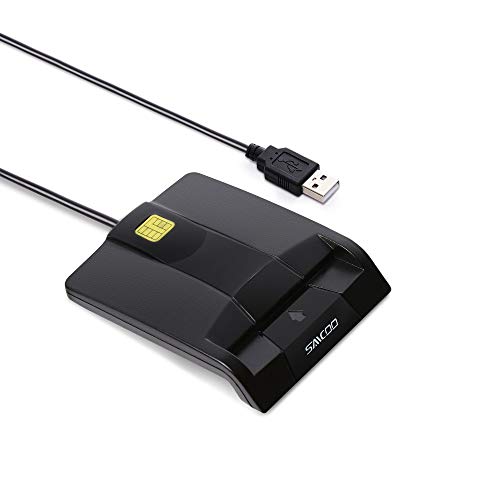
The Saicoo is the budget end of the list: a USB-A desk reader in a sloped gloss-black body with an anti-slip pad. The seller lists an 18-month warranty, a figure to read as a seller claim rather than a maker specification. It fits simple home login duty on Windows or Mac, without the federal-contract features of the bigger brands.
The limits are about documentation rather than the basic job. The brand publishes no datasheet or firmware notes, so there is no firmware guidance to check against newer cards and no spec sheet to hand to an IT department. Roundup coverage also states that this flat model is not Chromebook-friendly, so Chrome OS users should pick a reader above with stated Chrome OS support, such as the SCR3310v2. For agency work, the documented Identiv and IOGEAR models are safer.
Specs
- Connector: USB-A, sloped desk reader with anti-slip pad
- Card support: CAC, per listing
- Warranty: 18 months, per seller claim
- Documentation: no published datasheet or firmware notes
- Chrome OS: not Chromebook-friendly, per roundup copy; middleware not stated
- Best fit: simple Windows/Mac home logins
Who should skip
Skip this whole category if your organization issues its own readers or restricts logins to approved hardware requested internally; a personally bought reader may never be authorized. Skip the SmartFold as a main reader if you log in many times a day at one desk, since its hinge is not built for that duty cycle, and skip the Saicoo if you need Chrome OS support or IT-reviewable documentation. Mac users who cannot confirm new stock should think twice about readers whose firmware cannot be upgraded, and anyone expecting CAC middleware in the box should reset that expectation.
FAQ
Does a smart card reader include the software needed for a CAC login?
Generally, no. The reader is hardware, and CAC middleware is supplied by your agency or employer. The IOGEAR manual states this directly for the GSR205, and the same applies across the category.
Which reader should a USB-C laptop owner buy?
The IOGEAR GSR205 for desk use, a USB-C reader with TAA status and CAC and PIV support. For travel, the folding Identiv SCR3500C SmartFold is also USB-C. USB-A readers such as the SCR3310v2, OMNIKEY 3121, and Saicoo need an adapter on a USB-C-only machine.
Why does firmware version matter on a card reader?
Some readers, including the Identiv models here, cannot have their firmware upgraded after purchase. The SCR3310v2 is the clear example: units with firmware older than 6.02 can miss some newer CACs on Macs, with no field upgrade to fix them.
Are folding smart card readers durable enough for everyday use?
They are built for portability first. The SmartFold folds to thumb-drive size, but its folding arm can crack, and hinges are the weak point of this form. For travel and occasional logins they make sense; for daily desk logins, a cabled reader is the better pick.
Final verdict
Most buyers should start with the Identiv SCR3310v2: GSA listing and TAA status with plug-and-play setup on Windows and current macOS, provided you buy new stock. USB-C laptop owners get the same formula from the IOGEAR GSR205, with its one-year warranty and Mac caveats in mind. The SmartFold is the travel pick, the HID OMNIKEY 3121 serves fixed desks that want the card visible, and the Saicoo covers simple home logins on a budget. Match the connector to your laptop first, and the rest makes itself.
Product and ASIN Reference
| Product | ASIN |
|---|---|
| Identiv SCR3310v2 | B002N3MM6W |
| IOGEAR GSR205 | B071GCFSF7 |
| Identiv SCR3500C SmartFold | B07CV4D13G |
| HID OMNIKEY 3121 | B00AT4NX8S |
| Saicoo USB CAC Reader | B0177O5XNA |
More from Amazon
Programs that pair well with the guide above. Offers and eligibility are set by Amazon and may change.
A free business account with business pricing and bulk-buying tools for work, shop or home office.
Create a business accountFree shipping on eligible items, Prime Video and more. Eligible new members can start with a free trial.
Start a Prime free trialAudiobooks and podcasts to listen to on the go. Eligible new members can start with a free trial.
Try Audible freeAd-free music streaming. Eligible new subscribers can start with a free trial.
Try Music Unlimited freeAs an Amazon Associate we earn from qualifying purchases.
Write Your Review
No reviews yet. Be the first to share your experience!