
Shoeboxes of negatives and carousels of slides hold decades of family history, but the film is slowly fading, and the projectors and light tables that made it viewable are disappearing. A dedicated film and slide scanner turns those frames into digital files you can store, share and print, and the category splits cleanly into two camps: standalone converters that work without a computer, and dedicated 35mm scanners that connect to a laptop and trade speed for much higher resolution and control.
One honesty note before the picks. The headline megapixel figures on standalone converters describe interpolated output, not optical capture: the sensor records fewer pixels than the saved file contains, and software fills in the rest. Interpolation makes files bigger, not sharper, so the picks below separate the true capture figure from the interpolated one wherever both are known.
As an Amazon Associate, we earn from qualifying purchases.
Quick answer
For most people digitizing family slides and negatives, the KODAK Slide N Scan is the easiest standalone pick, with a 5-inch screen, no computer required. Archival quality points to the Plustek OpticFilm 8300i SE, a dedicated 35mm scanner with 7200 dpi hardware resolution and infrared defect mapping. The Magnasonic FS71, Plustek OpticFilm 8100 and KODAK SCANZA cover smaller budgets, black-and-white film and tight spaces.
How to choose
Start with the standalone-versus-dedicated decision, because it shapes everything else. Standalone converters such as the KODAK Slide N Scan, Magnasonic FS71 and KODAK SCANZA photograph each frame with a built-in sensor and save it to an SD card. They are fast, need no computer and suit large collections of family snapshots where convenience matters more than ultimate detail. Dedicated scanners such as the two Plustek models move one frame at a time past a high-resolution sensor under software control, producing far larger, cleaner files at the cost of minutes per frame and a required computer connection.
Check format support against what you actually own. Every pick here handles 35mm film in some form, and the standalone models add 110 and 126 formats plus mounted slides. None of the five scans 120 or 220 medium-format film, and none scans paper prints or photo albums; prints belong to flatbed or document scanners, which are a different product category. If part of your collection is medium format, it needs separate equipment regardless of which pick you choose.
Resolution claims need careful reading. On dedicated scanners, dpi is a hardware figure: both Plustek models scan at 7200 dpi, which yields very large files suited to big prints and heavy cropping. On standalone converters, megapixels are the marketing number, and the saved file is usually interpolated up from a smaller capture. A 22 MP interpolated file is not equivalent to a 22 MP optical capture, and judging converters by that number alone will mislead you.
Dust and scratch handling is the other major dividing line. The Plustek OpticFilm 8300i SE includes an infrared channel that maps physical defects so software can remove them, which saves substantial retouching time on old, dirty film. The OpticFilm 8100 lacks that channel and relies on software correction alone. Infrared mapping has one hard limit: it does not work on traditional silver-based black-and-white film, because the silver layer blocks the infrared light the defect map depends on. Colour film and chromogenic black-and-white film work fine.
Finally, think about throughput. A standalone converter can move through a tray of slides in an afternoon. A dedicated scanner at its highest setting with infrared mapping is a selected-frames tool: you scan the keepers, not the whole archive. If you are buying one device, match it to whether your priority is volume or quality.
KODAK Slide N Scan (RODFS50)
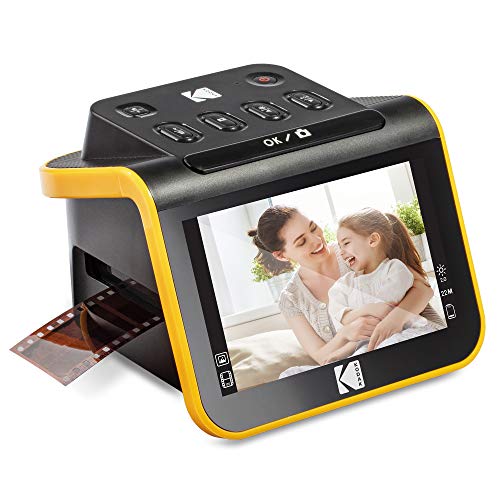
The Slide N Scan is the straightforward standalone option: load a film holder, preview the frame on the 5-inch LCD, adjust, and save to an SD card, all without a computer in the loop. It handles the formats most family collections contain, and its holder-based workflow keeps handling of fragile originals to a minimum.
Specs
- Operation: standalone, computer-free
- Display: 5-inch LCD
- Capture: 14 MP capture, 22 MP interpolated output
- Formats: 135 (35mm), 110 and 126 film, plus 50mm mounted slides
- Storage: SD card, required and not included, up to 32GB
- In the box: USB and HDMI included per roundup copy
- Computer connection: not required for scanning
Because the 22 MP figure is interpolated from the 14 MP capture, expect files that are easy to share and fine for moderate prints rather than true high-resolution scans. The SD card requirement is easy to overlook: the scanner cannot save internally, so budget for a card if you do not already own one.
Plustek OpticFilm 8300i SE

The 8300i SE is the quality-first pick, a dedicated 35mm scanner that connects to a computer and scans at a true hardware resolution of 7200 dpi. Its infrared channel maps dust and scratches so the bundled software can correct them, which is the single biggest time-saver available when the source film is old and dirty.
Specs
- Operation: dedicated scanner, computer required
- Resolution: 7200 dpi hardware resolution (maker spec)
- Output: 24/48-bit output
- Defect handling: infrared channel for dust and scratch mapping
- Software: SilverFast SE Plus 9 and QuickScan Plus bundled
- Formats: 35mm negatives and mounted slides only
- Speed: about 120 seconds per 7200 dpi infrared frame per the maker’s own timings
That timing figure defines the role of this scanner: at two minutes a frame at maximum settings, it is for scanning selected keepers at archival quality, not for unattended whole-roll runs. It also handles 35mm only, so 110, 126 and medium-format material is out of scope. The infrared limitation matters too: traditional silver-based black-and-white film cannot be defect-mapped, although it still scans normally.
Magnasonic All-in-One Film & Slide Scanner (FS71)

The FS71 is a standalone all-in-one converter with a 5-inch screen, aimed at mixed collections that include less common formats. Alongside the usual 35mm, 110 and 126 film, it accepts Super 8 still frames, which most converters offer only in limited form or not at all.
Specs
- Operation: standalone, computer-free
- Display: 5-inch screen
- Capture: 16 MP capture, plus a 24 MP interpolated setting
- Formats: 35mm, 110 and 126 negatives and slides, plus Super 8 still frames
- Storage and output: SD storage and HDMI output
- Maker note: the maker states it cannot repair scratches or fading
Treat the 24 MP setting as an output size rather than captured detail; the honest capture figure is 16 MP. The maker’s own statement that the scanner cannot repair scratches or fading is worth taking seriously: files from damaged film will need attention in photo software afterwards, and faded colour will not be restored by the scanner itself.
Plustek OpticFilm 8100

The 8100 is the dedicated alternative to the 8300i SE: the same 7200 dpi hardware resolution and bundled SilverFast software, but without the infrared channel. In its place it uses software-based SRDx correction, which estimates defects from the image itself rather than measuring them with infrared light.
Specs
- Operation: dedicated scanner, computer required
- Resolution: 7200 dpi hardware resolution
- Dynamic range: 3.6 Dmax per roundup copy
- Defect handling: no hardware infrared channel; software SRDx correction instead
- Software: SilverFast SE Plus bundled
- Included: film and slide holders included
- Formats: 35mm negatives and mounted slides
The missing infrared channel is a real loss on dirty colour film, but it is irrelevant on traditional silver-based black-and-white film, where infrared mapping cannot work anyway. If your archive is mostly black-and-white negatives, the 8100 gives up little in practice and remains a sensible dedicated pick, with software correction handling ordinary dust reasonably well.
KODAK SCANZA
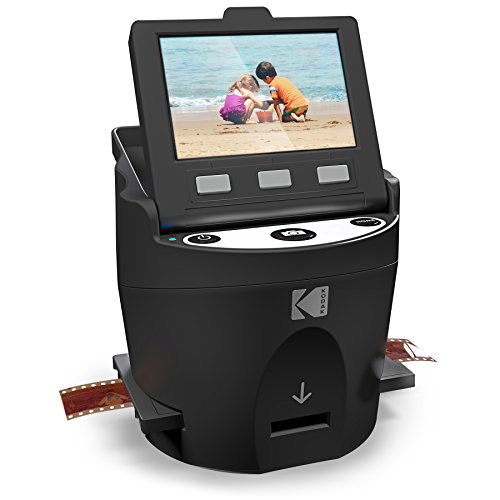
The SCANZA is the compact standalone option, built around a 3.5-inch tilting screen that makes previewing easier on a desk. It covers the common small formats and adds still frames from 8mm and Super 8 film, with on-device brightness and colour adjustment before you save each frame.
Specs
- Operation: standalone, computer-free
- Display: 3.5-inch tilting screen
- Capture: 14 MP CMOS sensor, 22 MP interpolated output
- Formats: 35mm, 126 and 110 negatives and slides, plus 8mm and Super 8 still frames
- Output: JPEG stills only; it does not digitize movies
- Adjustments: on-device brightness and colour adjustment
- Transfer: SD save, USB transfer and HDMI viewing
The movie point deserves emphasis: the SCANZA captures individual still frames from movie film as JPEGs, which is useful for sampling reels, but it does not convert film to video. Anyone hoping to digitize home movies needs a different class of equipment. Within its stills role, the tilting screen and on-device adjustments make it a comfortable choice for smaller collections.
Who should skip
Skip this entire category if your material is paper prints, photo albums or documents; none of these scanners handles prints, and a flatbed or document scanner is the right tool. Skip it as well if you own medium-format 120 or 220 film, since no pick here accepts it. If your goal is converting 8mm or Super 8 reels into watchable video, stills-only converters will disappoint you. And if your collection is small and sentimental, a scanning service may cost less than hardware you will use once. Finally, if your film is traditional silver-based black-and-white and you were counting on automatic dust removal, note that infrared defect mapping does not work on it in any scanner.
FAQ
Do these scanners work without a computer?
Three of the five do. The KODAK Slide N Scan, Magnasonic FS71 and KODAK SCANZA are standalone converters that save to SD cards with no computer involved. The two Plustek models require a connected computer running their bundled software for every scan.
What does interpolated resolution actually mean?
It means the saved file contains more pixels than the sensor captured. Software estimates the extra pixels from neighbouring ones, which enlarges the file without adding real detail. On the standalone picks here, the lower capture figure is the honest measure of recorded detail, and the higher figure is output size only.
Can any of these scan old photo prints or medium-format film?
No. All five picks are built for small film formats: 35mm across the board, with 110, 126 and movie-film stills on the standalone models. Paper prints need a flatbed or document scanner, and 120 or 220 medium-format film needs a scanner with a larger transparency area than any model listed here.
Why does infrared dust removal fail on black-and-white film?
The infrared channel maps defects by shining infrared light through the film, but the metallic silver in traditional black-and-white emulsions blocks that light, so no defect map can be formed. Chromogenic black-and-white film, which uses dyes instead, works normally. On silver-based film, expect to retouch dust manually or rely on software estimation.
Final verdict
Match the scanner to the collection. For boxes of family slides and negatives where speed and simplicity matter, the KODAK Slide N Scan is the default standalone choice, with the Magnasonic FS71 as the alternative for mixed formats and the compact KODAK SCANZA for smaller jobs and tighter spaces. For archival quality from 35mm film, the Plustek OpticFilm 8300i SE earns its place with true 7200 dpi scanning and infrared defect mapping, while the OpticFilm 8100 covers black-and-white archives where that infrared channel would go unused anyway. Judge every model by its true capture specification rather than its interpolated headline number, and the right pick becomes clear.
Product and ASIN Reference
| Product | ASIN |
|---|---|
| KODAK Slide N Scan (RODFS50) | B084NVRHYQ |
| Plustek OpticFilm 8300i SE | B09MHK6Q7D |
| Magnasonic All-in-One Film & Slide Scanner (FS71) | B086DX4253 |
| Plustek OpticFilm 8100 | B009PHCWL4 |
| KODAK SCANZA | B00O2BU8PK |
More from Amazon
Programs that pair well with the guide above. Offers and eligibility are set by Amazon and may change.
A free business account with business pricing and bulk-buying tools for work, shop or home office.
Create a business accountFree shipping on eligible items, Prime Video and more. Eligible new members can start with a free trial.
Start a Prime free trialAudiobooks and podcasts to listen to on the go. Eligible new members can start with a free trial.
Try Audible freeAd-free music streaming. Eligible new subscribers can start with a free trial.
Try Music Unlimited freeAs an Amazon Associate we earn from qualifying purchases.
Write Your Review
No reviews yet. Be the first to share your experience!