
Streaming console gameplay from a laptop setup usually runs into the same wall: the laptop has no video input, so the console picture has nowhere to go. An external capture card solves that by taking the console’s HDMI signal, passing it through to a TV or monitor for play, and sending a copy over USB to the laptop for recording or broadcasting. All five picks below are external USB units, which is the only form factor that makes sense for a laptop-based desk.
The shortlist is deliberately narrow. It covers two Elgato flagships, two AVerMedia models, and one Elgato unit that can record without a PC in the chain at all. Every resolution, frame rate, and latency figure quoted here comes from the maker’s own listing copy, so treat those numbers as manufacturer claims rather than measured results.
As an Amazon Associate, we earn from qualifying purchases.
Quick answer
For most laptop streamers, the Elgato 4K X is the strongest all-round pick, with maker-rated capture up to 4K144 over USB. The AVerMedia Live Gamer Ultra 2.1 suits players who want 4K60 capture with high-refresh passthrough, while the Elgato 4K60 S+ stands apart for recording straight to an SD card without a computer. The 4K S and Ultra S cover smaller, simpler setups.
How to choose
Start with the passthrough rating, because that is the signal you actually play on. A card can record at a modest resolution while passing a much higher refresh rate to your display, and for fast games the passthrough figure matters more than the recording figure. Check that the passthrough matches what your console and monitor can do together, otherwise the card becomes the bottleneck in the chain.
Next, look at the capture ceiling. Recording at 4K60 produces large files and demands a fast laptop drive, while 1080p capture is far lighter and still looks clean on most streaming platforms. Several picks here advertise capture above 4K60 at lower resolutions, which suits streamers who record at 1080p but play at higher refresh rates.
The USB connection is the third check. These cards rely on USB 3.2 Gen 2 bandwidth, so a laptop limited to older USB ports may not reach the advertised capture modes. Confirm your laptop has a suitable USB-C or USB-A port with the right speed before choosing a flagship model.
HDR10 and VRR support round out the checklist. HDR10 capture preserves the wider colour range of modern console games, and VRR passthrough keeps a variable-refresh display smooth while you play. Finally, decide whether you need standalone recording: only one pick below can save footage to an SD card with no computer attached, which is a different workflow from streaming through broadcasting software.
Elgato 4K X

Elgato’s 4K X is the flagship pick for a laptop streaming desk. Elgato rates it for capture up to 4K144 or 1080p240 over a USB 3.2 Gen 2 connection, figures stated in the maker’s own copy rather than independently measured. HDMI 2.1 in and out means the passthrough side is not the weak link when a current console is paired with a high-refresh display.
HDR10 capture and VRR passthrough are both on the maker’s feature list, which makes this the most complete option here for players who game on a variable-refresh monitor. The unit is compact at 112 by 72 by 18 millimetres and 91 grams, so it sits neatly beside a laptop rather than dominating the desk. For streamers who want one card that covers recording, high-refresh play, and HDR titles, this is the default recommendation.
Specs
- Model: 20GBH9901
- Video input and output: HDMI 2.1
- Capture: up to 4K144 or 1080p240, per maker claims
- USB connection: USB 3.2 Gen 2
- HDR: HDR10 capture supported, per maker
- Passthrough feature: VRR supported, per maker
- Dimensions: 112 x 72 x 18 mm
- Weight: 91 g
AVerMedia Live Gamer Ultra 2.1 (GC553G2)

The Live Gamer Ultra 2.1 is AVerMedia’s HDMI 2.1 entry in this roundup. AVerMedia rates it for 4K60 capture with 4K144 passthrough, again figures from the maker’s listing rather than lab results. That split suits the common streaming pattern: play at a high refresh rate on the passthrough display while the laptop records a clean 4K60 feed.
It connects over USB 3.2 Gen 2 Type-C, which pairs naturally with modern laptops that have moved to USB-C ports. At 115 grams it is slightly heavier than the Elgato 4K X but still firmly in portable territory. Streamers whose laptops are USB-C-first and who record at 4K60 rather than chasing higher capture rates will find this the most straightforward fit.
Specs
- Model: GC553G2
- Video input and output: HDMI 2.1
- Capture: 4K60, per maker claims
- Passthrough: up to 4K144, per maker claims
- USB connection: USB 3.2 Gen 2 Type-C
- HDR: not stated
- Weight: 115 g
- Dimensions: not stated
AVerMedia Live Gamer Ultra S (GC553Pro, Black)

The Live Gamer Ultra S, sold as the GC553Pro, is the second AVerMedia option and the one to look at in its Black colourway here. It sits in the same Live Gamer Ultra family as the 2.1 model above, but it is a distinct listing with its own specifications, so do not assume the two cards share ratings.
The retrieved listing record for this model is thinner than the others in this guide, and several specification fields are simply not stated in it. That makes this the pick for buyers who prefer the AVerMedia line and are comfortable confirming the fine detail on the product page before ordering. What is clear is its positioning: an external USB capture card in the Ultra line aimed at console-to-laptop streaming setups, in the Black finish.
Specs
- Model: GC553Pro
- Colour: Black
- Video input and output: not stated
- Capture: not stated
- USB connection: not stated
- HDR: not stated
- Weight: not stated
- Dimensions: not stated
Elgato 4K S
The Elgato 4K S is the smaller sibling in Elgato’s current external range, model 20GBR9901. Its listing advertises 4K60, 1440p120, or 1080p240 passthrough and capture, with HDR10 and VRR in the feature set, all stated as maker claims. Platform support in the listing is broad, naming PS5, Xbox Series X/S, Switch 2, PC, Mac, and iPad.
Elgato also describes the card as near-zero latency, which is the maker’s own wording for the preview feed rather than a measured figure. It connects over USB-C, keeping the cable run simple on a laptop desk. For streamers who play across several consoles and a laptop, and who do not need the 4K X’s higher capture ceiling, the 4K S covers the same workflow in a step-down model.
Specs
- Model: 20GBR9901
- Capture and passthrough: 4K60, 1440p120, or 1080p240, per maker claims
- HDR: HDR10, per maker
- Passthrough feature: VRR, per maker
- USB connection: USB-C
- Platforms named in listing: PS5, Xbox Series X/S, Switch 2, PC, Mac, iPad
- Latency: described by the maker as near-zero
- Weight: not stated
Elgato 4K60 S+
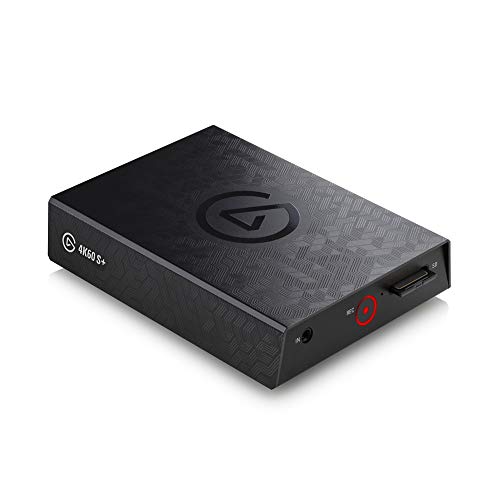
The 4K60 S+ takes a different approach from everything else in this guide. It is an external USB capture unit, not an internal card, and its defining feature is standalone recording: Elgato’s listing describes recording in 4K60 HDR10 with ultra-low latency either to a PC or directly to an SD card, so a laptop does not need to be in the chain while footage is captured.
That makes it the natural pick for recording sessions away from the main desk, at events, or on a second setup, with the files brought back to the laptop afterwards for editing. The listing names PS5 and PS4 plus the Xbox Series and Xbox One families, and references OBS and other broadcasting software for Windows when it is used with a computer. The ultra-low latency wording is the maker’s own description, not a measured result.
Specs
- Model: 10GAP9901
- Form factor: external USB capture unit
- Capture: 4K60 HDR10, per maker claims
- Recording targets: PC or SD card, standalone recording supported
- Latency: described by the maker as ultra-low
- Software named in listing: OBS and other broadcasting software
- Operating system named in listing: Windows
- Platforms named in listing: PS5, PS4, Xbox Series X/S, Xbox One X/S
Who should skip
Skip this entire category if your laptop lacks a USB 3.2 Gen 2 port, because the headline capture modes on the flagship cards depend on that bandwidth and will not be reachable over older USB connections. Also skip external capture cards altogether if you only play PC games on the laptop itself, since software capture handles that with no extra hardware.
Skip the 4K60 S+ if you always stream live through broadcasting software and never record on the move, because its standalone SD card recording is the feature you are paying for. Skip the top-end 4K X if your console and display top out at 4K60, since its higher capture and passthrough ratings would go unused. And skip the Live Gamer Ultra S if you need full written specifications before buying, because its listing record leaves several fields unstated.
FAQ
Do these capture cards work with a laptop instead of a desktop?
Yes. All five picks are external USB units, so they connect to a laptop over USB rather than occupying an internal slot. The laptop runs the recording or broadcasting software while the card handles the console’s HDMI signal and passes it through to a display.
What is the difference between capture and passthrough?
Capture is the feed sent to the laptop for recording or streaming, while passthrough is the feed sent onward to the TV or monitor you play on. Passthrough is often rated higher, so a card might record at 4K60 while passing a higher-refresh signal to the display, per the makers’ stated figures.
Can any of these record without a computer?
Only the Elgato 4K60 S+. Its listing describes standalone recording straight to an SD card as well as recording to a PC, so footage can be captured with no laptop attached and transferred later. The other four picks need a computer in the chain.
Does my laptop need a specific USB port?
The flagship models rely on USB 3.2 Gen 2 bandwidth to reach their advertised capture modes, per the makers’ specifications. A laptop with only older, slower USB ports may limit what the card can do, so check the port speed on your machine before choosing.
Final verdict
For a single card that covers high-end capture, HDR10, and VRR passthrough on a laptop desk, the Elgato 4K X is the strongest choice. The AVerMedia Live Gamer Ultra 2.1 is the cleaner fit for USB-C laptops recording at 4K60, while the 4K S offers the same Elgato workflow with a lower capture ceiling. Choose the 4K60 S+ when recording without a computer matters, and treat the Live Gamer Ultra S as the option for buyers already settled on the AVerMedia line who will confirm its unstated fields on the product page.
Product and ASIN Reference
| Product | ASIN |
|---|---|
| Elgato 4K X | B0CPFWXMBL |
| AVerMedia Live Gamer Ultra 2.1 (GC553G2) | B0CGD86HNB |
| AVerMedia Live Gamer Ultra S (GC553Pro, Black) | B0F93KM854 |
| Elgato 4K S – External Capture Card for PS5, Xbox Series X/S, Switch 2, PC, Mac, iPad | 4K60, 1440p120, or 1080p240 Passthrough and Capture, HDR10, VRR, USB-C, Near-Zero Latency | B0FFTFYGLV |
| Elgato 4K60 S+, External Capture Card, Record in 4K60 HDR10 with ultra-low latency to PC or SD Card on PS5/PS4, Xbox Series X/S, Xbox One X/S, in OBS and other broadcasting software, for Windows | B082N68RNS |
More from Amazon
Programs that pair well with the guide above. Offers and eligibility are set by Amazon and may change.
A free business account with business pricing and bulk-buying tools for work, shop or home office.
Create a business accountFree shipping on eligible items, Prime Video and more. Eligible new members can start with a free trial.
Start a Prime free trialAudiobooks and podcasts to listen to on the go. Eligible new members can start with a free trial.
Try Audible freeAd-free music streaming. Eligible new subscribers can start with a free trial.
Try Music Unlimited freeAs an Amazon Associate we earn from qualifying purchases.

Write Your Review
No reviews yet. Be the first to share your experience!