
Our Short List of 3

- Best for: Players who spend long evenings reading a busy kingdom at a desk.
- Processor: AMD Ryzen 7 260, 3.80 GHz up to 5.10 GHz
- Graphics: NVIDIA GeForce RTX 5060 Laptop GPU, 8 GB GDDR7
- Memory: 16 GB DDR5-5600 SODIMM, 32 GB maximum
- Storage: 1 TB SSD M.2 2242 PCIe Gen4 TLC

- Best for: Buyers whose library extends well past colony sims and who want upgrade slots in reserve.
- Model: ANV15-51-99XD
- Processor: Intel Core i9-13900H
- Graphics: NVIDIA GeForce RTX 4060 Laptop GPU
- Memory: 16 GB DDR5, two slots, 32 GB maximum

- Best for: Shorter building sessions on the move, where weight and battery matter more than graphics headroom.
- Processor: AMD Ryzen 7 8840HS, 8 cores and 16 threads
- Graphics: Integrated AMD Radeon 780M
- Memory: 16 GB LPDDR5X RAM
- Storage: 512 GB Gen 4 SSD
All 3 Picks at a Glance
| Product | Specs | Action |
|---|---|---|
| Lenovo Legion 5 Gen 10 |
| Check price on Amazon |
| Acer Nitro V 15 |
| Check price on Amazon |
| ASUS Zenbook 14 OLED |
| Check price on Amazon |
Noble Fates publishes one of the tersest requirement blocks on Steam. Its minimum graphics line prints just “970m” and its recommended line just “1070”, with no brand, no memory figure and no explanation attached to either. That makes the real buying decision an exercise in reading two bare model names sensibly: every current dedicated graphics card sits generations beyond both, so the figure that actually separates the five laptops below is memory, which doubles from 8 GB at minimum to 16 GB at recommended.
This guide is for first-time rulers starting a handful of dwarves, elves or humans in a fresh kingdom, for returning players meeting the finished game after its full release on November 12, 2026, and for anyone whose laptop also handles ordinary work. The picks run from a memory-heavy Victus and a high-resolution Legion to a slim Zenbook whose integrated graphics need an honest conversation.
Quick Picks
As an Amazon Associate we earn from qualifying purchases
| Product | Best for | Key spec from title |
|---|---|---|
| HP Victus 15 | Long building sessions with memory to spare | 32GB DDR5 RAM |
| Lenovo Legion 5 Gen 10 | Reading a crowded hold on a sharp screen | 15.1-inch WQXGA OLED display |
| Acer Nitro V 15 | The strongest processor in this group | Intel Core i9-13900H |
| MSI Katana 15 | A plain match for the recommended tier | 16GB DDR5 RAM |
| ASUS Zenbook 14 OLED | Short sessions away from a desk | 75Wh battery |
How to Choose
Read the Two Bare Graphics Lines
The published block names graphics hardware and nothing more: the minimum line prints “970m” and the recommended line prints “1070”, each a bare model name with no brand and no memory figure beside it. Treat those names as era markers rather than shopping targets. Each dedicated card in the five picks below — the RX 6550M in the Victus, the RTX 5060 in the Legion, the RTX 4060 in the Nitro and the RTX 4050 in the Katana — belongs to a much newer generation than either named model. The only genuine judgment call is the Zenbook, whose Radeon 780M is integrated and shares the system memory beside it.
Memory Is the Figure That Actually Moves
Memory is where the two tiers genuinely separate. The minimum asks for 8 GB RAM and the recommended tier doubles that to 16 GB RAM, and a colony sim keeps its whole population of nobles, peasants and visitors simulated while you build. Four of the picks ship with 16 GB installed, matching the recommended figure on day one, and the Victus configuration below carries 32 GB. Check the upgrade path before ordering as well: the Legion listing caps memory at 32 GB, the Nitro has two DDR5 slots with a 32 GB maximum, and the Zenbook’s LPDDR5X is fixed at purchase.
A Quad-Core Floor Written in Shorthand
The processor lines are shorthand rather than model names: the minimum prints “x64 2.3ghz Quad Core” and the recommended prints “x64 3ghz Quad Core”, with the 64-bit preamble repeated above both tiers. Clock figures alone do not translate across processor generations, so compare core counts and architecture instead. Every processor in these five picks clears the four-core floor with room to spare, from the six-core Ryzen 5 7535HS in the Victus to the Core i9-13900H in the Nitro. For a simulation that tracks ambitions, opinions and memories for every mortal in the hold, that headroom is the sensible side to land on.
Storage Is Trivial, the Platform Is Not
Storage barely registers here: the block asks for 1 GB available space at minimum and 2 GB at recommended, figures every solid-state drive in this group passes hundreds of times over. The platform lines matter more. Noble Fates is a Windows game, and the empty Mac and Linux headings in its store record are leftover shells, not editions anyone can buy. One more line deserves attention: the minimum names Windows 7, yet a footnote on the same store page states the Steam client has supported only Windows 10 and later since January 1st, 2024. All five picks ship with Windows 11 installed.
The 5 Best Options
HP Victus 15
This Victus configuration is the memory-first route into Noble Fates. Its listing pairs a Ryzen 5 7535HS with a dedicated Radeon RX 6550M, then doubles the game’s recommended memory figure with 32 GB of DDR5 and pairs it with a 1 TB solid-state drive, so a growing hold, a browser of build notes and a music app can sit open together. The 15.6-inch 144Hz panel is faster than a turn-based kingdom sim asks for, and the dedicated card clears the bare “970m” and “1070” lines without the shared-memory compromise the Zenbook below asks you to accept.
Specs
- Processor: AMD Ryzen 5 7535HS, 6 cores and 12 threads, up to 4.55 GHz
- Graphics: AMD Radeon RX 6550M, 4 GB GDDR6 dedicated
- Memory: 32 GB DDR5 RAM
- Storage: 1 TB NVMe solid-state drive
- Display: 15.6-inch FHD (1920 x 1080), 144 Hz, IPS, micro-edge, anti-glare
- Operating system: Windows 11 Pro
- Color and weight: Mica Silver, 5.06 lb
Best for: Rulers who keep guides, notes and other apps open beside a long building session.
Watch out for: This is a seller-upgraded configuration and the listing states the manufacturer box is opened to install the upgrades, so confirm the page shows 32 GB of memory and the 1 TB drive before ordering.
ASIN: B0DK1JHG13
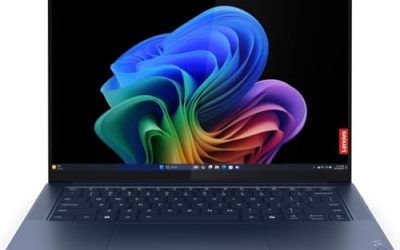
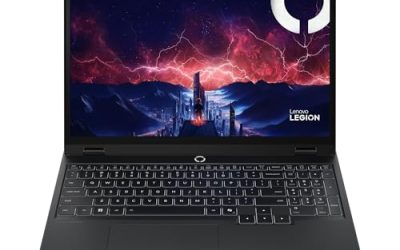
Lenovo Legion 5 Gen 10
- Best for: Players who spend long evenings reading a busy kingdom at a desk.
- Processor: AMD Ryzen 7 260, 3.80 GHz up to 5.10 GHz
- Graphics: NVIDIA GeForce RTX 5060 Laptop GPU, 8 GB GDDR7
- Memory: 16 GB DDR5-5600 SODIMM, 32 GB maximum
- Storage: 1 TB SSD M.2 2242 PCIe Gen4 TLC
Players who spend long evenings reading a busy kingdom at a desk.
The listing’s technical details print an item weight of 7.09 pounds, which reads as a packaged figure rather than the machine itself, so check the dimensions and weight lines on the page before ordering.
The Legion is the screen-led pick. Its 15.1-inch WQXGA OLED panel resolves 2560 x 1600, which suits a game spent reading opinion panels, feast invitations and building menus across a crowded hold. Underneath, a Ryzen 7 260 and an RTX 5060 Laptop GPU with 8 GB of GDDR7 sit far beyond the recommended “1070” line, and the installed 16 GB of DDR5-5600 matches the recommended memory figure exactly. Wired Ethernet, USB4 and HDMI 2.1 make it the easiest machine here to settle onto a desk full time.
Acer Nitro V 15
- Best for: Buyers whose library extends well past colony sims and who want upgrade slots in reserve.
- Model: ANV15-51-99XD
- Processor: Intel Core i9-13900H
- Graphics: NVIDIA GeForce RTX 4060 Laptop GPU
- Memory: 16 GB DDR5, two slots, 32 GB maximum
Buyers whose library extends well past colony sims and who want upgrade slots in reserve.
The listing’s headline text names the RTX 4060 without printing a graphics memory figure, and its copy drifts into “Nitro V 16” wording in places, so match the model code ANV15-51-99XD on the page before ordering.
The Nitro carries the strongest processor in this group, a Core i9-13900H, paired with an RTX 4060 Laptop GPU and 16 GB of DDR5. Against a requirement block whose recommended processor line stops at a 3ghz quad core, that is deep headroom for a simulation juggling hundreds of mortals, and the second M.2 slot and second memory slot leave the machine open to grow. Its 15.6-inch FHD IPS panel refreshes at 180Hz, and Thunderbolt 4 plus Wi-Fi 6 cover desk and travel connections alike.
MSI Katana 15
The Katana matches the recommended tier line for line without overshooting it. The listing pairs a Core i7-13620H with an RTX 4050 and 16 GB of DDR5-4800, which lands exactly on the recommended memory figure, and its 1 TB NVMe drive swallows the 2 GB storage line whole. The 15.6-inch Full HD IPS panel refreshes at 144Hz, and the black chassis keeps the gaming branding comparatively quiet for a machine in this class.
Specs
- Model: B13VEK-277US
- Processor: Intel Core i7-13620H
- Graphics: NVIDIA GeForce RTX 4050, 6 GB GDDR6 per the listing’s bullet text
- Memory: 16 GB DDR5-4800
- Storage: 1 TB NVMe SSD
- Display: 15.6-inch Full HD IPS, 144Hz
- Ports and system: USB Type-C, Windows 11 Home, Black
Best for: Players who want the recommended figures met exactly, in a mainstream gaming chassis.
Watch out for: The listing’s technical table prints a graphics card ram size of 16 GB against the 6 GB GDDR6 in its own bullet text; the bullet figure describes the card, so confirm the configuration on the page before ordering.
ASIN: B0BZBN3857
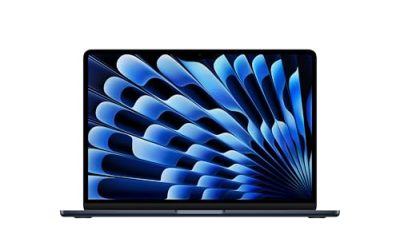
ASUS Zenbook 14 OLED
- Best for: Shorter building sessions on the move, where weight and battery matter more than graphics headroom.
- Processor: AMD Ryzen 7 8840HS, 8 cores and 16 threads
- Graphics: Integrated AMD Radeon 780M
- Memory: 16 GB LPDDR5X RAM
- Storage: 512 GB Gen 4 SSD
Shorter building sessions on the move, where weight and battery matter more than graphics headroom.
This listing describes a touchscreen while the maker’s sheet for the same model line also lists non-touch panels, and near-identical titles cover several configurations, so confirm the panel and the exact configuration on the page before ordering.
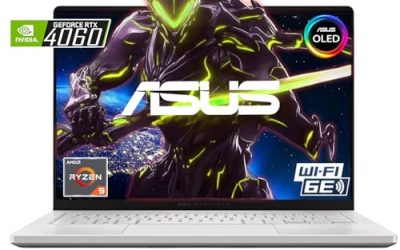
The Zenbook asks for the one honest conversation in this guide. Its Radeon 780M graphics are integrated, sharing the 16 GB of LPDDR5X system memory rather than holding a dedicated pool, so it should not be read as an answer to the recommended “1070” line. What it offers instead is the machine itself: a Ryzen 7 8840HS, a 14-inch WUXGA OLED touchscreen and a 75Wh battery in a Jade Black shell of about 2.82 pounds. For shorter sessions of building and decorating away from a desk, that trade is a deliberate one.
Which One Fits Your Situation
Your First Kingdom Shares One Family Laptop
Start with the Victus. Its 32 GB of memory doubles the recommended figure, so the simulation can run beside homework, browsers and chat apps without anything closing, and the 1 TB drive leaves room for everyone’s files. The dedicated RX 6550M clears both bare graphics lines, and Windows 11 Pro suits a machine that also does household duty.
Long Evenings Reading a Crowded Hold
Choose the Legion. A kingdom at full stretch fills the screen with opinion panels, visitor requests and building menus, and the 15.1-inch WQXGA OLED panel gives that text the most room and contrast here. The 16 GB of memory matches the recommended line, the RTX 5060 sits generations past it, and wired Ethernet suits a machine that stays put.
Noble Fates Sits Beside a Heavier Library
Look at the Nitro first: the Core i9-13900H and RTX 4060 are the strongest pairing here, and its spare memory and M.2 slots let the machine grow with your library. The Katana covers the same idea one step down, meeting the recommended tier exactly with its RTX 4050 and 16 GB of memory in a plainer black chassis.
The Kingdom Travels in a Carry-On
Take the Zenbook, and take it with clear eyes. At about 2.82 pounds with a 75Wh battery, it is the only pick here built for sofas, trains and short sessions, and its OLED touchscreen suits a menu-driven sim. Its integrated Radeon 780M shares system memory, so it is a portability choice, not a match for the recommended graphics line.
Common Mistakes
- Hunting for a Mac or Linux edition: the empty platform headings in the store record are leftover shells, and no such edition is sold; Noble Fates is Windows-only.
- Treating “970m” and “1070” as complete specifications: the published lines print no brand and no memory figure, so there is nothing further to match a card against.
- Buying to the 8 GB minimum: the recommended tier doubles memory to 16 GB, and a growing kingdom keeps every mortal simulated at once.
- Planning around the Windows 7 minimum line: the store page’s own footnote states the Steam client has supported only Windows 10 and later since January 1st, 2024.
- Ordering from a near-identical title: several of these models sell in multiple configurations under similar names, so match the model code and configuration on the page itself.
Frequently Asked Questions
Is Noble Fates still in Early Access?
No. The game has left Early Access, and its store record shows a full release date of November 12, 2026, with no Early Access genre attached. Buyers meeting the game now are meeting the finished release, although the published minimum and recommended requirement lines remain the same terse ones quoted throughout this guide.
Can I play Noble Fates on a Mac or Linux laptop?
No edition is sold for either platform. The store record carries Mac and Linux requirement headings, but both are empty shells with no lines beneath them, and the platform flags list Windows only. Treat any Mac or Linux block quoted elsewhere with suspicion: the live page sells a Windows game, and every laptop in this guide runs Windows 11.
What do the “970m” and “1070” graphics lines actually ask for?
Less than they appear to. Each line is a bare model name with no brand, no memory figure and no other detail printed beside it, so the honest reading is generational: any current dedicated laptop card, including the RTX 4050 in the Katana, belongs to a newer generation than either named model. Integrated graphics, as in the Zenbook, are the genuine judgment call.
How much memory and storage should I allow for the game?
Allow 16 GB of memory. The minimum line asks for 8 GB RAM, but the recommended tier doubles it to 16 GB RAM, and a colony sim keeps its full population simulated while you build. Storage is a non-issue by comparison: the block asks for 1 GB at minimum and 2 GB at recommended, figures every drive here passes easily.
More from Amazon
Programs that pair well with the guide above. Offers and eligibility are set by Amazon and may change.
A free business account with business pricing and bulk-buying tools for work, shop or home office.
Create a business accountFree shipping on eligible items, Prime Video and more. Eligible new members can start with a free trial.
Start a Prime free trialAudiobooks and podcasts to listen to on the go. Eligible new members can start with a free trial.
Try Audible freeAd-free music streaming. Eligible new subscribers can start with a free trial.
Try Music Unlimited freeAs an Amazon Associate we earn from qualifying purchases.



Write Your Review
No reviews yet. Be the first to share your experience!