
A brief power cut is easy to shrug off when you work on a laptop, because the laptop has its own battery. The rest of the desk setup is not so lucky: the external monitor goes dark, the router drops the connection, and a dock or external drive can lose power mid-task. A UPS battery backup bridges those gaps, keeping the whole setup running through short outages and giving you time to save work and shut down in an orderly way during longer ones.
This guide compares five UPS units sized for home laptop setups, from a compact 600VA model for a laptop and router up to 1500VA units with voltage regulation and sinewave output. The focus is on practical sizing: matching the VA and watt ratings to what you actually plug in, counting battery-backed outlets, and knowing which features matter for a laptop desk and which do not.
As an Amazon Associate, we earn from qualifying purchases.
Quick answer
A UPS keeps a laptop setup running through short outages and gives you time to save work and shut down safely during longer ones. For a laptop, monitor and router, the APC BE600M1 or BE850M2 covers the basics. Heavier desk setups are better matched to a 1500VA model such as the BX1500M, the BR1500MS2, or the Tripp Lite SMART1500LCDT.
APC Back-UPS 600VA (BE600M1)
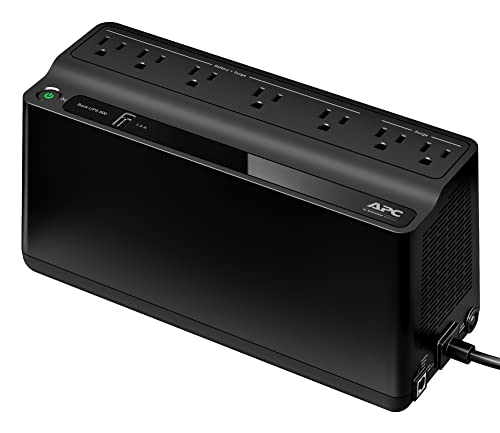
The BE600M1 is the compact entry point in this group, rated at 600VA and 330W. That capacity suits a light desk load: a laptop on its charger, a Wi-Fi router, and perhaps a small external drive. Seven outlets are provided in total, split into five battery backup plus surge outlets and two surge-only outlets, so the gear that must stay live during an outage goes on the battery side while a lamp or phone charger can sit on the surge-only side. A single USB charging port rated at 1.5A adds a handy way to keep a phone topped up.
Per listing coverage, this model uses a standby topology with simulated sine wave output. That is a reasonable match for a laptop power brick and networking gear, which are generally tolerant of that waveform, but it is not the pick for a high-draw desktop tower. The battery is user-replaceable (replacement APCRBC154), which extends the useful life of the unit once the original battery wears down.
Specs
- Capacity: 600VA / 330W
- Outlets: 7 total (5 battery backup + surge, 2 surge-only)
- USB charging: 1 port, 1.5A
- Waveform: simulated sine wave (standby topology, per listing coverage)
- Battery: user-replaceable, APCRBC154
- Model: BE600M1
APC Back-UPS 850VA (BE850M2)
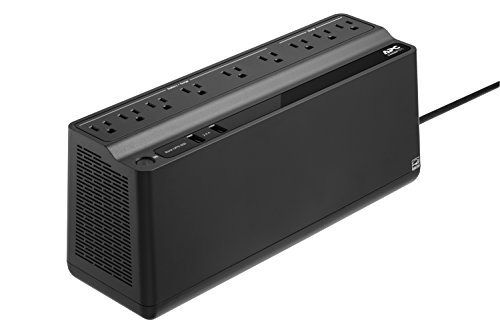
The BE850M2 steps up to 850VA and 450W, adding headroom for a laptop setup that includes an external monitor and a dock. It provides nine outlets in total, giving more room to place the monitor, router, and accessories without resorting to a power strip, which UPS makers generally advise against for battery-backed outlets. Two USB charging ports share 2.4A of output, enough for a phone and a tablet or a pair of smaller accessories.
This model suits readers whose desk has outgrown the smallest unit but who do not run a desktop tower or multiple large displays. The listing does not break the nine outlets down into battery-backed and surge-only counts in the facts gathered for this guide, so check the product page layout before planning exactly which devices go where. Use the model name BE850M2 when comparing listings, as that is the model number given in the listing title and model field.
Specs
- Capacity: 850VA / 450W
- Outlets: 9 total (battery-backed versus surge-only split: not stated)
- USB charging: 2 ports, 2.4A shared
- Waveform: not stated
- Battery: replacement details not stated
- Model: BE850M2
APC Back-UPS Pro 1500VA (BX1500M)

The BX1500M moves into the 1500VA class, rated at 900W, and is aimed at fuller desk setups: a laptop, one or two monitors, a dock, speakers, and networking gear. Ten NEMA 5-15R outlets give plenty of connection points, and automatic voltage regulation (AVR) helps smooth out brownouts and minor surges without switching to battery, which preserves battery runtime for genuine outages. An LCD display shows load and battery status at a glance, which makes it easier to judge how much headroom remains as you add devices.
For laptop users, this is the point in the range where a UPS stops being just outage insurance and becomes a desk power hub that also stabilizes the incoming supply. The research for this guide did not record a battery-backed versus surge-only split for the ten outlets, nor a stated waveform, so treat those two details as not stated and confirm them on the product page if they matter to your setup.
Specs
- Capacity: 1500VA / 900W
- Outlets: 10 (NEMA 5-15R; battery-backed versus surge-only split: not stated)
- Voltage regulation: AVR (automatic voltage regulation)
- Display: LCD
- Waveform: not stated
- Model: BX1500M
APC Back-UPS Pro Sinewave 1500VA (BR1500MS2)

The BR1500MS2 matches the BX1500M on headline capacity at 1500VA and 900W, and its step-up feature is the output waveform: the listing describes sinewave output, and lists the unit as active PFC compatible, which matters for power supplies that expect a cleaner waveform. It also carries AVR, ten outlets, and an LCD display, plus both USB-C and USB-A charging ports for phones and accessories. The battery is user-replaceable, which helps long-term ownership.
Position this model as the sinewave step-up from the BX1500M rather than a different class of product: the capacity is the same, and the reasons to choose it are the waveform, the active PFC compatibility as stated in the listing, and the USB-C charging port. If your setup is a standard laptop brick, monitor, and router, the simpler model above covers the need; if your dock or power supply is picky about waveform, this is the one in the group built around that requirement.
Specs
- Capacity: 1500VA / 900W
- Outlets: 10 (battery-backed versus surge-only split: not stated)
- Output: sinewave (per the listing’s wording); active PFC compatible per listing
- Voltage regulation: AVR
- Display: LCD
- USB charging: USB-C and USB-A ports
- Battery: user-replaceable
- Model: BR1500MS2
Tripp Lite SmartPro LCD 1500VA Tower (SMART1500LCDT)

The SMART1500LCDT is the non-APC option in this group, a line-interactive tower unit rated at 1500VA and 900W with ten outlets, AVR, and an LCD screen. Line-interactive topology with voltage regulation suits desks where the mains supply fluctuates, because the unit trims or boosts voltage without drawing on the battery for every dip.
Tripp Lite states runtime figures of up to 90 minutes for an entry-level PC system and 10 minutes at half load; those are the maker’s own estimates, not measured results, and your runtime will depend on what is actually plugged in. A lightly loaded laptop setup should sit at the favourable end of that range, while a full dual-monitor desk will drain the battery faster. Note that this is the tower model; a separate rackmount unit with a similar name exists, and the two should not be confused when ordering.
Specs
- Capacity: 1500VA / 900W
- Topology: line-interactive
- Outlets: 10 (battery-backed versus surge-only split: not stated)
- Voltage regulation: AVR
- Display: LCD screen
- Runtime: maker-stated up to 90 minutes for an entry-level PC system; 10 minutes at half load (maker’s claims)
- Form factor: tower
- Model: SMART1500LCDT
How to choose
Start with the load. Add up the watt draw of everything you want on battery: a laptop charger is often in the 45W to 90W range, a monitor adds roughly 20W to 40W, and a router only a few watts. Choose a UPS whose watt rating clears that total with room to spare, and check the VA figure alongside it, since both ratings need to cover your setup. Most laptop-only desks land comfortably in the 600VA to 850VA class; the 1500VA models earn their place when a dock, multiple monitors, or a desktop joins the load.
Next, count outlets and check the split. Only battery-backed outlets keep devices running in an outage, so the laptop, monitor, and router belong there; surge-only outlets are for peripherals that merely need protection. Then consider waveform: simulated sine wave output is fine for typical laptop bricks and routers, while a sinewave model is the safer match for power supplies that specify active PFC compatibility. AVR is worth having if your home power dips or flickers regularly. Finally, remember that runtime claims are maker estimates: the real goal for most laptop users is a few minutes to save work and shut down cleanly, plus riding through the short cuts that make up most outages.
Who should skip
Skip a UPS entirely if you work only on a laptop with no external monitor, dock, or router you depend on, since the built-in battery already covers brief outages. Skip the 1500VA models if your desk is just a laptop and a router; the smaller units cover that load for less money and desk space. Skip the compact BE600M1 if you run a high-draw desktop tower, as both its watt rating and its simulated sine wave output are aimed at lighter loads. And skip every model here if you need to run high-draw appliances or space heaters during an outage, which are outside what these desk-sized units are designed to support.
FAQ
How long will a UPS run my laptop setup in an outage?
It depends on the load. Makers publish estimates, such as the Tripp Lite figures quoted above, but a lightly loaded laptop, monitor, and router will run far longer than a fully loaded desk. Treat published runtimes as the maker’s claims and plan around having enough time to save work and shut down safely.
Is simulated sine wave output safe for a laptop?
For typical laptop power bricks and networking gear, simulated sine wave output from a unit like the BE600M1 is generally acceptable. If a power supply specifies active PFC compatibility or you want the closest match to wall power, choose a model whose listing states sinewave output, such as the BR1500MS2.
Can I plug a power strip into a UPS?
UPS makers generally advise plugging devices directly into the UPS rather than through a power strip, especially on battery-backed outlets. Count the outlets you need before buying, and use the surge-only outlets for peripherals that do not need battery support.
How often does a UPS battery need replacing?
Sealed lead-acid UPS batteries typically wear down over a few years of service. Models with a user-replaceable battery, such as the BE600M1 and BR1500MS2, let you swap in a fresh battery instead of replacing the whole unit.
Final verdict
For a simple laptop and router desk, the APC BE600M1 covers the essentials, and the BE850M2 adds welcome headroom for a monitor and dock. Fuller setups are better served by the 1500VA group: the BX1500M for capacity and AVR, the BR1500MS2 if sinewave output and active PFC compatibility matter, and the Tripp Lite SMART1500LCDT as a line-interactive tower alternative. Match the watt rating to your real load, put the laptop, monitor, and router on battery-backed outlets, and any of these five will handle the short outages that disrupt a working day.
Product and ASIN Reference
| Product | ASIN |
|---|---|
| APC Back-UPS 600VA / 330W (BE600M1) | B01FWAZEIU |
| APC Back-UPS 850VA (BE850M2) | B01HDC21FE |
| APC Back-UPS Pro 1500VA / 900W (BX1500M) | B06VY6FXMM |
| APC Back-UPS Pro Sinewave 1500VA / 900W (BR1500MS2) | B08GRY1W93 |
| Tripp Lite SmartPro LCD 1500VA / 900W Tower (SMART1500LCDT) | B009TZTGWK |
More from Amazon
Programs that pair well with the guide above. Offers and eligibility are set by Amazon and may change.
A free business account with business pricing and bulk-buying tools for work, shop or home office.
Create a business accountFree shipping on eligible items, Prime Video and more. Eligible new members can start with a free trial.
Start a Prime free trialAudiobooks and podcasts to listen to on the go. Eligible new members can start with a free trial.
Try Audible freeAd-free music streaming. Eligible new subscribers can start with a free trial.
Try Music Unlimited freeAs an Amazon Associate we earn from qualifying purchases.



Write Your Review
No reviews yet. Be the first to share your experience!