
Many modern laptops ship with modest internal drives that cannot be upgraded, so a full SSD quickly becomes a daily annoyance. A high-capacity microSD card is one of the simplest ways to add room for photos, videos, documents and downloads without opening the machine or carrying an external drive. The honest catch is that a microSD card only works in a laptop that has a microSD slot, a full-size SD slot used with an adapter, or a USB card reader, and card speeds sit well below an internal SSD. These cards suit overflow storage and media libraries rather than demanding applications. The five picks below are UHS-I cards in 1TB and 512GB capacities.
As an Amazon Associate, we earn from qualifying purchases.
Quick answer
For most laptop owners, the Samsung PRO Plus 1TB is the balanced pick, pairing up to 180 MB/s reads with an included adapter. The SanDisk Extreme 1TB is the fastest card here on stated figures, while the Samsung EVO Select 1TB covers the same capacity at lower stated speeds. Lexar’s Play cards round out the list for media-focused storage.
How to choose
Start with the slot. Check whether your laptop has a dedicated microSD slot, a full-size SD slot, or neither. Cards that bundle a microSD-to-SD adapter, like the two Samsung picks below, drop straight into a full-size slot; without any slot, you will need a USB card reader before any of these cards can be used.
Capacity is the headline decision. A 1TB card holds a large photo or video library and effectively doubles the storage of many thin laptops, while the 512GB option suits documents, music and lighter media collections. All five cards here are microSDXC format, which any reasonably recent slot or reader supports.
Next, read the speed figures carefully. The numbers printed for each card are stated maximums, and real transfers also depend on the laptop’s reader hardware. Read speed matters most when copying large libraries off the card, while write speed matters when dumping camera footage or big downloads onto it. Where a listing states only a read figure, the write speed is recorded as not stated rather than guessed.
The class ratings are a useful shorthand. U3 and V30 indicate the card is rated for sustained writes suited to 4K video recording, and A2 is an application performance class that helps when files are opened directly from the card. Every pick below carries U3 and V30, with A2 noted in each Specs section.
Finally, treat the card as extra space rather than your only copy: keep important files backed up elsewhere, because a tiny removable card is easy to lose.
SANDISK 1TB Extreme microSD UHS-I Card, New Version
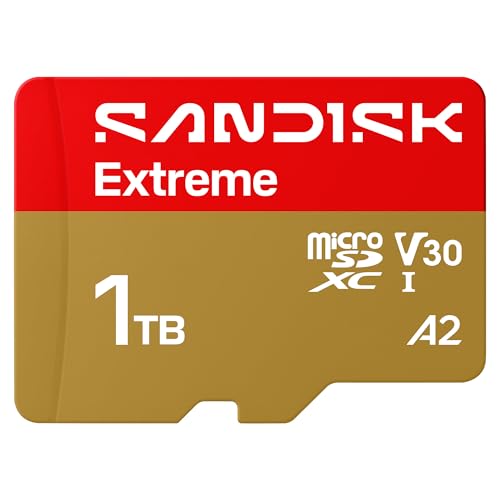
This is the new version of SanDisk’s Extreme microSD card, model SDSQXH9-1T00-GZ6MA, and it posts the strongest stated figures in this roundup: up to 245 MB/s read and up to 170 MB/s write. For laptop owners moving large video files or photo libraries on and off the card, those stated write speeds are the main attraction, since filling a 1TB card is where slower cards become tedious.
The listing names laptops among its compatible devices, and the card carries U3, V30 and A2 ratings, so it is specified for 4K video capture and general storage duties. The lifetime limited warranty is another point in its favour for a card that may stay seated in a slot for years.
One practical note: the listing title does not mention a bundled SD adapter, so adapter inclusion is not stated. If your laptop has only a full-size SD slot, confirm the adapter situation before ordering, or plan on a reader. As the fastest option here, this is the pick for buyers who prioritise stated transfer speeds.
Specs
- Capacity: 1TB
- Model: SDSQXH9-1T00-GZ6MA
- Read speed: up to 245 MB/s
- Write speed: up to 170 MB/s
- Bus: UHS-I
- Ratings: U3, V30, A2
- Adapter included: not stated
- Warranty: lifetime limited warranty
Samsung PRO Plus microSD 1TB with Adapter

Samsung’s PRO Plus, model MB-MD1T0SA/AM in its 2024 version, is the well-rounded option in this list. Its stated speeds reach up to 180 MB/s read and up to 130 MB/s write, and it carries the full C10, U3, V30 and A2 rating set, covering both bulk storage and direct-from-card use.
The bundled adapter is a genuine convenience for laptop use. Many laptops offer a full-size SD slot rather than a microSD slot, and the included adapter means this card works in either without a separate purchase. Besides its EVO Select sibling, it is the only pick here where adapter inclusion is stated outright.
For a laptop owner who wants one card for a media library, document overflow and occasional 4K footage transfers, the PRO Plus makes the fewest compromises in this group. Its stated figures sit below the SanDisk Extreme’s, but the adapter and balanced rating set make it the easiest recommendation for most people.
Specs
- Capacity: 1TB
- Model: MB-MD1T0SA/AM (2024)
- Read speed: up to 180 MB/s
- Write speed: up to 130 MB/s
- Ratings: C10, U3, V30, A2
- Adapter included: yes
- Warranty: not stated
Samsung EVO Select microSD 1TB with Adapter

The EVO Select, model MB-ME1T0SA/AM, is Samsung’s mainstream 1TB card, and it shares the PRO Plus’s useful habit of bundling an adapter for full-size SD slots. Its stated read speed is up to 160 MB/s. A separate write figure is not stated in the listing, so it is recorded that way here rather than estimated.
The rating set matches its sibling: C10, U3, V30 and A2, meaning the same baseline guarantees for sustained video writes and application performance, with the difference showing in the stated transfer ceiling rather than the class ratings.
This card suits laptop owners whose main need is capacity: a terabyte of overflow for photos, videos, installers and documents, moved at a pace that is fine for everyday copying. If your routine involves frequent multi-gigabyte transfers, the PRO Plus above is the stronger Samsung option; for straightforward extra room, the EVO Select covers the brief.
Specs
- Capacity: 1TB
- Model: MB-ME1T0SA/AM
- Read speed: up to 160 MB/s
- Write speed: not stated
- Ratings: C10, U3, V30, A2
- Adapter included: yes
- Warranty: not stated
Lexar 1TB Play microSD Card

Lexar’s Play card, model LMSPLAY001T-BNSNU, is a 1TB option positioned around media and gaming-style use, with stated speeds of up to 205 MB/s read and up to 140 MB/s write. Those figures place it second only to the SanDisk Extreme in this roundup on stated numbers, and ahead of both Samsung cards.
The listing highlights Full HD and 4K video support, and the card carries C10, U3, V30 and A2 ratings. For laptop owners, that translates to a card specified for large game libraries, downloaded video and photo collections that need to move at a reasonable pace.
Adapter inclusion is not stated for this card, so, as with the SanDisk, check your slot type first: a native microSD slot is fine, while a full-size SD slot may require an adapter you supply yourself. Buyers who want 1TB with strong stated figures, and who already have the right slot or reader, will find this a competitive alternative to the bigger-name picks.
Specs
- Capacity: 1TB
- Model: LMSPLAY001T-BNSNU
- Read speed: up to 205 MB/s
- Write speed: up to 140 MB/s
- Ratings: C10, U3, V30, A2
- Video: Full HD and 4K
- Adapter included: not stated
- Warranty: not stated
Lexar 512GB Play Blue microSD Card

The Play Blue, model LMSPLBL512G-BNNNU, is the smaller-capacity option in this list at 512GB. Its stated read speed is up to 160 MB/s, matching the EVO Select’s figure, and it carries C10, U3, V30 and A2 ratings with 4K support noted in the listing. A write speed is not stated, so none is claimed here.
Half a terabyte is still a substantial expansion. It doubles the usable space of a 512GB machine for documents, music, photos and moderate video collections, suiting owners whose internal drive is tight rather than completely full.
The available facts for this card are thinner than for the other picks, so it is best judged on its stated capacity, read figure and ratings. If you expect to grow into a large media library, one of the 1TB cards above is the safer long-term choice; if your overflow needs are modest, this 512GB card covers them in the same rated class as its larger sibling.
Specs
- Capacity: 512GB
- Model: LMSPLBL512G-BNNNU
- Read speed: up to 160 MB/s
- Write speed: not stated
- Ratings: C10, U3, V30, A2
- Video: 4K
- Adapter included: not stated
- Warranty: not stated
Who should skip
Skip microSD expansion entirely if your laptop has no card slot and you do not want to carry a USB reader, since none of these cards can connect on their own. Also skip this route if you need fast working storage for video editing timelines, virtual machines or large active projects; a card is overflow space, not a substitute for an internal SSD or a fast external drive. And if your drive is nearly full of essential files with no backup, solve the backup first and treat any card here as extra room, not the safety copy.
FAQ
Can I use a microSD card in a laptop with a full-size SD slot?
Yes, with a microSD-to-SD adapter. The two Samsung cards in this list state that an adapter is included; for the SanDisk and Lexar cards, adapter inclusion is not stated, so you may need to supply your own. Laptops with a native microSD slot need no adapter at all.
Will a microSD card make my laptop feel faster?
No. These cards add capacity, not performance. Stated read speeds top out at up to 245 MB/s in this list, fine for storing and playing media, but an internal SSD is far quicker for the operating system and applications. Use the card for files, not software you run all day.
What do the U3, V30 and A2 ratings mean for laptop use?
U3 and V30 are minimum sustained write ratings associated with 4K video recording, so the card can keep up when large files are written continuously. A2 is an application performance class covering random read and write operations, which matters when opening files directly from the card. All five cards here carry U3 and V30, and A2 appears in each Specs list.
Is 512GB enough, or should I buy 1TB?
It depends on what overflows. Documents, music and a moderate photo library fit comfortably in 512GB. If you store video projects, large game installs or a growing camera archive, 1TB gives far more headroom and avoids a second purchase later. Four of the five picks here are 1TB for that reason.
Final verdict
For most laptop owners, the Samsung PRO Plus 1TB is the easiest pick: stated speeds up to 180 MB/s read and 130 MB/s write, a full rating set and an included adapter for full-size slots. The SanDisk Extreme 1TB leads on stated figures and warranty, the Lexar Play 1TB is a strong stated-speed alternative, and the EVO Select 1TB and Lexar Play Blue 512GB cover simpler capacity needs. Whichever you choose, confirm your laptop’s slot type first, because every card here needs a slot or a reader to work at all.
Product and ASIN Reference
| Product | ASIN |
|---|---|
| SANDISK 1TB Extreme microSD UHS-I Card, New Version (SDSQXH9-1T00-GZ6MA) | B0G8LLK2HM |
| Samsung PRO Plus microSD 1TB with Adapter (MB-MD1T0SA/AM, 2024) | B0CWPNS8JY |
| Samsung EVO Select microSD 1TB with Adapter (MB-ME1T0SA/AM) | B0CWPNR918 |
| Lexar 1TB Play microSD Card (LMSPLAY001T-BNSNU) | B0DQYCG9D6 |
| Lexar 512GB Play Blue microSD Card (LMSPLBL512G-BNNNU) | B0DV7TWSP2 |
More from Amazon
Programs that pair well with the guide above. Offers and eligibility are set by Amazon and may change.
A free business account with business pricing and bulk-buying tools for work, shop or home office.
Create a business accountFree shipping on eligible items, Prime Video and more. Eligible new members can start with a free trial.
Start a Prime free trialAudiobooks and podcasts to listen to on the go. Eligible new members can start with a free trial.
Try Audible freeAd-free music streaming. Eligible new subscribers can start with a free trial.
Try Music Unlimited freeAs an Amazon Associate we earn from qualifying purchases.


Write Your Review
No reviews yet. Be the first to share your experience!