

Key takeaways
- Choosing an OLED laptop is mostly a decision about the screen. Each pixel makes its own light, so black is truly black, contrast is dramatic.
Choosing an OLED laptop is mostly a decision about the screen. Each pixel makes its own light, so black is truly black, contrast is dramatic, and color gamut claims tend to be generous. That is why OLED panels turn up in thin travel machines, creator notebooks, and even a gaming model. The catch is that the rest of the laptop varies wildly: memory, storage, processor family, and operating system platform all change from one listing to the next, and the panel quality you want only matters if the machine around it fits your work.
This guide is for buyers who already know they want an OLED display and now need to sort seven very different options. Some are slim 14-inch carry-everywhere notebooks, some are 16-inch productivity machines with a taller 16:10 panel, and one is a gaming laptop with a fast refresh rate. Everything below is judged from the specs printed in each product title, so treat the picks as a shortlist and confirm the final configuration on the product page before you commit.
Quick Picks
Our top picks

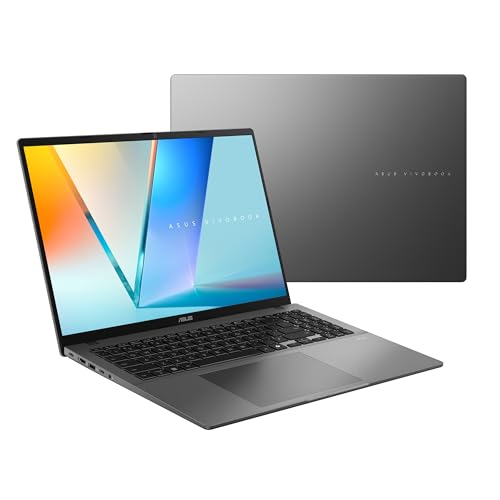


 ASUS Vivobook S16 Laptop
- Modern, Minimal, Refined Sleek, modern, and ultra‑portable, ASUS…
- Performance You Can Rely On ASUS Vivobook S16…
- Brilliance at Every Angle Enjoy stunning visuals on…
As an Amazon Associate we earn from qualifying purchases at no extra cost to you.
| Product | Best for | Key spec from the title |
|---|---|---|
| ASUS Zenbook 14 OLED | Light all-day travel | Ryzen AI 9 465, 16GB RAM, 1TB SSD, 2K 500 nits HDR |
| ASUS Vivobook S16 (Ryzen AI 7) | Big-screen multitasking | 16-inch 16:10 WUXGA OLED, 32GB RAM, 1TB SSD |
| HP OmniBook 3 14 | Color-critical creative work on a lean setup | 14-inch WUXGA OLED, 100% DCI-P3, Snapdragon X |
| Acer Swift Go 16 | Sharp, smooth display for everyday use | 3200×2000, 120Hz OLED, Core Ultra 5 125H |
| Dell XPS 14 | Premium all-rounder with touch | 3.2K OLED 48-120Hz, Core Ultra 7 255H, 32GB |
| ASUS Vivobook S16 (Snapdragon X2 Elite) | Copilot+ features on a 16-inch OLED | Snapdragon X2 Elite, 16GB RAM, 1TB SSD |
| Lenovo Legion 5a | Gaming on an OLED panel | RTX 5060, 15.3-inch 2560×1600 165Hz OLED |
How to Choose
Resolution and refresh rate
WUXGA means 1920×1200, which is comfortable on a 14-inch panel and still reasonable at 16 inches. If you edit photos or want crisper text, look for the 2.8K to 3.2K tier, such as the 3200×2000 and 3.2K panels in this group. For refresh rate, 60Hz is fine for documents, 120Hz makes scrolling and pen or touch input feel smoother, and 165Hz only matters if you play fast games. Variable ranges like 48-120Hz can also save a little power when the screen is idle.
Color gamut and brightness
Look for a stated gamut, since OLED panels do not all cover the same space. A listing that says 100% DCI-P3 is making a clear promise for creative work, while a listing with no gamut figure leaves you guessing. For HDR, a stated peak such as 500 nits is a useful floor; if the title gives no brightness number at all, do not assume it. Glossy OLED screens also reflect windows and lamps, so a bright room can matter more than a spec line.
Memory, storage, and processor platform
Treat 16GB of RAM as the practical minimum in 2026 and 32GB as the comfortable tier for heavy multitasking or editing. Storage of 512GB is workable, 1TB is safer, and 256GB fills quickly once you add media projects. Processor platform matters too: Intel, AMD, and Snapdragon chips differ in app compatibility and battery behavior, and Arm-based Snapdragon laptops can face compatibility gaps with a few older programs. Copilot+ and NPU figures matter only if you will use the AI features.
Burn-in habits and where budget models cut corners
OLED can retain static images if the same bright element sits on screen for hours, so dark mode, an auto-hiding taskbar, and a short screen timeout are sensible habits. Cheaper OLED models usually economize on memory, storage, or battery rather than the panel itself, so a low RAM or SSD figure in the title is the usual warning sign. Ignore marketing phrases like ultra thin or creator ready unless a figure supports them.
The 7 Best Options
ASUS Zenbook 14 OLED
This is the pick for people who carry a laptop every day and want the screen to feel like a treat. The title describes it as ultra light with long battery life, and it pairs a Ryzen AI 9 465 with 16GB of RAM and a 1TB SSD, which is a sensible mix for office work and light editing.
- Strength: a 2K OLED panel with 500 nits HDR and a touchscreen.
- Strength: 1TB of storage at 16GB of RAM leaves room to grow.
- Trade-off: the title gives no battery hour figure, so the long battery life claim is unquantified.
Skip it if you need a discrete graphics card or want 32GB of memory for large projects.
ASUS Vivobook S16 (Ryzen AI 7)
The large 16:10 canvas is the draw here. The 16-inch WUXGA OLED gives you extra vertical space for spreadsheets, documents, and side-by-side windows, and the 32GB of RAM is the most generous memory figure among the 16-inch models in this group.
- Strength: 32GB RAM and a 1TB SSD suit heavy multitasking.
- Strength: Copilot+ PC branding and a Ryzen AI 7 445 processor with Radeon graphics.
- Trade-off: WUXGA is less sharp at 16 inches than the 3.2K and 3200×2000 panels elsewhere in this list.
Skip it if portability is your top priority, since a 16-inch body is naturally bulkier than a 14-inch one.
HP OmniBook 3 14
HP aims this model at creators and designers, and the title backs that up with a 14-inch WUXGA OLED covering 100% DCI-P3. The Snapdragon X processor rated at up to 45 NPU TOPS targets AI features and efficiency rather than raw power.
- Strength: the only listing here that states full DCI-P3 coverage.
- Strength: 16GB of DDR5 memory and Wi-Fi 6E.
- Trade-off: a 256GB SSD is small for photo or video libraries.
Skip it if you rely on older Windows software that may not run well on an Arm processor, or if you need lots of local storage.
Acer Swift Go 16
This one puts a 3200×2000 OLED at 120Hz into a 16-inch frame, which is a sharper and smoother panel than the WUXGA options. The Core Ultra 5 125H and Intel Evo AI certification suit a student, commuter, or home office user who wants a good display without extreme specs.
- Strength: a high-resolution 120Hz screen at 16 inches.
- Strength: Intel Evo certification signals a baseline for responsiveness and battery design.
- Trade-off: 8GB of RAM is thin for heavy multitasking and may feel tight over time.
Skip it if you keep dozens of browser tabs open or edit large files, because the memory figure is the weak point.
Dell XPS 14
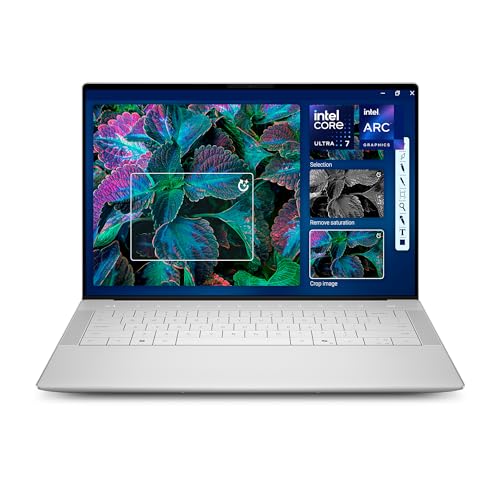
The XPS 14 is the premium tier of this group. It combines a 14.5-inch touch 3.2K OLED with a 48-120Hz range, a Core Ultra 7 255H, Intel Arc graphics, 32GB of memory, and a 1TB SSD, which is the most complete all-around spec sheet here.
- Strength: 3.2K resolution with a variable refresh range.
- Strength: 32GB of RAM and 1TB of storage for long-term use.
- Trade-off: it sits in the premium tier, and the title does not mention a dedicated GPU.
Skip it if you want an entry-level price or serious gaming performance from discrete graphics.
ASUS Vivobook S16 (Snapdragon X2 Elite)
This is the Arm version of the 16-inch Vivobook S16. The title lists a Snapdragon X2 Elite processor, an Adreno GPU, 16GB of RAM, a 1TB SSD, and the same 16:10 WUXGA OLED panel, plus Copilot+ PC support.
- Strength: Arm platform aimed at AI features and efficient operation.
- Strength: 1TB of storage with a large 16-inch OLED.
- Trade-off: 16GB of RAM is lower than the 32GB on the Ryzen version, and Arm software compatibility needs a check.
Skip it if you depend on niche Windows tools or need the extra memory headroom.
Lenovo Legion 5a
The only gaming laptop in the group pairs a GeForce RTX 5060 with a Ryzen 7 250 and a 15.3-inch 2560×1600 OLED running at 165Hz. Add 32GB of DDR5, a 1TB SSD, Wi-Fi 7, and an RGB backlit keyboard, and it is clearly built for play first.
- Strength: fast 165Hz OLED with a dedicated RTX 5060.
- Strength: 32GB DDR5 and Wi-Fi 7 for modern games and downloads.
- Trade-off: gaming laptops are typically heavier and shorter-lived on battery than slim notebooks.
Skip it if you mainly want a quiet, light office machine, because a gaming chassis and cooling setup are built for sustained power rather than a slim profile. Buyers who split time between play and schoolwork may still like the large memory and fast storage.
A final tip before the scenarios: write down the two or three specs you refuse to compromise on, such as memory, storage, or a dedicated graphics card, and eliminate any model that misses them. With OLED, the panel is a given, so the differences that remain are platform, weight, and how much room the machine leaves for the next few years of software.
Which One Fits Your Situation
You travel often and want one light laptop
The ASUS Zenbook 14 OLED matches the brief best, with its ultra-light description, touchscreen, and 1TB SSD. The HP OmniBook 3 14 is the alternative if color coverage matters more than storage.
You edit photos or video
The Dell XPS 14 has the strongest all-round combination, with 3.2K resolution, 32GB of RAM, and 1TB of storage. If you want a larger canvas, the ASUS Vivobook S16 with the Ryzen AI 7 gives you 32GB of memory on a 16-inch screen.
You play games
The Lenovo Legion 5a is the only choice here with a dedicated RTX 5060 and a 165Hz OLED, so the decision is easy.
You want a big screen for a modest daily workload
The Acer Swift Go 16 offers the sharpest 16-inch panel in the list, provided you can live with 8GB of RAM. If you prefer Arm and AI features, the Snapdragon version of the Vivobook S16 is the other route.
Common Mistakes
- Buying on panel type alone and ignoring a small SSD or low RAM figure that will hold the laptop back.
- Assuming every OLED covers the same color gamut when only some titles state a DCI-P3 figure.
- Skipping software compatibility checks before choosing a Snapdragon model.
- Paying for a high refresh rate you will never use outside of games.
- Leaving a static bright image on screen for hours instead of using dark mode and a short screen timeout.
Related guides
- Affordable Gaming Mouse For Alienware Laptop
- Laptop Docking Stations For Dual Monitors
- Travel Backpack With Laptop Compartment
Frequently Asked Questions
Is OLED worth it on a laptop?
For media, photo work, and general comfort, usually yes, because contrast and color stand out. The trade-off is potential image retention over years of static content, which sensible settings reduce.
How much RAM should an OLED laptop have?
Look for 16GB as the baseline and 32GB if you edit or multitask heavily. An 8GB model can work for light use but leaves little room later.
Does a higher refresh rate help outside gaming?
Yes, a little. 120Hz makes scrolling, cursor movement, and touch input look smoother, but it is a comfort feature rather than a necessity for office tasks.
Are Snapdragon OLED laptops a safe choice?
They suit mainstream apps and AI features, but a few older or specialized programs may not run well. Check the programs you rely on before buying.
More from Amazon
Programs that pair well with the guide above. Offers and eligibility are set by Amazon and may change.
A free business account with business pricing and bulk-buying tools for work, shop or home office.
Create a business accountFree shipping on eligible items, Prime Video and more. Eligible new members can start with a free trial.
Start a Prime free trialAudiobooks and podcasts to listen to on the go. Eligible new members can start with a free trial.
Try Audible freeAd-free music streaming. Eligible new subscribers can start with a free trial.
Try Music Unlimited freeAs an Amazon Associate we earn from qualifying purchases.



Write Your Review
No reviews yet. Be the first to share your experience!