

Key takeaways
- Most people shop for a computer bag backward. They start with color and brand.
Most people shop for a computer bag backward. They start with color and brand, then discover the laptop rattles inside or the shoulder strap digs in by Wednesday. A better order is to begin with the thing you carry besides the laptop. Are you hauling a lesson plan and a lunch, a charger and a tablet, or just the machine from the car to a desk, with maybe a coffee in the other hand? The answer decides whether you want a tote, a messenger, a briefcase, or a protective case, and it narrows the field far faster than any style gallery.
This guide compares six computer bags that represent those categories: a plain Lenovo messenger, a three-in-one BAGSMART briefcase, a slim Targus carrier, two LOVEVOOK totes aimed at teachers and healthcare staff, and an unbranded 15.6 inch briefcase-style case. It is written for office workers, educators, and travelers who want to carry a laptop in a bag that is not a backpack. As of 2026 the listings share similar buzzwords, so the table below focuses on sizes and features named in the titles.
Quick Picks
Our top picks



As an Amazon Associate we earn from qualifying purchases at no extra cost to you.
| Product | Best for | Key spec from the title |
|---|---|---|
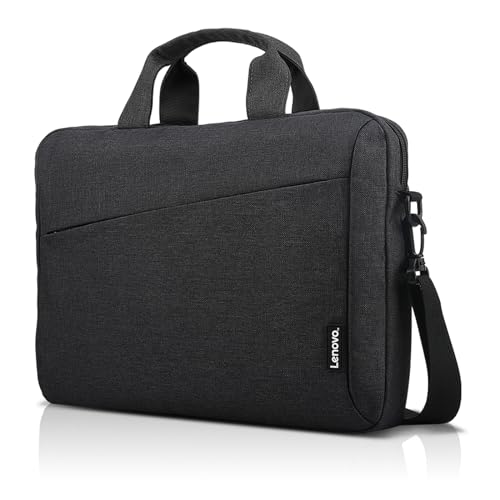
| Lenovo T210 Messenger | Plain everyday carry | Messenger shoulder bag for laptop or tablet |
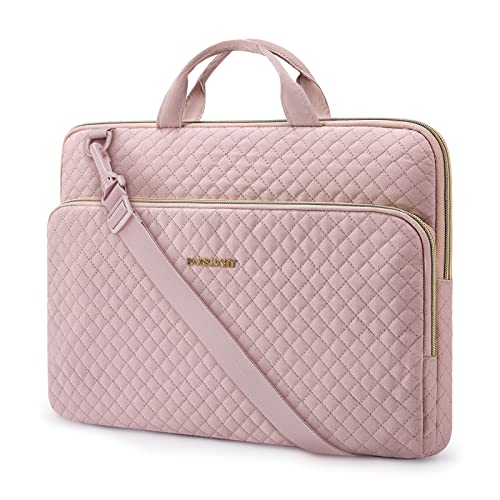
| BAGSMART 3 in 1 Briefcase | Large-screen business trips | 17.3 inch capacity, water-repellent |
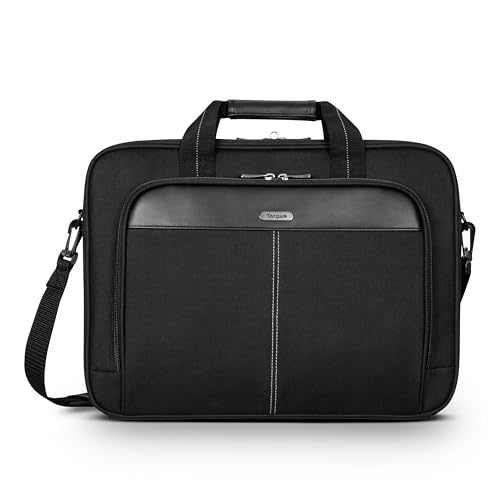
| Targus Slim Briefcase | Airport-friendly commuting | 15-16 inch fit, padded compartment, trolley strap |
| LOVEVOOK Tote with Wristlet | Style-conscious office days | 15.6 inch, waterproof, vintage tote with wristlet |
| LOVEVOOK Work Tote with Cup Holder | Teachers, nurses, and medical staff | 15.6 inch, vintage leather style, large cup holder |
| Unbranded 15.6 inch Briefcase Handbag | Simple padded carry | 15.6 inch, front pocket, water resistant |
How to Choose
Work out what rides along with the laptop
List the items you carry every day: charger, mouse, notebook, water bottle, badge. Add up the space they need. If it is more than a charger and a folder, favor a tote or briefcase with open pockets over a close-fitting sleeve. If you carry only the laptop, a sleeve-style case with a front pocket will keep weight down and slip into a larger bag when needed. People who bring a cup or lunch every day should check for a dedicated holder or an outer pocket, because a leaking bottle is the fastest way to ruin a keyboard.
Measure the laptop, not just the screen
Listings name a screen size, such as 15.6 inches or 17.3 inches, but the outer shell of a modern laptop can run an inch or two larger than the screen. Make sure the compartment size covers the true dimensions, and check whether a 16 inch machine is explicitly listed. A bag that fits loosely beats one that strains the zipper, because a forced zipper wears out first and can scratch the lid on every trip. When two bags look equal, choose the one whose listed compartment gives you a little extra room on every side.
Think about how the load rides on your body
A shoulder strap concentrates weight on one side, so heavy loads tire you out within a few blocks. Wide, padded straps and a bag that sits close to the hip help. Totes with short handles work well for a car-to-office routine but feel awkward on a long walk. Messenger bags and briefcases with removable straps handle both situations better. Trolley straps are the best answer if you travel with a rolling suitcase.
Watch for materials and weak points
Leather-style fabrics look polished but vary in durability, and water-resistant coatings wear off with use. The first parts to fail on lower-priced bags are zipper pulls, strap anchors, and handle stitching. Do not pay extra for decorative hardware, and treat words like “waterproof” as a sign of treated fabric rather than a sealed bag. Ignore gift-oriented wording in titles, since it says nothing about padding, stitching, or zipper quality.
The 6 Best Options
Lenovo T210 Messenger
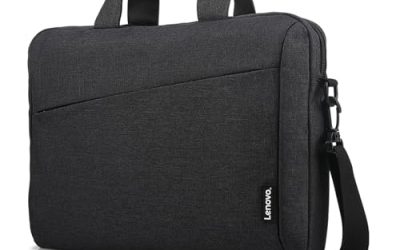
The Lenovo T210 is described simply as a messenger shoulder bag for a laptop or tablet, which makes it the most basic option on the list. That simplicity is a selling point for people who want a bag that fades into the background at a desk or in a conference room. It works well for light carrying across town or between offices, and the tablet mention makes it handy for households where one bag has to serve different devices. Because Lenovo is a laptop maker, buyers with a Lenovo machine may find the match reassuring.
- Strength: messenger design offers quick top access.
- Strength: it accommodates a tablet as well as a laptop.
- Trade-off: the title gives no size range or feature list, so confirm fit before ordering.
Skip it if you need a bag that names a specific laptop size, carries lots of extras, or has a trolley strap for rolling luggage.
BAGSMART 3 in 1 Briefcase
BAGSMART targets men with a 17.3 inch computer briefcase that is water-repellent and built for business, travel, and office use. The 3-in-1 label suggests it can be carried in more than one way. With support for a 17.3 inch screen, it is useful for people with large workstation-style machines, such as engineers or video editors. The black finish and business-travel wording point to a conservative office look.
- Strength: 17.3 inch capacity is among the largest in this group.
- Strength: water-repellent fabric helps in light rain.
- Trade-off: a bag built for 17.3 inches is bulky for small laptops.
Skip it if you want a slim profile, a softer, more casual look, or a bag for a 13 or 14 inch ultrabook.
Targus Slim Briefcase
This Targus carrier is a slim, lightweight briefcase that fits 15 to 16 inch laptops and works as a messenger or shoulder bag. A padded compartment and a trolley strap make it travel ready. It suits people who move through airports and train stations and want a bag that rides on top of a roller bag. Buyers with a 16 inch laptop should note the title names that size, which many 15.6 inch bags do not.
- Strength: the trolley strap slides over a suitcase handle for easy airport travel.
- Strength: slim construction keeps the empty weight low.
- Trade-off: the slim profile limits space for chargers and documents.
Skip it if you carry a lot of paperwork, want a roomy tote, or need a 17 inch compartment.
LOVEVOOK Tote with Wristlet
The LOVEVOOK listing describes a waterproof 15.6 inch vintage laptop tote for women, in brown, that includes a wristlet. The included wristlet is a separate small carrier, so you can step away from your desk without hauling the whole bag. It suits professionals who want a classic, vintage look, and the brown color is a softer alternative to the usual black office bag. The title does not state the wristlet’s size, so check the photos before you count on it for a phone.
- Strength: the included wristlet adds an organized place for small items.
- Strength: waterproof wording adds reassurance on wet days.
- Trade-off: totes are open, so the contents are less secure than in a zipped briefcase.
Skip it if you want a tech-oriented look, if you carry a laptop larger than 15.6 inches, or if you need a fully zipped top.
LOVEVOOK Work Tote with Cup Holder
This LOVEVOOK model is a vintage leather-style 15.6 inch work tote with a large cup holder, aimed at teachers, nurses, and medical professionals. The cup holder is a practical detail for people who spend all day on their feet and carry a drink everywhere. It also doubles as an office bag, so a clinic worker or classroom teacher can use one bag for the commute, the shift, and a quick coffee break. Check the product photos to see how the cup holder sits relative to the laptop pocket.
- Strength: a dedicated cup holder keeps drinks upright and away from the laptop.
- Strength: the vintage leather styling is polished enough for formal workplaces.
- Trade-off: leather-style fabric may scuff over time with heavy use.
Skip it if you carry a laptop larger than 15.6 inches, prefer a backpack, or want a bag that avoids leather-look styling.
Unbranded 15.6 inch Briefcase Handbag
This unbranded 15.6 inch laptop bag combines a briefcase, handbag, and protective case in one, with a front pocket and a water-resistant carrying sleeve. It is a flexible, no-frills way to protect a laptop. The hybrid design suits someone who wants one budget-minded bag to move between rooms, or a student who needs a padded cover inside a larger bag.
- Strength: a front pocket holds small accessories and cables.
- Strength: it can serve as a standalone bag or an inner sleeve.
- Trade-off: with no brand named, expect less clarity on materials and support.
Skip it if you want a recognized name, a premium finish, or a bag that stands on its own as a statement piece.
Which One Fits Your Situation
You teach or work in healthcare
The LOVEVOOK Work Tote with Cup Holder is the clearest match, since it names those professions and includes a large cup holder.
You fly or ride trains weekly
The Targus Slim Briefcase and its trolley strap suit mobile workers, while the BAGSMART 3 in 1 handles a larger 17.3 inch machine.
You want a classic bag with a small accessory
The LOVEVOOK Tote with Wristlet delivers a leather-look style plus a wristlet for small items.
You need something plain and flexible
The Lenovo T210 Messenger or the unbranded 15.6 inch Briefcase Handbag keep things simple, with the second also working as an inner sleeve.
Common Mistakes
- Choosing a bag for looks and discovering the laptop does not fit.
- Assuming a 15.6 inch bag also fits a 16 inch laptop.
- Carrying a heavy load on a single shoulder strap for a long commute.
- Believing that water-resistant means safe in a downpour.
- Skipping a padded compartment because the bag looks sturdy, then relying on thin fabric to absorb a drop.
- Overfilling the front pocket so the bag bulges and the zipper strains.
Related guides
- Affordable Gaming Mouse For Alienware Laptop
- Laptop Docking Stations For Dual Monitors
- Travel Backpack With Laptop Compartment
Frequently Asked Questions
What is the difference between a laptop bag and a computer bag?
The terms overlap. A computer bag typically has extra space for accessories and papers, while a laptop bag focuses on the machine itself.
Should I choose a tote or a briefcase?
Choose a tote for easy access and a softer look, and a briefcase for structure and a formal appearance. Briefcases usually protect the laptop better because they hold their shape.
Do I need a bag with a laptop-specific padded pocket?
Yes, if you carry the bag loose, since a padded pocket cushions bumps. A sleeve can add this protection to a tote that lacks it.
How do I know my laptop will fit?
Measure the width and depth of the laptop and compare them to the compartment dimensions on the product page. If only a screen size is given, leave an extra inch of space.
Write Your Review
No reviews yet. Be the first to share your experience!