Our Short List of 3

- Best for: Buyers who want one all-round Windows mini PC for a multi-monitor desk.
- Processor: AMD Ryzen 7 8745HS (8 cores, 16 threads)
- Memory: 32GB DDR5 RAM
- Storage: 1TB SSD
- Displays: Triple display support, 4K at 120Hz via HDMI, DisplayPort and USB4
- Best for: Power users running three or four monitors and heavy multitasking loads.
- Processor: AMD Ryzen 9 8945HS (8 cores, 16 threads, up to 5.2GHz)
- Graphics: AMD Radeon 780M integrated graphics
- Memory: 32GB DDR5 RAM
- Storage: 1TB PCIe 4.0 SSD

- Best for: Light gamers who want an OCuLink eGPU upgrade path in a compact box.
- Processor: AMD Ryzen 7 8845HS (8 cores, 16 threads, up to 5.1GHz)
- Graphics: AMD Radeon 780M integrated graphics
- Memory: 32GB DDR5 RAM, expandable
- Storage: 1TB SSD
All 5 Picks at a Glance
| Product | Specs | Action |
|---|---|---|
| Beelink SER8 |
| Check price on Amazon |
| MINISFORUM UM890 Pro |
| Check price on Amazon |
| GMKtec K8 Plus |
| Check price on Amazon |
 GEEKOM A8 |
| Check price on Amazon |
 Beelink Mini S13 |
| Check price on Amazon |
Cyber Monday is the last big chance of the year to replace a bulky desktop tower with a mini PC that hides behind a monitor, and the hard part is not finding offers but telling a genuinely capable compact machine apart from a weak one wearing a deal badge. The listings below were chosen because their processors, memory and storage are strong enough to stay useful for years, not because a banner called them a bargain.
This roundup suits home office workers, students, home server hobbyists and light gamers who want desktop performance without desktop bulk. Every pick is a true mini PC, and every model, configuration and specification comes from its Amazon product listing, so what you read here matches the page you will order from.
Quick Picks
As an Amazon Associate we earn from qualifying purchases
| Product | Best for | Key spec from title |
|---|---|---|
| Beelink SER8 | Best overall | Ryzen 7 8745HS, 32GB DDR5, 1TB SSD |
| MINISFORUM UM890 Pro | Multi-monitor desks | Ryzen 9 8945HS, quad display outputs |
| GMKtec K8 Plus | Future eGPU gaming | OCuLink port, dual 2.5G LAN |
| GEEKOM A8 | Premium build, big storage | 32GB DDR5, 2TB SSD, WiFi 6E |
| Beelink Mini S13 | Budget home server | Intel N150, dual 2.5G LAN |
How to Choose
Start with the processor class
The chip decides what a mini PC can realistically do for the next several years. Intel N-series processors such as the N150 sip power and handle browsing, documents, media playback and always-on server duties, but they are not built for heavy multitasking or gaming. AMD Ryzen 7 and Ryzen 9 chips in the 8000 series bring eight cores and strong integrated Radeon 780M graphics, which changes the machine from a basic terminal into a genuine all-purpose desktop. Match the processor to your busiest workload rather than your lightest one, because the chip is the one part you can never upgrade later.
Memory and storage you can grow
Soldered memory is the quiet trap in compact computers. Models with SO-DIMM slots let you add RAM later, and a second M.2 slot or an accessible drive bay lets storage grow with your library. For a Windows desktop bought today, 16GB of memory is the sensible floor and 32GB gives real headroom for browsers, chat apps and creative tools running together. Storage fills faster than buyers expect, so a 1TB SSD is the comfortable starting point, and an upgrade path matters more than a slightly faster factory drive you will outgrow within a year.
Ports and display outputs
A mini PC replaces a tower, so its port selection becomes your desk’s port selection. Count the monitors you plan to run and confirm the outputs to drive them, whether that is HDMI, DisplayPort or USB-C with video. USB4 ports add fast external storage and docking options, while an OCuLink port is the feature to look for if an external graphics dock is part of your plan. Dual Ethernet ports matter for home server and firewall builds. Check the listing’s port list carefully, because two machines with near-identical names often ship with different rear panels.
Cooling, noise and mounting
Small cases concentrate heat, and the better mini PCs treat cooling as a headline feature rather than an afterthought. Look for listings that describe a vapor chamber, dual fans or a redesigned airflow path, especially on Ryzen models you plan to push hard. If the PC will live in a bedroom or sit beside a television, fan noise under load is a real quality-of-life factor. A VESA mount in the box is worth having: it lets the machine disappear behind a monitor, freeing the desk space that made a mini PC attractive in the first place.
How to Hunt Cyber Monday Deals
- Build your shortlist now, before the event day, and add each exact configuration to your Amazon watchlist so you can spot movement quickly instead of searching from scratch.
- Always check the current price on the Amazon product page before you buy. Event pricing changes fast, sometimes several times in a day, and the figure you saw in the morning may not be the figure at checkout.
- Compare the same model across its own configurations. A higher memory or storage tier of the same mini PC can be the smarter buy during the event, and listings make it easy to switch between them.
- Look for a coupon checkbox on the listing itself, and read the full title of the configuration you are ordering so a barebone or lower-tier variant does not slip into your cart by mistake.
- Buy early once the listing in front of you matches your target configuration. Popular mini PC models and specific configurations sell out during the event, and restocks are never guaranteed.
The 5 Best Options
Beelink SER8
- Best for: Buyers who want one all-round Windows mini PC for a multi-monitor desk.
- Processor: AMD Ryzen 7 8745HS (8 cores, 16 threads)
- Memory: 32GB DDR5 RAM
- Storage: 1TB SSD
- Displays: Triple display support, 4K at 120Hz via HDMI, DisplayPort and USB4
Buyers who want one all-round Windows mini PC for a multi-monitor desk.
Several SER8 configurations exist under similar titles, so confirm the memory and storage in the listing title before ordering.
The SER8 is the balanced pick for buyers who want one compact Windows desktop that does a bit of everything well. Its Ryzen 7 8745HS processor pairs eight cores with 32GB of DDR5 memory and a 1TB SSD, a combination that covers office work, photo editing, coding and casual gaming without the machine feeling stretched. The listing highlights triple display support at up to 4K at 120Hz, which makes it an easy fit for a two or three monitor desk, and the 2.5Gbps Ethernet port gives wired networking proper headroom alongside WiFi 6 for everyday use.
MINISFORUM UM890 Pro
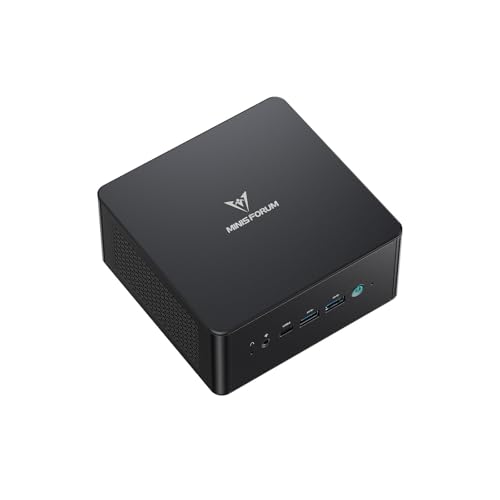
- Best for: Power users running three or four monitors and heavy multitasking loads.
- Processor: AMD Ryzen 9 8945HS (8 cores, 16 threads, up to 5.2GHz)
- Graphics: AMD Radeon 780M integrated graphics
- Memory: 32GB DDR5 RAM
- Storage: 1TB PCIe 4.0 SSD
Power users running three or four monitors and heavy multitasking loads.
A barebone version with no memory, storage or operating system is also sold, so check the configuration title carefully.
The UM890 Pro is the power user’s option, built around AMD’s Ryzen 9 8945HS with boost speeds up to 5.2GHz and Radeon 780M graphics. It drives up to four displays through HDMI, DisplayPort and USB-C outputs, which makes it the natural choice for traders, developers and anyone whose desk is mostly screens. Dual 2.5G LAN ports are unusual at this size and open up router, firewall and home lab roles that single-port machines cannot fill. With 32GB of DDR5 memory and a 1TB PCIe 4.0 SSD fitted, it arrives ready for demanding multitasking from day one.
GMKtec K8 Plus
- Best for: Light gamers who want an OCuLink eGPU upgrade path in a compact box.
- Processor: AMD Ryzen 7 8845HS (8 cores, 16 threads, up to 5.1GHz)
- Graphics: AMD Radeon 780M integrated graphics
- Memory: 32GB DDR5 RAM, expandable
- Storage: 1TB SSD
Light gamers who want an OCuLink eGPU upgrade path in a compact box.
A barebone configuration without RAM, SSD or operating system is sold under the same model name.
The K8 Plus is the pick for buyers who want a mini PC today and a gaming upgrade path tomorrow. Its Ryzen 7 8845HS and Radeon 780M graphics handle esports titles and older games at sensible settings, while the OCuLink port lets you connect an external graphics dock later for a major performance jump, something most mini PCs cannot do at all. The listing specifies 32GB of DDR5 memory that can be expanded further, a 1TB SSD, dual 2.5G network ports and both HDMI 2.1 and USB4 connections, so it doubles as a capable everyday desktop between gaming sessions.
GEEKOM A8
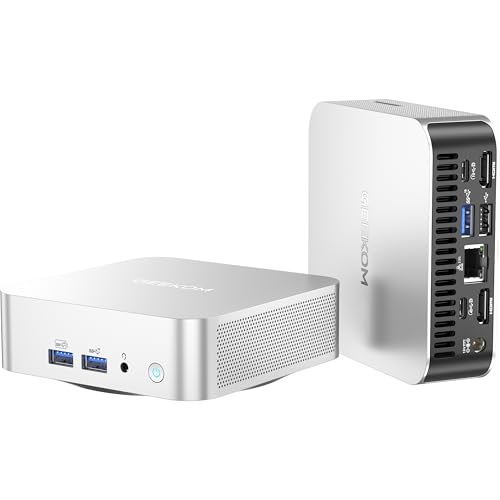
- Best for: Creators who want maximum built-in storage and a longer coverage term.
- Processor: AMD Ryzen 9 8945HS
- Graphics: AMD Radeon 780M integrated graphics
- Memory: 32GB DDR5 RAM
- Storage: 2TB PCIe 4.0 NVMe SSD
Creators who want maximum built-in storage and a longer coverage term.
The similar A8 Max name belongs to a different listing, so match the model name and ASIN before ordering.
The A8 is the premium-feeling option in this group, pairing the Ryzen 9 8945HS with the largest factory storage here, a 2TB PCIe 4.0 NVMe SSD, so big photo libraries and project folders live on the internal drive rather than on externals. The listing includes WiFi 6E, USB4 and an SD card slot, a small detail photographers and creators genuinely appreciate, plus support for 8K display output. GEEKOM also lists three-year coverage for this model, longer than the warranty terms typically attached to mini PCs, which suits buyers planning to keep the machine for a long stretch.
Beelink Mini S13
- Best for: Budget buyers, home server beginners and quiet media or office corners.
- Processor: Intel Twin Lake N150 (4 cores, 4 threads, up to 3.6GHz)
- Memory: 16GB DDR4 RAM
- Storage: 500GB M.2 SSD
- Networking: Dual 2.5G LAN ports, WiFi 6, Bluetooth 5.2
Budget buyers, home server beginners and quiet media or office corners.
The N150 is an efficiency chip, so this is not a gaming or heavy editing machine.
The Mini S13 covers the opposite end of the market: a quiet, low-power box for everyday computing and always-on jobs. Its Intel N150 processor is modest, but for web work, documents, media streaming, a Home Assistant server or a small Proxmox node it has exactly the right shape, and the listing’s dual 2.5G LAN ports make it far more useful for network roles than most budget machines. You get 16GB of DDR4 memory and a 500GB SSD, Windows 11 Home preinstalled, WiFi 6 and support for dual 4K displays, which is plenty for a study, a spare room or a living room television.
Which One Fits Your Situation
You are replacing an aging family desktop
Choose between the Beelink SER8 and the GEEKOM A8. Both arrive with 32GB of memory and fast processors that will feel quick for years of browsing, office work and photo management. The A8 adds double the internal storage, while the SER8 counters with triple display support at high refresh rates. Either ends the era of the dusty tower under the desk.
You want a small gaming setup that can grow
Start with the GMKtec K8 Plus. Its Radeon 780M graphics cover popular esports and older titles right away, and the OCuLink port keeps the door open to an external graphics dock when you want more. No other machine in this roundup offers that upgrade route, and it is the difference between replacing the whole PC and simply adding to it later.
You are building a home lab or server corner
The Beelink Mini S13 is the sensible first node: low power draw, dual 2.5G networking and enough memory for containers and smart home platforms. If your plans include several virtual machines or a software router with heavier throughput, step up to the MINISFORUM UM890 Pro instead, which pairs dual LAN ports with a far stronger processor and more display options for management.
Your desk is mostly monitors
The MINISFORUM UM890 Pro is built for you, with four display outputs and the processor strength to keep a wall of windows responsive. The Beelink SER8 is the alternative if three screens are your ceiling, since it supports triple 4K output at up to 120Hz. Check your monitors’ inputs against each listing’s port list before ordering either machine.
Common Mistakes
- Ordering a barebone configuration by accident, then discovering it has no memory, storage or operating system installed.
- Comparing two listings of the same model name without noticing they carry different memory and storage tiers.
- Assuming a deal badge means a strong machine, when the processor is an entry-level chip that will feel slow within a year.
- Forgetting that a mini PC still needs a monitor, keyboard and mouse, none of which are in the box unless the listing says so.
- Waiting until the final hours for a better offer while the exact configuration you wanted sells out.
Frequently Asked Questions
When do Cyber Monday mini PC deals end?
Cyber Monday falls on November 30, 2026, and most event listings run through that day, although individual models and configurations can sell out well before the end. Treat availability as the real deadline rather than the calendar, and if the exact configuration you want is listed as available, ordering sooner is the safer move.
How do I know I am seeing the real event price?
Check the current price on the Amazon product page at the moment you are ready to buy, because Cyber Monday prices change during the event and can move more than once in a day. The price shown on the listing when you check out is the one that applies, not a figure from an earlier screenshot or roundup.
Is a mini PC powerful enough to replace my desktop?
For everyday work, study, media and light gaming, the Ryzen models in this roundup are comfortably powerful enough, with eight-core processors and 32GB of memory. The honest limits are heavy gaming at high settings and sustained professional rendering, where a full tower with a dedicated graphics card still wins. The GMKtec K8 Plus narrows that gap with its external graphics option.
What else do I need to budget for with a mini PC?
Plan for a monitor, keyboard and mouse if you do not already own them, since most mini PC listings include only the computer, its power adapter and sometimes a mounting bracket or cable. Also check whether the listing includes the operating system, because barebone configurations ship without one and need memory and storage added before first use.
More from Amazon
Programs that pair well with the guide above. Offers and eligibility are set by Amazon and may change.
Send a Prime gift membership to someone who would use free shipping and Prime Video.
Gift Amazon PrimeGive audiobooks to someone who loves to listen. Plans and prices are set by Amazon.
Gift AudibleA free business account with business pricing and bulk-buying tools for work, shop or home office.
Create a business accountFree shipping on eligible items, Prime Video and more. Eligible new members can start with a free trial.
Start a Prime free trialAs an Amazon Associate we earn from qualifying purchases.






Write Your Review
No reviews yet. Be the first to share your experience!