Our Short List of 3
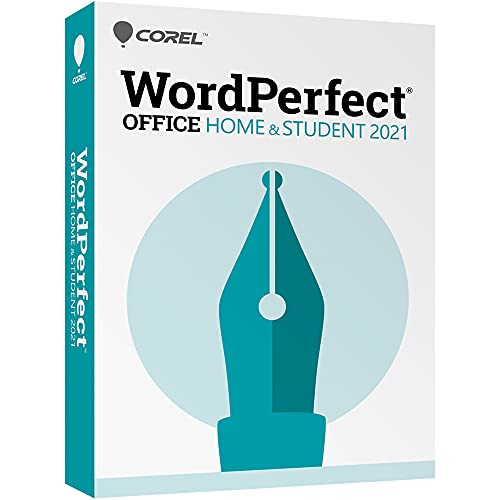
- Best for: A Windows home or student setup that wants WordPerfect and Microsoft-format compatibility without a subscription.
- Edition: Home & Student 2021
- Apps: WordPerfect word processor, Quattro Pro spreadsheets, presentations, note-taking
- File formats: more than 60, including Microsoft Word, Excel and PowerPoint
- Operating system: Windows PC only

- Best for: One Windows PC that needs a full PDF editor for contracts, forms and paperwork without a recurring fee.
- Edition: PDF Extra Lifetime (MobiSystems)
- License: lifetime license, one-time purchase, no subscription
- Devices: 1 user on 1 Windows PC
- Operating system: Windows 10 and 11

- Best for: A home or student computer that needs Microsoft-format compatibility from a physical copy with no subscription.
- Edition: LibreOffice Office Suite 2026, sold by PixelClassics
- License: one-time purchase, lifetime license and free updates
- Form: USB in a protective sleeve; retail box not included
- Operating systems: Windows 11, 10, 8.1, 8, 7, Vista and XP (32 and 64-bit), macOS and Mac OS X, Linux
All 4 Picks at a Glance
| Product | Specs | Action |
|---|---|---|
| 1. Corel WordPerfect Office Home & Student 2021 |
| Check price on Amazon |
| 3. PDF Extra Lifetime |
| Check price on Amazon |
| 4. LibreOffice Office Suite 2026 on USB |
| Check price on Amazon |
 5. Microsoft Office Home 2024 |
| Check price on Amazon |
The real decision is not which suite has the longest feature list. It is which license matches the computer in front of you, the files you already open, and how you want to pay. A one-device key card, a USB copy, a lifetime Windows-only PDF editor and a server operating system license all arrive in the same search results, and they do not do the same job.
This list is for home users, students, and small-office buyers who work with Word, Excel, PowerPoint and PDF files and want to pay once rather than rent software month after month. It also includes one server license, and the article says so plainly wherever that product appears. Every product below is described from the name and details on its Amazon page, with the version, device count, operating system and license form stated where the listing states them.
Quick Picks
As an Amazon Associate we earn from qualifying purchases.
| Product | Best for | Key spec from title |
|---|---|---|
| Corel WordPerfect Office Home & Student 2021 | A Windows household that wants WordPerfect, spreadsheets and slides without a subscription | Office suite of word processor, spreadsheets and presentation software, 2021 |
| Microsoft Windows Server 2025 Standard, 16 Core OEM | A small server that needs a licensed operating system for up to 16 cores | 64-bit base license, 16 core, OEM |
| PDF Extra Lifetime | One Windows PC that needs full PDF editing without a monthly fee | Lifetime license, professional PDF editor for Windows |
| LibreOffice Office Suite 2026 on USB | A home or student computer that needs Word, Excel and PowerPoint compatibility from a USB copy | Office suite on USB, Windows PC and Mac |
| Microsoft Office Home 2024 | One PC or Mac that needs the classic Word, Excel, PowerPoint and OneNote apps | One-time purchase, 1 device, key card |
How to Choose
One-Time Purchase, Lifetime License, or Subscription
A one-time purchase means you pay once for the version named on the listing, and that version keeps working without a monthly fee. A lifetime license is the same idea in different words: one payment, no recurring charge, usually tied to the version you bought. A subscription, by contrast, charges again every month or year and stops working when you stop paying. Read the listing carefully, because “lifetime” does not always mean every future version. For example, a lifetime PDF editor can cover the edition you buy while a later major release needs a separate purchase, so check the update terms before you decide.
How Many Devices, and Which Operating Systems
Count the computers first, then read the operating system line. Microsoft Office Home 2024 covers one PC or Mac, and PDF Extra Lifetime covers one Windows PC, so a second computer needs a second license. WordPerfect Office Home & Student 2021 is Windows only, which rules it out for a Mac household entirely. LibreOffice on USB lists Windows, macOS and Linux, which suits a mixed household. The device count is the detail buyers skip most often, and it is the one that causes an activation failure after the box is already open.
Key Card, USB, Disc, or Download
The form decides how the software reaches your computer. A key card is a physical card with a product key code that you redeem online and use to download the apps, as with Office Home 2024. A USB copy arrives on a stick and needs a free USB port, as with the LibreOffice listing. A disc needs an optical drive, which many laptops no longer have, so the Corel disc edition is a poor match for a slim notebook. A download or online code arrives by email or in your order details. Whichever form you buy, keep the key, card or code somewhere safe.
File Compatibility With the Documents You Already Have
An office suite is only useful if it opens the files you already own. WordPerfect Office states support for more than 60 file formats, including Microsoft Word, Excel and PowerPoint, which matters when documents move between a household and a school. LibreOffice lists the same Microsoft compatibility for its Writer, Calc and Impress apps. Office Home 2024 is the native home of those formats. PDF Extra edits PDFs but does not replace a word processor, and Windows Server 2025 is an operating system, not a document tool at all.
The 5 Best Options
1. Corel WordPerfect Office Home & Student 2021
- Best for: A Windows home or student setup that wants WordPerfect and Microsoft-format compatibility without a subscription.
- Edition: Home & Student 2021
- Apps: WordPerfect word processor, Quattro Pro spreadsheets, presentations, note-taking
- File formats: more than 60, including Microsoft Word, Excel and PowerPoint
- Operating system: Windows PC only
A Windows home or student setup that wants WordPerfect and Microsoft-format compatibility without a subscription.
The disc version needs a computer with an optical drive, and the Home & Student tier is not licensed for full commercial work.
This 2021 Home & Student edition suits a Windows household that still writes in WordPerfect or keeps years of WordPerfect files. It bundles the WordPerfect word processor with Quattro Pro spreadsheets, a presentation app and a note-taking app, and it is a one-time purchase, so there is no monthly fee to keep opening documents. The suite states support for more than 60 file formats, including Microsoft Word, Excel and PowerPoint files, which helps when documents move between households, schools and offices.
Watch out for: The disc version needs a computer with an optical drive, and the Home & Student tier is not licensed for full commercial work.
2. Microsoft Windows Server 2025 Standard Edition 64-bit, Base License, 16 Core – OEM
This is not an office suite and not a PDF tool. It is a server operating system license for a physical machine with 16 or fewer processor cores, and it appears in this list because it was grouped with the office and productivity listings. It fits a small business or home lab that runs a file server, a domain controller or a lightly virtualized host and needs a current, licensed copy of Windows Server 2025 rather than an evaluation copy.
Specs
- Edition: Windows Server 2025 Standard, 64-bit
- License: OEM base license covering 16 processor cores
- Scope: 1 server with 16 or fewer processor cores; provides 2 virtual machines when all cores are licensed
- Client Access Licenses: User and/or Device CALs required; none are included
- Extra cores: additional license packs are required for servers with more than 16 processor cores or to add virtual machines
- Form: activation key under a scratch-off area on a label; product ships in a plain envelope
- Support: mainstream support through October 2029, extended support until October 2034
- General availability: November 2024
Best for: A small server with 16 or fewer cores that needs a licensed, production-ready server operating system.
Watch out for: An OEM license is tied to the machine it is first installed on, CALs are not included, and the listing warns buyers to watch for counterfeit keys.
3. PDF Extra Lifetime
- Best for: One Windows PC that needs a full PDF editor for contracts, forms and paperwork without a recurring fee.
- Edition: PDF Extra Lifetime (MobiSystems)
- License: lifetime license, one-time purchase, no subscription
- Devices: 1 user on 1 Windows PC
- Operating system: Windows 10 and 11
One Windows PC that needs a full PDF editor for contracts, forms and paperwork without a recurring fee.
Windows only, with no Mac or mobile allowance, one PC only, and a lifetime license covers the version purchased — future major versions may need a separate purchase.
This MobiSystems PDF editor suits a single Windows computer that handles contracts, forms and paperwork. It covers the everyday PDF jobs in one place: editing text and images, converting to Word, Excel or ePub, combining and splitting files, filling forms and adding digital signatures. The license is a one-time purchase for one Windows PC, so there is no monthly fee, and it includes 5 GB of MobiDrive cloud storage for moving files between machines.
Watch out for: Windows only, with no Mac or mobile allowance, one PC only, and a lifetime license covers the version purchased — future major versions may need a separate purchase.
4. LibreOffice Office Suite 2026 on USB
- Best for: A home or student computer that needs Microsoft-format compatibility from a physical copy with no subscription.
- Edition: LibreOffice Office Suite 2026, sold by PixelClassics
- License: one-time purchase, lifetime license and free updates
- Form: USB in a protective sleeve; retail box not included
- Operating systems: Windows 11, 10, 8.1, 8, 7, Vista and XP (32 and 64-bit), macOS and Mac OS X, Linux
A home or student computer that needs Microsoft-format compatibility from a physical copy with no subscription.
LibreOffice itself is free open-source software that anyone can download at no cost, so this listing is a paid USB copy with seller extras rather than the only way to get the suite; also confirm the computer has a free USB port before ordering.
This USB copy of LibreOffice suits a home or student computer that needs to open and edit Word, Excel and PowerPoint files without a subscription. It bundles Writer, Calc and Impress with graphics, database and math tools, and it is sold as a one-time purchase with a lifetime license and free updates. The listing states compatibility with Windows and Mac computers, the USB arrives in a protective sleeve with no retail box, and the seller adds 1,500 fonts, PDF user guides, a PC install menu and email support.
Watch out for: LibreOffice itself is free open-source software that anyone can download at no cost, so this listing is a paid USB copy with seller extras rather than the only way to get the suite; also confirm the computer has a free USB port before ordering.
5. Microsoft Office Home 2024
- Best for: One PC or Mac that needs the classic Microsoft Office apps with no subscription.
- Edition: Microsoft Office Home 2024
- Apps: Word, Excel, PowerPoint and OneNote (classic desktop versions)
- License: one-time purchase, 1 device
- Operating systems: Windows 10 and 11, Mac
One PC or Mac that needs the classic Microsoft Office apps with no subscription.
One device only, no Outlook, and the Home edition is not licensed for commercial use — a business needs the Home & Business edition instead.
This edition suits one PC or Mac that needs the familiar Microsoft apps. Office Home 2024 delivers the classic desktop versions of Word, Excel, PowerPoint and OneNote as a one-time purchase. The key card holds a product key code that is redeemed online and used to download and install the apps on a single Windows or Mac computer, with no monthly or yearly fee after that. It is the straightforward pick for a household that wants Microsoft Office on one machine and does not want a subscription.
Watch out for: One device only, no Outlook, and the Home edition is not licensed for commercial use — a business needs the Home & Business edition instead.
Which One Fits Your Situation
You Want the Classic Microsoft Apps on One Computer
Pick Microsoft Office Home 2024. It puts Word, Excel, PowerPoint and OneNote on one PC or Mac as a one-time purchase, with the key on a card you redeem online. It is the direct answer when the household already works in Microsoft formats and does not want a monthly fee.
You Want Office Files Without a Subscription, on a Mac or an Older PC
Pick the LibreOffice Office Suite 2026 on USB. It lists Windows versions back to XP alongside macOS and Linux, opens Microsoft Word, Excel and PowerPoint files, and arrives as a physical USB copy. Remember that LibreOffice itself is free to download, so the USB is a convenience purchase with seller extras.
Your Files Are WordPerfect Documents, or Your Work Is Mostly PDFs
If the files are WordPerfect documents, pick Corel WordPerfect Office Home & Student 2021, which keeps the WordPerfect word processor alongside Quattro Pro and a presentation app on a Windows PC. If the files are PDFs that need editing, converting and signing, pick PDF Extra Lifetime instead, which covers those jobs on one Windows PC with no recurring fee.
You Are Licensing a Small Server, Not Writing Documents
Pick Microsoft Windows Server 2025 Standard, 16 Core OEM. It licenses one server with 16 or fewer cores and provides two virtual machines, but it is an operating system, not an office suite. Check the core count of the machine first, budget for CALs, which are not included, and keep the activation key safe.
Common Mistakes
- Buying a 1-device key for two computers and finding the second install will not activate.
- Buying an OEM server license expecting to move it to a new machine later.
- Buying a Windows-only product, such as WordPerfect Office 2021 or PDF Extra, for a Mac.
- Mistaking the Windows Server 2025 license for a desktop office suite.
- Assuming a “lifetime” license includes every future major version of the software.
Frequently Asked Questions
Can I install Microsoft Office Home 2024 on two computers?
No. The listing states one device, so the key card activates Office on a single PC or Mac. A second computer needs a second license. Redeem the key through the setup site linked to your Microsoft account, and keep the card until the install is finished.
Does a lifetime PDF Extra license cover future versions?
It covers the version you buy, with no monthly fee to keep using it on that one Windows PC. Future major versions may need a separate purchase, so check the update terms on the listing before buying if long-term upgrades matter to you.
Is LibreOffice really free?
Yes. LibreOffice is free open-source software, and anyone can download it at no cost from the project’s own site. The Amazon listing sells a physical USB copy with seller extras such as fonts, guides and email support, which is what the payment covers.
Can I move an OEM Windows Server license to another machine?
No, not in the way a retail license moves. An OEM license is tied to the machine it is first installed on, so a replacement server needs a new license. Client Access Licenses are also separate, and they are not included with this base license.
More from Amazon
Programs that pair well with the guide above. Offers and eligibility are set by Amazon and may change.
A free business account with business pricing and bulk-buying tools for work, shop or home office.
Create a business accountFree shipping on eligible items, Prime Video and more. Eligible new members can start with a free trial.
Start a Prime free trialAudiobooks and podcasts to listen to on the go. Eligible new members can start with a free trial.
Try Audible freeAd-free music streaming. Eligible new subscribers can start with a free trial.
Try Music Unlimited freeAs an Amazon Associate we earn from qualifying purchases.





Write Your Review
No reviews yet. Be the first to share your experience!