
A laptop sitting flat on a desk forces your screen down at neck level and eats the surface space your keyboard and notebook want. A tray mount lifts the machine onto a pole or an articulated arm, so the screen rises, the desk underneath clears, and the laptop can sit beside an external monitor as a second display. Every product here hangs a laptop from a VESA-pattern mount, but they split into two sub-types that solve different problems.
The first sub-type is the tray-only attachment: a vented plate that bolts onto a monitor arm you already own. Only one pick here, the Mount-It! tray, is sold that way. The other four are full desk mounts with pole or arm, clamp and tray in one box. Two picks come from VIVO and two from Mount-It!, HUANUO supplying the fifth; each is a separate product with its own specs.
As an Amazon Associate, we earn from qualifying purchases.
Quick answer
Start by deciding whether you own a monitor arm. If you do, the Mount-It! tray-only attachment is the simple route. Starting from scratch, the VIVO STAND-V001L covers one laptop, the VIVO STAND-V002C pairs a laptop with one monitor, the Mount-It! MI-3352LT adds full-motion positioning, and the HUANUO stand handles two monitors plus a laptop in one clamped setup for busy desks.
How to choose
Decide which sub-type you need before comparing anything else. A tray-only attachment assumes you already have a VESA monitor arm with the right pattern and enough spare capacity; it is the cheapest way to add a laptop to an existing setup, but it does nothing on its own. A full desk mount costs more and takes longer to install, yet it arrives complete with pole, clamp and tray.
Check the VESA pattern next. Every pick here uses the 75×75 and 100×100 patterns, except the Mount-It! full mount, whose tray attaches to a 75×75 plate only. A 100×100-only arm or plate decides the tray-only pick for you. Then confirm laptop size and weight: most trays here fit machines up to 17 inches and carry up to 22 lb, but the HUANUO laptop tray is smaller, rated for 10 to 15 inch notebooks up to 11 lb, so a large laptop rules it out.
Desk attachment is the third check. Clamp ranges differ: the VIVO mounts grip desks up to 3.4 inches thick, the Mount-It! full mount up to 3.15 inches, and the HUANUO up to 2.36 inches. Measure your desk edge, including any lip or bevel, first. Two of the mounts also offer a grommet option through a cable hole for desks whose edges are blocked.
A fixed pole mount holds the laptop at one height with tilt adjustment, fine for a permanent workstation. Full-motion arms let you swing the laptop aside, raise it for standing work, or pull it closer for calls. Rotation and swivel figures vary by model and are listed per pick below.
VIVO Single Laptop Notebook Desk Mount Stand (STAND-V001L)

This is the full mount for a single laptop: a pole, a C-clamp base and a vented tray that holds machines up to 17 inches. The tray attaches through a VESA plate, and because it is removable, the same stand can carry a monitor up to 32 inches if your setup changes later. That makes it a sensible first mount for a desk that holds only a laptop.
The tray tilts 90 degrees in either direction, swivels 180 degrees and rotates 360 degrees, and the arm extends 16.5 inches from the pole, so the laptop can sit beside a monitor rather than in front of you.
Specs
- Type: full desk mount with vented laptop tray
- Laptop fit: up to 17 inches
- Weight capacity: 22 lb
- VESA pattern: 75×75 and 100×100
- Tray size: 14 x 11.8 inches
- Pole height: 17 inches
- Clamp range: 0.4 to 3.4 inches; grommet 0.4 to 3 inches
- Tilt: +90 to −90 degrees; swivel 180 degrees; rotation 360 degrees
- Maximum arm extension: 16.5 inches
- Model: STAND-V001L
VIVO Monitor and Laptop Desk Mount Combo (STAND-V002C)

The V002C builds two supports onto one pole: a monitor arm for screens from 13 to 32 inches and a separate vented tray arm for a laptop up to 17 inches. For a one-monitor, one-laptop desk, it replaces two mounts with a single clamp point, keeping the desk’s back edge tidier.
Each side carries up to 22 lb, and both use the standard VESA patterns. Movement is more restrained than on the single-laptop stand: tilt runs +15 to −15 degrees, with 180 degrees of swivel and full rotation. That is enough to align two screens at matching heights, but not to swing a laptop far toward or away from you.
Specs
- Type: full desk mount combo, monitor arm plus laptop tray arm
- Monitor fit: 13 to 32 inches, up to 22 lb
- Laptop fit: up to 17 inches
- VESA pattern: 75×75 and 100×100
- Pole height: 17 inches
- Tilt: +15 to −15 degrees; swivel 180 degrees; rotation 360 degrees
- Mounting: C-clamp for desks up to 3.4 inches, or grommet
- Item weight: 11.15 lb
- Model: STAND-V002C
Mount-It! Laptop VESA Mount Tray for Monitor Arms (MI-5352T)
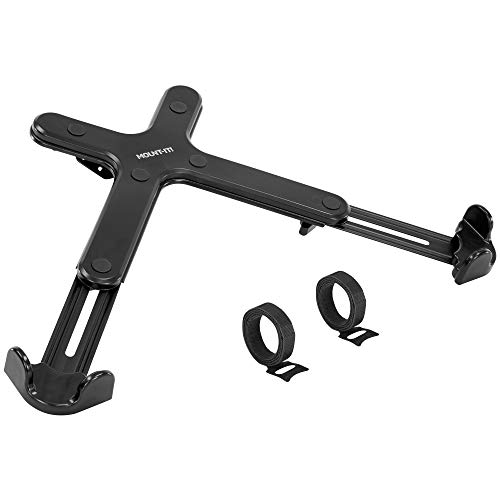
This is the one tray-only pick: a ventilated tray that bolts onto a VESA monitor arm you already own. No arm, pole or clamp is included, so it only makes sense as an add-on. At 1.81 lb it converts a spare monitor arm into a laptop holder in minutes.
The tray fits laptops from 11 to 17 inches and mounts to either VESA pattern. Two retention details stand out: a corner ledge stopper with silicone pads keeps the machine from sliding off when the arm tilts, and a safety strap secures laptops moved on and off the desk often. Ventilation slots let air reach the laptop underside.
Specs
- Type: tray only, attachment for an existing VESA monitor arm
- Included hardware: tray only; no arm or clamp included
- Laptop fit: 11 to 17 inches
- VESA pattern: 75×75 and 100×100
- Retention: corner ledge stopper with silicone pads, safety strap
- Tray design: ventilated
- Item weight: 1.81 lb
- Model: MI-5352T
Mount-It! Laptop Notebook Desk Mount Stand (MI-3352LT)

Mount-It!’s full mount takes the opposite approach to its tray-only sibling: everything is in the box, with the emphasis on motion. The vented tray holds notebooks up to 17 inches with a 22 lb capacity, and the tray tilts through 180 degrees so the keyboard angle can be set from near flat to steeply raised.
One specification needs care: the tray attaches to a VESA 75×75 plate, with no 100×100 option recorded. That is irrelevant on the included arm, but it matters if you later move the tray onto a 100×100 mount. The clamp fits desks up to 3.15 inches thick, slightly narrower than the VIVO clamps.
Specs
- Type: full-motion laptop desk mount
- Laptop fit: notebooks up to 17 inches
- Load capacity: 22 lb
- VESA pattern: 75×75 tray plate
- Tray design: vented
- Tray tilt: 180 degrees
- Clamp range: desks up to 3.15 inches thick
- Model: MI-3352LT
HUANUO Dual Monitor and Laptop Mount (HN-TS4B)

The HUANUO is the largest setup here: a single stand carrying two monitor arms plus a laptop tray, three devices from one desk attachment. It suits a workstation that has outgrown separate mounts, or a shared desk with little free edge space. At 18.26 lb it is also the heaviest pick.
The laptop tray is the compromise. It fits notebooks from 10 to 15 inches and carries up to 11 lb, noticeably less than the 17 inch, 22 lb trays above, so it fits a slim ultrabook far better than a large gaming laptop. Monitor fit is stated differently across the listing copies, so confirm your screens against the product page. The stand clamps or grommets to desks up to 2.36 inches thick, the thinnest limit in this guide.
Specs
- Type: 3-in-1 stand, two monitor arms plus one laptop tray
- Laptop fit: 10 to 15 inch notebooks, up to 11 lb
- VESA pattern: 75×75 and 100×100
- Mounting: C-clamp and grommet, desks up to 2.36 inches thick
- Tilt: −90 to +85 degrees; rotation 360 degrees
- Item weight: 18.26 lb
- Part number: HN-TS4B
Who should skip
Skip the tray-only Mount-It! pick if you do not own a compatible monitor arm; without one it cannot hold anything. Skip the HUANUO if your laptop is larger than 15 inches, heavier than 11 lb, or your desk is thicker than 2.36 inches. Anyone with a glass desktop or a blocked desk edge should also pause: every full mount here depends on a clamp or grommet gripping the desk securely. And if your laptop already sits at a comfortable height on a simple stand, a mount adds cost and installation time without solving a problem you have.
FAQ
Will a tray mount fit my laptop?
Check two figures: the tray’s size range and its weight capacity. Four picks here accept laptops up to 17 inches, while the HUANUO tray stops at 15 inches and 11 lb. Measure your laptop and check its weight against the tray rating, leaving margin for a thick protective case.
Can I reuse my existing monitor arm with a laptop tray?
Yes, that is what the tray-only Mount-It! pick is for. Confirm your arm uses a 75×75 or 100×100 VESA plate and that its remaining capacity covers your laptop, since the arm may already be carrying a monitor on a shared pole. The tray adds 1.81 lb to the load.
What is the difference between a clamp and a grommet mount?
A clamp grips the back edge of the desk and can be removed without a trace. A grommet mount bolts through an existing cable hole, useful when the desk edge is obstructed but requiring a hole in the right position. Several picks here include both options.
Do vented trays help with laptop heat?
A ventilated tray leaves the laptop underside open to the air instead of resting it on a solid surface, which supports the machine’s own cooling design. It is not active cooling and adds no fans, so a laptop that runs hot under load still relies on its internal fans; the tray simply avoids blocking its vents.
Final verdict
For most desks, the VIVO STAND-V001L is the balanced choice: a complete mount, 17 inch tray, wide clamp range and a tray that swaps for a monitor later. Add the Mount-It! tray instead if a spare VESA arm is already on your desk. Choose the VIVO V002C for a monitor-plus-laptop setup, the Mount-It! MI-3352LT when wide tilt range matters most, and the HUANUO only when two monitors and a smaller laptop need to share one mount.
Product and ASIN Reference
| Product | ASIN |
|---|---|
| VIVO Single Laptop Notebook Desk Mount Stand, Fully Adjustable Extension with C-clamp, Fits up to 17 inch Laptops, Black, STAND-V001L | B00CM9NG1W |
| VIVO Black Fully Adjustable 13 to 32 inch Single Computer Monitor and Laptop Desk Mount Combo, Stand with Grommet Option, Fits up to 17 inch Laptops (STAND-V002C) | B00FOTABWY |
| Mount-It! Laptop VESA Mount Tray for Monitor Arms – VESA Laptop Tray Fits Up to 17″ Notebooks – Adjustable Holder with Safety Strap, Ventilated Cooling Design, and Secure Ledge Stopper (Black) | B086336Z6C |
| Mount-It! Laptop Notebook Desk Mount Stand with Full Motion Height Adjustable Holder, 22 Lb Capacity Black (MI-3352LT) | B00FUOILAC |
| HUANUO Dual Monitor and Laptop Mount for Max 32″ Monitor and 17″ Laptop, Adjustable Arm with Tilt, Swivel and Rotation, Dual Monitor and Notebook Stand with VESA Bracket 75/100 mm | B08DNTVY8Y |
More from Amazon
Programs that pair well with the guide above. Offers and eligibility are set by Amazon and may change.
A free business account with business pricing and bulk-buying tools for work, shop or home office.
Create a business accountFree shipping on eligible items, Prime Video and more. Eligible new members can start with a free trial.
Start a Prime free trialAudiobooks and podcasts to listen to on the go. Eligible new members can start with a free trial.
Try Audible freeAd-free music streaming. Eligible new subscribers can start with a free trial.
Try Music Unlimited freeAs an Amazon Associate we earn from qualifying purchases.









Write Your Review
No reviews yet. Be the first to share your experience!