
The Avernum games from Spiderweb Software send a party of exiles into a vast underground nation of caves, tunnels, and hidden towns, where turn-based battles and long stretches of exploration reward patience. The modern trilogy, Avernum: Escape from the Pit, Avernum 2: Crystal Souls, and Avernum 3: Ruined World, retells that underground saga with updated engines, and each game offers a huge map that unfolds over many evenings at home.
These are gentle games for hardware, so the real questions are screen comfort, battery life, and which operating system you want to live with. As an Amazon Associate, we earn from qualifying purchases. The five laptops below cover Mac and Windows paths, from featherweight travel machines to a larger gaming laptop for the desk.
How to Choose a Laptop for Avernum
Start with the platform facts, because they shape the whole list. Steam publishes both Windows and macOS editions of the Avernum trilogy, so Mac buyers have a real native path and do not need to set up any workarounds. Escape from the Pit lists Windows XP and OS X 10.5 or later, a 1.6 GHz processor, and 256 MB of memory, while Ruined World lists Windows Vista or later and Mac OS 10.7, a 1.2 GHz processor, and 512 MB of memory. Plainly stated, those published Mac requirements are an older block from the Intel era, written long before Apple silicon existed, so owners of current MacBooks should check the store page notes for the latest guidance before they settle in.
Because the stated hardware needs are so light, almost any modern laptop clears them with room to spare. What matters more is the screen: Avernum fills the display with small text, dense cave maps, and rows of inventory icons, so a sharp, comfortable panel helps during long sessions. Storage needs are tiny, since each game asks for only a few hundred megabytes, and memory demands are minimal. A quiet keyboard, a trackpad you enjoy, and enough battery for an evening on the couch count for more here than raw graphics power. Windows buyers can pick almost anything, while the Snapdragon machine below carries the usual note to check the current guidance for Windows on ARM.
Apple MacBook Air 13 M4

The 13-inch MacBook Air is the natural starting point for Avernum on the Mac side. Its M4 chip handles the trilogy’s 2D maps and menus without effort, and the fanless body stays silent through hours of cave exploration, which suits a slow, thoughtful game played in a quiet room.
The 13.6-inch Liquid Retina screen renders the game’s text and tiny sprites crisply, and the light chassis makes the laptop easy to carry from desk to couch. Touch ID speeds up daily logins, and the 12MP Center Stage camera covers calls between sessions. For a single machine that plays the native Mac editions and handles everyday work, this is the balanced pick.
Specs
- Apple M4 chip
- 13.6-inch Liquid Retina display
- 16GB unified memory
- 256GB SSD storage
- 12MP Center Stage camera
- Touch ID
- Color: Midnight
- Model MW123LL/A
- ASIN: B0DZD9S5GC
Apple MacBook Air 15 M4

Players who want a larger canvas for Avernum’s sprawling cave maps should look at the 15-inch MacBook Air. The bigger 15.3-inch Liquid Retina display gives the world map, dialogue boxes, and inventory grids more room to breathe, which reduces squinting during long underground journeys.
It runs the same M4 chip as its smaller sibling, so the trilogy plays identically, and the 512GB of storage leaves generous space for a whole library of classic RPGs alongside the three Avernum games. The chassis stays slim and quiet, with no fan noise to break the mood of a torch-lit dungeon. If the laptop mostly lives at home on a desk or lap, the extra screen size is worth it.
Specs
- Apple M4 chip
- 15.3-inch Liquid Retina display
- 16GB unified memory
- 512GB SSD storage
- 12MP Center Stage camera
- Touch ID
- Color: Midnight
- Model MW1M3LL/A
- ASIN: B0DZD9VLQ4
Lenovo Yoga Slim 7x

The Yoga Slim 7x is the Windows pick for players who prize a vivid screen above everything else. Its 14.5-inch 3K OLED touch display shows Avernum’s dark caverns with deep contrast, and the panel’s 90Hz refresh keeps scrolling across the world map feeling fluid.
Inside, the Snapdragon X Elite processor and 32GB of memory give the laptop plenty of headroom for the trilogy and for everyday multitasking. One honest note: this is a Windows on ARM machine, so check the game’s current ARM guidance before buying, since older Windows titles can behave differently here. The backlit keyboard and Wi-Fi 7 round out a polished travel-friendly package.
Specs
- Snapdragon X Elite X1E-78-100 processor
- 14.5-inch 3K OLED touch display, 90Hz
- 32GB memory
- 1TB SSD storage
- Backlit keyboard
- Wi-Fi 7
- Windows 11 Pro
- ASIN: B0G7WV5T4K
ASUS Zenbook 14 OLED

The Zenbook 14 OLED is a compact Windows laptop that suits Avernum players who move between rooms and want a rich screen in a small bag. The 14-inch WUXGA OLED touchscreen shows the game’s hand-drawn style artwork with strong color, and the touch layer is handy for tapping through menus.
A Ryzen 7 8840HS processor with Radeon 780M integrated graphics is far beyond what the trilogy asks for, so the machine also covers everyday work and lighter modern games. With 16GB of memory and a 512GB SSD, it boots quickly and loads save files in moments. The Jade Black finish and slim profile make it an easy laptop to live with daily.
Specs
- AMD Ryzen 7 8840HS processor, up to 5.1 GHz as listed
- AMD Radeon 780M integrated graphics
- 16GB LPDDR5X memory
- 512GB M.2 NVMe PCIe 4.0 SSD
- 14-inch WUXGA OLED touchscreen, 1920×1200
- Wi-Fi 6E
- 75Wh battery
- Color: Jade Black
- Windows 11 Home
- ASIN: B0DFWZ77LB
HP Victus 15
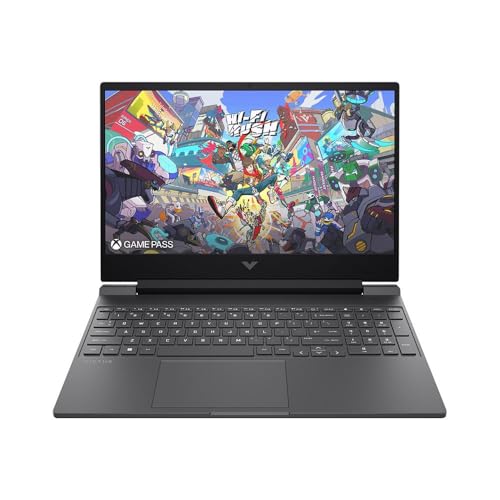
The Victus 15 is the pick for players who want one Windows laptop for Avernum and for far heavier games on other nights. Its dedicated RTX 5060 graphics card is enormous overkill for this trilogy, but it means the same machine can anchor a whole gaming library without a second purchase later.
The Ryzen AI 7 350 processor, 16GB of DDR5 memory, and 1TB SSD keep the system responsive, and the wired RJ-45 Ethernet port suits a fixed desk setup. This configuration carries 16GB of memory, stated exactly as its listing publishes it. For a home desk where Avernum shares time with demanding modern titles, the Victus makes the most sense.
Specs
- AMD Ryzen AI 7 350 processor
- NVIDIA GeForce RTX 5060 graphics, 8GB GDDR7
- 16GB DDR5-5600 memory
- 1TB PCIe Gen4 NVMe M.2 SSD
- Wi-Fi and LAN RJ-45 Ethernet
- HDMI and USB Type-C ports as listed
- Windows 11 Home
- ASIN: B0FLRWF779
Comparison Table
| Product | Best for | Key spec |
|---|---|---|
| Apple MacBook Air 13 M4 | Portable Mac play | M4 chip, 13.6-inch Liquid Retina |
| Apple MacBook Air 15 M4 | Bigger Mac screen | M4 chip, 15.3-inch Liquid Retina |
| Lenovo Yoga Slim 7x | Vivid OLED on Windows | 14.5-inch 3K OLED touch, 90Hz |
| ASUS Zenbook 14 OLED | Compact Windows travel | Ryzen 7 8840HS, 14-inch OLED |
| HP Victus 15 | Avernum plus heavy games | RTX 5060, 8GB GDDR7 |
FAQ
Do the Avernum games run natively on Mac?
Yes. Steam publishes macOS editions of Escape from the Pit, Crystal Souls, and Ruined World alongside the Windows editions. The published Mac requirement blocks are older ones, naming OS X 10.5 or later for the first game and OS 10.7 for Ruined World, so they come from the Intel era and Apple silicon owners should check the current store guidance.
How much storage does the trilogy need?
Very little. The published requirements ask for around 300 MB for Escape from the Pit and 500 MB for Ruined World, so even the smallest SSD on this list holds the full trilogy many times over, with room left for saves and other classic RPGs.
Is the Yoga Slim 7x a safe pick for an old Windows series?
The laptop itself is a capable Windows machine, but it runs on an ARM processor rather than an Intel or AMD chip. Older Windows games usually run through the built-in translation layer, yet the sensible step is to check the game’s current ARM guidance first.
Conclusion
Avernum asks almost nothing of modern hardware, so choose by screen, comfort, and platform instead. Mac players can run the native editions on either MacBook Air, with the 15-inch model suiting long map sessions at home. Windows players get a vivid OLED in the Yoga Slim 7x, a compact all-rounder in the Zenbook 14 OLED, and a gaming-ready desk machine in the Victus 15, any of which will carry a party through every cave in the trilogy.
More from Amazon
Programs that pair well with the guide above. Offers and eligibility are set by Amazon and may change.
A free business account with business pricing and bulk-buying tools for work, shop or home office.
Create a business accountFree shipping on eligible items, Prime Video and more. Eligible new members can start with a free trial.
Start a Prime free trialAudiobooks and podcasts to listen to on the go. Eligible new members can start with a free trial.
Try Audible freeAd-free music streaming. Eligible new subscribers can start with a free trial.
Try Music Unlimited freeAs an Amazon Associate we earn from qualifying purchases.










Write Your Review
No reviews yet. Be the first to share your experience!